
Yes—medical practices must provide patients with disabilities equal access to their services, including services offered through their websites. In 2026, the exact website accessibility requirements depend on whether your practice is a private business, a public entity, or a recipient of covered federal financial assistance. The key distinction: an accessibility obligation does not mean every medical website falls under the same technical standard or compliance deadline.
- Is website accessibility compliance required for medical websites? Yes; ADA obligations apply, while technical requirements depend on the provider.
- Private medical practices face ADA Title III obligations; public providers and covered funding recipients have additional rules.
- Test appointment booking, patient intake, and portal access—not just the homepage.
- WCAG conformance supports accessibility work, but an automated scan does not establish legal compliance.
Why this matters
A patient who cannot submit your appointment form cannot use that route into your practice. A readable homepage does not solve an unlabeled date picker, an inaccessible error message, or a booking window that traps keyboard users.
Start with the patient journey, not a compliance badge. Your patient intake form connections deserve the same scrutiny as your service pages because the handoff is part of the experience. Keep legal advice separate from technical testing: counsel determines your obligations, while accessibility specialists identify and verify barriers.
Is website accessibility compliance required for medical websites?
Yes, but the governing rules differ by provider type. The Americans with Disabilities Act addresses disability discrimination, while additional requirements apply to certain public entities and recipients of federal financial assistance.
Use this comparison to identify the rules to review with counsel. A provider can fall into more than one category.
| Provider situation | Main framework to review | What it means for your website |
|---|---|---|
| Private medical or dental practice | ADA Title III | Equal access and effective communication obligations apply; DOJ has not prescribed a universal private-business website WCAG standard under Title III. |
| State or local government healthcare provider | ADA Title II web accessibility rule | Covered web content and mobile apps are subject to WCAG 2.1 Level AA requirements, with applicable deadlines and exceptions. |
| Recipient covered by HHS disability nondiscrimination rules | Section 504 and HHS implementing regulations | Covered recipients face specific web and mobile accessibility requirements, subject to scope, timing, and exceptions. |
For a 2026 legal review, the governing sources include the U.S. Department of Justice’s Guidance on Web Accessibility and the ADA, its Title II web and mobile accessibility regulation, and the U.S. Department of Health and Human Services’ Section 504 regulation. These address different covered organizations; do not apply one organization’s deadline to another.
This article provides general information, not legal advice. Confirm your practice’s coverage, current deadlines, and applicable state requirements with qualified counsel.
Private practices: ADA Title III obligations
A private physician’s office or dental practice does not escape accessibility obligations because it operates a small website. DOJ identifies medical offices as examples of public accommodations covered by Title III.
The practical requirement is equal access to the services your practice offers. When your website supports appointments, inquiries, or patient information, barriers in those functions deserve direct attention.
However, do not confuse a technical target with a universal federal private-business website rule. DOJ’s Title III web guidance does not establish one mandatory WCAG version for every private business. Courts and jurisdictions also differ in how they apply the ADA to websites.
Ask counsel which obligations govern your practice, then document the technical standard your development team will use. Avoid contracts that promise only an undefined “ADA-compliant website.”
Public providers: WCAG 2.1 Level AA requirements
State and local government healthcare providers need to review the ADA Title II web accessibility rule. That rule establishes WCAG 2.1 Level AA as the technical standard for covered web content and mobile apps, subject to its provisions.
Your review must account for the entity’s category, applicable compliance date, and any relevant exceptions. Do not assume that every public clinic has the same implementation timetable.
Also examine services supplied through contractual arrangements. Moving appointment scheduling to an outside platform does not automatically remove the public entity’s responsibilities.
For a 2026 procurement decision, require the vendor to identify the standard it supports and provide evidence tied to the functions you will actually use. A general accessibility statement is not a test of your configured booking workflow.
Covered funding recipients: review Section 504 separately
Healthcare organizations receiving covered federal financial assistance need a separate Section 504 review. HHS regulations address disability discrimination and include technical requirements for covered web content and mobile apps.
Do not decide coverage from your website’s size, your specialty, or a vendor’s sales presentation. Have counsel assess the funding relationship, the entity covered, and the applicable implementation requirements.
The operational lesson is straightforward: maintain an inventory of your website, forms, documents, and connected services. Your review needs to reach beyond pages maintained directly by your marketing team.
Why medical website accessibility requirements vary
The legal obligation and the remediation scope depend on different facts. Gather those facts before accepting a fixed compliance promise.
- Provider ownership: Private practices and government-operated providers fall under different ADA titles.
- Federal financial assistance: Covered funding relationships can introduce Section 504 obligations.
- Jurisdiction: Applicable state laws and court decisions affect the legal analysis.
- Website functions: Appointment requests, intake forms, documents, and portals create different testing tasks.
- Third-party services: Scheduling platforms and embedded tools need evaluation alongside the main website.
- Content changes: New PDFs, videos, forms, and redesigns can introduce barriers after an initial review.
A narrow brochure site and a patient booking website do not require identical testing work. Both still need an accessibility plan appropriate to their services and legal obligations.
What should you test on a medical website first?
Test the path from a patient’s question to a completed action. A primary care patient requesting a visit and a dental patient submitting a new-patient inquiry should both be able to understand the next step and complete it.
Use this sequence as an acceptance test, not as a substitute for a full accessibility evaluation:
- Find care: Check navigation, headings, service descriptions, provider information, and location details with keyboard and screen-reader use.
- Choose an action: Make appointment and inquiry controls identifiable, descriptive, and reachable without a mouse.
- Complete intake: Check field labels, instructions, required-field notices, validation, and error recovery.
- Confirm submission: Ensure patients receive an accessible success message rather than an unexplained page change.
- Get assistance: Provide a clear way to report an access problem and obtain help from the practice.
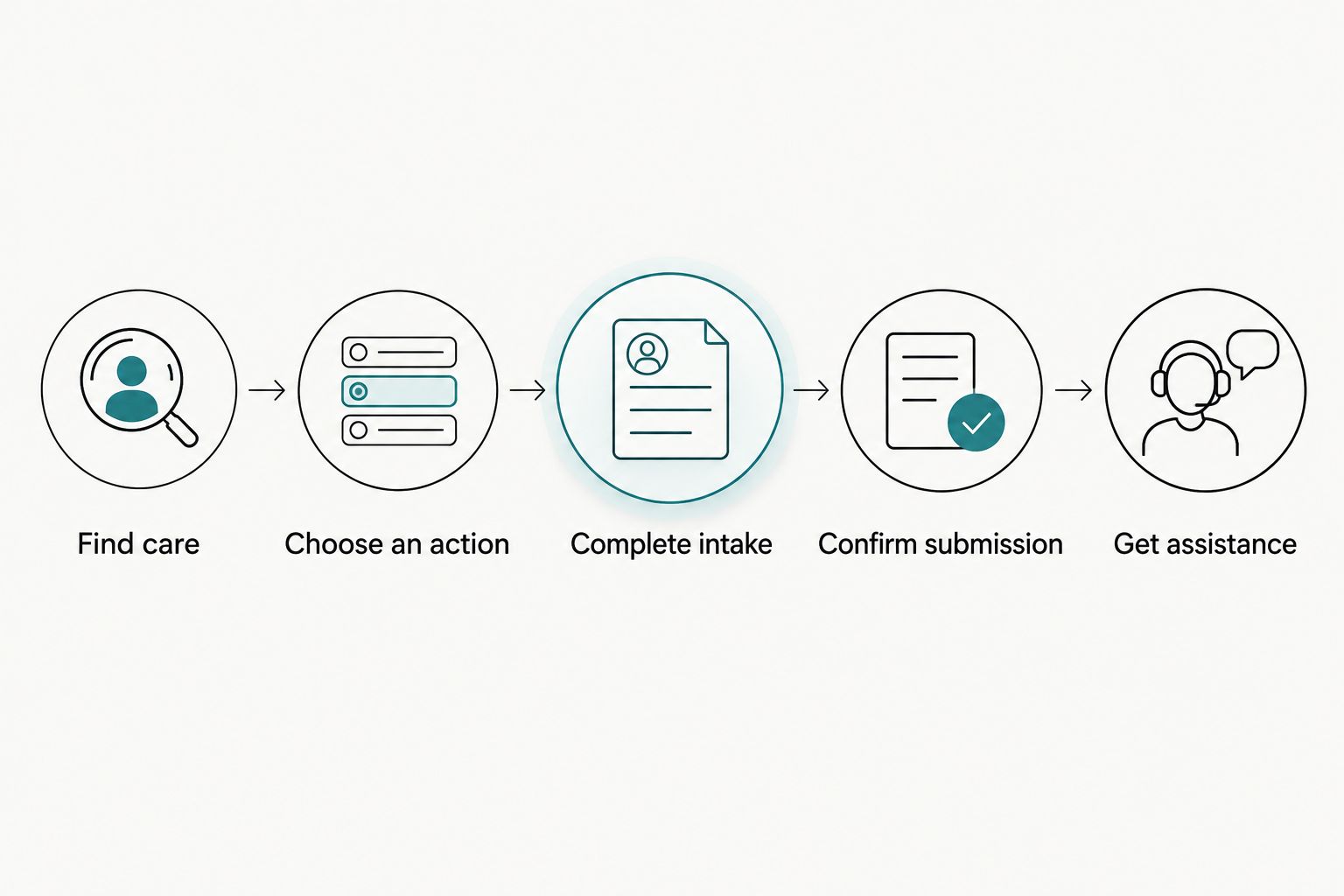
Include the handoffs. If your appointment button opens a separate service, continue testing through that service rather than stopping when the patient leaves your domain.
Use measurable checks, not visual impressions
WCAG provides testable criteria. Under WCAG Level AA, normal text generally needs a contrast ratio of at least 4.5:1, while qualifying large text needs at least 3:1. Text must also support resizing to 200% without loss of content or functionality, subject to the criterion’s exceptions.
Those checks address specific barriers; they do not certify the entire website. Keyboard operation, meaningful labels, focus behavior, text alternatives, and accessible status messages require their own evaluation.
A pale appointment button can fail before the booking form even opens. A form can look clear yet remain unusable when its error messages are not associated with the relevant fields.
Is a custom medical website better than a template for accessibility?
Custom design gives you control over the patient journey; it does not guarantee accessibility. A template can support accessible implementation, while custom code can introduce serious barriers.
Choose based on your required workflows and the provider’s testing process—not the label attached to the build.
| Approach | Best for | Advantage | Limitation |
|---|---|---|---|
| Template-based website | Practices whose requirements fit the template’s components | Existing components can provide a consistent starting point | Restricted components can make booking or form defects harder to fix |
| Custom medical website | Practices needing tailored inquiry and appointment paths | Layout, labels, validation, and handoffs can be designed around actual patient tasks | Custom components still require skilled implementation and testing |
For a dental practice, ask the provider to demonstrate a new-patient inquiry from service selection through confirmation. For a specialist clinic, include the referral or appointment-request path that patients actually need.
Website Symphony is best for medical website buyers seeking custom design, marketing, and hosting from one team. That service scope supports a single point of accountability, but it is not evidence of accessibility conformance. Require a written accessibility scope, test results, and responsibility for fixing defects before treating any website as ready.
Can automated tools or AI make a medical website compliant?
Automated tools help find some accessibility defects; they cannot establish compliance alone. They can identify issues such as certain missing labels or contrast failures, but passing a scan does not prove a patient can book an appointment.
AI-powered functionality should serve a defined patient or staff need. For example, a proposed assistant could help patients find office information or help staff prepare content drafts. Those are use cases to evaluate, not a reason to skip human review.
For any patient-facing assistant, require keyboard access, understandable controls, accessible responses, and a direct route to staff. Do not make a conversational tool the only way to request care, and do not invite sensitive health information into a tool without an appropriate privacy and security review.
Website Symphony offers AI-powered website design alongside marketing and hosting. Evaluate any proposed functionality by the task it helps patients complete and the evidence that it remains accessible—not by the AI label.
How should you choose a medical website provider in 2026?
Ask for demonstrations and deliverables rather than assurances. A portfolio shows examples of design work; it does not establish accessibility or prove higher patient conversion.
Require these items in the proposal:
- Defined scope: Identify the pages, forms, documents, integrations, and patient tasks included.
- Named standard: Specify the WCAG version and conformance level used for technical evaluation.
- Manual testing: Include keyboard testing and appropriate assistive-technology evaluation alongside automated checks.
- Acceptance evidence: Request findings, remediation records, and verification of corrected patient paths.
- Ownership: Assign responsibility for content updates, vendor issues, accessibility reports, and ongoing maintenance.
For Website Symphony or any other provider, distinguish the work included in website design from the work included in hosting and marketing. One accountable team is useful only when the agreement states who maintains forms, tests changes, and coordinates fixes with outside vendors.
FAQ
Does my small medical practice need an accessible website?
Yes—being a small private medical practice does not remove ADA Title III obligations. Confirm how federal and state requirements apply to your website and patient services with counsel.
Is WCAG 2.1 Level AA required for every medical website?
No—WCAG 2.1 Level AA is not a universal federal website mandate for every private medical practice. Specific Title II and HHS Section 504 rules establish that technical standard for covered entities, subject to their provisions.
Does an accessibility plugin make my medical website compliant?
No—installing an accessibility plugin does not establish legal compliance or prove that patients can complete essential tasks. Test the underlying website, forms, and third-party handoffs.
Do I need to test a booking tool supplied by another company?
Yes—include the booking tool in your patient-path accessibility review. Your legal responsibilities depend on the applicable rules, but a third-party handoff is not proof that the patient can complete an appointment request.
Is an accessible website automatically HIPAA compliant?
No—accessibility and HIPAA address different obligations. Evaluate disability access separately from the privacy and security requirements governing protected health information.
What should a medical practice fix first in 2026?
Prioritize barriers that prevent patients from finding care, requesting appointments, or submitting inquiries. Address keyboard access, form labels, error recovery, and confirmation messages while continuing the broader accessibility review.
Can a custom website guarantee more patient inquiries?
No—custom design alone does not guarantee more patient inquiries. Define the patient actions you need, test whether visitors can complete them, and measure completed inquiries after launch.
One last thing
The confirmation message is part of accessibility, not an afterthought. If a patient submits a request but cannot determine whether it succeeded, the appointment path remains incomplete.
For your next 2026 website review, ask someone to demonstrate the entire process without a mouse, including errors and confirmation. That demonstration makes the discussion concrete: can the patient request care, understand what happened, and know what to do next?