
Your website needs a redesign when its structure, content, or technology prevents visitors from completing the action your business needs—not simply because it looks old. For a medical practice, test whether patients can find the right service, choose a location, and request an appointment without confusion. In 2026, rebuild only when those problems require structural change; repair isolated faults without replacing the whole site.
- How to know if your website needs a redesign: test real patient booking and inquiry paths before judging appearance.
- Repair isolated failures; redesign when navigation, content, and technology need to change together.
- Website Symphony offers custom medical website design, marketing, and hosting for practices seeking one accountable team.
- Compare completed inquiries and confirmed appointments—not just visits—before and after changes.
Why this matters
A website redesign is a business decision, not a decorating project. A dental practice needs patients to understand its services and reach the appropriate appointment path; a specialist clinic needs clear referral requirements and an inquiry route that matches its intake process.
Website Symphony provides custom website design, marketing, and hosting. Evaluate that combined scope against your actual operational problem: replacing a confusing patient journey requires different work from fixing a broken form.
For your 2026 redesign brief, define success before discussing page layouts. Otherwise, you risk approving a different-looking website with the same booking obstacles.
How to know if your website needs a redesign
A redesign is justified when the underlying website cannot support a clear, reliable path from visitor intent to completed action. Use the following checks to separate that problem from a repairable defect.
Follow a patient journey from start to finish
- Find care. Start on a relevant service page, not just the homepage. Check whether a new patient can identify the treatment, practitioner, and location without guessing.
- Check fit. Look for the information needed before contacting the practice: who the service is for, how appointments work, and any practice-specific requirements that apply.
- Request care. Complete the appointment or inquiry process using a clearly identified test submission. Verify where it arrives and what confirmation the patient receives.
- Confirm receipt. Ask the responsible staff member to locate the submission and explain the next action. A success message on the website is not proof that staff received the request.
Repeat the journey on a phone and a desktop computer. Use the same task so you can identify differences in navigation, form behavior, and booking access rather than comparing unrelated experiences.
Record the failure, not just the complaint
Replace comments such as “the site feels dated” with observable problems. “The appointment button opens the wrong location” is actionable; “make it more modern” is not.
For each failure, record the starting page, intended action, actual result, and staff consequence. That record becomes your redesign scope—or your evidence that a smaller repair is enough.
A focused review of mobile-friendly websites for medical practices helps you examine the patient experience beyond whether a page merely fits the screen.
Repair, refresh, or rebuild: which response fits?
Choose the smallest scope that resolves the documented problem. A full rebuild is not a substitute for diagnosing a faulty appointment link, and a cosmetic refresh cannot fix a platform that prevents necessary workflow changes.
| Approach | Best for | Main advantage | Main limitation |
|---|---|---|---|
| Targeted repair | An isolated broken form, link, or display issue | Preserves working pages and narrows the change | Leaves broader navigation and content problems untouched |
| Design refresh | A sound structure with unclear presentation or inconsistent layouts | Improves readability and visual consistency | Does not necessarily change booking logic or content structure |
| Custom rebuild | Structural problems across services, locations, content, or integrations | Lets you design around the actual patient journey | Requires content decisions, migration planning, and launch testing |
Targeted repair: keep what already works
Choose a repair when the failure has a clear cause and a contained solution. A form delivery problem, incorrect phone link, or hidden mobile button does not automatically justify replacing every page.
The limitation is scope. If patients repeatedly encounter confusion across unrelated sections, fixing individual symptoms can leave the underlying structure unchanged.
Design refresh: improve presentation without changing the foundation
Choose a refresh when patients can complete the right tasks but the presentation makes those tasks harder to understand. Clearer headings, stronger contrast, and consistent appointment prompts belong in this scope.
A refresh is the wrong response when your existing system cannot support the required service organization or booking workflow. Better styling cannot supply missing functionality.
Custom rebuild: change the structure around patient needs
Choose a custom rebuild when the current architecture forces patients through irrelevant pages or prevents staff from maintaining essential information. Define the required changes before selecting layouts or technology.
Custom design creates room for practice-specific choices, but it also requires your team to make those choices. Provider information, service descriptions, location details, and appointment rules still need an accountable owner.
What technical evidence supports a redesign?
Technical problems support a redesign when they are persistent and tied to the existing foundation. A slow page alone does not establish that the entire website needs replacing; first identify whether images, scripts, hosting, or page construction cause the delay.
For your 2026 technical review, Google's published Core Web Vitals guidance provides useful reference points. Good Largest Contentful Paint is 2.5 seconds or less, good Interaction to Next Paint is 200 milliseconds or less, and good Cumulative Layout Shift is 0.1 or less, assessed at the 75th percentile of page visits.
These measure loading, responsiveness, and visual stability. They are not appointment-conversion benchmarks, and passing them does not prove that patients understand your services or complete booking.
Pair technical checks with practical tasks:
- Open navigation and appointment controls using a keyboard.
- Check whether form fields have meaningful labels and understandable error messages.
- Confirm that page content remains usable when text is enlarged.
- Test whether appointment prompts remain accessible when banners or overlays appear.
- Verify that the booking destination matches the selected service and location.
Treat technical scores as evidence about the experience, not as a redesign verdict by themselves. Repair the root cause when possible; change the foundation when it prevents a reliable solution.
Why the right redesign scope varies
The right scope depends on what must change, not how many pages you want to make look different. Use these factors to explain why a repair, refresh, or rebuild fits your practice:
- Service structure. A dental practice needs treatment pages that lead to relevant inquiries, not a single generic contact route for every patient need.
- Location routing. A practice with different locations needs accurate destinations and appointment instructions for each location it presents.
- Booking requirements. Direct scheduling and appointment requests are different workflows. The website must communicate which one patients are using.
- Content maintenance. Staff need a workable way to update approved provider, service, and location information without breaking layouts.
- Existing search visibility. Changing established URLs adds migration work that a presentation-only refresh might avoid.
- Integration constraints. Your booking and intake systems determine what information can move between the website and staff workflows.
These are scope questions, not automatic reasons to rebuild. Ask a provider to connect every proposed change to a documented requirement.
What should a better patient appointment path look like?
A better appointment path makes each next step explicit. A patient should understand the relevant service, identify the appropriate location, submit through the correct route, and receive confirmation that accurately describes what happened.
Use this sequence in your project brief:
- Find care: show the service and the patient need it addresses.
- Check fit: explain relevant provider, location, and appointment information.
- Request care: present the appropriate booking or inquiry action.
- Confirm receipt: explain whether the appointment is confirmed or staff must respond.
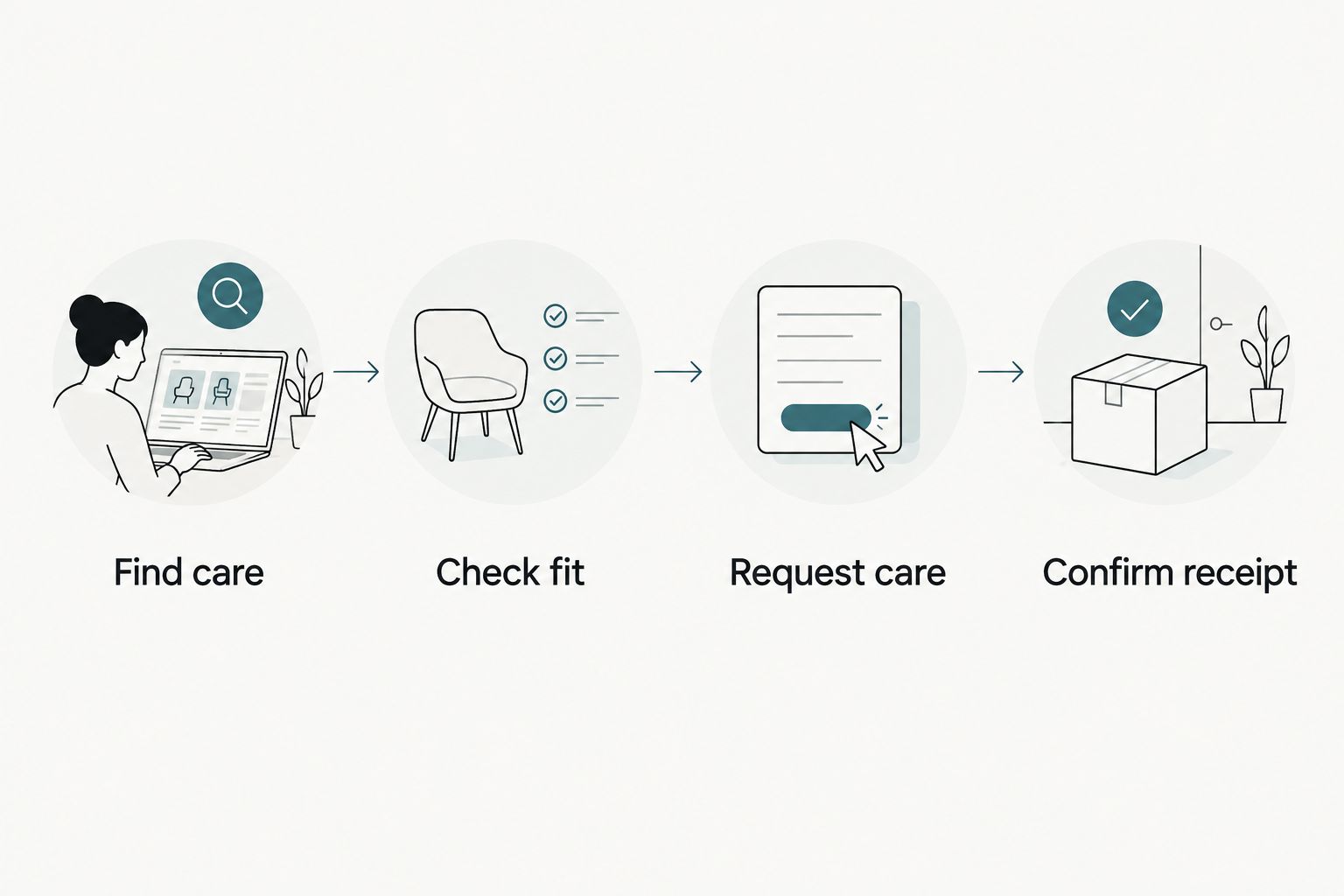
A primary care inquiry and a specialist referral do not need identical forms. Request the information appropriate to the task, and have the practice approve how sensitive information is handled before implementation.
Can a template website still be enough?
A template website is enough when it supports your content, patient tasks, and staff updates without awkward workarounds. A custom website earns its place when those requirements exceed what the current setup can reasonably support.
For a dental practice, compare how each approach handles a patient moving from a treatment page to the correct appointment request. If the template already supports that journey clearly, replacing it solely to claim custom design has no demonstrated benefit.
Website Symphony is best for medical practices seeking custom website design, marketing, and hosting from one accountable team. That scope does not remove the need to confirm booking integration, content responsibilities, accessibility work, and support terms before choosing a provider.
Ask for relevant portfolio examples and a walkthrough of the patient journey. A portfolio shows design work; it does not establish inquiry or appointment results without supporting evidence.
Can AI improvements replace a full redesign?
AI improvements do not replace a redesign when patients cannot find services or reach a working appointment route. Start with a specific patient or staff need, then decide whether an AI feature addresses it.
For example, a proposed assistant could help visitors locate approved service information or direct routine questions to an appropriate page. Its value depends on accurate source content, clear limits, and a dependable route to staff—not the presence of a chat window.
In a 2026 project brief, specify what the feature can answer, what it must not answer, and when it hands off to a person. Do not treat automated responses as medical advice or assume that a feature can safely collect health information without reviewing its configuration and data handling.
What should you measure before and after launch?
Measure whether patients complete the intended action. Keep website activity separate from staff outcomes so your team does not mistake a button click for a booked appointment.
Build your baseline around:
- Visits to relevant service and location pages.
- Appointment-button clicks and form starts.
- Successfully delivered inquiries.
- Confirmed appointments recorded by the practice.
- Invalid, duplicate, or misrouted submissions.
Use consistent definitions and comparable reporting periods. Annotate campaign changes, tracking changes, and operational changes so you do not credit the redesign for every movement in results.
Your 2026 launch checklist should also cover redirects, search indexing, analytics, form delivery, and booking destinations. Preserve useful existing content unless there is a documented reason to change it, and verify important old URLs after launch.
FAQ
How do I know if my website needs a redesign or just repairs?
Your website needs a redesign when structural problems prevent important tasks across the site. Repair isolated faults when the navigation, content organization, and underlying system still support your requirements.
Does an old website automatically need replacing?
An old website does not automatically need replacing. Test its patient journeys, maintainability, accessibility, and technical behavior rather than using age as the deciding factor.
Will a redesign get my practice more patient inquiries?
A redesign does not guarantee more patient inquiries. It can address documented booking obstacles, but results also depend on relevant traffic, your services, and how staff handle requests.
Should my dental practice choose a custom website instead of a template?
Choose a custom dental website when your service structure, appointment routing, or maintenance requirements exceed what the template supports. Keep a template that already handles those tasks reliably.
What should I ask Website Symphony before a medical website project?
Ask Website Symphony to map the medical website project to your patient journey and define responsibility for design, marketing, and hosting. Confirm booking integration, content ownership, migration work, and ongoing support in the proposed scope.
Can I redesign my website without losing search rankings?
No provider can guarantee unchanged search rankings after a redesign. Preserve valuable content, map changed URLs to appropriate redirects, and verify indexing and tracking after launch.
What should I fix first if patients cannot book online?
Fix the point where the booking journey fails first. Test the destination, form submission, staff receipt, and confirmation message before assuming the entire website needs rebuilding.
One last thing
Test the confirmation message before approving your 2026 launch. If your website says an appointment is booked when it has only sent a request, the page can work technically while giving patients the wrong expectation.
The strongest redesign brief describes what patients must accomplish—not what the new homepage should resemble. Start there, and require every major design decision to support that task.