
Yes—a mobile-friendly website is necessary for medical practices in 2026 because patients need to read service information, contact your office, and request appointments from their phones. A responsive layout alone is not enough: the booking system, inquiry forms, and confirmation messages must also work on a small screen.
- Is a mobile friendly website necessary for medical practices? Yes—patients need usable appointment, inquiry, and contact paths.
- Test the entire patient booking journey, not just whether the homepage fits a phone screen.
- Custom medical website design should solve specific patient or staff problems that a template leaves unresolved.
- Website Symphony fits practices seeking one team for custom website design, marketing, and hosting.
Is a mobile-friendly website necessary for medical practices?
Yes. Your medical website must let a patient complete a useful task on a phone—not simply display smaller versions of desktop pages. That means readable information, usable navigation, clear contact details, and a working route to an appointment.
For a dental practice, the test is concrete: can a prospective patient find the relevant treatment, identify the location, and request a visit? For a specialist clinic, add referral instructions and an explanation of how appointment requests are reviewed. For primary care, distinguish new-patient inquiries from existing-patient portal access.
A website fails this test when its pages look polished but the appointment button opens an unusable scheduler. It also fails when a patient submits a request without knowing whether the appointment is confirmed.
Use these acceptance criteria when reviewing your website:
| Patient task | Mobile requirement | Failure to fix |
|---|---|---|
| Understand a service | Readable text and clear headings | Tiny text or information hidden in image files |
| Contact the practice | Visible, usable phone and location details | Contact information buried below unrelated content |
| Request an appointment | A form or scheduler usable on a phone | Cropped fields or controls hidden by overlays |
| Understand next steps | An explicit confirmation message | No distinction between a request and a confirmed visit |
| Access existing care | A clearly labeled portal route | Portal access confused with new-patient inquiries |
For dental-specific planning, the website design guide for dentists covers the broader website decisions behind these patient paths.
Why this matters
Your website is part of the handoff between a patient and your staff. When that handoff is unclear, the patient has to resolve the uncertainty by calling, repeating information, or trying another route.
Mobile design also matters for search visibility. Google's mobile-first indexing uses the mobile version of a site's content for indexing and ranking. That makes complete mobile content important, but it does not turn a responsive redesign into a ranking guarantee.
For your 2026 website review, separate visibility from usability. Search visibility helps patients find a page; usability determines whether they can act once they arrive. Neither replaces accurate medical information or a working appointment process.
What should a mobile-friendly medical website include?
Start with patient intent, then choose the layout. A person checking your address needs a different route from someone comparing treatment options or asking whether the practice accepts new patients.
Clear service pages
Explain the service, who should contact the practice about it, and the next step. Keep clinical wording accurate and have the appropriate practice representative review it before publication.
Do not hide essential information in desktop-only panels. Mobile visitors need access to the same substantive content, including preparation instructions and referral requirements when those apply to your practice.
Distinct appointment and inquiry paths
An appointment request is not a confirmed appointment. Label the action according to what the system actually does, and carry that distinction into the confirmation message.
If staff must review a request, say so. If the patient must use a separate scheduling system, make the transition explicit rather than presenting an unexplained new screen.
Usable forms and contact controls
Use visible labels, understandable error messages, and fields that work with a phone's keyboard. Keep the form focused on the information needed for its stated purpose.
Do not treat a general website inquiry form as an approved channel for sensitive medical details. Establish the appropriate collection method, access controls, and handling process before asking patients to submit health information.
Accessible interaction
Patients should be able to enlarge text, understand field labels, and operate controls without relying on color alone. Include keyboard and assistive-technology checks alongside phone testing.
Responsive design and accessibility overlap, but they are not interchangeable. A page can fit a phone screen and still contain unlabeled buttons, confusing focus order, or unreadable contrast.
Template or custom design: which fits your practice?
Choose custom design when your patient journey requires changes that the template cannot support cleanly. Choose a template when its structure already matches your needs and your team can maintain it properly.
Do not replace a functioning site just to obtain a different visual style. Identify the failed patient task first, then decide whether targeted repairs or a rebuild will address it.
| Approach | Best for | Main advantage | Main limitation |
|---|---|---|---|
| Template website | Practices whose patient paths fit the existing structure | A starting layout for standard pages | Structure and integrations can constrain changes |
| Custom website | Practices needing tailored inquiry, referral, or appointment paths | Layout and functionality can follow the practice workflow | Requires clear requirements, review, and ongoing ownership |
| Targeted mobile repairs | Practices with useful content and isolated usability problems | Addresses specific failures without replacing everything | Does not resolve deeper platform or workflow constraints |
For example, a dental template with a generic contact page might be sufficient for a straightforward inquiry process. It is less suitable if patients need clearly separated routes for treatment consultations, routine visits, and existing-patient questions—and the template cannot present those routes clearly.
Custom design does not automatically create more inquiries. Its value is the ability to remove identified obstacles and test whether more visitors complete the intended action.
In 2026, ask providers to demonstrate the actual mobile workflow before you approve a design. A desktop presentation cannot establish whether a patient can finish the task on a phone.
How do you test the mobile patient journey?
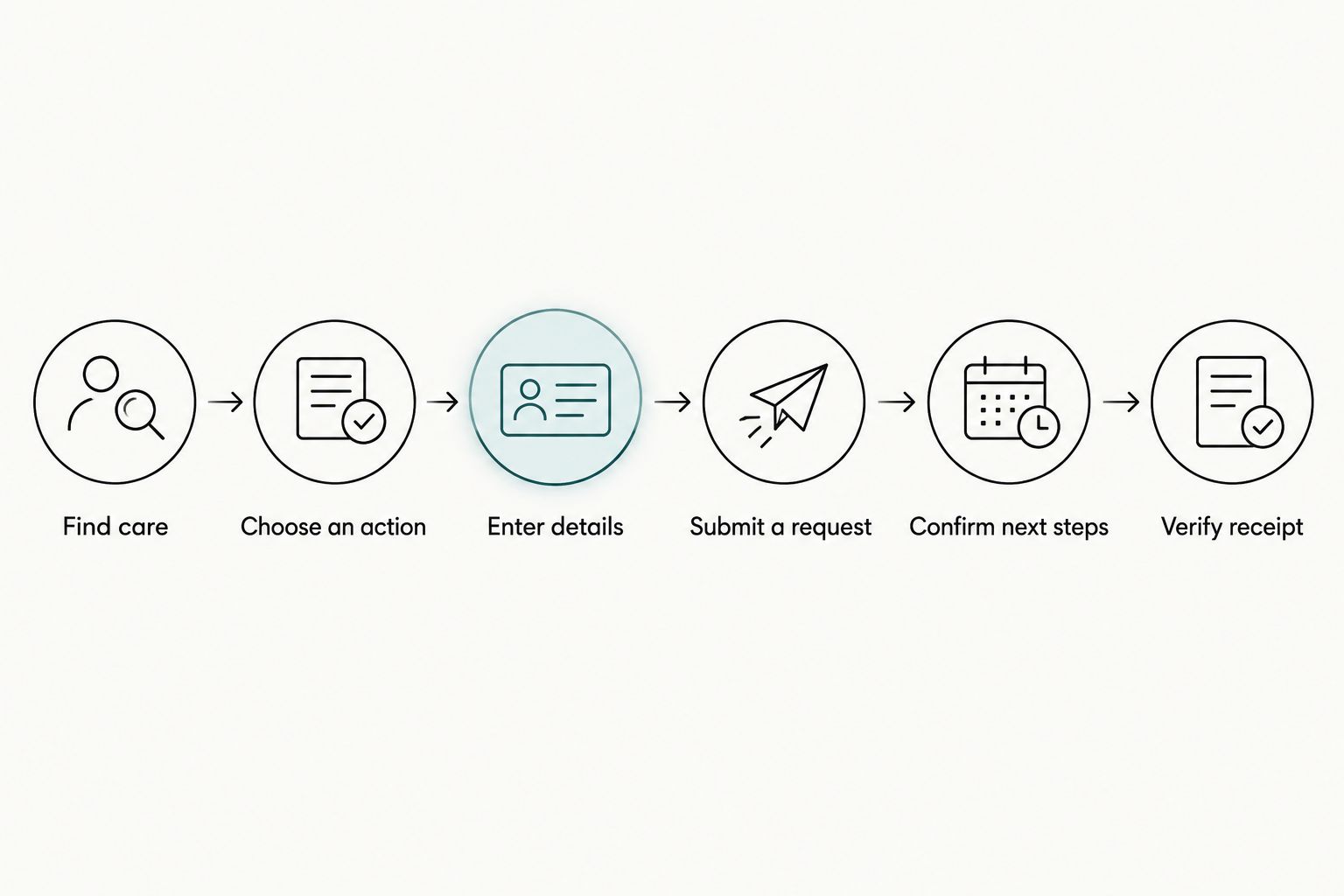
Use this sequence before a launch, after an integration change, and during routine website reviews. Test with authorized sample information rather than real patient details.
- Find care. Open a relevant service page directly, as a visitor arriving from search would. Confirm that the page explains the service and provides a relevant next step without requiring a return to the homepage.
- Choose an action. Locate the appointment or inquiry control. Check that sticky banners, chat windows, and cookie controls do not cover it or make nearby navigation unusable.
- Enter details. Complete every required field using the phone keyboard. Trigger an error deliberately and confirm that the message identifies the problem without erasing valid entries.
- Submit a request. Follow the process through to its actual endpoint. Check any embedded scheduler or external booking screen, not just the page that contains the first button.
- Confirm next steps. Read the completion message. It should explain what happened, whether staff must respond, and what the patient should do next.
- Verify receipt. Ask the responsible staff member to confirm that the test reached the correct destination. A successful screen message is not proof that the office received a usable request.
Set a practical acceptance test: complete 3 tasks on 2 devices, including 1 test submission that staff verify. These are suggested review requirements, not performance benchmarks. Include a new-patient appointment request, a service-information search, and a location or contact lookup.
Record each failure with the page, device, action, and expected outcome. That gives your provider a repair brief rather than a vague request to make the website more mobile-friendly.
Why mobile performance varies between medical websites
The same homepage layout can produce very different patient experiences. The difference is often in the content, integrations, and operational decisions behind it.
- Appointment workflow: Direct scheduling and staff-reviewed requests require different labels, screens, and confirmations.
- Practice structure: Multiple locations, specialties, or provider schedules require clear routing so inquiries reach the right destination.
- Content complexity: Treatment explanations, referral instructions, and preparation information need readable organization rather than indiscriminate shortening.
- Third-party systems: Embedded forms, portals, and schedulers need their own mobile testing; a responsive website does not establish that they work.
- Page weight and interruptions: Large media files, unnecessary scripts, and overlapping overlays add obstacles that design screenshots do not reveal.
- Operational ownership: Someone must maintain contact details, review incoming requests, and check that integrations still function after changes.
Use these factors to scope the work. Asking for a mobile-friendly redesign without specifying the patient journey leaves the most important acceptance criteria undefined.
Can practical AI functionality help patients or staff?
Yes, when it handles a defined task with approved information and a clear handoff. In a 2026 medical website brief, describe the task before asking for an AI feature.
A proposed assistant could help a visitor locate published office hours, find a service page, or identify the appropriate appointment route. Staff-facing assistance could prepare draft administrative answers for review. These are potential project requirements, not confirmed features of any provider's service.
Keep clinical advice, diagnosis, and urgent-care decisions outside a general website assistant's role. Define what information the feature can access, what it retains, and when it sends the user to staff.
Do not use AI to compensate for missing basic information. If patients cannot find your address or appointment instructions, correct the page before adding another interface.
How should you choose a medical website provider?
Ask for a demonstration of patient tasks, not a tour of design effects. Review relevant portfolio examples for service-page clarity, mobile forms, and appointment routing without assuming that attractive work proves conversion results.
Website Symphony medical website design fits practices seeking one accountable team for custom design, marketing, and hosting. That service combination is relevant when you want fewer handoffs between website work, patient acquisition activity, and technical maintenance.
The trade-off is that a combined provider still needs an explicit scope. Ask who owns form testing, hosting support, content updates, integration troubleshooting, and reporting; do not assume every responsibility is included.
Before choosing Website Symphony for medical website design, request a proposed patient journey and acceptance criteria. The same standard applies to any provider: define what patients must accomplish and how the finished work will be checked.
Discuss your patient inquiry workflow
Explain your appointment process and where patients encounter problems on mobile.
Will mobile-friendly design bring more patient inquiries?
Mobile-friendly design removes usability barriers; it does not guarantee more inquiries. Demand, traffic quality, service information, and the practice's response process also affect the outcome.
For a 2026 redesign, establish how you will count completed inquiries before launch. Distinguish a button tap from a submitted request, and distinguish a submitted request from a booked appointment. Otherwise, a report can show more interactions without establishing more usable patient inquiries.
Do you need to replace your existing website?
Replace your website when its platform or structure prevents you from fixing important patient tasks. Repair it when the problems are isolated and the existing system supports a dependable solution.
Ask the provider to demonstrate the constraint. A broken form, unclear button label, or oversized image is a repair requirement—not, by itself, proof that the entire website needs replacing.
FAQ
Is a mobile friendly website necessary for medical practices?
Yes—a mobile-friendly website is necessary for medical practices because patients need usable service information, contact details, and appointment paths on their phones. Test the full journey, including external schedulers and confirmation messages.
Does a responsive medical website guarantee more appointments?
No—a responsive medical website does not guarantee more appointments. Measure completed requests and booked visits separately, and check whether staff receive usable inquiries.
Is a custom medical website better than a template?
A custom medical website is the better fit when a template cannot support the practice's required patient workflows. A template remains a valid option when its structure supports those workflows and passes usability testing.
What should a dental practice test on mobile first?
A dental practice should test the path from a treatment page to an appointment request first. Include form completion, confirmation wording, and staff receipt of the test inquiry.
Can a medical website use an AI assistant?
A medical website can use an AI assistant for a defined administrative task based on approved information. Establish privacy boundaries and staff handoff rules rather than treating it as a source of clinical advice.
Does mobile-friendly design make a website HIPAA compliant?
No—mobile-friendly design does not establish HIPAA compliance. Review the collection, transmission, storage, and handling of protected health information with qualified advisers and the relevant vendors.
What does Website Symphony offer medical practices?
Website Symphony offers custom website design, AI-driven marketing, and hosting for medical practices and other businesses. Confirm the specific appointment, inquiry, and support requirements in the project scope.
One last thing
The most revealing mobile test happens after submission. A patient-facing form can appear to work while the request reaches the wrong inbox, lacks useful context, or leaves the patient expecting a confirmed appointment.
Before approving your next website update, have a staff member trace a test request from the phone screen to the office workflow. For your 2026 review, make verified receipt a launch condition—not an assumption.