
Yes, a website can generate more patient leads by helping people find the right service, understand your practice, and complete a call, inquiry, or appointment request. More traffic alone does not establish success: your staff must distinguish new-patient inquiries from existing-patient messages and turn appropriate requests into scheduled visits.
- Can a website generate more patient leads? Yes—connect relevant medical service pages to clear appointment and inquiry paths.
- Website Symphony offers custom medical website design, marketing, and hosting for practices seeking one accountable team.
- Measure new-patient inquiries and scheduled appointments, not just traffic or booking-button clicks.
- Choose custom design when a template cannot support your practice’s patient journey without workarounds.
Why this matters
Your website sits between a patient's question and your front desk. Someone looking for a dentist, specialist, or primary care practice needs enough information to decide whether to contact you—and an obvious way to do it.
A useful 2026 website review starts with that journey, not a discussion about colors. Open a service page on your phone, find the relevant clinician or location, and attempt an appointment request. Our guide to mobile-friendly websites for medical practices covers the mobile side of that decision.
Fix the path to an inquiry before paying to send more visitors into it. A confusing form remains confusing whether the visitor arrives through search, an advertisement, or a referral.
Can a website generate more patient leads for a medical practice?
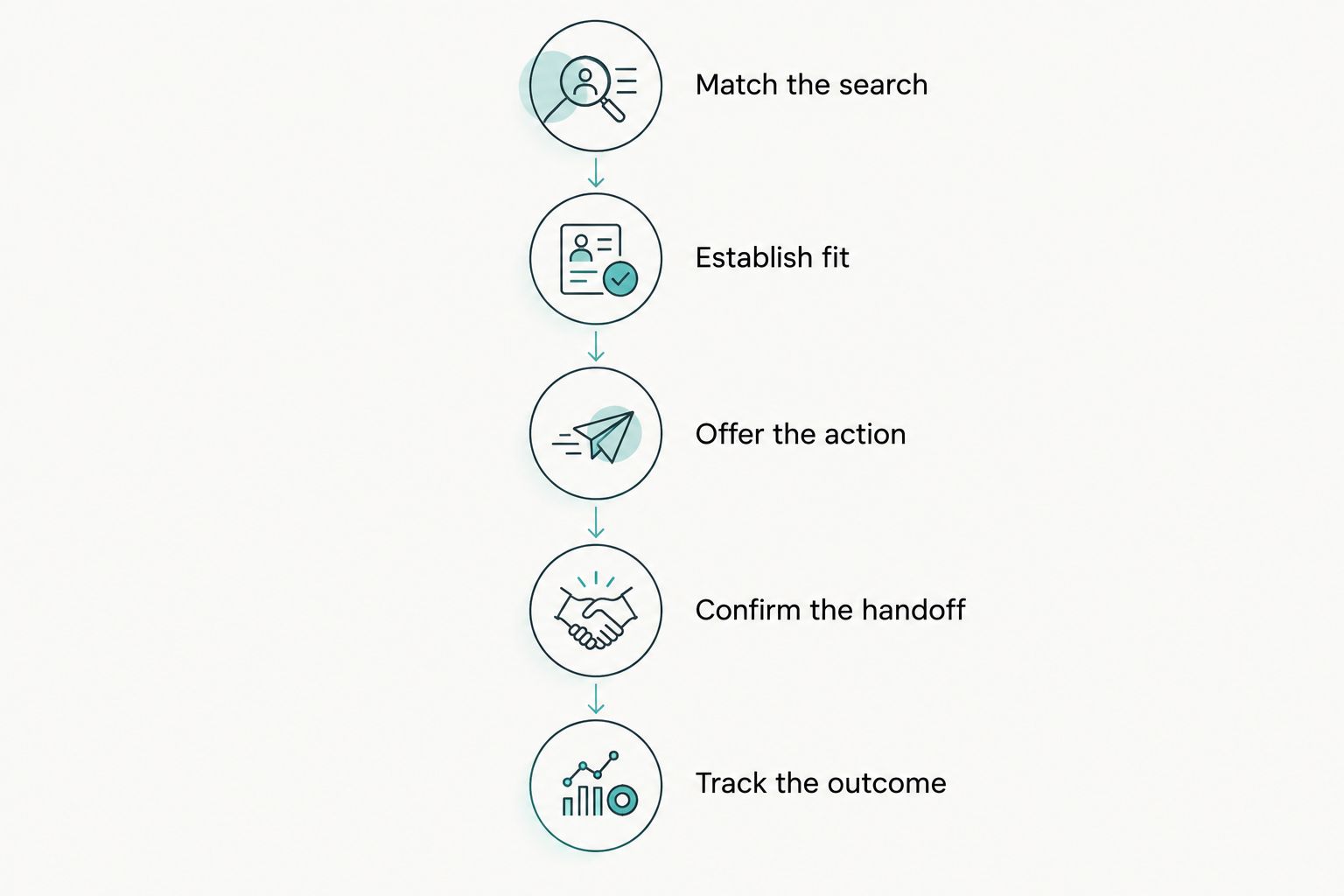
Yes. The practical mechanism is a connected path from a relevant patient question to a completed contact action. Build that path around these 5 steps, then check whether the resulting inquiries become appointments.
- Match the search. Give each actual service a useful page that explains what your practice provides. Avoid sending every search visitor to a homepage that makes them search again.
- Establish fit. Present accurate clinician, location, referral, and patient eligibility information where relevant. Publish only details your practice has confirmed.
- Offer the right action. Let visitors call, request an appointment, or enter an approved booking system according to your actual workflow.
- Confirm the handoff. Explain whether submission creates a booking or sends a request for staff review. Do not leave patients guessing whether someone received their message.
- Track the outcome. Connect the inquiry to staff follow-up and appointment status without placing sensitive patient information into general marketing reports.
These steps describe a website workflow, not a promised increase. A redesigned page proves its value when the practice records more relevant inquiries or a better path from inquiry to appointment—not simply when the page looks different.
Choose the patient contact path before the design
An appointment button needs to match what happens after someone selects it. Direct booking and appointment requests serve different workflows; neither should pretend to be the other.
| Contact path | Best for | Advantage | Limitation |
|---|---|---|---|
| Direct booking | Visits your practice permits patients to schedule themselves | Lets patients select an available appointment | Requires accurate scheduling rules and a working booking connection |
| Appointment request | Visits that require staff review before scheduling | Gives staff a chance to confirm fit and requirements | Submission does not reserve an appointment |
| Phone inquiry | Questions that need a conversation | Supports clarification before scheduling | Depends on call handling and follow-up |
Make the distinction explicit beside the action. Use appointment-request wording when staff must confirm the visit; use booking wording only when the process actually books it.
For your 2026 website brief, document what patients see after each action and who receives the request. A polished page cannot compensate for messages sent to an unattended inbox.
Custom design versus a template for patient inquiries
Choose custom design when your patient journey needs structure a template cannot provide cleanly. Keep a template when it already supports accurate information, accessible contact paths, and manageable updates.
| Approach | Best for | Advantage | Limitation |
|---|---|---|---|
| Template website | Practices whose content and contact needs fit an existing layout | Provides a starting structure for common pages | Layout constraints can force awkward service or booking paths |
| Custom website | Practices needing tailored service, location, or inquiry journeys | Allows the structure to follow the practice workflow | Requires clear requirements, content decisions, and ongoing ownership |
For a dental practice, a routine appointment request and a question about a specialist procedure need different explanations. Custom design can place the relevant information beside each action instead of forcing both visitors through the same generic page.
Custom does not automatically mean better. Ask the provider to demonstrate the patient journey using your actual services and scheduling rules. If the proposed design adds decoration but leaves the same confusing form and handoff, the underlying problem remains.
Why patient lead generation varies
Website results depend on more than the page design. Use these factors to identify the constraint before choosing a redesign, a marketing change, or a staff workflow change.
- Visitor relevance. Visits from people seeking services you do not provide are not the same as relevant new-patient demand.
- Service clarity. Patients need to understand what your practice handles before deciding to contact you.
- Location fit. Make it clear which location provides the service and where the appointment would happen.
- Contact friction. Broken booking connections, unclear buttons, and unnecessary form questions obstruct completion.
- Staff follow-up. A completed request needs a defined owner and an accurate response process.
- Appointment suitability. A request still needs to match your practice's services, eligibility rules, and scheduling requirements.
Do not treat every weak result as a traffic problem. If relevant visitors reach the request form but cannot complete it, inspect the form. If requests arrive but remain unanswered, fix the handoff.
Measure patient inquiries, not just website activity
Set your 2026 measurement plan before approving a redesign. Separate website activity from patient outcomes so a report cannot label every button click a new lead.
Use these 3 measures as the reporting foundation:
- New-patient inquiries: completed contacts from people seeking to become patients, separated from existing-patient administration and spam.
- Scheduled appointments: inquiries that result in a confirmed visit, using the practice's scheduling records.
- Attended appointments: confirmed visits that actually take place, recorded through the practice's approved process.
A booking-button click is an intermediate action. A form submission is an inquiry, not proof of an appointment. An appointment request is not evidence of an attended visit.
Keep reporting definitions consistent before and after launch. Record when marketing activity, appointment capacity, service offerings, or intake rules change so the practice does not attribute every difference to the website.
Compare the same kinds of inquiries across equivalent reporting periods. Exclude staff tests and obvious spam from lead totals, and avoid combining routine patient administration with requests for new care. That distinction makes the report useful for decisions.
Use AI for practical assistance, not medical judgment
For a 2026 medical website, assess AI functionality against a specific patient or staff task. Useful proposals include helping visitors find an approved service page, locate office information, or identify the correct contact route.
Require the provider to explain what information the feature uses, what it records, and how it hands off unanswered questions. Treat these as requirements to verify—not assumed capabilities of every website service.
Keep diagnosis, treatment decisions, and urgent medical concerns outside a general website assistant's role. Provide an appropriate human contact route and practice-approved instructions rather than letting generated answers substitute for clinical judgment.
Test realistic failures before launch. What happens when a visitor asks about a service you do not offer, enters sensitive details, or asks whether an appointment is confirmed? The response should respect the feature's actual limits.
An assistant that answers office-location questions accurately has a defined purpose. One that produces confident but unreviewed medical answers introduces a problem rather than solving a patient inquiry problem.
Choose a provider around the patient journey
Website Symphony is a fit for medical practices seeking custom website design, marketing, and hosting from one accountable team. The limitation is that a website provider cannot replace your practice's decisions about clinical content, scheduling rules, or staff response ownership.
Ask prospective providers to show relevant portfolio examples without relying on unsupported conversion claims. Review how each example explains a service, presents the next action, and handles the transition to booking or inquiry.
For your 2026 provider review, use these 4 checks:
- Patient journey: Can the provider explain how a new patient moves from a service page to the appropriate contact action?
- Operational handoff: Who receives requests, handles failures, and confirms appointment status?
- Ongoing ownership: Who updates content, maintains the website, and resolves hosting problems?
- Evidence: Can the provider show relevant work and explain its design decisions without promising results it cannot substantiate?
Website Symphony offers custom websites alongside marketing and hosting. Ask for a scope that assigns responsibility across those services and identifies what your practice must supply or approve.
Plan your patient inquiry website
Discuss custom website design, marketing, and hosting around your practice’s patient contact workflow.
Can a dental website bring in more appointment requests?
Yes, a dental website can support more appointment requests when patients can identify the relevant service and complete the correct next action. Separate routine scheduling from questions that need staff review, and explain what happens after submission.
For example, a patient seeking a routine visit needs a clear scheduling route. A patient asking about a specialist procedure needs enough service information to make an appropriate inquiry without being asked to self-diagnose.
Do you need a complete redesign to get more patient inquiries?
No, a complete redesign is not always necessary. Correct inaccurate service information, repair broken forms, clarify appointment wording, and resolve missed-message handoffs before deciding the entire site must be replaced.
Choose a redesign when the current structure repeatedly blocks those fixes or makes routine updates difficult. Require the proposed replacement to solve the documented problems rather than merely introduce a different appearance.
FAQ
Can a website generate more patient leads without paid advertising?
Yes, a website can generate patient inquiries through unpaid search, referrals, and other relevant visits. It still needs clear service information and a working contact path; publishing a website alone does not guarantee demand.
What's the best website approach for a dental practice?
The best approach supports the dental practice's actual services and scheduling workflow. Choose custom design when a template cannot clearly handle the required patient journeys, not simply because custom sounds better.
Is a custom medical website better than a template?
A custom medical website is better when tailored service pages, location choices, or inquiry workflows solve a documented problem. A template remains a valid choice when it meets those needs without confusing workarounds.
Should a medical website offer booking or appointment requests?
Offer booking when patients can actually reserve an appointment, and appointment requests when staff must review the submission. Label the action accurately and explain whether confirmation is still required.
How do I know whether website leads become patients?
Track new-patient inquiries through scheduled and attended appointments using your practice's approved records. Keep button clicks separate from completed contacts, and avoid sending sensitive patient details into general marketing reports.
Can an AI website assistant answer patient questions?
An AI website assistant can be designed to help with approved administrative information and contact routing. Verify its data handling, answer limits, and human handoff rather than treating it as a source of medical judgment.
What should I ask a medical website design provider?
Ask the provider to demonstrate the patient journey, show relevant portfolio work, and define responsibility for content, hosting, marketing, and request handling. Website Symphony offers medical website design, marketing, and hosting; confirm the exact project scope before selecting a provider.
One last thing
Test the confirmation message, not just the submit button. Send a test appointment request and inspect the patient-facing response, the staff notification, and the next action assigned to your team.
If the website says an appointment is booked while staff see only an unconfirmed request, correct that mismatch before promoting the page. The patient experience continues after submission—and your measurement should continue with it.