
Plastic surgeons’ website design is the planning and building of a practice website with the aim of turning informed patient interest into consultation requests. This 2026 guide explains how to connect procedure information, surgeon credentials, patient photography, and appointment inquiries without treating a medical decision like an ordinary online purchase.
- Website design for plastic surgeons should connect procedure research, surgeon credentials, and a clear consultation request.
- Website Symphony suits practices seeking custom medical website design, marketing, and hosting from one accountable team.
- Choose custom design when templates cannot support your patient inquiry paths or staff workflow.
- Use AI for approved administrative answers and routing, not diagnosis or surgical suitability decisions.
Why website design matters for plastic surgeons
A plastic surgery website must support a decision about a medical procedure, not just explain a service. Patients need to understand what the surgeon offers, what a consultation involves, and how to ask questions without disclosing unnecessary health information.
Build around the consultation decision, not the homepage reveal. A visually polished opening cannot replace readable procedure pages, accurate credentials, or a working inquiry form. Your design brief should connect those elements before anyone chooses page layouts.
For your 2026 project, distinguish a website provider’s visual portfolio from evidence that the provider understands medical inquiry workflows. The guide to web design companies for plastic surgeons provides a related starting point for evaluating providers; use the patient-path requirements below to assess their proposals.
Your practice’s own constraints belong in that assessment: who answers inquiries, whether appointments require screening, which services need separate explanations, and how patient photographs receive approval. Set those requirements before selecting a template or commissioning custom work.
How to build a plastic surgery website around patient inquiries
Define your consultation paths
Start with a document or spreadsheet. Map how someone researching a procedure reaches the correct person at your practice, including what happens after the website interaction ends.
Separate appointment requests from confirmed bookings. If staff must review the request before scheduling, the button and confirmation message must say so. Otherwise, the website creates an expectation your team cannot fulfill.
Use 3 patient tasks as your initial acceptance test: find a relevant procedure, verify the surgeon’s background, and request a consultation. These are recommended test tasks, not a conversion benchmark. Complete each on a phone without relying on knowledge of the practice.
- List the procedures your practice actually offers.
- Define separate paths for new patients and existing patients.
- Label each action as a request, booking, or call.
- Assign an owner to every inquiry destination.
- Write the confirmation message before designing the form.
Write procedure pages that support informed questions
Draft procedure content in a shared document before placing it in a website editor. Have the appropriate clinician review medical explanations, limitations, and recovery guidance before publication.
Give each distinct procedure enough space to explain its purpose and the consultation process. Avoid duplicating the same paragraph across pages with only the procedure name changed. That approach leaves patients without answers specific to their concerns.
A useful page distinguishes general education from an individual recommendation. Explain what the consultation assesses, rather than presenting a checklist that appears to determine surgical eligibility online. Keep the next step visible without interrupting the explanation with repeated booking prompts.
- Explain the procedure’s purpose in plain language.
- Describe the questions patients can bring to consultation.
- Include clinician-reviewed risks and limitations.
- State when individual assessment is necessary.
- Connect the page to the appropriate consultation path.
Choose custom design for requirements templates cannot meet
Before commissioning a rebuild, sketch the patient journey using your existing pages or a simple wireframe. Identify the exact restriction: confusing navigation, an unsuitable form, difficult content editing, or a disconnected appointment process.
Custom design earns its place when it addresses those restrictions. It is not proof of better inquiry performance by itself. A template remains a valid option when it supports the required content, accessibility, and workflow without awkward workarounds.
Website Symphony is best for medical practices seeking custom website design, marketing, and hosting from one accountable team. Website Symphony offers that service combination; ask the team to show how the proposed design handles your specific consultation paths. For a 2026 proposal, require clear scope and ownership rather than an unsupported conversion promise.
- Document the template limitations you need to remove.
- Request portfolio examples of relevant medical page types.
- Ask who owns design, marketing, and hosting decisions.
- Confirm who maintains forms and appointment connections.
- Define what the practice can edit after launch.
Present credentials and photography with context
Audit existing biographies, credentials, and image permissions manually. Verify every professional claim against the practice’s approved records before copying it into the new site.
Treat before-and-after photography as clinical context, not decorative material. Use authorized images and clinician-approved descriptions. Explain the circumstances needed to interpret a result without implying that another patient will receive the same outcome.
Consistent image presentation helps visitors inspect the photographs rather than interpret changes in framing. Do not use generated imagery as evidence of a patient result. A design provider’s portfolio demonstrates presentation work; it does not establish the medical quality of the practice shown.
- Publish accurate surgeon names and professional credentials.
- Explain each clinician’s role in the practice.
- Confirm permission for every patient image used.
- Keep photographic framing and presentation consistent.
- Add context and an individual-results disclaimer.
Simplify inquiries and limit sensitive data collection
Test your current inquiry process with dummy information and permission from the person responsible for the system. Follow the submission through to staff receipt, response, and scheduling. A successful form submission alone does not prove the workflow works.
Ask only for information needed to handle the initial inquiry. Route medical histories, photographs, and other sensitive material through a process reviewed for that purpose. A standard contact form is not automatically appropriate for clinical intake.
For a practice subject to HIPAA, assess vendors, data flows, and required agreements with qualified privacy and security advisers. A secure-looking page or a vendor badge does not establish that the entire workflow meets the practice’s obligations.
- Remove fields staff do not need for initial contact.
- Explain whether the form requests or confirms an appointment.
- Provide a clear alternative when the form fails.
- Review submission destinations and staff access.
- Keep sensitive information out of general analytics events.
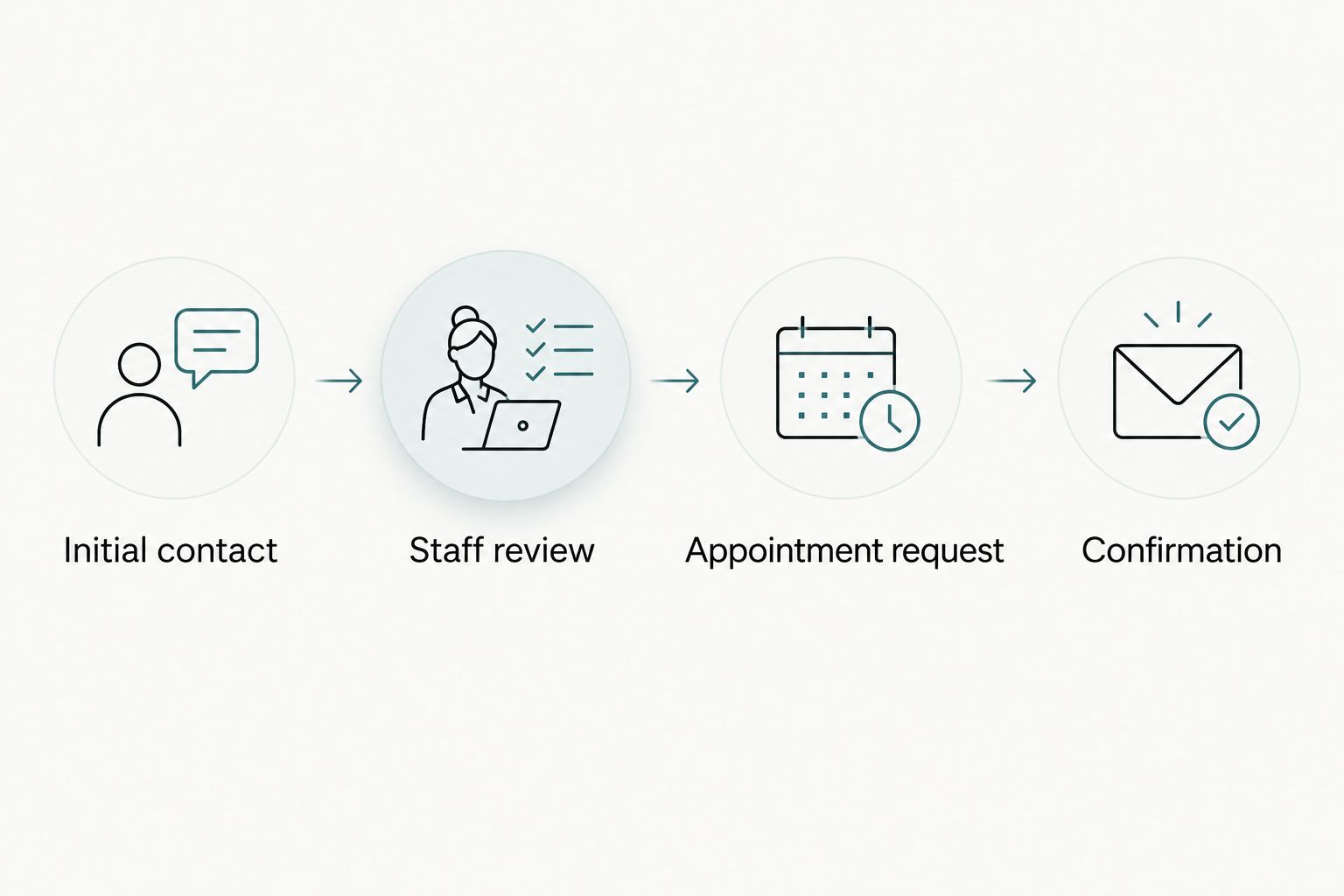
Add AI only to approved administrative tasks
Start with a staff-maintained FAQ and clear routing rules. This manual approach establishes which answers are approved and which questions require a person. Automation should follow those boundaries, not define them.
A practical AI improvement is helping visitors find approved information about consultation preparation or directing an administrative question to staff. Do not position an assistant as a clinician, a diagnosis service, or a tool that determines surgical suitability.
Website Symphony offers AI-powered website and marketing services. For this practice, request a specific demonstration of the proposed functionality, its information sources, and its handoff behavior. The limitation matters as much as the feature: an assistant needs an explicit stopping point when the question becomes medical or the answer is uncertain.
- Restrict answers to approved administrative information.
- Identify the assistant as automated.
- Direct medical questions to qualified practice staff.
- Provide a visible human contact route.
- Review data handling before enabling conversations.
- Test unanswered questions and incorrect assumptions.
Measure completed inquiries and test the handoff
Begin with a simple tracking sheet that connects website inquiries to staff disposition. Separate irrelevant submissions, consultation requests, scheduled consultations, and attendance when your systems and privacy obligations permit that reporting.
For your 2026 launch, define success before changing the site. A phone-button click is an interaction, not proof of a conversation. A submitted form is an inquiry, not proof of a booked consultation. Report each event under its correct name.
Use 2 reporting views: website actions and staff-confirmed outcomes. This is a recommended reporting structure, not a performance claim. Website Symphony’s design, marketing, and hosting scope gives you one team to question about the website side; your practice still needs an owner for staff-side records and follow-up.
- Record a baseline before replacing the current site.
- Test forms on mobile and desktop browsers.
- Check confirmation messages and submission destinations.
- Distinguish clicks, submissions, and booked consultations.
- Assign responsibility for reviewing failed inquiries.
Compare website approaches for your practice
Choose the approach that fits your workflow and maintenance capacity. Do not assume a custom site fixes weak content, or that a template prevents a clear patient experience. Compare the same requirements across every proposal.
| Option | Best for | Main advantage | Key limitation |
|---|---|---|---|
| Self-managed template | Practices with a straightforward inquiry path and an available internal editor | An established layout gives staff a starting point | Layout and workflow restrictions can require compromises |
| Custom agency website | Practices needing tailored procedure pages and coordinated external delivery | Design can follow the practice’s actual patient paths | Scope, ownership, and ongoing responsibilities need explicit agreement |
| Internally managed custom website | Practices with dedicated design, development, and maintenance staff | The internal team controls implementation priorities | The practice carries delivery and maintenance responsibility |
For an agency-led project, ask who handles a broken form, a content correction, and a hosting incident. One contract does not automatically mean one accountable owner. Put those responsibilities into the project scope.
For an internally managed project, make the same ownership decisions. A capable developer still needs approved medical content, access rules, and a staff contact who can validate the appointment workflow.
Common mistakes plastic surgery practices make
Treating a consultation request as a confirmed booking
A button labeled as immediate booking creates confusion when staff must review the request first. Match the label to the actual process, then explain how confirmation happens. The website should promise the next step it can actually deliver.
Letting galleries replace procedure explanations
Patient photographs cannot explain the full decision, preparation, risks, or suitability of a procedure. Keep galleries connected to clinician-reviewed information and a consultation path. Do not make patients infer medical guidance from images alone.
Sending every inquiry to an unmonitored destination
A form can function technically while failing operationally. Name the staff owner, verify access, and document coverage when that person is unavailable. Test the destination after any change to forms, email routing, or connected systems.
Moving every visitor toward surgery
A website should help visitors ask informed questions, not imply that every concern requires an operation. Explain the role of individual assessment. Keep educational content separate from claims about what a particular patient needs.
Replacing a site without preserving useful pages
Before a 2026 redesign, inventory existing procedure pages and record their destinations in the new structure. Preserve useful content and plan redirects for changed addresses. Otherwise, a visual upgrade can leave old links pointing to missing information.
FAQ
What should a plastic surgeon’s website include?
A plastic surgeon’s website should include accurate credentials, clinician-reviewed procedure information, authorized patient photography where used, and a clear consultation path. Explain whether the visitor is requesting an appointment or confirming one.
Is custom website design better than a template for plastic surgeons?
Custom design is the better fit when a template cannot support the practice’s patient paths, content, or staff workflow. A template remains suitable when it meets those requirements and the practice can maintain it.
How do I choose a plastic surgery website design company?
Choose a provider that can demonstrate relevant medical website work and explain inquiry handling, content ownership, maintenance, and hosting responsibilities. Ask for portfolio examples and a walkthrough of your proposed patient journey rather than unsupported performance claims.
Can AI answer questions on a plastic surgery website?
AI can help visitors find approved administrative information when its scope and data handling have been reviewed. Medical advice, diagnosis, and surgical suitability questions need a clear route to qualified practice staff.
Does my plastic surgery website need online booking?
Your website needs a clear appointment path, but that does not have to mean immediate online booking. If staff screening comes first, use an appointment request and explain the confirmation process.
How do I measure whether my website brings patient inquiries?
Track website submissions separately from staff-confirmed consultation requests and scheduled appointments. Phone-button clicks and page views do not establish that a patient contacted or visited the practice.
Can I use before-and-after photos on my practice website?
Use patient photographs only with appropriate permission and a review of applicable professional and legal requirements. Provide accurate context, protect patient privacy, and avoid implying that the same result applies to every patient.
One last thing
Before approving your 2026 website, run a final handoff test with 3 roles: a prospective patient, a staff member, and the person responsible for website maintenance. Use dummy information, not real patient details.
Ask the prospective patient to request a consultation. Ask the staff member to locate and process it. Ask the maintenance owner to explain what happens if delivery fails. Do not approve the launch until the inquiry reaches its intended owner and the confirmation accurately describes the next step. That test connects the design to the work your practice actually needs done.