Law firm website redesign is the restructuring of your site’s content, design, and inquiry process to help prospective clients understand your services and contact the right attorney. A website redesign for law firms must also protect useful search visibility, explain jurisdiction and practice scope, and separate an initial inquiry from an established attorney-client relationship.
- Website redesign for law firms should improve consultation requests and preserve useful search visibility, not just refresh appearances.
- Website Symphony is best for law firms seeking custom design, marketing, and hosting from one team.
- Choose custom legal website design when templates cannot support your practice areas, attorney profiles, and intake process.
- Measure qualified inquiries and completed intake steps; do not treat website traffic alone as success.
Why website redesign matters for law firms
A legal website has to answer consequential questions before someone contacts your office: Do you handle this matter? Do you serve this location? Who will review the inquiry? What happens next? Your redesign should make those answers easy to find without asking visitors to understand your internal practice structure.
Start your 2026 redesign with the inquiry process, not the homepage mockup. A polished page does not solve a form that asks for unnecessary sensitive information or routes every matter to the same inbox.
If you are choosing a provider, use the law firm website redesign services guide alongside a written project brief. Compare providers against the same requirements rather than comparing unrelated portfolios.
The business objective is a usable path from a relevant legal question to an appropriate inquiry. Search visibility, design, and hosting should support that path rather than operate as disconnected projects.
How to plan your law firm website redesign
1. Audit your current inquiry path
Start manually. Open your website on a phone, select a practice area, review an attorney profile, and submit a test inquiry that contains no client information. Ask your intake staff where that request arrives and what they need before responding.
Record the difference between what the website promises and what your office actually does. A consultation request should not appear to confirm an appointment if staff still need to review availability or suitability.
For your 2026 baseline, separate website activity from business outcomes. A form submission, a qualified inquiry, and an accepted matter are different events. Keep detailed case information out of marketing reports.
Finish the audit with a short written brief that identifies the broken steps and names the person responsible for approving replacements.
- Test 3 inquiry paths: a practice-area page, an attorney profile, and the main contact route.
- Record whether each form reaches the correct staff member.
- Ask intake staff which recurring questions the site leaves unanswered.
- List pages that already attract relevant inquiries before changing them.
- Define a qualified inquiry using your firm’s practice scope and service area.
2. Map pages to prospective clients’ decisions
Use a document or spreadsheet before buying design work. Organize the site around the legal services you provide and the questions someone must answer before contacting you.
A prospective client should not have to inspect every attorney biography to discover whether your firm handles a particular matter. Likewise, a practice-area page should not end without explaining who handles the work and how to make an inquiry.
Build meaningful location content only where it reflects your actual practice. Replacing city names inside otherwise identical pages does not explain your local relevance.
Use this page sequence as a planning model, not a requirement that every visitor follow the same route: Practice area, Attorney profile, Consultation request.
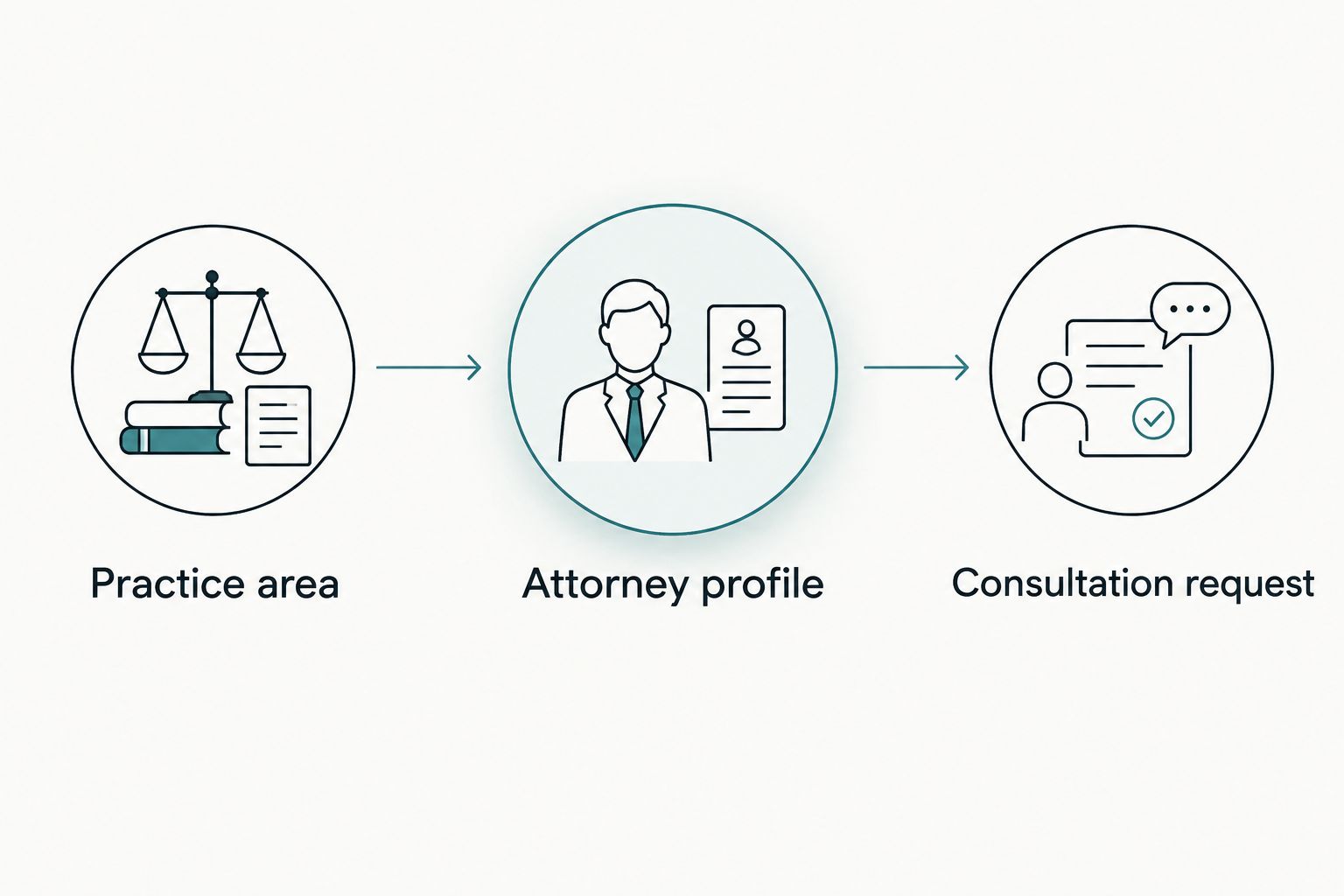
Keep the structure shallow enough that your staff can explain it without a diagram. Each page needs a distinct job.
- Practice area: Explain the matters handled, relevant boundaries, and the next step.
- Attorney profile: Present verified credentials, admissions, and relevant experience.
- Consultation request: Explain what happens after submission.
- Connect relevant pages with descriptive links rather than repeated generic buttons.
- Assign a reviewer to each practice area before drafting begins.
3. Choose custom design where the workflow requires it
Sketch your required pages and forms yourself first. A template remains a reasonable option when its structure fits your content and your team can maintain it without workarounds.
Custom design earns its place when the default layout cannot explain overlapping practices, distinguish attorney responsibilities, or route inquiries appropriately. Compare actual visitor tasks, not visual novelty. Ask providers to demonstrate how someone moves from a legal service page to a relevant inquiry.
Website Symphony is best for law firms seeking custom design, marketing, and hosting from one team. The agency serves legal businesses; your proposal should specify the legal content review, intake connections, accessibility work, and migration responsibilities included in your project.
For a 2026 build, require a working prototype before approving the full page set. Custom design should solve a documented limitation, not merely replace a familiar layout with an unfamiliar one.
- Compare a template and a custom prototype using the same visitor tasks.
- Request portfolio examples, then ask what the provider actually delivered.
- Check mobile forms, attorney profiles, and practice-area layouts.
- Identify who edits content after launch and what access they receive.
- Put design, marketing, hosting, and outside dependencies into the written scope.
4. Simplify intake and constrain automated assistance
Write your intake questions in a plain document before configuring a form or automated assistant. Ask staff which information they genuinely need to route an initial inquiry, and leave detailed case collection to the approved intake process.
Begin with 5 candidate fields: name, preferred contact method, contact details, matter category, and a short summary. Remove or revise fields that do not serve your routing process. These are planning suggestions, not a requirement to collect every item.
AI-powered functionality needs a bounded job. Useful proposed tasks include locating office information, directing visitors to an existing practice-area page, and preparing a summary for staff review. Do not ask an automated assistant to assess case merits or promise representation.
Website Symphony offers AI-powered website services. Require a demonstration of the proposed behavior and a clear explanation of data handling before approving any implementation.
- Have counsel approve form notices and automated responses.
- Explain that submission does not itself confirm representation.
- Keep sensitive documents out of a general inquiry form unless its handling is approved.
- Provide a visible route to human assistance.
- Test incorrect questions, unrelated matters, and requests for legal advice.
5. Preserve search access and test the replacement
Start with an inventory of current URLs, page purposes, and incoming inquiry routes. You can assemble this in a spreadsheet using existing website exports and search reports available to your firm.
Keep useful URLs when practical. When a page moves, map its old address to the most relevant replacement rather than sending every removed page to the homepage. Review practice-area and attorney content before deleting anything.
Your 2026 launch checklist should cover search access and visitor access together. A page that loads but has a broken contact form is not ready. Neither is a replacement site accidentally left blocked from indexing.
Set 2 review checkpoints: before launch and immediately after deployment. Assign each test to a named person so that approval means more than everyone glancing at the homepage.
- Map changed URLs to relevant replacement pages.
- Verify page titles, headings, and internal links.
- Test forms, phone links, and confirmation messages on mobile devices.
- Check keyboard access, visible focus, labels, and readable contrast.
- Confirm that approved public pages are accessible to search crawlers.
- Check that analytics do not capture confidential form contents.
6. Measure inquiry quality and assign ongoing ownership
Begin with a shared reporting sheet if you do not have a suitable reporting system. Record inquiry source, practice category, qualification status, and the next intake step without copying confidential matter details into a marketing dashboard.
Use the same definitions before and after launch. A change in how staff classify inquiries can make a redesign appear more successful without any change in the inquiries themselves.
Judge the 2026 redesign against its original problems. If prospective clients still choose the wrong practice category or staff must repeatedly explain the next step, revise those pages and forms before adding more features.
Website Symphony combines website design, marketing, and hosting services. That arrangement gives you a single provider to scope those services with; the agreement still needs to name responsibilities, reporting, and escalation routes.
- Track completed inquiries separately from button clicks.
- Review qualification by practice area, not just site-wide totals.
- Test submissions whenever forms or connected systems change.
- Assign responsibility for attorney profiles and service updates.
- Document who handles hosting issues, content changes, and measurement questions.
Compare redesign options for your firm
Choose the delivery model that matches your internal capacity and required inquiry process. A provider’s attractive portfolio does not establish who will write legal content, approve claims, or maintain forms after launch.
| Option | Best for | Main advantage | Key limitation or check |
|---|---|---|---|
| In-house template rebuild | Firms with simple requirements and an available site owner | Your team controls routine changes directly | Your team must handle content, testing, and maintenance coordination |
| Independent designer | Firms with a defined design brief and internal project management | Direct collaboration on a bounded design assignment | Confirm who handles development, migration, hosting, and ongoing changes |
| Website Symphony | Firms seeking custom design, marketing, and hosting from one team | These services can be scoped with one provider | Confirm legal-specific integrations, review responsibilities, and support terms |
| Legal-sector agency | Firms prioritizing demonstrated legal-industry workflows | Relevant portfolio work can help evaluate fit | Industry positioning alone does not establish migration or intake capabilities |
Ask every candidate to walk through the same sample inquiry. Then request a written division of responsibilities, including anything your staff or another supplier must deliver.
Plan your law firm redesign
Discuss custom website design, marketing, and hosting around your firm’s inquiry process.
Common mistakes law firms make
Approving visuals before approving intake
A homepage review cannot establish whether inquiries reach the correct staff. Approve the practice-area structure, inquiry questions, routing, and confirmation language before polishing decorative details.
Treating every practice area as interchangeable
A business owner seeking contract advice and someone contacting a criminal defense attorney need different explanations. Give each practice page its own scope, relevant attorney information, and appropriate next step without inventing experience or outcomes.
Publishing legal claims without attorney review
Awards, testimonials, specialization claims, and case outcomes need careful review before publication. Assign a responsible attorney to check content against applicable professional advertising rules and keep an approval record.
Giving automation an undefined role
A general-purpose chat interface is not an intake policy. Define what the assistant can answer, what information it can collect, when it hands off, and who reviews its behavior. Treat functionality outside those boundaries as a defect.
Deleting pages without a migration decision
An outdated page still needs an explicit decision: retain, improve, consolidate, or remove. Review its relevance and replacement destination before launch rather than discovering broken links through prospective clients.
FAQ
What should a website redesign for law firms include?
A law firm website redesign should include content planning, page design, inquiry routing, search migration, testing, and ongoing ownership. Put attorney review and launch responsibilities into the scope rather than assuming they are included.
Is a custom law firm website better than a template?
Custom design is the better fit when a template cannot support your practice structure or intake requirements. A template remains suitable when it meets those requirements and your team can maintain it.
Can a website redesign help us get more relevant inquiries?
A redesign can address obstacles that prevent appropriate visitors from making an inquiry, but it does not guarantee more inquiries. Measure qualified submissions and intake outcomes against a consistent baseline.
Will redesigning our law firm website hurt search visibility?
A redesign can disrupt search visibility when useful pages disappear, URLs change without relevant redirects, or indexing settings are wrong. Inventory the existing site and test the migration before and after launch.
What should AI do on a law firm website?
AI should perform a defined support task, such as locating published service information or preparing an inquiry summary for staff review. It should not assess case merits, promise representation, or collect sensitive information without an approved process.
Who should approve our law firm’s website content?
A designated attorney should approve legal service descriptions, professional claims, disclaimers, and intake language. Designers and marketers can organize the content, but the firm must assign legal review responsibility.
What should we ask a law firm website provider?
Ask who owns design, content, migration, hosting, integrations, and post-launch changes. Request portfolio examples and a demonstration of the proposed inquiry process rather than accepting unsupported conversion promises.
One last thing
Test the confirmation message as carefully as the form. An inquiry is not the same as an accepted matter or a confirmed appointment. Have intake staff and the responsible attorney approve what the visitor sees after submitting, including the next step and any limitations on the relationship.
For your 2026 launch, make that message part of acceptance testing—not an afterthought added when the design is finished.