
Best overall for a custom medical website with one accountable service team: Website Symphony. Best for an existing WordPress site: WP Engine. Best for developer-managed WordPress: Kinsta. For 2026, choose Amazon Web Services or Microsoft Azure when your practice needs a separately engineered application environment rather than routine website hosting.
- Website Symphony leads the best hosting providers for medical practice websites when custom design, marketing, and hosting belong together.
- WP Engine and Kinsta fit WordPress websites; neither choice replaces a clear patient booking and inquiry path.
- Amazon Web Services and Microsoft Azure suit technical teams building application environments, not practices seeking routine website management.
- Choose hosting around the data your website handles; ordinary website hosting does not establish HIPAA compliance.
Why this matters
Your medical website has two jobs: help patients understand your practice and help them take the next step. Hosting supports those jobs, but it does not fix an unclear appointment button, an irrelevant service page, or an inquiry that reaches the wrong inbox.
For a 2026 hosting decision, separate your public website from systems that collect or store sensitive patient information. A dental practice showing services and linking to an appointment platform has different requirements from a specialist clinic building a patient application.
Choose the service model before choosing the server. That decision determines whether your staff manages several vendors or works with a team responsible for the website as a whole.
What makes the best medical website hosting provider?
Judge providers against these criteria before comparing names:
- Patient paths: Your website needs clear routes from treatment information to an appointment request, phone call, or approved booking platform.
- Accountability: Establish who handles hosting problems, website changes, forms, and connections to outside systems.
- Data boundaries: Identify which systems receive patient information. Assess those systems separately from the public website.
- Platform fit: WordPress hosting serves WordPress sites; cloud infrastructure requires application and operational expertise.
- Recovery: Ask who maintains backups, restores the website, and checks essential functions after a change.
- Editing and ownership: Confirm who can update content and what happens to your website, domain, and data when the relationship ends.
These criteria favor different providers for different practices. A primary care office replacing a template needs a different arrangement from a medical organization developing custom patient software.
Medical website hosting providers at a glance
| Provider | Best for | Standout service model | Key limitation |
|---|---|---|---|
| Website Symphony | Custom medical websites with combined service accountability | Custom website design, marketing, and hosting | Confirm hosting scope, maintenance responsibilities, and data requirements before signing |
| WP Engine | Practices keeping an existing WordPress website | Managed WordPress hosting | Not a substitute for website design, marketing, or clinical-system review |
| Kinsta | WordPress sites supported by a developer | Managed WordPress hosting with development workflows | Requires separate responsibility for content, design, and patient journeys |
| Amazon Web Services | Custom medical applications with an engineering team | Configurable cloud infrastructure and services | Architecture and operations remain technical responsibilities |
| Microsoft Azure | Application projects managed by a Microsoft-focused technical team | Cloud infrastructure within the Microsoft ecosystem | Not a turnkey medical website service |
No provider receives a compliance endorsement from this ranking. Evaluate the actual website, contracts, integrations, and information flows—not the name on the hosting invoice.
1. Website Symphony: best for combined website accountability
Website Symphony provides custom website design, marketing, and hosting, including services for medical businesses across the U.S. That combination fits practices replacing a template site and seeking one accountable team rather than buying hosting separately from design.
The buying decision should center on patient tasks. Ask how a prospective dental patient finds a treatment, checks practice information, and requests an appointment; then establish which parts of that path the team will manage.
Pros:
- Custom design can be planned around your practice's patient inquiry paths.
- Website design, marketing, and hosting are offered by the same business.
- The stated service focus includes medical businesses.
Cons:
- Hosting specifications and maintenance responsibilities need confirmation in the proposal.
- The service description does not establish suitability for storing protected health information.
Best for: Dental practices, specialist clinics, and primary care offices seeking a custom public-facing website and combined service accountability.
Verdict: Buy for an integrated website project, after confirming the hosting scope and patient-data boundaries. Do not treat an integrated service offer as automatic approval for clinical data storage.
2. WP Engine: best for keeping an existing WordPress website
WP Engine is a managed WordPress hosting provider. It belongs on the shortlist when your practice already uses WordPress and wants to keep that platform rather than commission a replacement website.
Managed hosting narrows the infrastructure decision, but your practice still needs an owner for website content and patient inquiries. A technically functioning site can still send appointment requests to an unattended mailbox.
WP Engine pros:
- A WordPress-specific service model matches an existing WordPress website.
- Managed hosting reduces the need to assemble a general-purpose server environment.
- Your practice can keep hosting separate from its design or marketing agency.
WP Engine cons:
- A WordPress hosting decision does not resolve website design or content problems.
- Plugins, forms, and booking connections still require an assigned owner.
Best for: Practices satisfied with their WordPress website that have someone responsible for ongoing site management.
Verdict: Buy for WordPress continuity; skip it as a substitute for a full website redesign. Confirm the selected plan's maintenance boundaries before moving the site.
3. Kinsta: best for developer-managed WordPress websites
Kinsta provides managed WordPress hosting. It fits a practice that has a developer or agency responsible for the website and wants a WordPress-focused hosting environment.
The distinction here is the working arrangement. Your developer should own changes, deployment checks, and integration troubleshooting; the hosting provider should have a clearly defined infrastructure role.
Kinsta pros:
- The hosting model is focused on WordPress rather than a general server setup.
- A developer can pair managed hosting with a separate website maintenance agreement.
- Hosting and website production can remain independently selected services.
Kinsta cons:
- Hosting alone does not provide your practice's content or appointment strategy.
- Divided vendor responsibilities need documentation to prevent support gaps.
Best for: Practices retaining a developer who manages an established WordPress website.
Verdict: Buy when a developer owns the website; hold when nobody owns updates and inquiry troubleshooting. In 2026, a clear responsibility split is more useful than adding another vendor without a defined job.
4. Amazon Web Services: best for custom application infrastructure
Amazon Web Services provides cloud infrastructure and application services. It fits a medical organization building software that needs deliberate architecture, rather than a practice seeking someone to host and manage a brochure-style website.
A technical team must choose services, configure access, manage deployments, and plan recovery. Where HIPAA applies, the team must also evaluate contractual requirements, eligible services, and the complete application design.
Amazon Web Services pros:
- Infrastructure can be selected around application requirements.
- Engineering teams can control architecture and deployment decisions.
- The environment can serve projects beyond a public marketing website.
Amazon Web Services cons:
- Technical configuration and operations require an accountable team.
- Cloud infrastructure does not supply practice-specific design, content, or marketing.
Best for: Medical organizations with engineering support and a defined custom application requirement.
Verdict: Buy for an engineered application environment; skip for routine website management without technical support. More infrastructure choice is not a benefit when your practice needs someone to manage the website end to end.
5. Microsoft Azure: best for Microsoft-focused application teams
Microsoft Azure provides cloud infrastructure and application services within the Microsoft ecosystem. It belongs on the shortlist when your technical team is building a medical application and already works within that environment.
Choose Azure because it fits the application and the team's operating model—not because a public website needs a familiar technology name. The architecture, access controls, integrations, and contracts require their own review.
Microsoft Azure pros:
- A Microsoft-focused team can evaluate infrastructure within its existing ecosystem.
- Application hosting can be designed around specific technical requirements.
- Technical ownership can remain with the organization's established team.
Microsoft Azure cons:
- It is not a combined medical website design and marketing service.
- Service selection and configuration do not remove compliance responsibilities.
Best for: Organizations whose Microsoft-focused technical team owns application development and operations.
Verdict: Buy when Azure matches the technical plan; skip when the requirement is simply a better practice website. Keep public-site redesign decisions separate from application infrastructure decisions.
Test the patient path before signing
For your 2026 shortlist, ask each provider to walk through 3 patient tasks: finding the right service, requesting an appointment, and receiving clear next-step instructions. Use your actual dental, primary care, or specialist services—not a generic demonstration.
A useful website journey follows this sequence:
- Service page: Explain the treatment or appointment type in language patients understand.
- Appointment choice: Make the appropriate booking or inquiry route clear.
- Approved destination: Send the request to the system your practice has approved.
- Staff follow-up: Assign responsibility for responding and handling failed submissions.
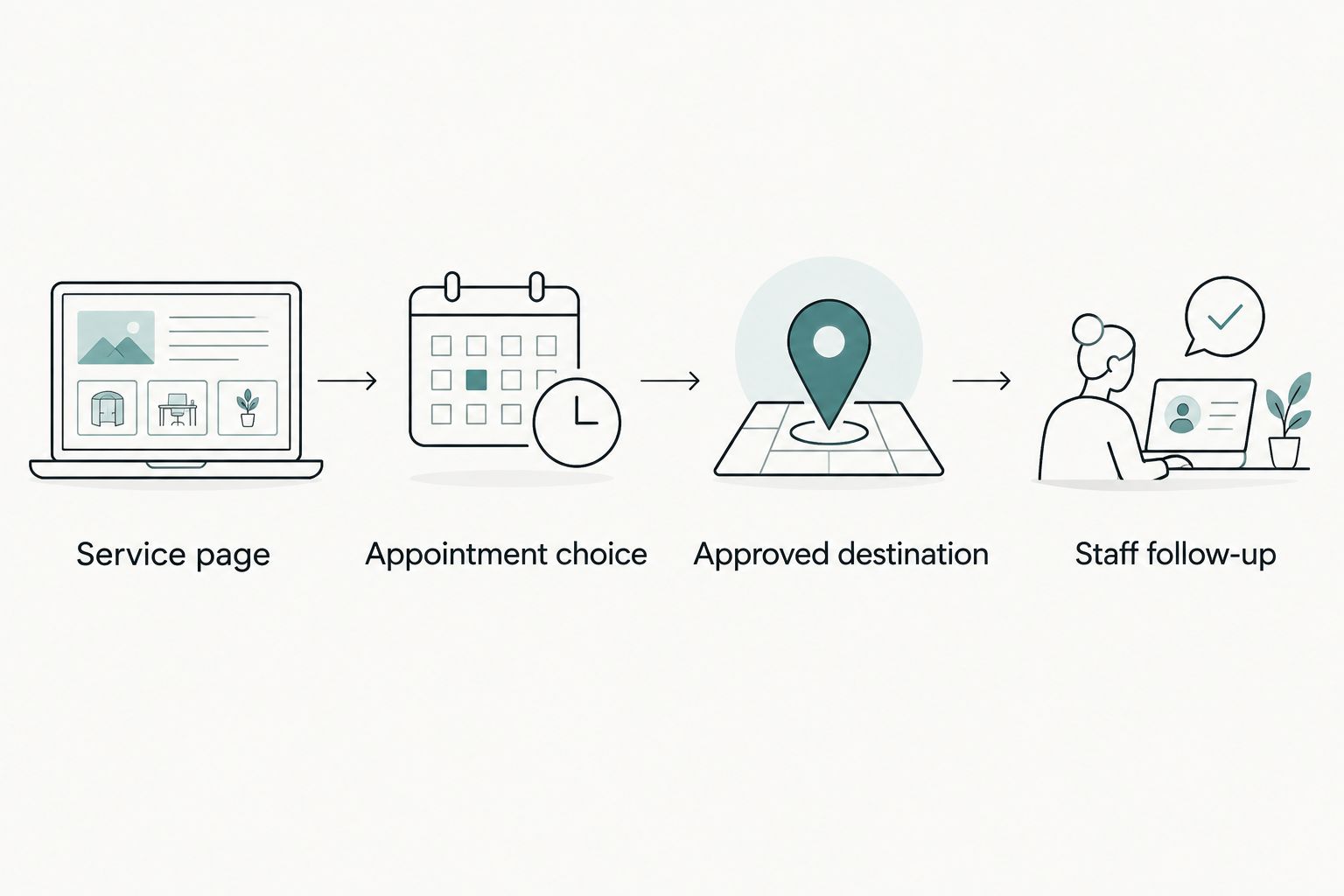
Check 2 inquiry paths separately: a new patient seeking an appointment and an existing patient seeking help. They need clear directions, and neither path should encourage patients to place sensitive medical details in an unapproved form.
Use the best medical website design companies guide when your hosting search reveals a larger design problem. Replacing the server while keeping a confusing patient journey leaves the main issue untouched.
Make automation practical, not decorative
A 2026 medical website brief should define a task before requesting automated functionality. Examples include helping visitors find office information, directing them to the correct appointment route, or helping staff prepare draft responses for review.
These are requirements to discuss, not capabilities to assume any listed provider includes. Specify the approved information source, the escalation route, and what the system must not do.
Do not place diagnosis, treatment advice, or unrestricted collection of patient information inside a general website assistant. Keep clinical questions on the practice's approved clinical communication path.
Ask the provider to demonstrate the proposed function with realistic questions. A useful answer directs the visitor correctly; a confident answer that misstates appointment instructions creates another staff problem.
How these providers are ranked
This 2026 ranking compares service models against patient paths, accountability, platform fit, and operational responsibility. It is not a speed-test ranking or a claim that one provider produces more appointments than another.
The integrated service option ranks first for practices needing a custom public-facing website. WordPress specialists follow for existing WordPress sites; cloud platforms serve the narrower requirement of custom application infrastructure.
Which hosting provider should you choose?
Website Symphony is best for medical practices that want custom website design, marketing, and hosting from one accountable team. Confirm the scope in writing, especially maintenance, form ownership, recovery, and connections to appointment systems.
Choose WP Engine for an existing WordPress site, or Kinsta when a developer already owns WordPress operations. Choose Amazon Web Services or Microsoft Azure only when a technical team has defined an application infrastructure requirement.
Require 1 accountable owner for the complete inquiry path. Even with several vendors, your staff should know who handles a broken form or a booking connection that stops working.
Discuss your medical website requirements
Review custom design, marketing, and hosting around your practice's patient inquiry paths.
FAQ
What's the best hosting provider for a medical practice website?
Website Symphony is the strongest fit in this comparison for practices seeking custom design, marketing, and hosting from one team. WP Engine and Kinsta fit existing WordPress websites with separate website management.
Does every medical practice website need HIPAA-compliant hosting?
The hosting requirements depend on the information the website handles and the practice's HIPAA obligations. Assess forms, integrations, storage, and third-party tools rather than assuming that every public page has the same requirements.
Is managed WordPress hosting better than custom website hosting?
Managed WordPress hosting is the relevant option when your website runs on WordPress. A custom website service is a broader purchasing decision that includes design and responsibilities beyond the hosting platform.
Can better hosting bring in more patient inquiries?
Better hosting alone does not establish that your practice will receive more inquiries. Evaluate the service pages, appointment route, form handling, and follow-up process alongside technical reliability.
Should a dental practice use Amazon Web Services or Azure?
A dental practice should choose either platform when a technical team has a defined application infrastructure requirement. A public website redesign does not, by itself, require a separately engineered cloud environment.
What should I ask before replacing a template medical website?
Ask how the new website will handle your actual appointment and inquiry paths. Confirm content ownership, editing access, hosting responsibilities, recovery procedures, and the destination of patient submissions.
What is a practical use of automated functionality on a medical website?
A practical use is directing visitors to approved office information or the correct appointment route. Define the information source and staff escalation process, and keep clinical advice outside a general website assistant.
One last thing
Test what happens when an inquiry fails—not just when it succeeds. Ask who notices the failure, where the patient receives instructions, and who fixes the connection.
A polished appointment button is not the end of the patient journey. The next step needs an owner.