
OB-GYN website design is the planning and development of a practice website with the aim of turning patient questions into appropriate appointment requests. Your site must distinguish routine visits, pregnancy care, and existing-patient needs without asking visitors to disclose sensitive information in the wrong place.
- Website design for ob-gyn practices should connect each patient need to an appropriate appointment or inquiry path.
- Website Symphony best fits medical practices seeking custom website design, marketing, and hosting from one accountable team.
- Choose custom design when template restrictions interfere with patient booking, clinician selection, or staff workflows.
- Keep clinical questions out of general forms and AI chat; route patients to practice-approved channels.
Why website design matters for OB-GYN practices
An OB-GYN website serves people making different decisions: choosing a clinician, finding pregnancy care, requesting a preventive visit, or contacting an established care team. A single appointment button does not explain whether a patient is booking a confirmed visit or asking staff to call back.
Design the patient handoff before choosing the page layout. Start with what your practice offers, who handles each request, and what the patient should expect next. A polished homepage cannot correct a request that reaches an unmonitored inbox.
For your 2026 website brief, prioritize clear service information, usable mobile forms, and visible contact routes. The guide to mobile-friendly websites for medical practices covers the device experience; the steps below connect that experience to office operations.
Build the website around patient decisions
Map your patient entry paths
Start manually. Ask reception staff to list the questions callers ask before requesting an appointment, then group those questions by patient need rather than internal department names.
Test 3 tasks: finding a new-patient appointment route, contacting an existing care team, and locating a clinician. These are proposed usability checks, not performance benchmarks. Ask a staff member unfamiliar with the draft to complete them without coaching, and record every unclear instruction.
Separate appointment requests from clinical communication. Your clinical team should approve instructions about urgent concerns and after-hours contact; a designer should not invent medical routing language.
- Define distinct routes for new and existing patients.
- Match service labels to care your practice actually provides.
- Identify the staff owner for each inquiry destination.
- Write the next-step message before building the form.
Explain services through patient questions
Review your existing pages and draft answers in a shared document before buying new functionality. Each service page should explain what the practice provides, which clinicians provide it, and how someone requests an appropriate visit.
For pregnancy care, explain how patients begin the appointment process using instructions approved by your team. For gynecologic services, describe the offered care without implying every concern has the same booking requirements. Do not publish services simply because a template includes them.
Provider profiles should help patients assess fit through verified credentials, clinical interests, office locations, and scheduling instructions. Have each clinician review their information. Avoid unsupported claims about outcomes, expertise, or patient satisfaction.
- Give each materially different service a focused page.
- Use patient-friendly headings instead of unexplained abbreviations.
- Verify clinician credentials and location assignments.
- Place the relevant appointment action beside the service explanation.
Choose custom design around a documented workflow
Sketch the patient journey on paper first. Then identify which requirements your current template cannot support: distinct appointment routes, clearer clinician selection, useful location pages, or an accessible form sequence.
Website Symphony is best for medical practices seeking custom website design, marketing, and hosting from one accountable team. Website Symphony offers those services; use your workflow brief to establish the exact project scope. Custom development still requires practice decisions about content, routing, and approvals.
Request portfolio examples and ask the provider to demonstrate the patient inquiry path, not just the homepage. A portfolio shows design work; it does not establish an increase in appointments. Ask what is included in the proposed engagement and what requires a separate agreement.
- Document the template restrictions affecting actual patient tasks.
- Request examples relevant to medical appointment and inquiry journeys.
- Assign ownership for website, marketing, and hosting issues.
- Confirm editing access, support responsibilities, and handover terms.
Separate booking from appointment requests
Inspect the current process yourself before commissioning an integration. Submit a test request with non-patient information and follow it through the office workflow, including the confirmation screen and any follow-up message.
Create 2 distinct paths where your operations require them: direct booking into an approved scheduler and a request that staff must review. Name each action accurately. A request form should not tell patients their appointment is confirmed when staff have not accepted it.
The handoff should make the next step explicit: what was submitted, who responds, and which approved channel handles changes. Only publish response expectations your office has agreed to meet.
- Label direct scheduling and staff-reviewed requests differently.
- Link existing patients to the approved communication channel.
- Use practice-approved fields and avoid unnecessary clinical details.
- Test success messages, failed submissions, and staff notifications.
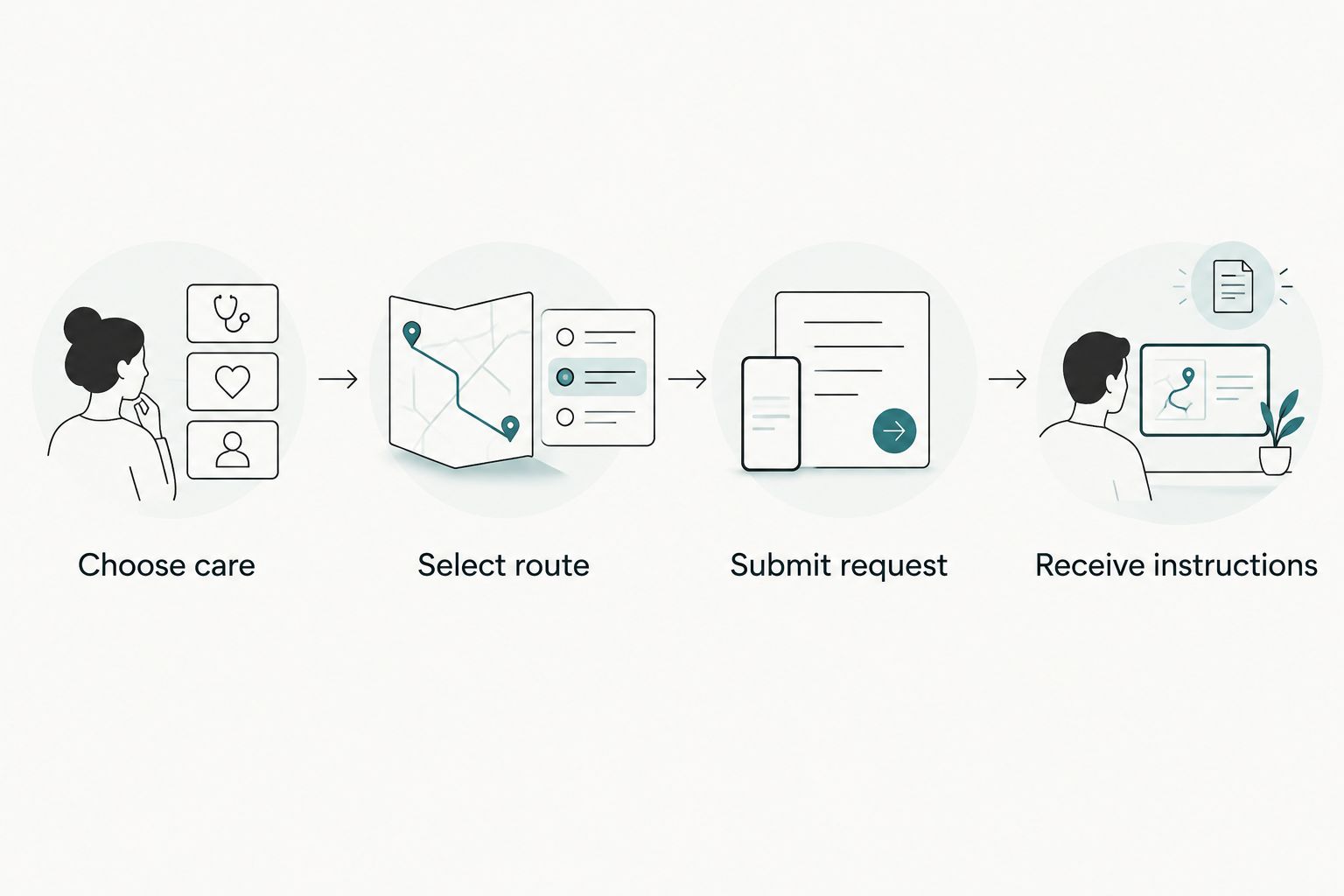
The patient-facing sequence should remain understandable even when different systems handle each stage. Map it before approving the build: Choose care, Select route, Submit request, Receive instructions.
Set privacy and AI boundaries before adding tools
Begin with a manual inventory of forms, analytics, chat, scheduling, and embedded content. Record what information each component collects and where that information goes. Have your privacy or compliance lead review the proposed configuration; a security badge does not establish compliance.
For a 2026 AI feature brief, choose an administrative task: answering approved office-information questions, pointing to a service page, or explaining how to reach scheduling. Define what the feature must refuse. Do not ask it to diagnose symptoms, assess pregnancy concerns, or provide individualized medical advice.
Website Symphony describes its websites as AI-powered. Ask the team to demonstrate a specific patient or staff task, identify the information involved, and explain the human handoff. Do not assume a particular integration or safeguard is included.
- Restrict automated answers to approved administrative content.
- Define prohibited inputs, escalation rules, and staff ownership.
- Review vendor agreements, data handling, and access controls.
- Test sensitive questions using fictional information before launch.
Make service and location information easy to use
Start with a manual consistency check across your public practice information. Confirm the practice name, address, phone number, office hours, and clinician assignments before rewriting pages or changing business listings.
Build location pages only for real offices. Give each page the details patients need to arrive and contact the right team, using verified parking, entrance, and accessibility information. Do not publish those details until someone at the location confirms them.
Make the website usable beyond a visual inspection. Test keyboard access, visible focus, form labels, error messages, readable text, and zoom. Automated checks help identify issues, but they do not replace completing patient tasks with assistive technology and human review.
- Match service and location claims to actual practice operations.
- Give page titles a clear service or location purpose.
- Test calling and scheduling controls on a real phone.
- Check forms without a mouse and correct unclear errors.
Measure completed handoffs and protect the launch
Start with a simple measurement sheet that separates website actions from office outcomes. A phone-link tap, submitted request, scheduled appointment, and attended visit are different events. Do not report all of them as new patients.
Set a 30-day post-launch review as an internal operating checkpoint, not a promised results window. Compare inquiries with staff records using approved procedures, and investigate broken routing before changing headlines. Keep sensitive health details out of analytics events and marketing reports.
Your 2026 launch checklist should also protect existing useful pages. Map changed addresses, test redirects, verify public contact information, and assign responsibility for fixing failures after release.
- Establish baseline inquiry and booking definitions before launch.
- Review tracking configurations with the appropriate privacy lead.
- Test redirects, scheduling links, forms, and phone controls.
- Assign someone to investigate missed or misrouted requests.
Compare website options for your practice
Use this 2026 comparison to choose a delivery approach, not to assume one approach guarantees more appointments. Choose custom design when a documented patient or staff requirement exceeds the template's practical limits. Keep a template when it supports the required tasks and your team can maintain it.
| Option | Best for | Main advantage | Key limitation |
|---|---|---|---|
| Self-managed template | Practices with straightforward pages and an available internal owner | Direct control over routine edits | Staff must manage content, testing, and vendor coordination |
| Template with specialist setup | Practices whose appointment flow fits existing components | Professional configuration without a fully custom build | Layout and integration choices remain constrained by the template |
| Custom website agency | Practices with distinct service, clinician, and inquiry paths | Design decisions can follow documented workflows | Requires more discovery, approvals, and project coordination |
| Website Symphony | Medical practices wanting custom design, marketing, and hosting together | One accountable team across those services | Confirm booking integrations, privacy responsibilities, and ongoing scope before signing |
Ask every shortlisted provider to walk through the same patient tasks. Compare working examples, content responsibilities, maintenance terms, and ownership arrangements. A proposal that names deliverables but omits the patient handoff leaves an operational gap.
Common mistakes OB-GYN practices make
Sending every patient to one generic form
A new patient asking about appointment access and an established patient seeking clinical guidance need different instructions. Replace the catch-all form with clearly named routes that match your office's approved procedures.
Treating appointment requests as confirmed visits
A submitted form does not reserve a slot unless the scheduling system actually does so. Match button labels, confirmation screens, and staff follow-up to what happened.
Publishing sensitive questions into ordinary chat
An open-ended prompt can invite personal medical information even when the intended purpose is administrative. State the tool's limits and provide the approved channel for clinical communication.
Replacing useful pages with a prettier homepage
A redesign can remove the service and clinician details patients came to find. Inventory those pages before changing the structure, and preserve useful content with appropriate redirects when addresses change.
Expecting the agency to decide clinical policy
Designers can implement instructions, but your practice must approve clinical wording, escalation routes, and information collection. Name a clinical reviewer and an operational owner before the project begins.
FAQ
What's the best website design approach for an OB-GYN practice?
The best approach matches your actual patient booking and inquiry workflow. Choose custom design when template restrictions prevent clear service selection, clinician selection, or an appropriate scheduling handoff; retain a template when it meets those needs.
Is a custom OB-GYN website better than a template?
Custom design is better when your practice needs workflows or page structures the template cannot adequately support. A template remains a practical option for straightforward requirements when someone owns content updates and ongoing testing.
Can an OB-GYN website help generate more patient inquiries?
An OB-GYN website supports patient inquiries by explaining services and making the appropriate contact action clear. Establish a baseline and track valid inquiries and scheduled appointments separately before claiming an improvement.
Should our OB-GYN website offer online booking?
Offer online booking when your scheduling process supports appropriate appointment selection and reliable confirmation. Use a clearly labelled request process when staff must review appointment suitability or scheduling details first.
How should an OB-GYN practice use AI on its website?
Use AI for bounded administrative tasks, such as directing visitors to approved office information or scheduling instructions. Define prohibited clinical questions, review data handling, and provide a clear human handoff before enabling it.
Does a secure form make our medical website HIPAA compliant?
A secure form alone does not establish HIPAA compliance. Have qualified privacy and legal advisers review applicable obligations, vendor relationships, information flows, access controls, and the actual website configuration.
What should we ask a medical website provider in 2026?
Ask the provider to demonstrate your patient inquiry journey and identify who owns each handoff. Confirm content approvals, integrations, accessibility testing, privacy responsibilities, hosting support, and website ownership in the agreement.
One last thing
Test the confirmation message before approving the homepage. It reveals whether the website and the office agree on what happens next. If staff must review the request, the patient should know that immediately—not after expecting a confirmed appointment.
For your 2026 redesign, make that message part of the first project review. A clear handoff is a more useful acceptance criterion than whether everyone likes the hero image.


