Yes, a law firm website can include secure client portal access through a separate portal, an embedded interface, or a custom application. Security depends on authentication, matter-level permissions, protected file handling, and ongoing maintenance—not simply adding a login button. For a 2026 project, choose the setup around how clients exchange documents and communicate with your firm.
- A law firm website secure client portal needs verified identities and matter-level permissions, not just a password-protected page.
- A separate portal keeps confidential client work apart from public website publishing.
- Test document access, account recovery, and staff offboarding before launch.
- Website Symphony offers custom website design, marketing, and hosting; confirm portal requirements in the project scope.
Why this matters
Your public website and your client portal serve different audiences. Prospective clients need to understand your services and request a consultation; existing clients need a controlled place to exchange information about their matters. Mixing those paths creates confusion about where sensitive documents belong.
Keep consultation requests separate from confidential client work. A public contact form should not become your default case-file inbox just because it accepts attachments.
Website Symphony provides custom website design, marketing, and hosting for businesses, including law firms. For a portal project, define the confidential workflow before choosing how the public website connects to it.
Can a law firm website include a secure client portal?
Yes. Your website can direct clients to a separately hosted portal, display a supported portal interface, or connect to a custom-built application. These approaches differ in who maintains the software and how much control your firm has over the experience.
A portal link is an entry point, not a security control. Evaluate what happens after clients sign in: which matters they can open, which files they can download, and how access ends.
| Portal approach | Best for | Main advantage | Main limitation |
|---|---|---|---|
| Separate portal | Firms whose existing systems already support client access | Keeps public publishing separate from confidential workflows | Clients move into a separate interface |
| Embedded portal | Firms with a provider-supported embedding option | Places supported portal functions within the website experience | Browser restrictions and session behavior need testing |
| Custom application | Firms with documented requirements that existing systems cannot meet | Allows tailored permissions and workflows | Adds responsibility for development, testing, and maintenance |
Use this comparison to select an architecture, not to declare a system secure. Each approach still needs a review of its actual configuration.
Separate portal: best for an established client workflow
A separate portal gives your public website a clear client-login destination while confidential work happens in another application. Start here if your current practice-management or document system already includes the functions your clients need.
The benefit is separation. Updating a lawyer biography or publishing an article does not require changing the application handling client documents. Your website designer still needs to make the login destination recognizable and explain how clients receive access.
The drawback is the handoff. Clients can lose confidence if the destination looks unfamiliar or the instructions do not match the invitation email. Test that transition on mobile, including the route back to support.
Recommendation: evaluate your existing system before commissioning a new portal. Confirm its capabilities rather than assuming a website integration includes them.
Embedded portal: best for supported in-page access
An embedded portal places a provider-supported interface inside a page on your website. It can keep selected tasks close to your public website experience, but the integration must work with the portal provider’s authentication and browser requirements.
Embedding does not remove the boundary between systems. Cookies, session expiration, redirects, and mobile layouts still affect whether a client can finish a task. Do not force a portal into a frame if its provider does not support that arrangement.
The main advantage is presentation continuity. The limitation is dependence on another application’s embedding rules and updates.
Recommendation: require a working demonstration of sign-in, document exchange, and sign-out before approving an embedded approach. A screenshot proves appearance, not functionality.
Custom application: best for requirements existing tools cannot meet
A custom portal is appropriate when you can describe a necessary workflow that available systems do not support. Examples of requirements to evaluate include distinct permissions for multiple parties or an approval sequence tied to your firm’s internal process. These are design requirements, not features to assume any agency already provides.
Custom development gives you control over the application’s behavior. It also creates an ongoing obligation to maintain authentication, dependencies, permissions, backups, and recovery procedures.
A custom public website does not require a custom portal. You can tailor service pages, consultation paths, and client instructions while using a separate application for confidential work.
Recommendation: commission custom portal development only after documenting the unmet requirement. Compare the scope of a custom website versus a template for law firms separately from the portal decision.
What makes a law firm client portal secure?
For a 2026 evaluation, ask for evidence of controls rather than accepting the word secure in a proposal. HTTPS protects information in transit, but it does not establish whether a signed-in client can open someone else’s file.
Identity and recovery
Require individual accounts rather than a shared password. Evaluate multifactor authentication, invitation handling, account recovery, and the process for replacing a lost authentication device.
Recovery deserves the same attention as sign-in. A strong login process loses value if a support request can bypass it without adequate identity verification.
Matter-level permissions
Define access by person, role, and matter. A client’s access to one case should not automatically expose another case, another household member’s documents, or internal staff notes.
Ask the implementer to demonstrate denied access as well as successful access. Hiding a document from a menu is not enough if its direct address still opens for an unauthorized account.
File handling and notifications
Specify how uploads are checked, stored, retrieved, retained, and deleted. Confirm that downloading a file requires authorization rather than possession of a publicly accessible link.
Keep email notifications minimal. A message can tell a client that an update is ready without copying confidential documents or matter details into an ordinary inbox.
Operational ownership
Assign responsibility for updates, access reviews, backups, incident handling, and recovery tests. Check whether audit records capture the events your firm needs to investigate, including permission changes and document access.
Security is an operating responsibility, not a launch-day feature. Put those responsibilities in the agreement.
How should clients move from the website into the portal?
Use a defined path: Client login, Identity check, Matter access, and Document exchange. Keep that path separate from the public consultation journey so existing clients do not send case material through a prospect form.
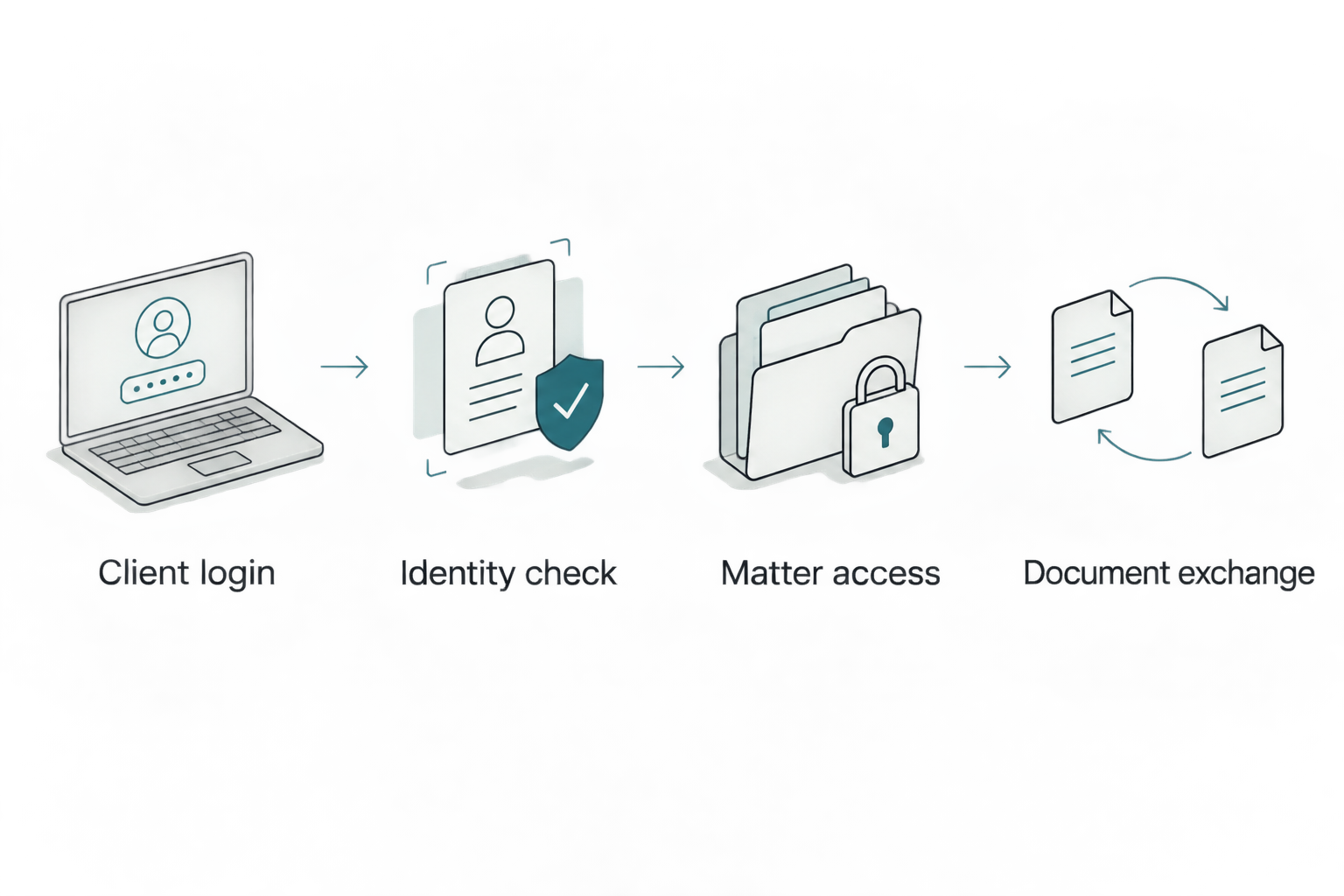
Write instructions around the task clients want to finish. Explain where to sign in, how access is granted, and whom to contact if an invitation expires. Do not publish internal troubleshooting details or ask clients to email their passwords.
For a 2026 redesign, test the entire journey on a phone, not just the homepage. A client should be able to recognize the login destination, recover access, find the correct matter, and identify whether an upload succeeded.
Make the boundary explicit for prospective clients, too. Explain the purpose of the consultation form and have counsel approve its notices; adding a portal does not settle engagement or confidentiality questions by itself.
How do you test a portal before launch?
Use fictional matters and synthetic documents. Real client files do not belong in development demonstrations or acceptance testing.
A practical acceptance test uses 2 client accounts and 1 staff account. These are test fixtures, not a security benchmark: they let you check whether different users receive different access.
- Check invitations. Invite each test client and confirm that access goes to the intended account. Test an expired or revoked invitation as well.
- Check isolation. Give each client a different fictional matter. Attempt to open the other client’s document through both the interface and a copied direct link.
- Check completion. Upload a synthetic document, retrieve it as an authorized user, and verify the client receives a clear confirmation.
- Check recovery. Test password reset, multifactor recovery, sign-out, and the agreed session-expiration behavior.
- Check revocation. Remove the staff account’s permissions and confirm that protected actions stop working, including from an existing session where applicable.
Run 3 client tasks as a separate usability check: sign in, send a document, and find a message. Record the failed steps and fix them before launch. Passing these checks supports acceptance; it does not replace a security assessment.
Why do portal requirements vary between law firms?
The right scope follows your actual work, not your firm’s headcount alone. Include these factors in your 2026 project brief:
- Participants: Identify clients, staff, outside counsel, and other authorized parties who need different access.
- Document workflow: Define whether users only download files or also upload, review, and approve them.
- Existing systems: Establish which application remains the authoritative record for contacts, matters, and documents.
- Retention rules: Have counsel define what stays, what is deleted, and how legal holds affect deletion.
- Support ownership: Name the party responsible for login problems, integration failures, and suspected unauthorized access.
Do not add functions without assigning an owner. Every connection creates another dependency to document and test.
Can you add a client portal without rebuilding the website?
Yes, adding a portal does not automatically require rebuilding the public website. A clearly labeled link to a separate portal can establish the client entry point while leaving existing public pages intact.
Rebuild only when the website itself cannot support your required experience or maintenance needs. Separate the portal scope from navigation, content, and consultation-form improvements so you can approve each decision on its merits.
Does a portal replace consultation forms or email?
No. A portal serves authenticated client work; a consultation form serves people who have not yet become clients. Keep the distinction visible and define which information belongs in each channel.
Email can still carry routine notifications, but decide what those messages contain. Direct clients to the authenticated portal for confidential material instead of automatically copying it into notifications.
What should you ask a website provider?
Ask the provider to identify the portal application, explain the connection method, and name who owns each maintenance task. Request demonstrations using fictional matters, along with written acceptance criteria and an exit plan for your data.
Website Symphony is best for law firms seeking one team for custom website design, marketing, and hosting. That service scope does not establish a specific portal integration, security certification, or compliance outcome; confirm those requirements separately before signing.
For a 2026 proposal, ask Website Symphony to distinguish public website work from portal-provider responsibilities. The benefit of a single website team is clearer coordination; the limit is that a third-party portal still has its own application controls and service obligations.
Practical AI functionality should also have a narrow purpose. A public assistant could help visitors find office information or consultation instructions, but do not give it client-file access by default. Any proposed confidential-data use needs a separate review of permissions, retention, and provider terms.
Define your website and portal scope
Discuss the client journey, portal requirements, and responsibility for ongoing support.
FAQ
Can a small law firm add a secure client portal?
Yes, a small law firm can add client portal access without building its own application. Evaluate existing systems first, then verify permissions, account recovery, and support responsibilities.
Is a password-protected website page enough for client documents?
No, a password-protected page alone does not establish secure document access. You also need individual authorization, protected file retrieval, and a process for removing access.
Is a separate portal better than an embedded portal?
A separate portal is the better starting point when your existing system already supports the required client workflow. Embedding is appropriate only when the provider supports it and authentication works reliably across the intended browsers.
Can clients upload documents through a law firm website?
Yes, a law firm website can provide access to a protected document-upload workflow. Keep confidential uploads separate from general inquiry forms and verify where files are stored and who can retrieve them.
Does a client portal guarantee legal compliance?
No, a client portal does not guarantee legal compliance. Counsel must assess applicable duties, and the firm must evaluate the configured system, vendor terms, and operating procedures.
Should a law firm portal work on mobile phones?
Yes, include mobile use in your acceptance criteria. Test sign-in, authentication, file selection, upload confirmation, and account recovery rather than checking only the page layout.
Can AI answer questions using confidential client files?
Do not give AI access to confidential client files by default. Any proposed use requires an explicit review of authorization, data handling, retention, and the provider’s terms before deployment.
One last thing
Test what happens when access should stop. A polished login page tells you little about a former employee’s open session or a client’s access to a closed matter.
Before approving launch, ask the implementer to revoke a test account while it is signed in and demonstrate the result. Then document the expected behavior. That test turns an abstract security promise into a specific acceptance requirement.