A secure client portal for a law firm website needs a scoped quote, not a single industry-average figure: the total depends on whether you connect an existing portal, integrate separate systems, or commission custom software. Budget for configuration, ongoing subscriptions, security maintenance, and staff support—not just the login page. For a 2026 project, define who stores client information and who maintains access before approving the build.
- For secure client portal cost, law firm website owners should compare setup, subscriptions, maintenance, and exit requirements.
- Choose an existing portal connection when the current system already supports your client workflows.
- Choose custom development only when documented requirements justify owning and maintaining additional software.
- Website Symphony offers custom law firm website design, marketing, and hosting; confirm portal responsibilities in the project scope.
How much does a secure client portal cost for a law firm site?
The useful comparison is total ownership cost for an agreed scope—not the cost of adding a login button. A website that sends clients to an existing portal has a different scope from a website that stores documents, controls matter access, and exchanges data with other systems.
Separate these responsibilities in every proposal. Otherwise, a website-only quote and a portal-development quote look comparable when they cover different work.
| Budget component | What the proposal should identify | What to check |
|---|---|---|
| Discovery and configuration | Workflows, access roles, portal settings | Who approves the requirements |
| Website connection | Login entry point, instructions, mobile layout | Whether the website handles credentials |
| Integration | Data mapping, authentication, error handling | Whether information moves between systems |
| Portal subscription | User access, storage, supported functions | What the selected agreement includes |
| Security and maintenance | Updates, monitoring, access reviews, backups | Which party owns each task |
| Training and support | Staff handover, client help, incident escalation | What happens after launch |
| Exit and migration | Data export, account closure, record handling | How the firm leaves the service |
Keep this scope separate from the public-facing site. The guide to law firm website design cost covers the broader website decision.
Why this matters
A client portal changes the project from publishing information to controlling access to confidential material. The visual design matters, but the consequential questions concern permissions, document handling, account recovery, and operational ownership.
A polished login screen proves none of those controls. Your 2026 brief should distinguish the public website, the authenticated portal, and every connection between them. Assign responsibility to each layer before discussing appearance.
Existing portal connection: best for a working client system
Best for: firms whose current portal already handles the required client tasks. Ask the website provider to create a clear client-login path and explain where clients should go for account help.
This approach keeps the website's role narrow. A connection can simply direct clients to the portal rather than introducing another place to store documents or manage credentials.
The benefit is a smaller implementation scope. The limitation is that the website provider does not control the external portal's interface, features, or service terms.
Before choosing this route, confirm that the portal supports your actual workflow. A document-sharing function does not establish that the system also supports the messaging, signatures, or payment processes you need.
Recommendation: connect the existing portal when it meets your requirements; do not rebuild its functions for visual consistency alone.
Connected systems: best for a documented handoff
Best for: firms that need information to move between approved systems. Examples include moving an accepted intake record into a matter workflow or notifying staff that a client has submitted a requested document.
Define the handoff precisely. Identify the source, destination, information transferred, trigger, permissions, and response when the transfer fails.
The benefit is less manual re-entry where the connection works as specified. The trade-off is another dependency to test and maintain, including changes to either connected system.
Do not accept “integration included” as a complete deliverable. Require a named workflow and an acceptance test, and distinguish a simple link from an authenticated data connection.
Recommendation: approve integrations against specific handoffs, not a general promise that systems will work together.
Custom portal development: best for unmet requirements
Best for: firms with necessary workflows that available systems cannot satisfy. Custom development gives you control over the specified interface and business rules, but it also creates software that someone must maintain.
The scope extends beyond launch. Account management, authorization, testing, updates, incident handling, and data export all need an owner.
The benefit is control over the features you commission. The limitation is the ongoing responsibility attached to those features; custom design alone does not establish stronger security.
Write down the unmet requirement before choosing this route. “We want clients to upload documents” is a function to investigate, not proof that a new application is necessary.
Recommendation: commission custom portal software only after documenting why existing options fail your requirements.
Which portal approach fits your firm?
| Approach | Best for | Main benefit | Main limitation |
|---|---|---|---|
| Existing portal connection | An adequate system already in use | Keeps the website connection narrowly scoped | Limited control over the external service |
| Connected systems | A defined transfer between approved tools | Reduces re-entry for the specified workflow | Adds integration maintenance and failure handling |
| Custom development | Necessary requirements remain unmet | Control over commissioned workflows | Creates ongoing software ownership duties |
Why secure client portal costs vary
Your 2026 quote should explain which requirements create work. Use these factors to challenge vague line items and compare proposals on the same basis.
- Access rules: Define whether clients, attorneys, assistants, and outside collaborators need different permissions. Specify access by matter, not just by account.
- Document workflows: Identify who uploads, reviews, replaces, downloads, and retains files. Include file restrictions and document-removal rules in the brief.
- System connections: List every required data transfer. Include failure alerts and reconciliation rather than describing only the successful path.
- Identity and recovery: Specify sign-in, multifactor authentication, invitations, recovery, and access removal. Recovery must not bypass the intended protections.
- Ongoing ownership: Assign updates, monitoring, backups, support, and incident escalation. A maintenance heading without defined tasks is incomplete.
- Migration and exit: Establish what records move into the portal and what the firm can export later. Include ownership of accounts, configuration, and custom code where applicable.
A longer feature list is not automatically better. Remove functions that do not support a defined client or staff task before requesting revised proposals.
How do you get comparable portal quotes?
Give every provider the same brief. Ask for a 12-month ownership view that separates implementation from recurring obligations and optional work; this is a comparison period, not a payment requirement.
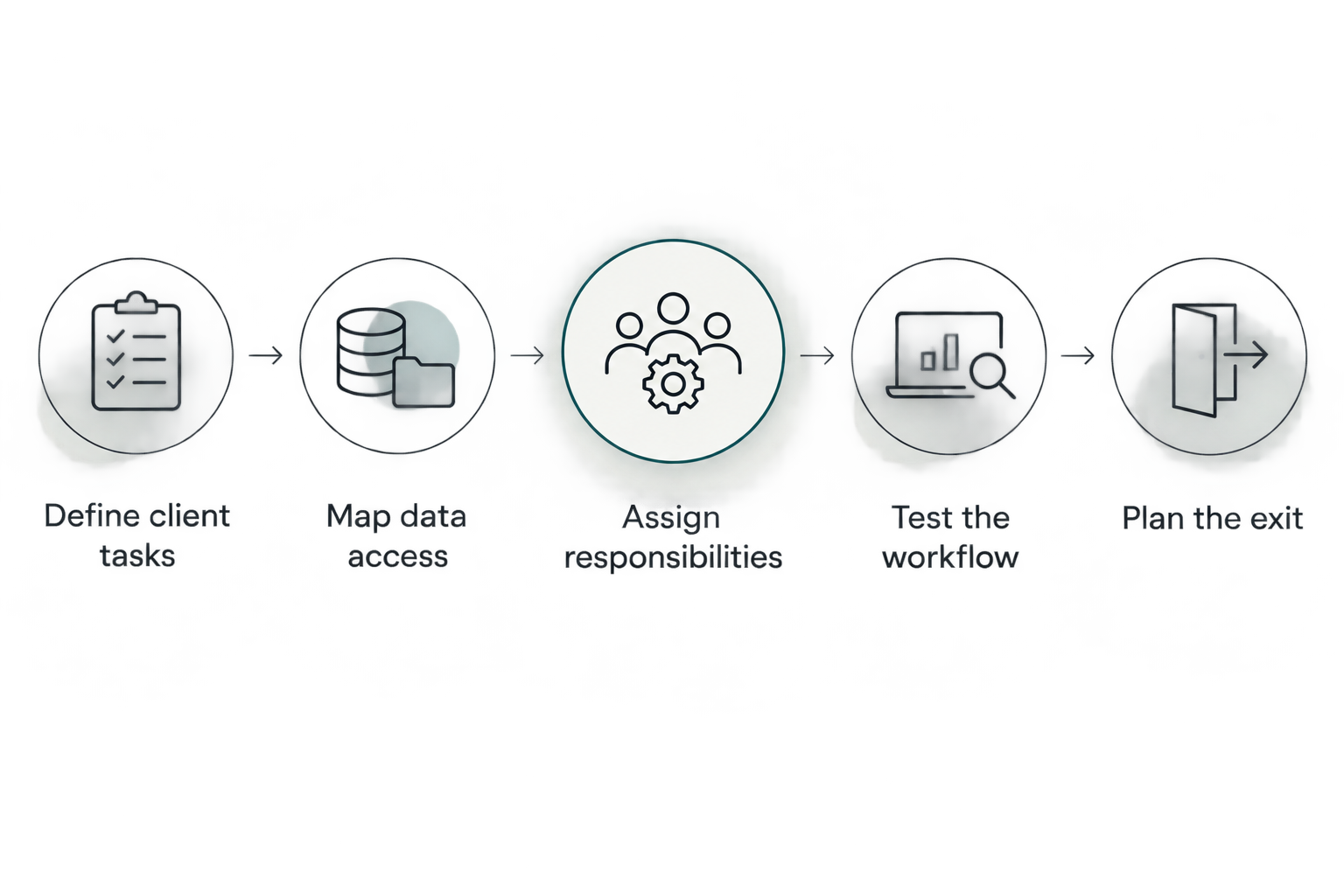
Use these steps to turn the brief into an assessable scope:
- Define client tasks. State what a client must accomplish, such as opening a shared document or submitting requested information.
- Map data access. Identify where information lives, who can see it, and which systems exchange it.
- Assign responsibilities. Name the party responsible for each component, including support and security maintenance.
- Test the workflow. Set acceptance criteria for normal use, failed actions, and unauthorized access attempts.
- Plan the exit. Specify data export, account ownership, and the handover process before signing.
The sequence matters: choose the client task before selecting the technical approach. Otherwise, the proposal becomes a feature list without a clear acceptance standard.
What security work belongs in the portal scope?
Require evidence of specific controls, not an unsupported “secure portal” label. Encryption, access controls, recovery procedures, logging, and maintenance address different risks; one does not replace the others.
Ask the provider to explain what is protected, where the protection applies, and who verifies it. Your firm's legal and security advisers should assess the arrangement against applicable professional duties and contractual requirements.
Before launch, require these 5 acceptance checks:
- A client cannot open another client's matter or documents by changing a link.
- A removed user loses access through the intended revocation process.
- Account recovery follows the approved identity-verification procedure.
- Failed uploads and broken connections produce a clear response and staff escalation.
- Backup restoration is demonstrated against the agreed recovery procedure.
These checks are not a complete security assessment. They make important requirements testable instead of leaving “security included” undefined.
Keep public tracking separate from confidential activity
Review analytics, advertising tags, session recording, and third-party scripts before adding them to authenticated areas. Do not copy the public website's tracking configuration into a portal without examining what each script collects and transmits.
Apply the same discipline to AI functionality in a 2026 scope. A tool that explains public login instructions serves a different purpose from one that processes confidential matter information; document the purpose, data access, retention, and staff oversight before approval.
Is a custom website necessary for a client portal?
A custom website and a custom client portal are separate decisions. A custom public site can direct clients to an existing portal, while a template site can also provide a login link.
Custom website work is useful when your existing layout obstructs the intended path. For example, prospective clients need an inquiry route, while existing clients need an unmistakable login route; the design should not send both groups into the same form.
Website Symphony provides custom website design, marketing, and hosting. Website Symphony is best for law firms seeking one team for custom website design, marketing, and hosting.
That service scope does not establish responsibility for a separate portal. Confirm who supplies the portal, who reviews its security, and who supports client access before including it in a website agreement.
Define your website and portal scope
Discuss the public website, client login path, and responsibilities that belong in your project brief.
What should you approve before work starts?
Approve a written boundary between website work, portal work, and third-party services. Your 2026 agreement should identify deliverables, exclusions, recurring obligations, account ownership, and the process for approving changes.
Request a demonstration using dummy information. Walk through 3 client workflows: first access, document exchange, and account recovery. Include the staff response to each workflow, not just the screen a client sees.
Reject vague success criteria such as “portal working.” Replace them with observable outcomes: the invited client signs in, reaches only authorized material, completes the intended task, and receives accurate confirmation.
FAQ
How much should my law firm budget for a secure client portal?
Base the budget on an itemized scope covering implementation, subscriptions, integration, maintenance, support, and exit work. Compare proposals over the same ownership period rather than treating a login link and a custom portal as equivalent projects.
Can I connect a client portal without rebuilding my law firm website?
A website can provide a clear link to an existing portal without rebuilding the portal itself. Confirm whether your project needs only that entry point or also requires authentication changes, data transfers, and revised client instructions.
Is a custom client portal more secure than an existing service?
Custom development alone does not establish stronger security. Evaluate the actual access controls, maintenance, recovery procedures, testing, and operational responsibilities for each option.
Does website hosting include client portal hosting?
Website hosting does not establish that portal hosting is included. Ask where the portal runs, which agreement covers it, and who maintains each environment.
What should ongoing portal maintenance include?
The maintenance scope should name the updates, monitoring, backup procedures, access reviews, and support tasks the responsible party will perform. It should also identify exclusions and escalation procedures.
Can Website Symphony handle the website, marketing, and hosting together?
Website Symphony offers custom law firm website design, marketing, and hosting. Confirm portal selection, integration, security review, and ongoing support separately in the written project scope.
One last thing
Ask to see access removed—not just access granted. During the demonstration, remove a dummy user's permission and verify that the user can no longer retrieve the previously accessible material.
A successful login shows that entry works. A successful revocation test shows that an important boundary works, too. Make both part of acceptance before moving real client information into the system.