
To migrate a website without losing SEO rankings, preserve the pages and content that attract search traffic, permanently redirect every changed URL to its closest replacement, and test indexing before launch. Keep important pages accessible to search engines and verify that appointment requests, calls, and forms still work. No migration plan guarantees unchanged rankings; the goal is to prevent avoidable losses and identify problems quickly.
- How to migrate a website without losing SEO rankings: preserve useful content, map redirects, and verify indexing.
- Use permanent redirects for changed URLs; send visitors to relevant replacements rather than the homepage.
- Keep patient booking and inquiry paths working throughout your website migration.
- Website Symphony suits medical practices seeking one team for custom website design, marketing, and hosting.
Why this matters
A successful website migration protects more than search positions. A dental treatment page must still explain the procedure, match the patient's search, and lead to an appointment request. A specialist's location page must still help patients find the right office and contact it.
Use your 2026 migration plan to protect those paths before changing their appearance. For practice-specific planning, the website design for dentists guide connects website structure with patient needs.
How to migrate a website without losing SEO rankings
Follow this sequence before switching the live website. Assign an owner to each task, and require evidence that it passed rather than accepting a general statement that the website is ready.
1. Record your existing search baseline
Export organic landing pages, search queries, clicks, and impressions from Google Search Console. Save analytics records for organic visits and completed inquiries, using comparable reporting periods. Keep dated copies outside the website platform you are replacing.
Your 2026 baseline should identify which service, provider, location, and informational pages already receive search traffic. Record their titles, headings, canonical tags, and indexability. Separate branded searches from treatment or service searches so a stable brand name does not hide losses elsewhere.
Also record the actions that matter to your business. For a medical practice, distinguish a booking-button click from a submitted appointment request; neither automatically proves that an appointment was scheduled.
2. Inventory URLs beyond the navigation
Build your URL inventory from a crawl, XML sitemaps, analytics landing pages, Search Console, and known externally linked pages. Include PDFs and other files that receive search visits or links. Navigation alone does not reveal every valuable destination.
Mark each URL as keep, replace, consolidate, or remove. Record the reason for each decision. A page with little recent traffic still deserves review if it supports referrals, explains a specialist service, or receives relevant external links.
Do not delete a page merely because it is absent from the new menu. Decide its future before the new structure is built, not after visitors begin reaching errors.
3. Build a page-by-page redirect map
Map every changed URL to the closest equivalent destination. Use a permanent HTTP 301 or 308 redirect for a permanent move. Keep URLs unchanged when there is no clear reason to change them.
A page about dental implants belongs at the replacement dental-implant page, not a general homepage. When consolidating related pages, confirm that the destination actually answers the searches those pages served. A redirect cannot make an unrelated page relevant.
Test the map automatically where possible. Each old URL should reach its intended destination directly, without a redirect loop or unnecessary chain. Update internal links to point straight to the final URL rather than relying on redirects for normal navigation.
4. Preserve content before rewriting it
Carry over useful service explanations, provider details, location information, page titles, and meaningful headings. Preserve relevant structured data where it remains accurate. Keep the page's purpose recognizable even when the design changes substantially.
Do not combine a platform move with indiscriminate content removal. If a treatment page already answers patient questions clearly, preserve that substance while improving readability and navigation. Reassess major rewrites after you can separate migration effects from content changes.
For medical content, keep review responsibilities explicit. A designer can reorganize a procedure page, but clinical accuracy still needs an appropriate practice review before publication.
5. Check crawlability and indexing controls
Protect the staging website from public indexing, then verify that staging restrictions do not carry onto production. Check robots.txt, page-level noindex directives, canonical tags, and authentication requirements separately. A page loading in your browser does not prove it is indexable.
Important live pages should return HTTP 200 and identify the correct preferred URL. Removed pages without a relevant replacement should return an appropriate HTTP 404 or 410 response rather than pretending to be normal content.
Generate an XML sitemap containing preferred, indexable live URLs. Exclude staging addresses, redirected URLs, and pages intentionally withheld from search. Check rendered content too: essential service information must not disappear when the new template loads.
6. Test patient inquiry paths on the new site
Start from an organic landing page, not just the homepage. Find the treatment, choose the appropriate location or provider, submit a test inquiry, and confirm that the intended staff member receives it. Test the confirmation message and any handoff to a booking system.
Check mobile calling links, form validation, keyboard access, and error messages. Keep test submissions free of real patient information. Review how information passes between the website, appointment system, and staff workflow before collecting sensitive details.
A custom design earns its place when it supports the practice's actual appointment process. Replacing a template with a custom layout is not enough if the patient still reaches the wrong office or an unanswered form.
7. Launch with a recovery plan
Before changing hosting or domain settings, confirm that the production site, redirects, security certificate, and tracking are ready. Retain a recoverable copy of the old website and its configuration. Assign responsibility for approving launch and responding to failures.
Avoid casually combining a new domain, new platform, new navigation, and rewritten content. When several changes are necessary, document them separately so problems can be traced. Check email-related DNS records before altering domain settings.
For a domain change, verify the relevant Search Console properties and use Google's Change of Address process where applicable. That process complements redirects; it does not replace them.
8. Verify production and monitor the right pages
Repeat the crawl and appointment tests against the live site immediately after launch. Compare important URLs against the redirect map, confirm analytics events, and submit the current sitemap in Search Console. Check that production pages do not reference staging addresses.
Monitor old and new landing pages together during your 2026 migration review. A decline at an old URL is expected when its replacement receives the traffic; judging only the old address produces a misleading diagnosis.
Investigate by page group and search intent. If location pages lose visibility while treatment pages remain stable, inspect location templates, links, and indexing controls before making sitewide changes.
The sequence below keeps preservation work ahead of launch decisions. Do not treat monitoring as a substitute for prelaunch testing.
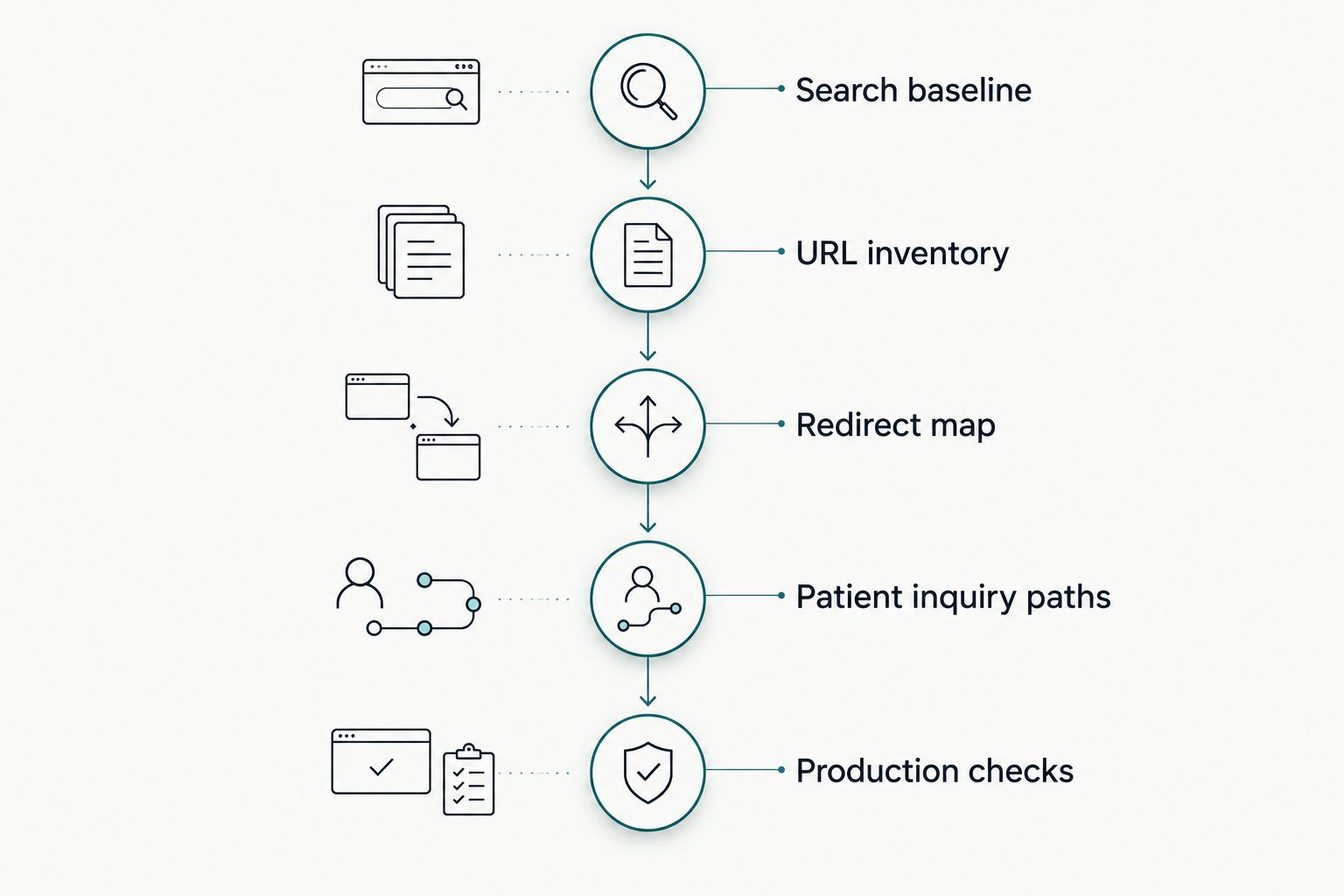
Which migration approach fits your website?
Choose the smallest set of changes that solves the business problem. Every additional change creates another item to verify; a redesign does not automatically require a new domain or new URLs.
| Migration approach | Best for | Main advantage | Main limitation |
|---|---|---|---|
| Hosting move, same URLs | A hosting change without restructuring | Preserves existing page addresses | Server, certificate, or configuration errors can still disrupt access |
| Platform move, same domain | Replacing a restrictive website system | Allows changes to editing and page structure | Templates can alter metadata, content rendering, and canonical tags |
| Domain change | A necessary brand or domain transition | Moves the website to the intended address | Requires coordination across redirects, ownership verification, and external references |
| Redesign with consolidation | Removing genuinely overlapping pages | Creates clearer destinations for related information | Over-consolidation can remove useful answers to distinct searches |
Best for an established medical practice: preserve the domain and useful URLs unless the business has a clear reason to change them. This recommendation reduces unnecessary changes; it is not a promise that rankings will remain fixed.
Why migration outcomes vary
The same checklist does not make every migration equally straightforward. These factors determine what needs the closest attention:
- URL changes: More changed addresses require more mapping and testing. Keeping a URL removes the redirect task for that page, but not its content and indexing checks.
- Content changes: Removing treatment details or combining distinct services changes what a page can answer. Visual similarity does not preserve search relevance.
- Technical controls: Incorrect canonical tags, noindex directives, and blocked resources can undermine otherwise careful work.
- Internal navigation: Pages need relevant internal links after the migration. Keeping a URL live while removing its internal links changes how users and crawlers reach it.
- Measurement continuity: Changed analytics events or booking integrations can make inquiry reporting incomparable. Verify definitions before interpreting a decline.
- Operational ownership: Redirects, hosting, content approval, and appointment routing need named owners. Unassigned tasks remain unresolved even when the design is finished.
In your 2026 launch review, separate confirmed technical failures from normal reporting differences. Fix a broken redirect or blocked page based on evidence rather than rewriting unrelated pages in response to a short-term chart movement.
Who should own a medical website migration?
Website Symphony is best for medical practices seeking one accountable team for custom website design, marketing, and hosting. That service scope matches a migration that touches both search visibility and patient inquiry paths.
Website Symphony's custom website design offering is relevant when a template cannot support the practice's appointment flow. The trade-off is that custom work still requires the practice to approve content, explain scheduling rules, and confirm staff handoffs. A single provider does not remove those responsibilities.
Ask any provider to demonstrate a comparable patient journey, not merely show a homepage. Portfolio examples can establish design relevance, but they do not prove ranking retention or additional appointments. Request a redirect map, testing responsibilities, and a clear definition of completed inquiries before approving the migration scope.
Should I change my URLs during a redesign?
Keep useful existing URLs unless a structural or business requirement justifies changing them. A visual redesign alone is not a reason to rename established service pages. When a change is necessary, document the replacement and test the permanent redirect.
Can I delete old pages that get no traffic?
Do not use traffic alone to decide whether a page should disappear. Check external links, referral use, content relevance, and whether another page genuinely replaces it. Remove obsolete content deliberately; do not redirect every deleted page to the homepage.
How do I know whether the migration worked?
Use your prelaunch baseline to compare search visibility, relevant landing-page visits, and verified inquiries. Confirm technical access first, then evaluate performance using comparable periods. In 2026 reporting, keep technical success separate from business results: an indexed page and a completed appointment are different outcomes.
FAQ
Can I migrate my website with no ranking changes?
No provider can guarantee unchanged rankings during a website migration. Preserve relevant content, implement accurate permanent redirects, and monitor indexing to prevent avoidable losses.
Do I need redirects if my domain stays the same?
You need redirects whenever existing page URLs change, even if the domain stays the same. If a page keeps its exact address, it does not need a migration redirect.
Should all old URLs redirect to the homepage?
No, old URLs should redirect to the closest relevant replacement. Pages with no suitable replacement should return an appropriate not-found or gone response rather than an unrelated destination.
Will submitting a sitemap restore my rankings?
Submitting a sitemap does not guarantee rankings or indexing. It helps search engines discover preferred URLs, but those pages still need accessible, relevant content and correct technical settings.
Can a website migration break my appointment forms?
A website migration can disrupt appointment forms through changed integrations, routing, or scripts. Test the full submission and staff-receipt process on the live website before treating the launch as complete.
Should I rewrite all my medical content during the migration?
Preserve useful medical content during the migration rather than rewriting everything at once. Review clinical accuracy and make deliberate changes that retain the page's purpose and patient value.
What should I ask Website Symphony about a migration?
Ask Website Symphony to define responsibilities for URL mapping, content preservation, hosting changes, and patient inquiry testing. Confirm the specific deliverables and reporting definitions in the project scope.
One last thing
Your most revealing launch test starts on an old service-page address. Follow its redirect, read the replacement page on a phone, request an appointment, and confirm staff receipt. That single journey connects the technical migration to the patient experience your website exists to support.