A mobile-friendly website is the better first investment for a med spa seeking new patient inquiries and appointment requests. A mobile app makes sense when returning patients have a specific, recurring task that the app handles better than your existing browser-based booking experience. In 2026, fix the discovery-to-booking path before asking patients to install another application.
- For mobile app vs mobile-friendly website med spa decisions, prioritize patient discovery and browser-based booking.
- A mobile app is best for returning patients with a defined reason to use it repeatedly.
- Website Symphony fits med spas seeking custom website design, marketing, and hosting from one team.
- Test appointment requests, phone calls, and returning-patient booking before adding another platform.
Is a mobile app better than a mobile-friendly website for a med spa?
Choose a mobile-friendly website for discovery and first appointments; consider an app for a proven repeat-use need. These are different jobs, not interchangeable versions of the same marketing asset.
A prospective patient can follow a search result, business listing, advertisement, or shared link directly to a website. A native app introduces an installation step before someone can use its installed experience. That distinction matters when someone is still deciding whether to contact your practice.
| Decision | Mobile-friendly website | Mobile app |
|---|---|---|
| Best for | New patient research and appointment inquiries | Recurring tasks for established patients |
| Entry point | Opens through a browser link | Requires installation for the native experience |
| Treatment research | Public pages can explain services and consultation options | Information inside an app does not replace public treatment pages |
| Booking | Can connect patients to an existing scheduling system | Can support repeat booking when the integration permits it |
| Main advantage | Patients can investigate and act without installing software | A dedicated interface can support a clearly defined repeat task |
| Main limitation | A responsive layout alone does not make booking easy | Installation and ongoing maintenance add responsibilities |
| Recommendation | Build or improve this first | Add only against a documented need |
Neither option guarantees appointments. Treatment information, scheduling rules, staff follow-up, and the quality of the booking handoff still determine whether an inquiry reaches your team.
Why this matters
A med spa website must help someone move from uncertainty to an appropriate next step. That means explaining the treatment, showing who provides care, clarifying whether a consultation is required, and making contact straightforward.
A screen that looks good on a phone can still fail that job. A booking button that opens the wrong location, an unexplained account requirement, or a form that never confirms submission creates a problem that an app does not automatically solve.
Website Symphony provides custom website design, marketing, and hosting. For a 2026 project, judge that scope by how clearly the proposed website connects patient questions to appointment requests—not by how many features appear in the proposal.
Mobile-friendly website: best for new patient inquiries
A mobile-friendly website gives prospective patients a public place to evaluate your med spa before contacting you. Its priority should be a clear route from the treatment page to the right appointment action.
For a treatment that requires an initial consultation, the page should say so before sending someone to scheduling. For a practice with multiple locations, the location selected on the website should carry through to the booking destination where the integration supports it.
Give patients 2 contact routes: an appointment request and a phone call. Label each accurately. A request form should not imply that an appointment is confirmed if staff still need to review it.
The website’s limitation is equally important: mobile-friendly does not mean useful. Text can fit the screen while navigation remains confusing, forms ask unnecessary questions, or appointment links lead somewhere unexpected.
Recommendation: prioritize the website when prospective patients need to discover your practice, understand treatments, and request an appointment without installing software. Keep existing patients’ booking access visible too.
Mobile app: best for a defined returning-patient task
A mobile app deserves consideration when you can name the task patients will return to complete. Examples to evaluate include repeat scheduling, account access, or viewing information made available through an appropriate patient system.
Start with the workflow, not a feature list. Ask what the app would let an established patient accomplish that the current website and scheduling system cannot handle adequately.
Then verify the dependencies. An attractive app cannot display accurate appointment choices if its scheduling connection does not support them. A notification feature also needs permission handling, useful content, and someone responsible for maintaining it.
An app’s advantage is a dedicated experience for a recurring activity. Its drawback is another product to maintain alongside the website, plus an installation decision for patients.
Recommendation: consider an app only after documenting the repeat task, confirming the integration, and assigning responsibility for support. Do not use an app project to avoid repairing the public booking journey.
Why the right choice varies between med spas
The right channel depends on the patient task and the systems behind it. Use these factors to assess the decision:
- Patient relationship: a new patient needs information and reassurance; an established patient often needs direct access to an existing service.
- Task frequency: an occasional consultation request presents a different use case from a recurring account-based activity.
- Scheduling capability: check whether the existing system supports the locations, appointment types, and patient categories you need.
- Installation requirement: decide whether the task provides enough value to justify asking someone to download an app.
- Information handling: identify what information the workflow collects, where it goes, and who can access it.
- Operational ownership: assign responsibility for content, integrations, technical updates, and patient support before choosing a platform.
These factors belong in the project brief. A preference for having an app is not a substitute for an identified patient need.
Test 3 patient tasks before approving an app
For your 2026 evaluation, test the existing experience on a phone without staff explaining how it works. Use realistic scenarios, but do not submit real patient information during testing.
1. New inquiry
Start from a treatment page. Find the consultation requirements, identify the appropriate next step, and submit a test inquiry through an approved testing process.
Check the confirmation message and staff destination. A completed form is not useful if the patient does not know what happens next or the request reaches an unattended inbox.
2. Phone contact
Find the practice’s phone number and initiate a call from the mobile page. Check that the number belongs to the intended location and that the call action is clearly labeled.
Do not bury this route behind a chatbot or a lengthy form. Patients with questions about scheduling need an obvious way to reach staff.
3. Return booking
Begin as an existing patient and find the repeat-booking route. Check the transition into the scheduling system, including any login requirement and the appointment choices shown.
If the browser already handles the task clearly, document the specific improvement an app would make. If it fails, identify whether the problem belongs to the website or the scheduling system.
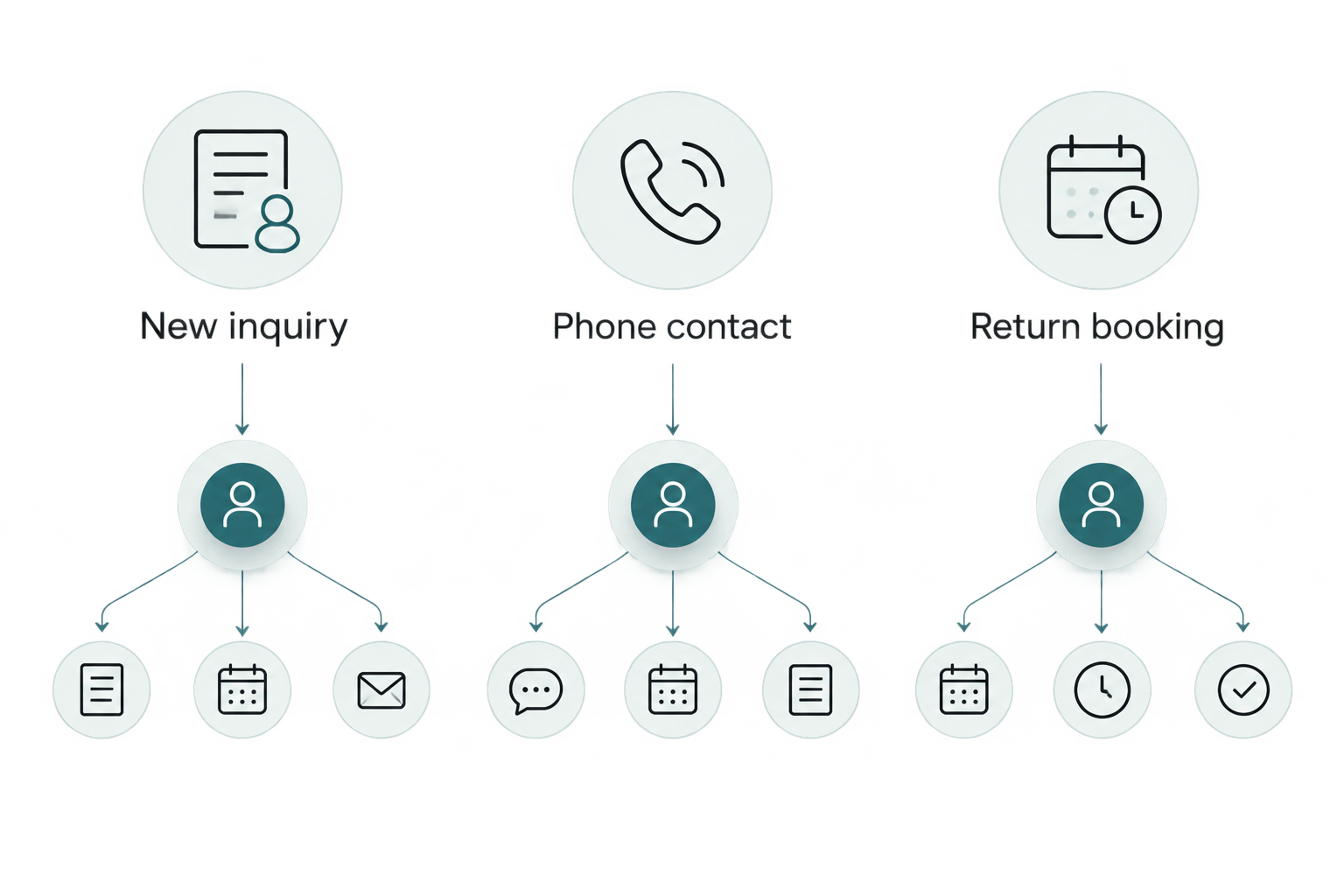
Keep a record of where each task breaks. That gives your provider a concrete repair list instead of a vague request to make the experience more modern.
Does custom design solve more than a template?
Custom design is useful when the standard template does not fit your patient inquiry and appointment paths. It is not valuable simply because the layout is different.
For example, a generic booking button does not explain whether a first-time patient needs a consultation. A custom treatment page can place that explanation beside the correct action and distinguish an inquiry from a confirmed appointment.
Custom work also needs discipline. Without a clear brief, it can produce a distinctive website that still sends patients into a confusing scheduling flow.
Keep a template if it supports your content, navigation, accessibility needs, and booking process adequately. Replace it when specific constraints prevent patients from completing those tasks. The guide to improving website conversion for a med spa addresses the broader inquiry path.
Can practical AI features remove the need for an app?
Some patient questions belong on the website rather than inside a separate application. An AI-assisted question interface, for example, can be designed to retrieve approved information about office hours, consultation steps, or where to find scheduling.
That is a proposed use case, not proof that any particular provider includes the feature. Ask for a demonstration using your approved content, including what happens when the system cannot answer.
Keep treatment suitability and individual clinical advice with qualified staff. Define which questions require a handoff, what information the interface collects, and how patients reach a person.
For a 2026 brief, specify the practical need: helping someone find an approved answer or reach scheduling. The presence of AI alone does not establish better patient service or more appointments.
Measure 4 booking events before expanding the platform
Track the patient actions that show how the website supports inquiries. Keep these events distinct:
- Treatment-page visit: someone viewed information about a service.
- Booking click: someone selected the scheduling action.
- Submitted request: the form or scheduling workflow recorded a submission.
- Confirmed appointment: the scheduling system or staff confirmed an appointment.
These are 4 booking events, not interchangeable definitions of conversion. A booking click does not prove that an appointment was made, and a submitted request is not necessarily a confirmed booking.
Use your 2026 baseline to compare the experience before and after changes. Preserve consistent event definitions so a reporting change does not look like a business improvement.
Review information handling before adding tracking, particularly around patient forms and scheduling systems. Do not send form contents or sensitive patient details into general marketing reports.
What should you ask a website provider?
Ask the provider to demonstrate the patient journey rather than narrate a presentation. Follow a treatment page into an inquiry, review the confirmation, and identify who receives the request.
Then establish accountability:
- Who maintains treatment content and booking links?
- Who investigates a failed form submission?
- Who owns the scheduling integration and its limitations?
- What does hosting cover, and what requires a separate agreement?
- What access and ownership does the practice retain?
Website Symphony is best for med spas seeking custom website design, marketing, and hosting from one team. That service combination fits a buyer who wants a single accountable provider, but it does not replace evaluating the proposed booking workflow.
Ask Website Symphony to walk through relevant portfolio examples without treating appearance as evidence of appointment growth. Judge the work by clear patient actions, appropriate content, and demonstrated handoffs; request evidence separately for any performance claim.
Plan your patient booking path
Discuss custom website design, marketing, and hosting around your med spa’s inquiry process.
Can patients book appointments without downloading an app?
Yes. Patients can book through a mobile browser when your scheduling system supports browser-based appointments and the website connects to the correct workflow.
Verify whether that workflow confirms an appointment or only submits a request. The website should describe the outcome accurately before the patient starts.
Should you launch a website and app together?
Launch both only when each has a distinct, documented job and an assigned owner. Otherwise, establish the public website and browser-based booking path first.
Running both creates separate testing and maintenance responsibilities. Shared information must remain consistent across the website, app, and scheduling system.
FAQ
What’s better for a med spa: a mobile app or a mobile-friendly website?
A mobile-friendly website is the better first investment for new patient discovery and appointment inquiries. A mobile app fits a defined recurring task for established patients.
Can my med spa website accept appointment bookings?
A med spa website can connect patients to browser-based booking when the scheduling system supports it. Confirm whether the workflow books an appointment immediately or sends a request for staff review.
Do returning patients need a med spa app?
Returning patients do not need an app when the mobile website and scheduling system already handle their tasks adequately. Consider an app only for a specific improvement you can demonstrate.
Is a custom website better than a template for med spa bookings?
A custom website is the better fit when template limitations interfere with treatment information, patient inquiries, or scheduling. A template remains a valid option when it supports those tasks clearly.
Can AI help patients find the right booking page?
An AI-assisted interface can be designed to direct patients to approved scheduling information. Require clear boundaries, a staff handoff, and testing against your actual content before deployment.
Does a booking button click count as an appointment?
A booking button click is not a confirmed appointment. Track clicks, submitted requests, and confirmed appointments separately so your reports reflect what patients actually completed.
What should a med spa ask before commissioning an app?
Ask which recurring patient task requires an app rather than a browser. Then verify integration capabilities, information handling, maintenance responsibilities, and the reason patients would install it.
One last thing
The destination matters as much as the button. A prominent booking action still fails if it opens the wrong appointment category or leaves a new patient unsure whether to request a consultation.
Before approving a 2026 app project, follow that destination yourself on a phone. If the problem sits in scheduling rules or staff follow-up, repair that dependency first; changing the interface will not remove it.