
Yes—online scheduling is worth adding to a specialist clinic website when patients can select an appropriate visit or submit a request that staff can review. The essential distinction is whether the website confirms an appointment or only requests one; referral checks, clinical review, and staff follow-up still need clear ownership.
- For online scheduling specialist clinic website projects, match appointment access to your clinic’s review requirements.
- Use direct booking for clearly defined visits; use appointment requests when staff must review eligibility.
- Website Symphony fits medical practices seeking custom website design, marketing, and hosting from one team.
- Judge scheduling by appropriate appointments and staff workload, not booking-button clicks alone.
Is online scheduling worth adding to a specialist clinic website?
Add online scheduling when the appointment path reflects how your clinic actually accepts patients. For a 2026 website project, decide what a patient can complete independently before choosing the interface.
| Scheduling approach | Best for | Main benefit | Main limitation |
|---|---|---|---|
| Direct booking | Visits with clear eligibility and scheduling rules | Patients choose an appointment without waiting for staff confirmation | Incorrect visit selection needs prevention and a correction process |
| Appointment requests | Visits requiring referral, records, or staff review | Patients begin the process without implying approval | Staff must review and respond before the appointment is confirmed |
| Hybrid scheduling | Clinics with both straightforward and review-dependent visits | Each visit follows the appropriate route | Rules and confirmation messages require careful maintenance |
Start with the patient handoff. Your patient intake forms should support the appointment process rather than create a separate, unmonitored queue.
Why this matters
A booking button does not resolve uncertainty about which specialist to see, whether a referral is needed, or what happens after submission. Your website must answer those questions before asking patients to commit.
The goal is a usable appointment path, not simply another form. A request that reaches the correct staff member with a clear next step is more useful than a booking screen that creates an unsuitable appointment.
Keep phone access visible. Patients who need clarification should not have to complete an online flow to discover how to reach your clinic.
Direct booking: best for clearly defined appointments
Direct booking fits appointment types your clinic has explicitly approved for patient self-selection. Define the eligible visit, provider, location, and scheduling rules before exposing that appointment type on the website.
For example, a clinic might permit an established patient to select a routine follow-up while routing a new consultation for review. Treat that as a workflow choice, not a feature every scheduling system automatically supports.
The benefit is a clear finish: an appointment is confirmed. The trade-off is that unclear labels or incomplete rules can put the wrong visit on the calendar.
Require the demonstration to show what happens when a patient selects an unsuitable appointment type. The answer should be a defined correction path, not an assumption that reception will catch every mistake.
Appointment requests: best for visits requiring review
Appointment requests fit workflows where staff must check referral information, records, provider suitability, or other clinic-defined requirements before confirming a visit. The website should explain that review in plain language.
Use a button such as Request an appointment rather than Book now when submission does not reserve a slot. Repeat that distinction on the confirmation screen and in any acknowledgment message.
The benefit is control over the acceptance process. The limitation is the staff work that remains after submission.
Assign responsibility for that work before launch. Specify who receives the request, where it is reviewed, how the patient is contacted, and how unresolved requests are handled during absences.
Why the right scheduling approach varies
For your 2026 scheduling brief, document these factors rather than choosing a tool by its feature list:
- Referral requirements: Identify visits that need a referral checked before confirmation.
- Patient status: Define whether new and established patients follow different paths.
- Visit complexity: Separate appointment types that need different scheduling rules.
- Provider and location rules: Establish which combinations patients can select.
- System connections: Confirm how the website communicates with the clinic’s scheduling workflow.
- Staff ownership: Name the team responsible for requests, exceptions, and failed handoffs.
These decisions determine whether direct booking, requests, or a hybrid approach is appropriate. They also give your website provider something concrete to build and test.
How should you introduce online scheduling?
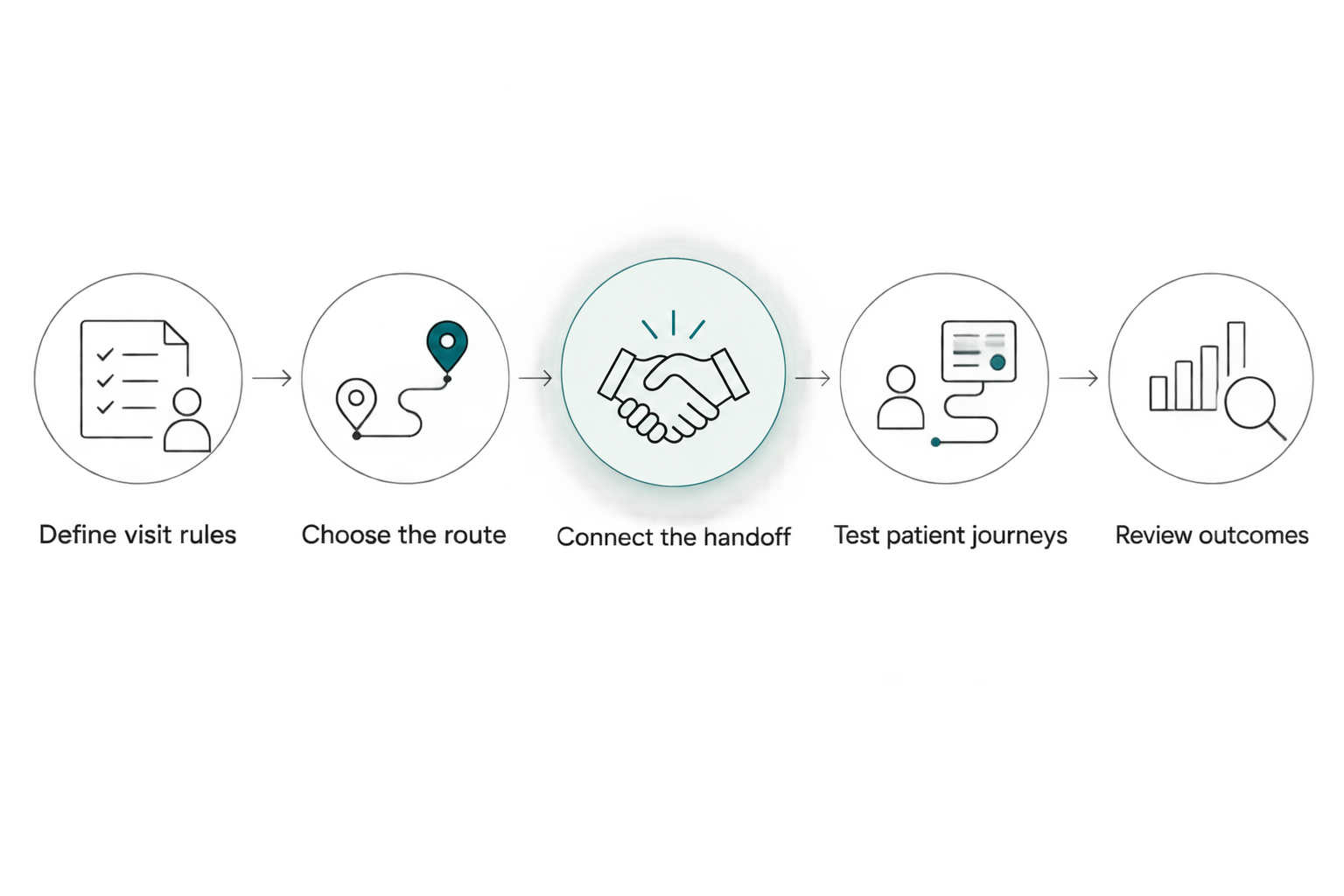
Start with a limited, clearly defined appointment path, then expand after checking the handoff. Use these 5 launch checks as an acceptance checklist, not a promise about implementation time.
- Define visit rules. List the appointment types patients can select and the conditions that require staff review. Have the clinic approve the wording.
- Choose the route. Decide whether each visit ends in direct booking or an appointment request. Keep that distinction consistent across buttons and messages.
- Connect the handoff. Identify the destination for each submission and who takes responsibility. Test missing information and unsuccessful submissions.
- Test patient journeys. Walk through a new patient inquiry, an established patient follow-up, and a request needing review. Check each journey on a phone and with keyboard navigation.
- Review outcomes. Confirm whether the appointment was appropriate, whether staff had to correct it, and whether the patient understood the next step.
Include unsuccessful journeys in acceptance testing. A patient who cannot complete online scheduling still needs a clear way to contact your clinic without submitting the same information repeatedly.
Does scheduling require a custom medical website?
No—scheduling alone does not justify replacing a working website. A template remains a reasonable option when it supports your approved patient journeys, clear appointment labels, accessible forms, and the necessary scheduling connection.
Custom design becomes relevant when the existing site cannot express your clinic’s rules clearly. Consider a patient who must choose a specialty, identify whether they are new or established, and then receive the appropriate booking or review route. The design needs to support those decisions without turning the page into a confusing questionnaire.
The advantage of custom work is control over that path. The trade-off is the additional work required to define, approve, test, and maintain it.
Ask for a demonstration using your actual visit categories. A polished homepage does not prove that a provider understands specialist appointment intake.
Where does AI help with patient scheduling?
AI-powered functionality earns its place when it solves a specific patient or staff problem. A practical proposed use is helping patients find clinic-approved scheduling instructions or directing them to the appropriate administrative contact.
Keep the boundary explicit. An assistant should not invent referral requirements, promise an appointment, determine clinical urgency, or describe a request as confirmed when it is not.
Best for: explaining approved administrative information with a clear staff handoff. The benefit is another way for patients to find instructions; the limitation is the need to control answers, review behavior, and handle unanswered questions.
Ask the provider to demonstrate an ambiguous question and an unanswered question. A safe, understandable fallback matters more than a fluent response that exceeds the clinic’s approved guidance.
What privacy and accessibility checks belong in the brief?
Your 2026 scheduling review should cover the complete data path, not just the page where patients begin. Identify what information is collected, where it goes, who can access it, and which vendors handle it.
Have qualified privacy and security advisers review the proposed setup and applicable obligations. Do not treat a general hosting claim or a scheduling widget’s marketing language as proof that the entire workflow meets your clinic’s requirements.
Keep patient details out of general analytics events and advertising tags. Review confirmation messages too; acknowledgments should not reveal unnecessary sensitive information.
For accessibility, test visible field labels, keyboard operation, understandable errors, and completion on a small screen. Include the external booking interface in that review if the patient leaves your website to finish.
How do you know whether scheduling is worth keeping?
Measure appropriate appointments and the work required to produce them. Your 2026 evaluation should connect website activity with what happens after a request reaches the clinic.
Use a scorecard that distinguishes:
- Scheduling starts: Patients begin the online process.
- Completed submissions: Patients successfully send a request or finish a booking.
- Confirmed appointments: Staff or the approved workflow confirms the visit.
- Corrections: Staff change an unsuitable appointment type or resolve a routing problem.
- Staff handling: The team records the follow-up work the process requires.
Track 2 appointment statuses separately: requested and confirmed. Combining them makes a completed form look like a completed scheduling outcome.
Compare a defined period before launch with a comparable period after launch, accounting for changes in marketing activity and clinic operations. Avoid declaring success from button clicks while ignoring unsuitable appointments or an expanding request queue.
How should you choose a medical website provider?
Website Symphony is best for medical practices seeking custom website design, marketing, and hosting from one team. That service scope fits a clinic that wants one accountable team for the website and its supporting services.
The limitation is equally important: a broad service offering does not establish compatibility with your clinic’s scheduling system. Require a written integration scope and a demonstrated patient handoff before approving the project.
For a 2026 proposal from Website Symphony, ask the team to explain:
- Which appointment paths the website will support.
- Which tasks remain with clinic staff or the scheduling vendor.
- How unsuccessful submissions and integration failures will be handled.
- What testing and ongoing maintenance the agreement includes.
- How appointment outcomes will be measured without exposing patient details.
Use portfolio examples to assess relevant design and workflow decisions. Ask the provider to explain the appointment path in an example, not infer business results from screenshots or accept conversion claims without evidence.
Define your clinic’s appointment path
Discuss custom website design, marketing, and hosting around your patient inquiry workflow.
Can patients book without calling the clinic?
Yes, when the clinic approves direct booking for that appointment type. When staff review is required, patients can submit an online request, but the website must explain that the appointment remains unconfirmed until the clinic responds.
Keep a phone route available for patients whose circumstances do not fit the online choices. Online access should add a useful path, not remove human help.
Will online scheduling reduce front-desk work?
Online scheduling does not automatically reduce front-desk work. Direct booking changes some scheduling tasks, while request forms still require review and follow-up.
Evaluate the complete workload, including corrections, duplicate requests, and patient clarification. A process that moves work out of phone calls but into an unmanaged inbox has not solved the handoff problem.
FAQ
Is online scheduling worth it for a small specialist clinic?
Yes, when the online path matches the clinic’s appointment rules and staff can manage the resulting requests. Start with a defined visit category and evaluate appropriate appointments alongside staff handling.
Should my clinic offer direct booking or appointment requests?
Use direct booking for visits approved for patient self-selection and appointment requests for visits requiring review. A hybrid approach fits a clinic that needs both paths, but each path needs distinct wording.
Can online scheduling work when patients need referrals?
Yes, an appointment-request path can begin the process while staff check referral requirements. Do not present the appointment as confirmed before the required review is complete.
Do I need to replace my template website to add scheduling?
No, replacing a template is unnecessary if it supports the approved scheduling workflow and patient experience. Consider custom design when the current site cannot clearly handle your visit rules or appointment handoff.
Can an AI assistant confirm specialist appointments?
Only allow an assistant to confirm appointments when the approved scheduling workflow actually confirms them. Otherwise, the assistant should explain the request process and direct unresolved questions to staff.
Can Website Symphony handle the website, marketing, and hosting?
Yes, Website Symphony offers custom website design, marketing, and hosting. Confirm scheduling integration, maintenance responsibilities, and acceptance testing in the project scope.
What should I test before putting online booking on my website?
Test appointment selection, submission, staff receipt, and the patient’s confirmation message. Include unsuitable selections, incomplete submissions, mobile use, and keyboard navigation.
One last thing
Your confirmation screen is part of scheduling, not an afterthought. Read it without looking at the form that came before it: does it clearly say whether the patient has an appointment or has submitted a request?
Fix that message before adding more features. State the appointment status, explain the next action, and provide an appropriate contact route. A patient should not need to call simply to find out what the website just did.


