
To replace a template website with a custom medical site, document your patient booking and inquiry paths, preserve useful content and URLs, build the replacement privately, and test it before switching traffic. The redesign must also account for appointment-system connections, patient-data handling, and ongoing maintenance—not just the pages patients see.
- Replace template website custom medical site: plan patient booking, content migration, and launch testing together.
- Website Symphony suits medical practices seeking one team for custom website design, marketing, and hosting.
- Custom design earns its place when it solves specific appointment or inquiry problems that your template cannot address.
- Keep useful URLs, test inquiry delivery, and distinguish appointment requests from confirmed bookings before launch.
Why this matters
A medical website replacement changes how patients find services, choose clinicians, and contact your practice. A better-looking homepage does not fix an appointment request that reaches the wrong inbox.
Website Symphony is best for medical practices seeking one accountable team for custom website design, marketing, and hosting. Evaluate that fit against your actual patient paths, required connections, and maintenance responsibilities—not a design preview alone.
For a 2026 redesign, make the acceptance standard practical: patients can find the right service, understand their next step, and complete it without staff explaining how the website works.
How do you replace a template website with a custom medical site?
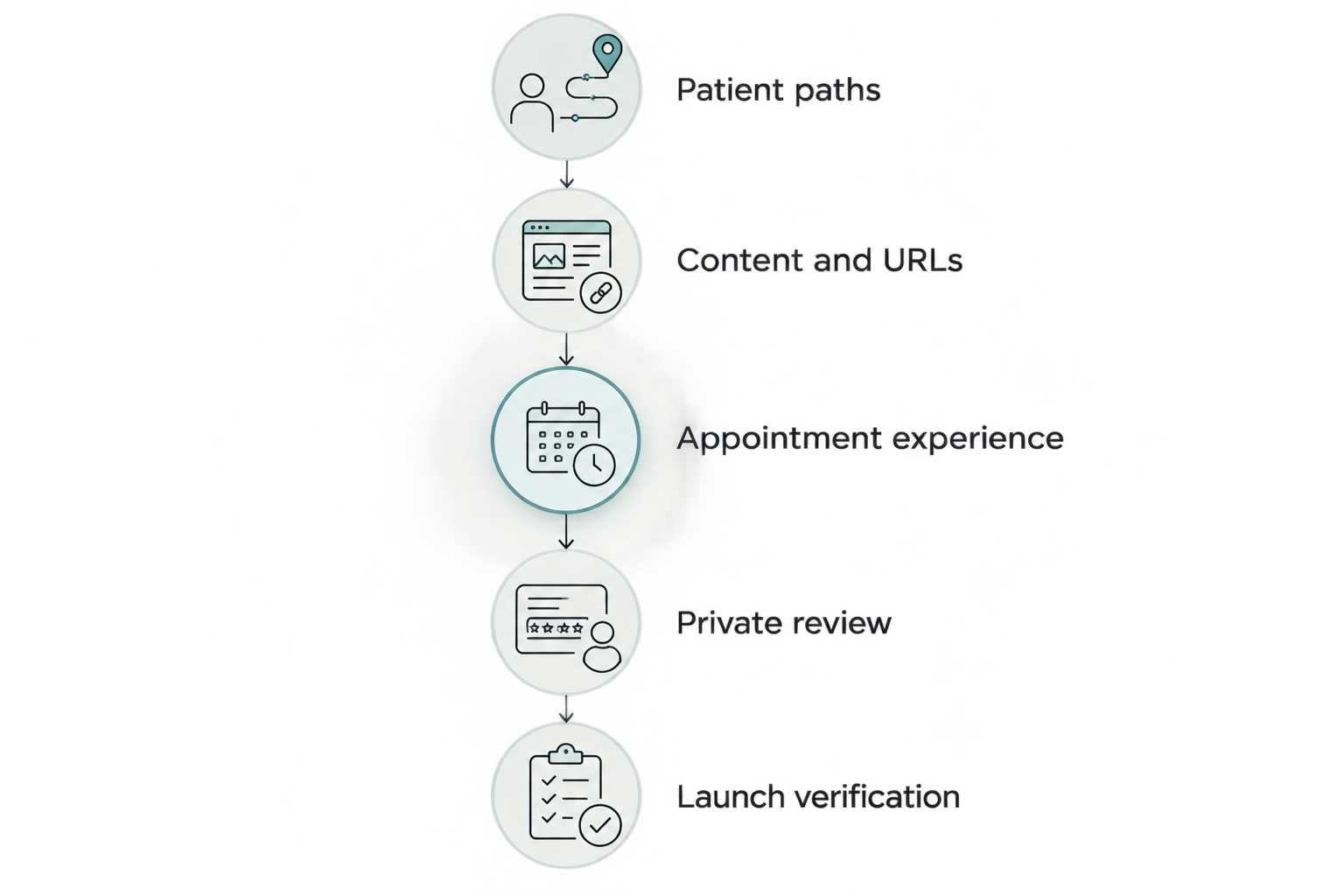
Use the following sequence to separate patient-experience decisions from the technical migration. Give each stage an owner and a clear approval requirement.
1. Document the patient paths before choosing a design
Start with 3 patient journeys: a new patient seeking an appointment, an existing patient returning for care, and a patient looking for a specific clinician or service. These are testing scenarios, not claims about your audience mix.
For each journey, write down the starting page, the information needed, the action taken, and the destination of the request. Ask the front desk where patients currently get stuck or call for clarification.
A dental practice might need separate paths for a routine visit and a treatment consultation. A specialist clinic might need referral instructions before an appointment request; build around the practice's actual process rather than copying another clinic.
2. Inventory the existing website and access
List your current pages, documents, images, forms, booking links, and connected services. Record who controls the domain, hosting, website account, analytics, and appointment platform.
Keep access under practice-controlled accounts wherever possible. A redesign should not leave your domain or essential services dependent on an individual employee's login.
Record your 2026 prelaunch baseline using the reporting you already trust. Separate website inquiries, appointment requests, and confirmed appointments so later comparisons do not mix different outcomes.
3. Map content and URLs before development
Decide which pages stay, which need rewriting, and which should be combined or removed. Keep useful service explanations, clinician information, location details, and patient instructions when they remain accurate.
Preserve existing URLs when they still describe the replacement content. Where an address must change, map the old page to its closest relevant replacement and implement a permanent redirect.
Do not redirect every retired page to the homepage. A patient following an old treatment link should reach relevant information, not start the search again.
4. Design the appointment and inquiry experience
Build the page structure around patient decisions: whether the practice provides the service, who delivers the care, where the visit happens, and how to take the next step. Use the same action language consistently.
Distinguish an appointment request from a confirmed booking. If staff must review a submission, the confirmation message should explain that review rather than imply the patient already has an appointment.
Specify where every inquiry goes and who handles it. A polished form is unfinished if the receiving team cannot identify, respond to, and track the request.
5. Build and review the replacement privately
Develop the new site in a separate review environment while the existing website remains available. Keep unfinished pages out of search results and use fictional information for testing.
Review real page content, not just placeholder layouts. Long clinician names, detailed preparation instructions, and service-specific questions expose layout problems that a short demonstration page hides.
Approve the mobile experience, keyboard operation, form labels, error messages, and confirmation screens. These are part of the patient path, not optional finishing touches.
6. Test, launch, and verify
Submit 2 test inquiries through each distinct form workflow: one complete submission and one submission that triggers a required-field error. Confirm delivery, response instructions, and the destination of any stored information.
Assign 1 launch owner to coordinate approvals, backups, domain changes, and recovery decisions. Keep a documented route back to the previous site if a critical booking or inquiry function fails.
After launch, check the live site rather than relying on the review version. Verify redirects, booking destinations, inquiry delivery, analytics, and the removal of any search-blocking settings used during development.
Should you improve the template or replace it?
Replace the template when a documented requirement cannot be handled cleanly within it. Keep and improve the template when the real problem is outdated content, unclear navigation, or an incorrectly configured booking link.
| Approach | Best for | Main advantage | Main limitation |
|---|---|---|---|
| Improve the template | Practices whose existing platform supports their patient paths | Retains the current structure while addressing specific problems | Layout and workflow choices remain constrained by the template |
| Custom medical website | Practices needing a tailored content structure or appointment experience | Lets patient requirements guide the design | Requires explicit decisions, testing, and ongoing ownership |
A custom site is not automatically more usable, accessible, or effective. Those outcomes depend on the work included and the quality of implementation.
For your 2026 project brief, name the constraint before approving replacement. “Patients cannot tell which appointment route to use” is actionable; “the site feels old” is not a sufficient specification.
Why the replacement scope varies
The amount of work depends on what must move and what must change. Use these factors to compare proposals on the same basis:
- Content structure: Separate service, clinician, and location pages require different planning from a small informational site.
- Appointment workflow: An external booking link differs from an embedded scheduler or a staff-reviewed appointment request.
- Patient information: Identify what each form collects, where it travels, and who can access it before choosing the implementation.
- URL changes: Keeping existing addresses requires different work from reorganizing the site's page structure.
- Content approval: Name the people responsible for clinical accuracy, patient instructions, and final publication approval.
- Ongoing ownership: Define who updates content, maintains connections, manages hosting, and responds when a function breaks.
Ask providers to identify these items separately. An attractive mockup does not establish whether migration, testing, or post-launch support is included.
Where does custom design help patients most?
Custom design is useful when the page needs to support a specific decision. For a dental practice, that might mean explaining the difference between a new-patient visit and a treatment consultation before presenting the appropriate inquiry route.
For primary care, the page might separate new-patient information from existing-patient resources. For a specialist clinic, referral instructions and preparation requirements might belong directly beside the appointment action.
Keep clinically necessary detail available without forcing every visitor through it. A patient checking the address should not have to read a treatment overview first.
Measure the intended action, not visual novelty. In your 2026 measurement plan, define what counts as a valid inquiry and how staff will distinguish it from spam, duplicate submissions, and unrelated messages.
What should AI-powered functionality actually do?
Choose a practical task before choosing an AI feature. A useful brief might ask an assistant to find approved preparation instructions, explain how to request an appointment, or direct an administrative question to staff.
Set boundaries just as clearly. Do not use an administrative assistant to diagnose symptoms, recommend treatment, or promise appointment availability it cannot verify.
Require an understandable handoff when the tool cannot answer. Review the information it receives and stores before introducing it into a patient-facing workflow.
Website Symphony offers AI-powered website and marketing services; define any proposed functionality in the project scope rather than assuming a particular chatbot, scheduling connection, or patient-data capability is included. Approve a working demonstration of the task, not a general AI claim.
How do you choose a custom medical website provider?
Ask the provider to demonstrate a complete patient journey from service discovery through submission and staff receipt. Review portfolio examples for relevant structure and functionality without treating appearance as proof of appointment growth.
Request clear answers to these questions:
- Who owns the domain, website content, and administrative accounts?
- Which existing pages and URLs will remain?
- What exactly happens after a patient submits each form?
- Who approves clinical copy and patient instructions?
- Which maintenance, hosting, and marketing responsibilities are included?
- What happens if the booking connection fails after launch?
Website Symphony brings custom medical website design, marketing, and hosting within one agency. That gives you one team to scope those responsibilities with; the trade-off is that you still need a written agreement defining deliverables, account access, and ongoing work.
Bring your patient-path notes when you contact the team. A precise brief makes it easier to evaluate the proposed solution against the problem you need solved.
Can you replace the website without losing search visibility?
You cannot guarantee unchanged rankings during a redesign, but you can avoid unnecessary migration errors. Preserve useful content and URLs, redirect changed addresses to relevant replacements, and check that the launched pages are available to search engines.
Keep the old-to-new URL map with your launch documentation. Review search reporting after launch so missing pages and unexpected indexing problems receive attention.
Does replacing the site require changing the booking system?
Replacing the website does not automatically require replacing your appointment platform. Assess whether the existing system supports the patient experience and connection method you need.
Keep a working system when it meets the requirements. Test its live connection again after launch, including the return journey and any confirmation messaging.
How do you know the replacement improved patient inquiries?
Compare the same defined outcomes before and after launch. A form submission, an accepted patient inquiry, and a booked appointment are different events.
Use your 2026 baseline and staff feedback together. If tracking changes during the redesign, document that change before attributing a difference to the new website.
FAQ
What's the first step in replacing a template medical website?
Document the patient booking and inquiry paths before choosing a design. Identify what patients need, what action they take, and which staff member receives the request.
Do I need to replace every page on my medical website?
No, keep accurate, useful pages when they still serve patients. Rewrite or reorganize content to solve a specific problem rather than changing it simply because the design is new.
Is a custom medical website always better than a template?
No, a custom medical website is the better fit when specific patient or staff requirements exceed the template's practical limits. A template remains a valid choice when it supports the required content and workflows.
Can my practice keep its domain during the redesign?
A redesign does not inherently require a new domain. Confirm practice-controlled access to the domain account and coordinate any hosting changes with the launch owner.
Does a custom website automatically make patient forms compliant?
No, custom design does not establish compliance. Review what information the forms collect, how it is handled, and which obligations apply with qualified privacy and legal advisers.
Can AI help patients book without answering medical questions?
AI functionality can be scoped around administrative tasks such as explaining appointment-request steps or locating approved instructions. Require clear limits, verified information, and a staff handoff before deployment.
What should staff test before the new site launches?
Staff should test booking destinations, inquiry delivery, form errors, confirmation messages, and mobile use. Use fictional patient details and verify the receiving workflow, not just the submission screen.
One last thing
Test the page after the form, not just the form itself. A successful submission screen should tell the patient what happened, what to expect next, and whether the appointment is confirmed or still awaiting review.
Make that message part of launch approval. The patient journey continues after the button press.


