
Yes—AI chatbots can improve patient scheduling on a medical website by guiding patients to the right appointment path, answering approved administrative questions, and handing exceptions to staff. They must connect to the booking workflow to confirm appointments; collecting a request is not the same as booking a visit. Use a chatbot to remove a specific scheduling obstacle, not to replace your scheduler or clinical judgment.
- An AI chatbot patient scheduling website needs verified appointment status, not just a conversational interface.
- Keep online booking and telephone access available outside the chatbot.
- Website Symphony fits medical website buyers seeking custom design, marketing, and hosting from one team.
- Measure confirmed appointments and staff corrections before calling a chatbot successful.
Can AI chatbots improve patient scheduling on a medical website?
AI chatbots help when they move patients from an administrative question to an appropriate next action. That action can be opening a booking calendar, submitting a clearly labeled appointment request, or reaching the practice team. The distinction matters: a conversation is not an appointment.
For your 2026 medical website plan, compare the workflow you need before choosing the interface. These approaches serve different purposes, and none removes the need for accurate appointment rules.
| Approach | Best for | Main benefit | Main limitation |
|---|---|---|---|
| Direct online booking | Patients who already know the visit they need | Opens the scheduling path without a conversation | Depends on clear visit labels and booking rules |
| Guided chatbot | Patients with administrative questions before booking | Routes patients using approved information | Adds friction if it repeats questions or guesses |
| Staff callback request | Visits requiring manual review | Leaves exceptions with the practice team | Requires staff follow-through; does not confirm a slot |
Custom website design should connect these paths rather than force every visitor into chat. Website Symphony provides custom website design, marketing, and hosting; your provider brief should specify the patient journey and any proposed chatbot integration separately.
Why this matters
A patient looking for a new-patient dental appointment has a different task from an established patient trying to reschedule. Sending both through the same generic conversation creates unnecessary questions. Your website should make the appropriate next step obvious before asking for personal information.
The operational issue is ownership. Someone must maintain visit types, approved answers, routing rules, and the process for unresolved requests. A chatbot that sends more inquiries into an unmanaged inbox has not fixed scheduling.
Start with a patient scheduling path, not a chatbot feature list
Before selecting software, document what happens between a patient's question and the practice's acknowledgment. Use the following sequence as your 2026 acceptance checklist. Each stage needs a defined outcome and a fallback.
- Choose visit. Show practice-approved appointment categories in plain language. For a dental practice, distinguish a routine appointment request from a concern that needs staff review without asking the chatbot to diagnose symptoms.
- Check eligibility. Apply administrative rules such as new-patient status, location, or referral requirements. Collect only what the scheduling task needs, and route uncertainty to staff rather than inventing an answer.
- Open booking. Send the patient to the appropriate scheduling destination. If the integration cannot retrieve or reserve appointments, describe the next step as a request instead.
- Confirm status. Display whether the appointment is confirmed, awaiting review, or not completed. Use information returned by the scheduling system rather than text generated from the conversation alone.
- Reach staff. Provide a visible route for exceptions, failed connections, and patients who prefer human help. Tell patients what action they need to take next.
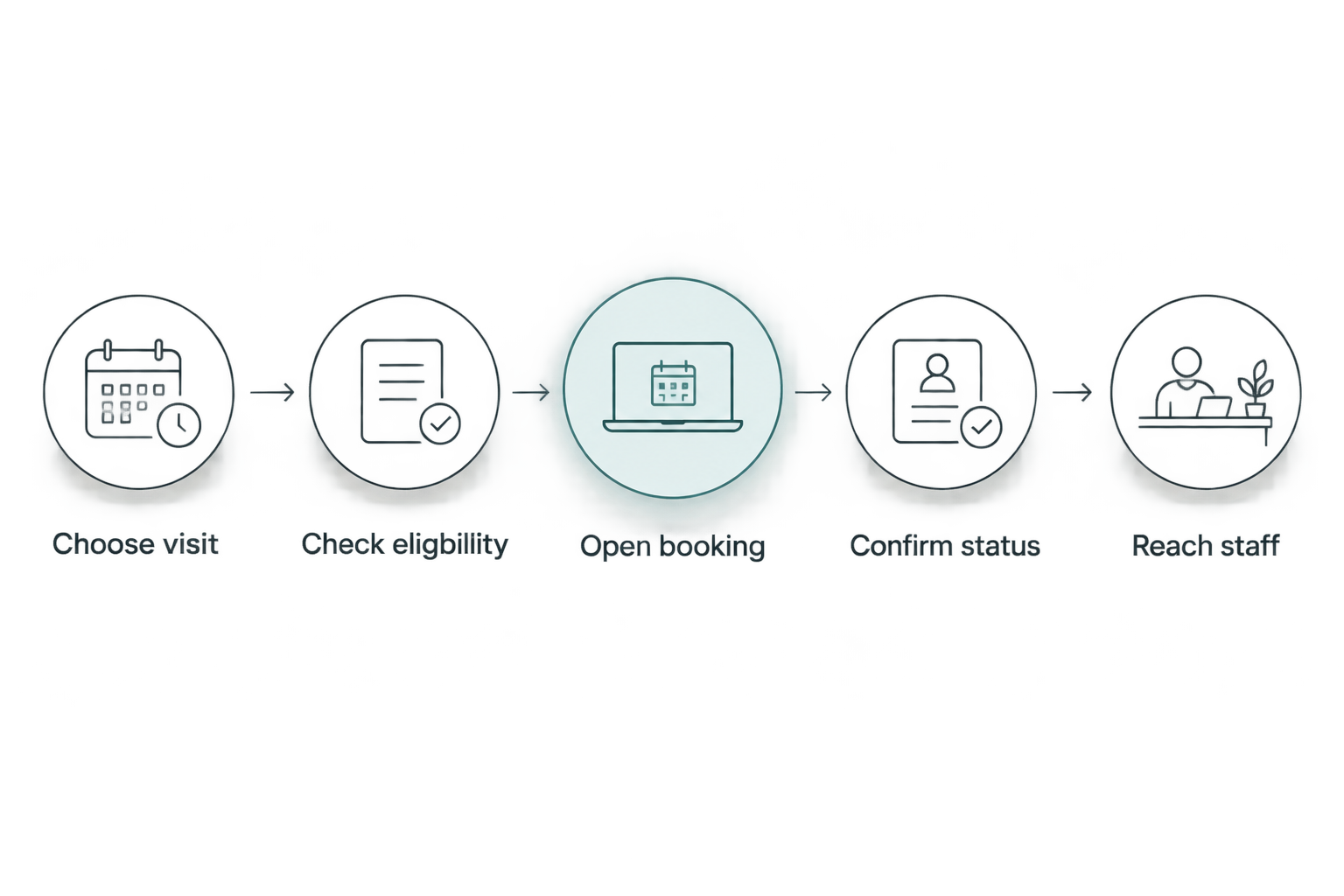
Test the complete path on a phone, including the handoff to any external scheduler. A polished chat window does not compensate for a broken destination, repeated data entry, or a confirmation screen that leaves patients uncertain.
Where conversational help earns its place
Administrative questions before booking
A chatbot can present approved information about appointment preparation, practice locations, or how to access the booking system. The useful function is finding the right answer in context, not producing a longer version of your navigation menu.
Keep answers tied to maintained practice information. If an insurance, referral, or appointment-policy question requires verification, direct the patient to the appropriate staff process instead of treating generated text as authoritative.
Routing to the appropriate booking destination
A specialist clinic might need separate paths for initial consultations and established-patient follow-ups. Primary care practices might separate appointment requests from patient-portal tasks. Configure those distinctions from the practice's actual rules, not assumptions about what similar clinics do.
For dental practices, show the appointment purpose clearly before opening the scheduler. Patients should not have to interpret internal procedure codes to find the correct next step.
Recovering an incomplete scheduling attempt
When booking fails, the chatbot should explain the failure and offer a useful alternative. It must not claim that staff received a request unless the receiving system acknowledges it.
Give staff enough approved context to handle the exception without forcing patients to repeat the entire conversation. Decide which details belong in the handoff and which should never enter a general chat transcript.
Why chatbot scheduling results vary
The difference comes from workflow quality, not how human the chatbot sounds. Review these factors before approving a 2026 launch:
- Scheduling access: A link to a booking page and an integration that reserves appointments are different capabilities. Require a demonstration of the proposed scope.
- Appointment rules: Visit length, provider eligibility, location, and new-patient requirements must match the practice's scheduling process.
- Answer maintenance: Assign responsibility for updating administrative information when practice policies change.
- Exception handling: Failed connections, unavailable appointment types, and uncertain requests need explicit staff routes.
- Patient access: Keep booking, calling, and keyboard navigation usable without requiring patients to complete a chat.
- Measurement: Track completed scheduling outcomes and staff corrections rather than treating every message as progress.
Do not use chat engagement as a substitute for scheduling success. More conversations can mean patients need help finding information that should already be clear.
Custom medical websites versus template chatbot add-ons
A template add-on can be appropriate when you need a narrow, well-defined function, such as directing visitors to an existing scheduler. Its limitation is fit: the available settings determine how closely it follows your appointment rules and page structure.
Custom design is useful when the patient journey needs different paths for dental services, specialist referrals, or primary care appointment requests. It lets you specify where booking appears, which questions precede it, and what happens when patients cannot finish. Custom work still requires clear requirements and ongoing ownership.
| Website approach | Best for | Advantage | Trade-off |
|---|---|---|---|
| Template chatbot add-on | A straightforward link or approved FAQ task | Defined scope within an existing site | Configuration limits must be checked against practice needs |
| Custom patient scheduling journey | Multiple appointment paths and staff handoffs | Design follows the practice's workflow | Requires detailed decisions, testing, and maintenance |
Website Symphony is best for medical website buyers who want custom design, marketing, and hosting from one accountable team. That service model fits a coordinated website project; it does not establish compatibility with a particular scheduler or prove appointment growth. Require the proposed integration, responsibilities, and acceptance tests in writing.
For a dental-focused project, start with the patient paths in the website design for dentists guide. Define those paths before deciding where conversational assistance belongs.
What should a medical practice check before launch?
Use the 2026 launch review to test behavior, not just appearance. Ask your provider to demonstrate a successful appointment, an appointment request awaiting review, and a failed scheduling connection. Patients must see a different, accurate message for each outcome.
Protect patient information
Map where chat content goes, who can access it, and which vendors receive it. For workflows involving protected health information, review applicable HIPAA obligations, vendor roles, required agreements, and safeguards with qualified privacy and security advisers.
Do not treat a vendor's compliance label as approval of your entire implementation. Review transcript storage, access controls, retention, and any analytics or advertising tools present in the patient journey. Avoid collecting clinical details in a general-purpose chat widget.
Separate administrative help from clinical judgment
Define the chatbot's permitted subjects and its refusal or escalation behavior. It should not diagnose symptoms, recommend treatment, or decide that an urgent concern can wait for a routine appointment.
Use practice-approved emergency instructions and escalation language. Test attempts to push the chatbot outside its scope, including questions phrased differently from the examples used during setup.
Keep access open when chat fails
Make the main booking action and telephone option available outside the chat window. Test keyboard use, readable labels, error messages, and whether the widget covers important content on small screens.
Also test what happens when the scheduling service is unavailable. A clear failure message and an appropriate alternative are better than a reassuring but unsupported confirmation.
How do you know whether the chatbot improves scheduling?
Evaluate the chatbot against your existing scheduling path using consistent definitions. For a 2026 evaluation, distinguish appointment requests, scheduler-confirmed appointments, and attended visits rather than combining them into a single conversion total.
Track the following outcomes without placing sensitive patient details in general marketing analytics:
- Booking completion: Did the scheduling system record a confirmed appointment?
- Unresolved requests: Which inquiries still require staff action?
- Correction workload: Did staff need to change visit types, providers, or appointment details?
- Abandonment points: Where did patients stop before reaching a defined outcome?
- Duplicate contacts: Did patients also call because the website left their status unclear?
Use appointment-system records to validate confirmation events. Marketing analytics alone cannot establish whether a patient received an appropriate appointment or attended it.
Keep changes interpretable during evaluation. If you replace the website, rewrite service pages, change advertising, and introduce chat together, you cannot attribute the outcome to the chatbot alone.
Can a chatbot book appointments without scheduling integration?
A chatbot cannot independently confirm a slot without a verified booking mechanism. It can open an existing scheduler or collect an appointment request, but the interface must describe that action accurately.
A callback request remains a callback request until the practice completes its process. Never let conversational wording imply that a time has been reserved when it has not.
Should a chatbot replace your appointment form?
Keep the appointment form or direct booking path when it serves patients clearly. Chat is an additional interface, not a reason to remove a shorter route.
For patients who know what they need, a visible booking button avoids an unnecessary conversation. Use chat where questions or routing decisions genuinely stand between the patient and the next step.
What should you ask a custom medical website provider?
Ask the provider to demonstrate your actual appointment scenarios, name the system responsible for confirmation, and explain who fixes failed handoffs. Request a written division of responsibility for website changes, scheduling configuration, privacy review, and ongoing support.
Website Symphony brings custom medical website design, marketing, and hosting into one service relationship. Confirm any chatbot functionality and scheduling integration as project requirements rather than assuming they are included.
Plan your patient scheduling website
Discuss custom website design, patient inquiry paths, marketing, and hosting.
FAQ
Can an AI chatbot confirm a patient appointment?
An AI chatbot can confirm an appointment only through a verified booking workflow. The confirmation must reflect the scheduling system's response, not generated reassurance.
Is a chatbot better than an online booking button?
A chatbot is better suited to administrative questions and routing; a booking button is better suited to patients ready to schedule. Keep the direct route available.
Can a dental website chatbot help new patients?
A dental website chatbot can guide new patients through approved administrative information and the appropriate appointment path. Clinical questions and uncertain requests need practice-defined escalation.
Does a medical chatbot need a HIPAA review?
A medical chatbot workflow needs a privacy and security review when it handles patient information. Assess applicable HIPAA duties, vendor relationships, data flows, and safeguards for the actual implementation.
Can the chatbot answer insurance questions?
A chatbot should answer insurance questions only within maintained, practice-approved information. Questions requiring patient-specific eligibility or benefit verification should follow the practice's verification process.
Will adding a chatbot guarantee more appointments?
Adding a chatbot does not guarantee more appointments. Evaluate confirmed bookings, unresolved requests, and staff corrections against the existing scheduling path.
What happens if the chatbot cannot finish scheduling?
The chatbot should explain that scheduling is incomplete and offer a clear staff handoff or alternative booking route. It must not imply that an appointment exists.
One last thing
Test the confirmation message before polishing the greeting. Ask a staff member to attempt an unavailable appointment and interrupt the booking connection. If either attempt produces a success message, the workflow is not ready for patients.


