
A patient portal is not universally necessary for a modern medical practice website; it is appropriate when your practice needs authenticated access to records, messages, or other patient-specific services. Keep new-patient inquiries and appointment requests accessible without a portal account, and evaluate privacy, security, and clinical obligations separately from website design.
- Patient portal necessary medical practice website decision: match secure patient access to actual workflows, not a redesign checklist.
- New patients need a clear appointment path; established patients need the correct secure destination.
- Website Symphony provides custom medical website design, marketing, and hosting through one team.
- A portal login does not replace service pages, appointment instructions, or a usable mobile website.
Why this matters: Your 2026 website must serve people choosing a practice and people already receiving care. Those audiences need different routes. Website Symphony brings website design, marketing, and hosting together; your clinical systems still need their own clearly defined responsibilities.
Is a patient portal necessary for a modern medical practice website?
No—not for every website or every patient task. Decide which destination each task requires before choosing software or redesigning your homepage.
| Website component | Best for | Main benefit | Main limitation |
|---|---|---|---|
| Public practice website | People researching care | Explains services, clinicians, locations, and next steps without authentication | Is not automatically an appropriate destination for sensitive patient information |
| Appointment request or scheduling tool | People seeking a visit | Gives patients a defined route toward an appointment | A submitted request is not necessarily a confirmed booking |
| Patient portal | Established patients using supported account-based services | Provides authenticated access to patient-specific functions | Requires account access and only handles functions the selected system supports |
The decision is about patient tasks, not whether your website looks modern. A public site and a portal perform different jobs. Neither replaces the other.
For your 2026 project brief, define 3 patient tasks: finding appropriate care, requesting an appointment, and accessing existing care information. Assign each task a destination and a staff owner. That creates a clearer specification than asking a designer to “add a portal.”
New-patient inquiries: keep the first step outside the portal
A prospective patient needs to understand whether your practice treats their concern, where you operate, and how to request a visit. Requiring an existing-patient login before showing that path creates an unnecessary dependency.
For a dental practice, distinguish a new-patient appointment request from an existing patient's account access. For primary care, explain the process for becoming a patient. For a specialist clinic, state whether the appointment process involves a referral or document review when that applies to your practice.
Use a clear action label, such as “Request an appointment,” when staff must review the submission. Reserve “Book an appointment” for a process that actually confirms the visit.
Best for: Practices that need a clearer path from service research to a patient inquiry. The benefit is a defined next step; the limitation is that your staff still need a reliable process for reviewing and responding to requests.
Established-patient access: give the portal a specific job
A portal makes sense when patients need authenticated functions that your selected system supports. Examples include access to records, secure messages, or appointment information. Confirm each function rather than assuming every portal includes it.
Place the portal link where returning patients can find it, and explain its purpose in plain language. “Patient portal” alone tells an experienced user where to go, but a short description helps someone using the system for the first time.
Account recovery deserves attention too. Provide instructions for finding the portal provider's support route without asking patients to send passwords or private medical information through a public contact form.
Best for: Practices with defined account-based patient services. The benefit is a dedicated destination for those services; the limitation is the additional login and support workflow your practice must explain.
Specialist and referral pathways: separate intake from account access
A specialist appointment can involve steps that differ from a routine new-patient inquiry. Build the website around your actual process rather than sending every visitor to the same login screen.
If your clinic requires a referral, explain who submits it and how the patient learns what happens next. If staff review appointment requests before scheduling, make that distinction visible before submission. Do not imply that completing an online form establishes an appointment.
A portal account is not a substitute for these instructions. Patients still need to know which office handles questions and which destination is appropriate for documents.
Best for: Clinics with referral or pre-appointment review requirements. The benefit is clearer routing; the limitation is that instructions become inaccurate unless someone owns updates when the clinical process changes.
Why the need for a patient portal varies
Use these factors to set your 2026 priorities. Treat them as questions for your practice, not a universal feature checklist.
- Patient tasks: Identify which activities require authenticated access. Keep general practice information and initial appointment instructions publicly accessible.
- Scheduling rules: Distinguish direct booking from a staff-reviewed request. The website must describe the actual outcome of each submission.
- Existing systems: Confirm what your current clinical software already provides before commissioning another patient-facing account system.
- Staff responsibility: Assign responsibility for messages, appointment requests, account-access questions, and website changes. A new destination needs an owner.
- Information handling: Map what information each form or tool collects and where it goes. Review the privacy and security requirements for that specific workflow.
Do not buy a portal to solve an unclear appointment process. First identify the task that is failing. A confusing button, an unexplained referral requirement, and a missing account-recovery route need different fixes.
How should patients move between the website and portal?
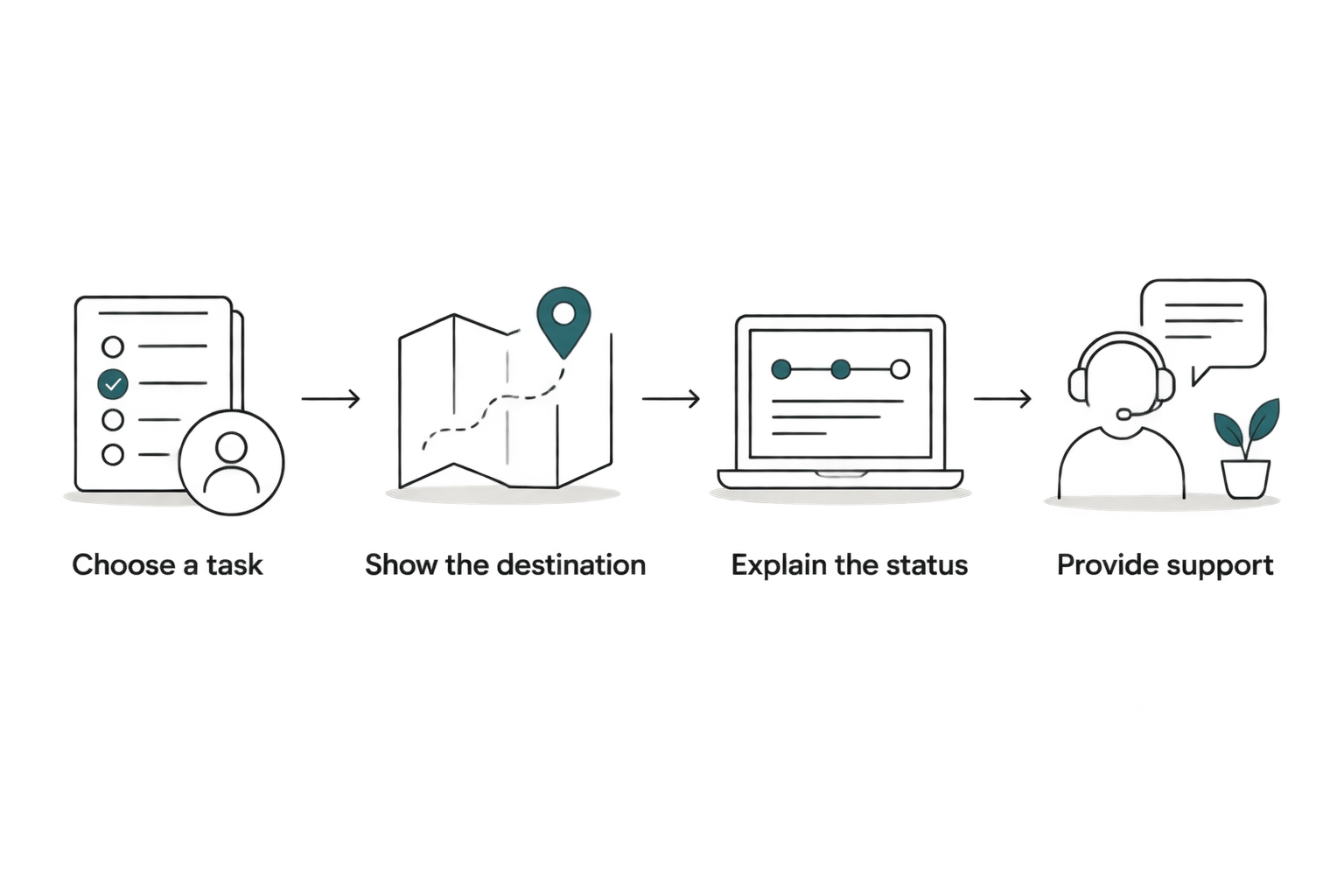
Design the handoff before selecting a layout. Use this sequence to turn a broad portal request into a patient-facing workflow your team can test.
- Choose a task. Start with a real visit purpose, such as requesting a first appointment or finding an existing patient's account.
- Show the destination. Tell patients whether they are opening a scheduling tool, entering a portal, or sending a request to staff.
- Explain the status. State whether the action produced a confirmed booking, a pending request, or another outcome.
- Provide support. Explain what to do when the destination fails or account access is unavailable.
Test 2 booking states: a confirmed appointment and a submitted request awaiting review. Those states need different confirmation messages. Never leave patients to infer whether they have an appointment from a generic submission message.
For your 2026 launch review, have someone unfamiliar with the website follow each route on a phone. Ask them to explain what happened and what they would do next. Confusion at that point identifies a specific design or wording problem to fix.
Is a custom medical website better than a template with a portal button?
Custom design is justified when your patient paths require structure a template does not provide cleanly. A dental practice might need separate new-patient and returning-patient routes; a specialist clinic might need referral instructions before an appointment request.
A template remains a reasonable option when it supports your actual content, accessibility needs, and patient workflows. Custom work adds project decisions and ongoing maintenance responsibilities. It does not automatically produce more inquiries.
Website Symphony is best for practices seeking custom medical website design, marketing, and hosting from one team. Evaluate that fit through the proposed patient journey and project scope, not an unsupported promise of conversion growth.
Ask to see relevant portfolio work and have the provider explain how a visitor reaches an appointment request. A portfolio demonstrates design and content decisions; it does not establish booking performance without supporting results. For a closer comparison, read about replacing a template website with a custom medical site.
Where does AI help without replacing the portal?
AI-powered functionality should address a specific patient or staff need. A proposed website assistant could help visitors find approved office information or identify the correct appointment route. That is a routing use case, not a reason to expose medical records through public chat.
Define the approved content, allowed questions, escalation route, and information the tool must not collect. Test whether the assistant accurately distinguishes new-patient requests from existing-patient portal access. Provide a visible non-chat alternative.
For a 2026 project, require a demonstration using your own practice's instructions before approving an assistant. Do not accept a general conversation demo as proof of scheduling accuracy. A tool should only claim an appointment is booked when the connected scheduling workflow actually confirms it.
Keep diagnosis, urgent clinical decisions, and access to patient-specific information outside a general public website assistant. Any broader proposal requires a separate clinical, privacy, and security assessment.
What should you ask a medical website provider before signing?
Request a written division of responsibility between the website provider, clinical software vendor, and practice. Having one team for website design, marketing, and hosting simplifies that purchasing scope; it does not make that team the owner of every clinical system.
Use 5 acceptance checks before approving the build:
- Appointment path: Can a new patient reach the appropriate request or booking destination without an existing account?
- Portal handoff: Does the link open the correct destination, with understandable instructions and an account-help route?
- Submission meaning: Does each confirmation distinguish a request from a scheduled visit?
- Data handling: Has the team documented what each form, chat tool, and integration collects and receives?
- Ownership: Is someone responsible for maintaining links, instructions, integrations, and public practice information?
When discussing a project with Website Symphony, ask for those checks to appear in the agreed scope. Also request a clear explanation of which connections are included and which require coordination with another vendor.
Plan your patient website paths
Discuss custom website design, marketing, and hosting around your practice's appointment and inquiry needs.
FAQ
Does every medical practice website need a patient portal?
No, a patient portal is not necessary for every public-facing medical website task. Base the decision on the authenticated services your practice needs, while reviewing applicable patient-access and privacy obligations separately.
Can new patients request an appointment without creating a portal account?
Yes, your website can provide an appointment-request path that does not require an existing portal account. Choose a workflow appropriate for the information collected and explain whether submission confirms a visit or requests staff review.
Is online scheduling the same thing as a patient portal?
No, online scheduling handles appointment-related tasks, while a patient portal provides the account-based functions supported by its system. Confirm the actual capabilities before assuming either tool replaces the other.
Should I replace my existing patient portal during a website redesign?
Do not replace a functioning patient portal solely because you are redesigning the public website. First assess the existing system's patient tasks, access problems, and connection requirements.
Does adding a patient portal make my website HIPAA compliant?
No, adding a portal alone does not establish HIPAA compliance. Assess the applicable requirements for each system, data flow, vendor relationship, and practice process with qualified advisers.
Can an AI chatbot replace a patient portal?
A general website chatbot is not a substitute for authenticated patient access. Use a narrowly scoped assistant for approved public information or routing, with a separate assessment for any handling of patient-specific information.
How do I know whether my appointment button is working?
Test the complete appointment path, not just whether the button opens a page. Confirm the destination, submission outcome, patient instructions, and staff handling process, then measure completed requests or bookings without treating every click as an appointment.
One last thing
A working portal link can still lead to an incomplete patient journey. Test what happens when someone cannot sign in, chooses the wrong appointment route, or submits a request without receiving a clear next step. Those recovery paths belong in your website brief, not just your staff's memory.


