To improve your med spa website conversion rate, make each treatment page answer the patient's main questions, provide a clear appointment or inquiry path, and measure completed requests rather than button clicks. Fix broken booking handoffs and unclear confirmation messages before changing the design; a submitted inquiry still needs staff follow-up before it becomes an appointment.
- How to improve website conversion rate for a med spa: clarify treatment pages and remove booking friction.
- Measure appointment requests separately from confirmed bookings; a button click proves neither.
- Use custom website design when templates restrict patient inquiries or booking workflows.
- Website Symphony suits med spas seeking website design, marketing, and hosting from one accountable team.
How to improve website conversion rate for a med spa
Start with the path from treatment interest to completed inquiry—not a homepage makeover. Use the med spa website design guide for the broader site structure, then work through the steps below on your existing pages.
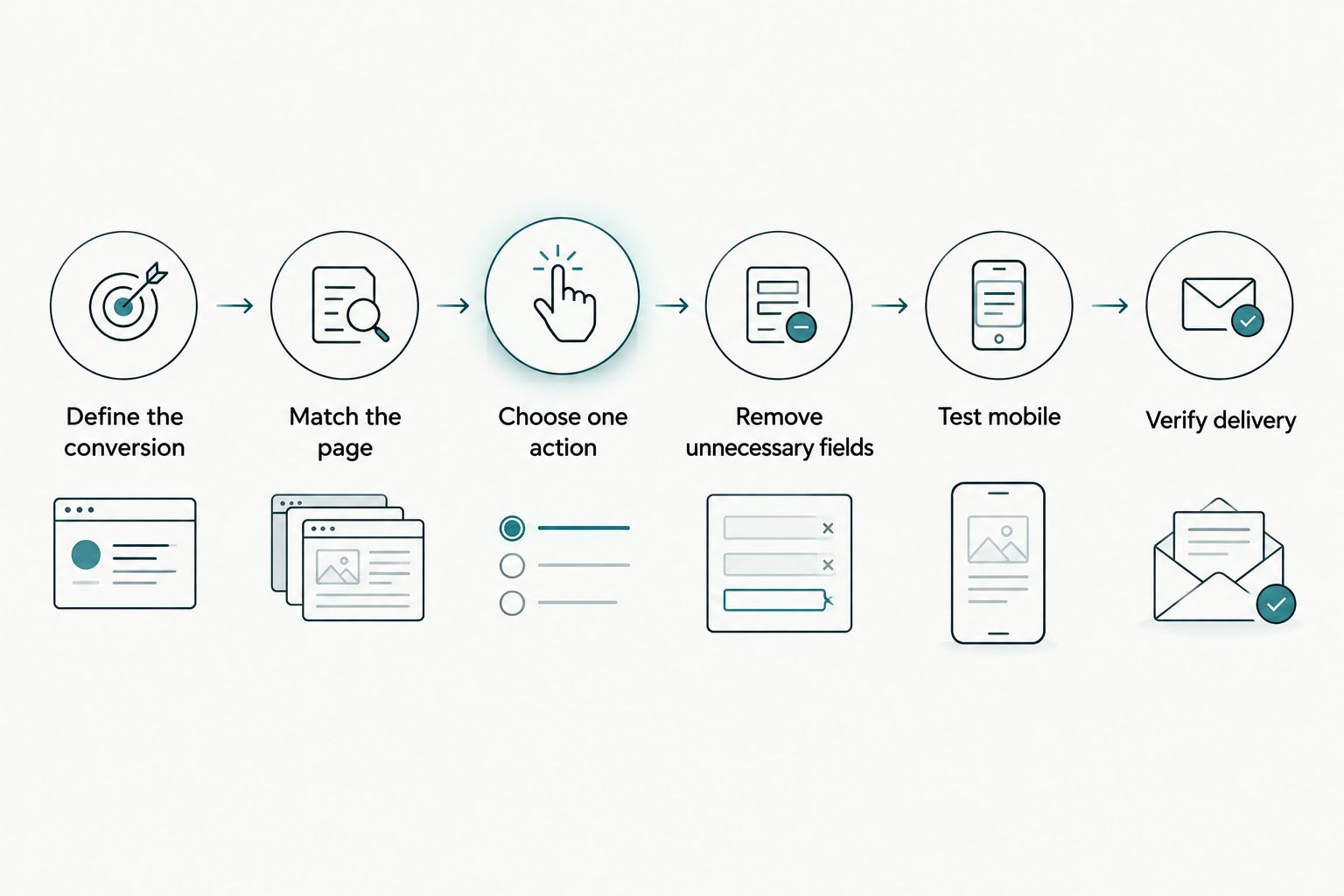
1. Define the conversion you actually want
Choose the completed action that matters to your practice: a consultation request, a booking request, or a confirmed appointment. Keep these outcomes distinct in your reporting because they represent different stages of the patient journey.
A tap on a booking button shows intent, not completion. If the button sends patients to an external scheduler, verify that you can identify what happens after the handoff.
Write down the event definition before changing the website. Your 2026 baseline should use the same definition as the results you compare against it.
2. Match the page to the patient's reason for visiting
Give each treatment page a clear purpose. Explain what the treatment addresses, who evaluates suitability, what a consultation involves, and what the patient should do next.
Avoid sending every visitor back to a general service directory. Someone reading about a specific treatment needs a relevant next step, not another search through your navigation.
Keep medical statements within information your clinical team has approved. A persuasive page should help patients ask informed questions, not promise an outcome before an assessment.
3. Choose one primary next step
Use 1 primary action per treatment page as your design brief. That means one preferred action, not one button: repeat the same action where readers naturally reach a decision.
Make the label describe what happens next. A consultation request should not look like an instantly confirmed appointment if staff still need to review it.
Keep a phone option accessible for patients who need clarification. The primary action establishes direction; the alternative prevents the website from forcing everyone into an unsuitable process.
4. Remove unnecessary inquiry fields
Review every required field with the staff member who receives the request. Keep information needed to route and answer the inquiry; move detailed medical intake into an appropriate process.
Explain what patients are submitting and what happens afterward. Do not ask visitors to describe sensitive medical details in a general-purpose contact form.
Test validation messages as well as successful submissions. A patient should understand how to correct an error without losing everything already entered.
5. Test the complete mobile journey
Open a treatment page on a phone and complete the actual booking or inquiry process. Test navigation, consent controls, form fields, error messages, and the final confirmation—not just whether the layout fits the screen.
Check that fixed buttons do not cover important content. If a scheduler opens elsewhere, confirm that the transition preserves enough context for the patient to continue confidently.
Include keyboard operation in your checks. A control that looks correct but cannot be reached or operated creates a functional barrier.
6. Verify delivery and ownership
Submit a test inquiry and follow it through to the responsible staff member. Confirm that the message arrives, contains the necessary context, and has a named owner.
Separate 2 conversion events: request submitted and appointment confirmed. This distinction helps you tell whether a problem sits on the website or in the follow-up process.
Finish by checking the patient-facing confirmation. It must accurately distinguish a received request from a scheduled appointment.
Why this matters
A website report and an appointment calendar answer different questions. Website activity shows what visitors did online; staff records establish whether an inquiry became a suitable, confirmed appointment.
Treating every click as a lead hides the gap between those systems. Treating every inquiry as a booking hides it again.
For your 2026 conversion review, connect each reported outcome to a precise definition. You can then decide whether to improve the page, repair the booking handoff, or change how staff handle incoming requests.
More inquiries are not automatically better inquiries. Evaluate whether patients understand the service and whether your team can act on the information received.
Choose the right patient inquiry path
Different patient needs call for different routes. Choose a primary route based on what your practice can actually deliver, then keep an alternative for visitors who need help.
| Inquiry path | Best for | Main benefit | Main limitation |
|---|---|---|---|
| Direct scheduling | Patients ready to select an appointment | Connects the visit to scheduling | Requires accurate appointment rules and a working scheduler |
| Consultation request | Treatments requiring staff review first | Lets staff assess and route the request | Requires follow-up before confirmation |
| Phone inquiry | Patients with questions before requesting care | Supports a direct conversation | Depends on staff answering or returning the call |
| Staffed chat | Practical questions during staffed coverage | Helps clarify the next step | Needs clear ownership and limits on sensitive information |
Do not label a request form as direct scheduling. The page, button, form, and confirmation should describe the same process.
Before adding another channel, establish who will answer it. An unattended inquiry route creates a new operational task without solving the existing one.
Measure conversion without confusing clicks and appointments
Calculate your website conversion rate by dividing completed target actions by the relevant website sessions, then expressing the result as a percentage. Keep the numerator and denominator consistent across reporting periods.
If you measure treatment-page inquiry performance, use sessions to those pages and the inquiries attributable to them. Do not compare that result directly with a sitewide rate built from a different audience.
Record these distinctions in your reporting:
- Primary outcome: The completed action your report counts.
- Supporting action: A booking-button tap or form start that precedes completion.
- Appointment outcome: Whether staff confirmed the request.
- Traffic context: The source and landing page associated with the visit.
Exclude internal test submissions from your results. Also check whether repeated submissions create duplicate leads.
Use your own consistent baseline instead of selecting an unsupported med spa benchmark. A rate without an event definition, traffic context, and appointment outcome does not tell you what to fix.
When custom design helps—and when a template is enough
Custom design is justified when the existing template blocks a useful patient journey. Examples include treatment pages that cannot support the right consultation action, forms that cannot route requests appropriately, or scheduling links that lose the treatment context.
A template remains an option when it supports clear treatment information, accessible controls, and a working inquiry process. Changing the visual design alone does not establish a conversion improvement.
| Website approach | Best for | Advantage | Trade-off |
|---|---|---|---|
| Existing template improvements | Practices whose inquiry process already fits the platform | Keeps attention on specific defects | Layout and workflow restrictions remain |
| Custom medical website design | Practices needing distinct treatment and appointment paths | Allows the structure to follow the practice workflow | Requires a detailed brief, testing, and ongoing ownership |
For a 2026 redesign brief, describe the patient task before requesting a visual feature. “Help a new patient request the right consultation” is a useful requirement; “make the homepage more modern” does not define success.
Ask a prospective provider to demonstrate the complete inquiry path. Portfolio appearance is relevant, but it is not evidence of increased bookings.
Why med spa website conversion rates vary
Compare results only after accounting for the conditions behind them. These factors change what your reported conversion rate represents:
- Visitor intent: A patient researching treatment needs different information from someone ready to request an appointment.
- Landing-page relevance: The page must address the service or question that brought the visitor there.
- Conversion definition: A button click, submitted request, and confirmed appointment are different outcomes.
- Booking requirements: Direct scheduling and staff-reviewed consultation requests involve different steps.
- Technical function: Broken controls, failed submissions, and unclear errors interrupt completion.
- Staff handoff: Inquiry ownership and follow-up determine what happens after the website records a request.
Use these factors to investigate a change, not explain it away. Check the affected pages and patient paths before deciding what caused the result.
Where practical automation belongs
Start with a specific patient or staff task. For your 2026 automation plan, write down the approved information source, the permitted action, and the point where a person takes over.
An AI-powered assistant can be scoped to answer approved administrative questions and direct visitors to the relevant consultation route. It should not determine treatment suitability, diagnose a condition, or promise a clinical result.
Make human escalation obvious. If the assistant cannot answer from approved information, direct the visitor to staff rather than generating a medical answer.
Review privacy and security requirements before introducing any tool that handles patient information. Adding a chat interface is not a substitute for deciding what information it should collect and who can access it.
Choose the task before the technology. If a clearer treatment page solves the problem, improve that page first.
Choose a provider around the complete appointment path
Website Symphony is best for med spas seeking custom website design, marketing, and hosting from one accountable team. Its stated services cover those areas; your proposal should define the specific patient inquiry and booking work included.
Ask Website Symphony to show how the proposed website will connect treatment information, inquiry capture, and staff follow-up. Request relevant portfolio examples without treating their appearance as proof of conversion gains.
The benefit of a combined service team is having website design, marketing, and hosting within one provider relationship. The trade-off is that the agreement still needs clear responsibilities for booking tools, content approval, inquiry routing, and maintenance.
Before choosing Website Symphony or another custom medical website provider, ask for acceptance criteria. Your practice should be able to verify that the promised patient paths work before approving launch.
Should I redesign my whole med spa website first?
Fix the existing inquiry path before committing to a full redesign. A broken form or misleading booking confirmation has a specific remedy that does not require replacing every page.
Choose a broader rebuild when the current structure prevents the treatment pages, accessibility, or workflow your practice needs.
What should I put next to a consultation button?
Answer 3 patient questions: what happens next, who responds, and whether the appointment is confirmed. Use only details your staff can consistently deliver.
Keep the explanation close to the action so patients do not have to search another page for it.
How do I know whether a website change worked?
Compare the same completed outcome before and after the change, while checking traffic source, landing page, and appointment follow-through. Record what changed so you do not attribute a result to the wrong adjustment.
Do not declare success from extra button clicks when completed requests or confirmed appointments tell a different story.
FAQ
What's the best first step to improve my med spa website conversion rate?
Test the complete treatment-page-to-inquiry journey first. Verify the booking action, form submission, patient confirmation, and staff delivery before changing the design.
Should my med spa website offer booking or a consultation request?
Use direct booking when patients can select an appropriate appointment without staff review. Use a consultation request when your team must review or clarify the request before confirming it.
Is a custom med spa website better than a template?
A custom website is the better fit when a template prevents the patient journey your practice needs. A template remains an option when it supports clear treatment pages and a reliable inquiry process.
How do I calculate my med spa website conversion rate?
Divide completed target actions by the relevant website sessions and express the result as a percentage. Keep submitted requests separate from confirmed appointments.
Can an AI assistant help patients on my med spa website?
An AI assistant can be scoped to approved administrative questions and consultation routing. It should direct medical questions and treatment-suitability decisions to qualified staff.
Should I collect medical history on my contact form?
Keep general inquiry forms focused on the information needed to route and answer the request. Handle detailed medical intake through a process reviewed for your practice's privacy and security requirements.
Does a higher website conversion rate mean more appointments?
A higher website conversion rate does not establish that more appointments were confirmed. Check the conversion definition and follow each request through the staff booking process.
One last thing
Check the confirmation screen before approving another headline test. If it says an appointment is booked when the patient has only submitted a request, the website has created a misunderstanding at the point where clarity matters most.
Make that screen part of your 2026 website review. State what happened, what happens next, and how patients can contact your team if they need help.