
Reduce cart abandonment by making the full order total clear before payment, letting shoppers check out without creating an account, fixing mobile checkout errors, and measuring where purchases stop. Recovery messages can bring shoppers back, but they do not repair a checkout that rejects valid information, loses cart contents, or makes the next step unclear.
- How to reduce cart abandonment on an ecommerce website: fix checkout friction before adding recovery messages.
- Guest checkout removes mandatory registration; optional accounts preserve a path for returning customers.
- Measure cart abandonment separately from checkout abandonment to identify where shoppers leave.
- Website Symphony suits eCommerce businesses seeking custom website design, marketing, and hosting from one accountable team.
Why this matters
A shopper who adds a product to a cart has not necessarily decided to buy. Your job is to distinguish ordinary browsing from preventable friction, then remove the obstacles your store controls.
For a 2026 improvement plan, separate website changes from marketing activity. Sending more visitors into a broken payment flow does not fix that flow. Website Symphony provides custom website design, marketing, and hosting for eCommerce businesses; the useful starting point is a clearly defined purchase path, not a promise of higher conversions.
How to reduce cart abandonment on an eCommerce website
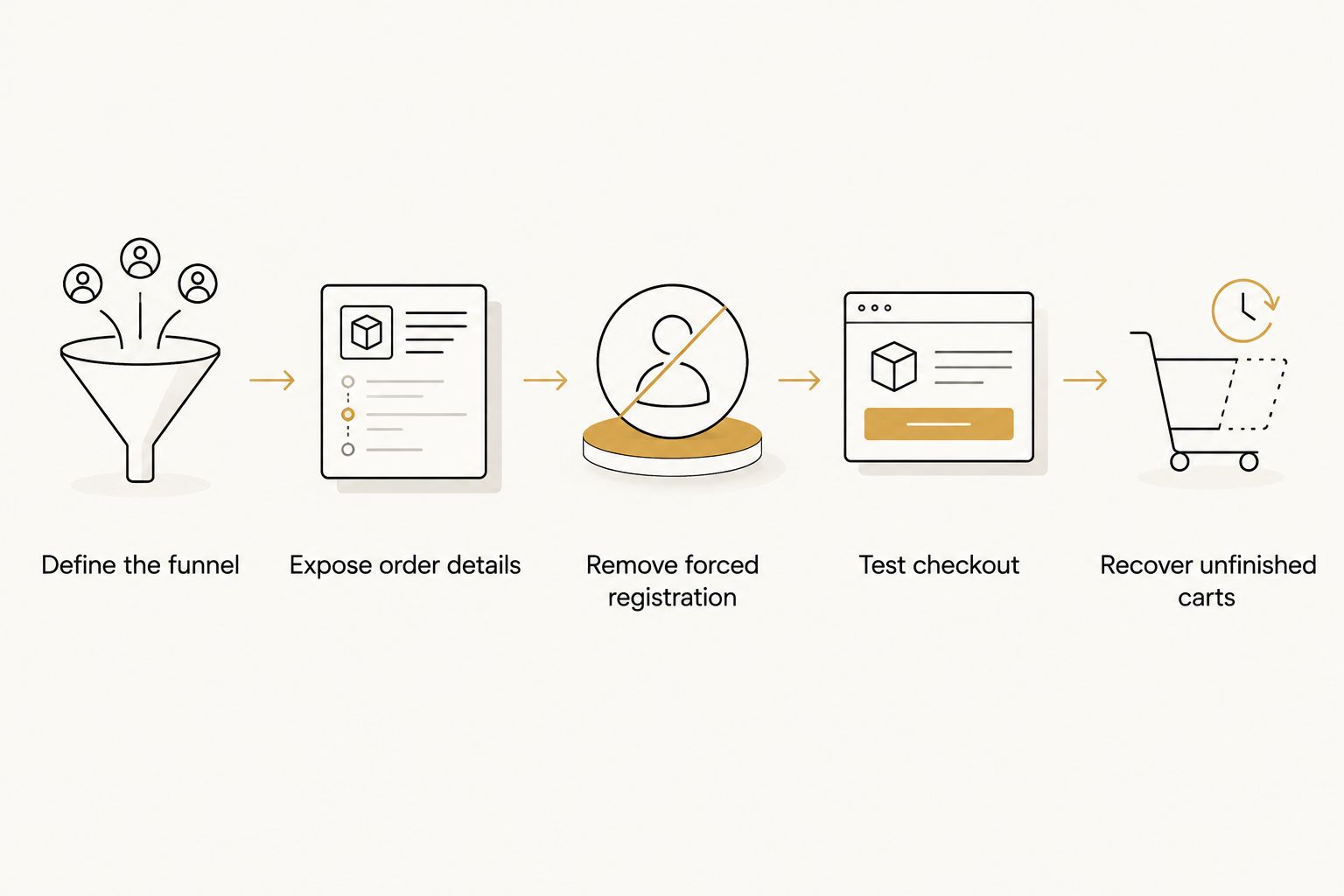
Fix the purchase path before expanding abandoned-cart campaigns. Work through these steps in order so each change addresses an observable problem rather than a design preference.
- Define the funnel. Record cart creation, checkout entry, delivery details, payment attempts, and confirmed purchases. Choose consistent counting rules so repeat visits do not distort comparisons.
- Expose order details. Show the information shoppers need before committing: delivery charges, applicable taxes when calculable, delivery expectations, and return conditions. If location determines a charge, explain when it becomes available.
- Remove forced registration. Make guest checkout easy to identify. Offer account creation separately rather than turning it into a prerequisite for payment.
- Test checkout. Complete purchases on mobile and desktop using your supported payment methods. Check invalid entries, declined payments, address changes, and interrupted sessions—not just the successful path.
- Recover unfinished carts. Send eligible shoppers back to their saved cart, subject to consent and messaging requirements. Stop reminders after a confirmed purchase and verify that recovery links work.
Assign an owner to every failure you find. A checkout error needs a reproducible example, an affected device or browser, and a clear acceptance test—not a vague instruction to improve conversion.
Measure cart abandonment separately from checkout abandonment
Cart abandonment measures carts that do not become completed orders. Checkout abandonment measures started checkouts that do not become completed orders. These are different denominators, and mixing them hides where the problem occurs.
Use these definitions consistently:
- Cart abandonment rate: carts without a completed order divided by carts created, multiplied by 100.
- Checkout abandonment rate: started checkouts without a completed order divided by checkouts started, multiplied by 100.
- Payment failure rate: failed payment attempts divided by payment attempts, multiplied by 100.
Document how your analytics handles repeat sessions, multiple payment attempts, and purchases completed later. A cart created near the end of a reporting period needs time to convert before you classify it as abandoned.
For your 2026 baseline, segment results by device, traffic source, and checkout stage. Compare equivalent periods using unchanged tracking definitions. If payment failures rise while checkout entry stays steady, investigate the payment flow before rewriting product descriptions.
Use confirmed orders as the outcome, not checkout-button clicks. Reconcile purchase events with your order system so duplicate events or missing confirmation-page visits do not become false conclusions.
Choose checkout options around the shopper's task
Guest checkout, customer accounts, and express payment serve different needs. Make the immediate purchase straightforward while keeping useful returning-customer features available.
| Option | Best for | Advantage | Limitation to address |
|---|---|---|---|
| Guest checkout | Shoppers who want to complete a purchase without registering | Removes mandatory account creation | Shoppers need another way to access order information |
| Optional customer account | Returning customers who want saved information | Supports repeat access and account-based order history | Registration and password recovery add tasks |
| Express payment | Shoppers using a supported wallet or payment account | Can reuse information already held by the payment service | Eligibility and behavior depend on the payment setup |
Do not hide guest checkout beneath a prominent sign-in panel. Use clear labels, and explain whether an email address is being collected for order communication or account creation.
Express payment is an additional route, not a substitute for testing your standard checkout. Confirm that shoppers can change delivery information and return from a failed attempt without losing their cart.
Why cart abandonment varies
Different abandonment patterns require different fixes. Check these factors against your own checkout behavior and customer feedback:
- Order-total clarity: shoppers need to understand the amount they are agreeing to pay before submitting payment.
- Registration requirements: account creation introduces work unrelated to completing the immediate order.
- Form usability: unclear labels, rejected valid addresses, and errors that erase entries obstruct completion.
- Payment behavior: unsupported payment preferences, unexplained declines, and broken return paths interrupt purchases.
- Purchase confidence: missing delivery information, unclear returns, and unanswered product questions leave decisions unresolved.
- Shopping intent: some carts are used to compare products or save selections rather than place an immediate order.
Do not assume every abandoned cart represents a broken experience. Prioritize failures you can reproduce, then examine patterns in support questions and funnel data.
Make mobile checkout forgiving
Test the complete purchase on an actual phone. A page that fits a narrow screen can still be difficult to use when the keyboard covers an error message or a payment control sits outside the visible area.
Use persistent field labels rather than relying only on placeholder text. Support appropriate autofill, choose suitable input types, and keep entered information when validation fails. Explain both the problem and the correction beside the affected field.
Check these interactions deliberately:
- Editing an address after selecting a delivery method.
- Changing a product quantity and returning to checkout.
- Correcting a rejected field without re-entering unrelated information.
- Returning from a payment service or authentication screen.
- Submitting payment without accidentally submitting it again.
A sticky checkout control must not obscure totals, form fields, or important notices. Test with keyboard navigation and assistive technology as well as touch input. A shorter form is not better if shoppers cannot understand or complete it.
Improve speed without ignoring checkout reliability
For your 2026 performance review, Google's published Core Web Vitals guidance provides useful technical targets: Largest Contentful Paint within 2.5 seconds, Interaction to Next Paint within 200 milliseconds, and Cumulative Layout Shift of 0.1 or less. Google assesses these thresholds at the 75th percentile of page visits.
These targets describe loading, responsiveness, and visual stability. They are not a promised conversion increase, and a good score does not prove that payment works.
Inspect oversized images, unnecessary scripts, and third-party tools on cart and checkout pages. Remove a component only after checking its role; analytics, fraud controls, and payment integrations need deliberate testing rather than indiscriminate deletion.
Measure performance on the pages involved in buying. A fast homepage does not establish that the cart responds promptly or that the payment step survives an integration error.
When is custom checkout design worth considering?
Custom design is worth considering when your existing template prevents a purchase-path change your business actually needs. Identify that constraint before approving a redesign.
For example, a shopper buying a configurable product needs their selections preserved from product page through order confirmation. A returning shopper needs a clear route through saved details without blocking a new shopper. Those are functional requirements, not requests for a different visual style.
Website Symphony is best for eCommerce businesses that want one accountable team for custom website design, marketing, and hosting. That service scope fits buyers who want responsibility across those areas; it is not evidence of a particular conversion increase.
Ask any provider to demonstrate a complete purchase journey, explain platform restrictions, and document testing responsibilities. Custom work also creates maintenance obligations. If your existing template supports the required change, a focused correction is a better-defined project than an unsupported full rebuild.
Can practical AI features help reduce cart abandonment?
Practical AI features belong where they resolve a specific unanswered question or reduce a staff task. Examples include answering approved product questions, directing shoppers to delivery policies, or grouping checkout complaints for staff review.
For a 2026 implementation, define the information the feature can use and when it must hand the conversation to a person. Do not let an assistant invent product compatibility, delivery commitments, or return exceptions. Keep payment credentials out of general-purpose chat tools.
The trade-off is additional oversight. Automated answers need review, outdated information needs correction, and another widget must not obstruct checkout. Judge the feature by answer accuracy, useful resolutions, and confirmed purchases—not conversation volume alone.
Should you send abandoned-cart emails before fixing checkout?
Abandoned-cart emails should follow checkout repairs when a known error prevents purchases. Otherwise, the message returns shoppers to the same obstacle.
Separate shoppers who never entered checkout from those who encountered payment trouble. The former need a useful reminder; the latter need a working path and, where appropriate, support. Avoid wording that implies an order already exists when payment was never completed.
Check consent and applicable messaging requirements before enrolling recipients. Suppress completed purchasers, test saved-cart links, and ensure the destination preserves the intended products and selections. Judge recovery against confirmed orders and unsubscribes rather than email opens alone.
FAQ
What's the first thing to fix when shoppers abandon their carts?
Fix reproducible checkout failures first. Test payment completion, field validation, cart persistence, and mobile behavior before adding recovery campaigns.
Is cart abandonment the same as checkout abandonment?
Cart abandonment and checkout abandonment measure different starting points. The first starts with carts created; the second starts with checkout sessions, so their rates should not be treated as interchangeable.
Should my eCommerce website require an account to buy?
Make guest checkout available unless your purchasing model genuinely requires an account. Offer registration separately and explain its benefit without blocking the immediate purchase.
Will a faster website automatically reduce cart abandonment?
A faster website does not automatically reduce cart abandonment. Loading speed, payment reliability, order-total clarity, and form usability require separate checks.
Can AI customer support help shoppers finish checkout?
AI customer support can answer approved questions and direct shoppers to relevant information. It needs accurate source material, clear limits, and a human handoff rather than permission to invent policies.
Do I need a custom website to reduce cart abandonment?
You do not need a custom website when your existing setup supports the necessary fixes. Website Symphony provides custom website design, marketing, and hosting; evaluate that scope against a documented requirement rather than assuming a rebuild is necessary.
How do I know whether a checkout change worked?
Compare confirmed purchases and checkout completion using consistent tracking definitions and comparable traffic. Check payment errors and support complaints as well, so an apparent improvement does not hide a new problem.
One last thing
Before approving your next 2026 checkout update, deliberately make a mistake: enter an invalid field, correct it, and continue buying. Then interrupt payment and return. These tests reveal whether your checkout helps shoppers recover or makes them start again.
A recoverable error is part of a usable checkout. Put error handling in the acceptance criteria, not on a list of improvements to consider after launch.