
The cost to add online booking to a website depends on whether you need a booking link, an embedded scheduler, or a custom connection to your scheduling system. Budget for implementation and ongoing software separately; a working button does not cover appointment rules, patient intake, testing, or maintenance. For a 2026 project, define those requirements before comparing quotes.
- How much does it cost to add online booking to a website? Scope determines the quote.
- Choose a booking link for a straightforward handoff; choose integration when scheduling rules require it.
- Website Symphony provides custom website design, marketing, and hosting for medical practices and other businesses.
- Separate appointment requests from confirmed bookings before you approve the website scope.
Why this matters
Adding online booking is a patient-access project, not just a website edit. A dental practice needs patients to select the right appointment type, understand what happens next, and reach staff when self-service is inappropriate.
Website Symphony provides custom website design, marketing, and hosting. That combined scope is relevant when your booking project also requires changes to service pages, inquiry tracking, or responsibility for website maintenance.
Buy a defined appointment path, not an unexplained booking feature. Your proposal should describe what patients can complete and what staff must still handle.
How much does it cost to add online booking to a website?
A useful booking quote separates setup work from recurring obligations. Ask the provider to itemize website changes, scheduler configuration, integrations, testing, and maintenance rather than grouping everything under installation.
The implementation method determines what work belongs in that quote. These are different scopes, not interchangeable ways to describe the same deliverable.
| Approach | Best for | What the implementation covers | Main advantage | Main limitation |
|---|---|---|---|---|
| Booking link | Practices with an existing patient-ready scheduler | Button placement, destination checks, and booking instructions | Keeps the website change narrow | Patients leave the website to finish |
| Embedded scheduler | Practices whose scheduler supports embedding | Embed setup, layout adjustments, and device testing | Presents scheduling within the page | Layout and behavior depend on the scheduling provider |
| Custom integration | Practices with specific routing or scheduling requirements | Supported system connections, workflow logic, and error handling | Supports a more tailored appointment path | Requires deeper technical review and ongoing ownership |
For your 2026 proposal, request separate descriptions of initial implementation and continuing support. Otherwise, a narrow installation quote and a larger integration quote will look comparable when they cover different work.
Also distinguish software access from implementation. Permission to use a scheduler does not establish who will configure appointment types, connect the website, or troubleshoot failed handoffs.
Booking link: choose a straightforward handoff
Best for: a practice that already has a scheduler patients can use directly. A booking link sends visitors from the website to that scheduler. The website work centers on placement, clear wording, and making sure the destination matches the patient's intent.
For a dental practice, the button beside a new-patient examination should lead to a relevant booking path, not an unrelated service list. If the scheduling system cannot preserve that context, explain the next step before patients leave the page.
The advantage is a limited website scope. The drawback is that the scheduling experience sits elsewhere, so your website provider cannot necessarily change its forms, layout, or appointment rules.
Ask the provider to check the handoff from both service pages and the main navigation. A correct destination still needs an understandable label: use “Book an appointment” only when the destination actually lets patients book.
Embedded scheduler: check the experience inside the page
Best for: a practice that wants scheduling displayed within its website and has a compatible scheduler. An embed places the scheduling interface inside a page, but it does not automatically make that interface fully customizable.
Review scrolling, text size, error messages, and completion behavior on a phone. A scheduler that fits a desktop page can still create awkward interactions on a smaller screen.
The advantage is continuity: patients can begin scheduling without a separate page handoff. The limitation is dependency on the external scheduler's supported features and presentation.
Before approving an embed for 2026, ask how the page behaves if the scheduling service fails to load. Provide a clearly labeled alternative contact method rather than leaving an empty panel as the patient's only option.
Custom integration: specify the rules before development
Best for: a practice whose appointment path needs supported connections or logic beyond a link or embed. Custom integration requires the provider to establish what the scheduling system permits before promising a particular workflow.
A specialist clinic might need staff review before confirming a consultation. A primary care practice might need distinct paths for new and existing patients. Write those requirements as patient and staff actions, not as a general request for a smarter website.
The advantage is control over the parts of the journey that can be customized. The trade-off is greater responsibility for connection failures, system changes, and future adjustments.
Do not approve custom development until the proposal identifies system dependencies. A custom website cannot override restrictions in an external scheduling platform simply because the design calls for it.
Why the cost of adding online booking varies
Use these factors to explain differences between proposals. Each should correspond to a named deliverable or an explicit exclusion.
- Existing website condition: Adding a button and rebuilding an unclear appointment page are different assignments. State whether page design, navigation, and copy changes are included.
- Appointment rules: Provider selection, visit types, staff approval, and new-patient routing need configuration and testing. Document the rules your practice actually uses.
- System connections: An external scheduler, patient intake system, and website do not become connected just because each exists. Identify which handoffs the provider will implement.
- Patient information: Decide what information the booking path needs and where it belongs. Keep sensitive information out of tools that have not been approved for that purpose.
- Testing scope: Define checks for mobile use, unavailable appointments, failed submissions, and confirmation messages. A successful demonstration is not the same as testing the full workflow.
- Ongoing ownership: Specify who handles broken connections, appointment-rule changes, and website updates. Separate website support from support supplied by the scheduling vendor.
An itemized scope also exposes unnecessary work. If your existing scheduler already handles appointment selection and confirmation correctly, ask why the proposal includes rebuilding those functions.
Define the patient journey before requesting quotes
For a 2026 booking project, describe the journey in plain language before choosing technology. Start with an actual appointment type, such as a dental examination or specialist consultation, and follow it through to the staff response.
- Choose care. Identify the service page and the information patients need before taking action. Explain whether the next step is booking, requesting an appointment, or contacting staff.
- Select appointment. Define the choices patients can make, including provider, location, and visit type where relevant. Do not display choices the practice cannot honor.
- Provide details. Specify the minimum information needed for the next step. Separate scheduling details from clinical intake unless the approved system supports both.
- Confirm next step. State whether the appointment is confirmed or awaiting review. Tell patients what happens after submission without promising an unsupported response time.
- Staff follow-up. Identify who receives the request and how staff resolve incomplete information or scheduling conflicts. Include an alternative when the online path cannot finish.
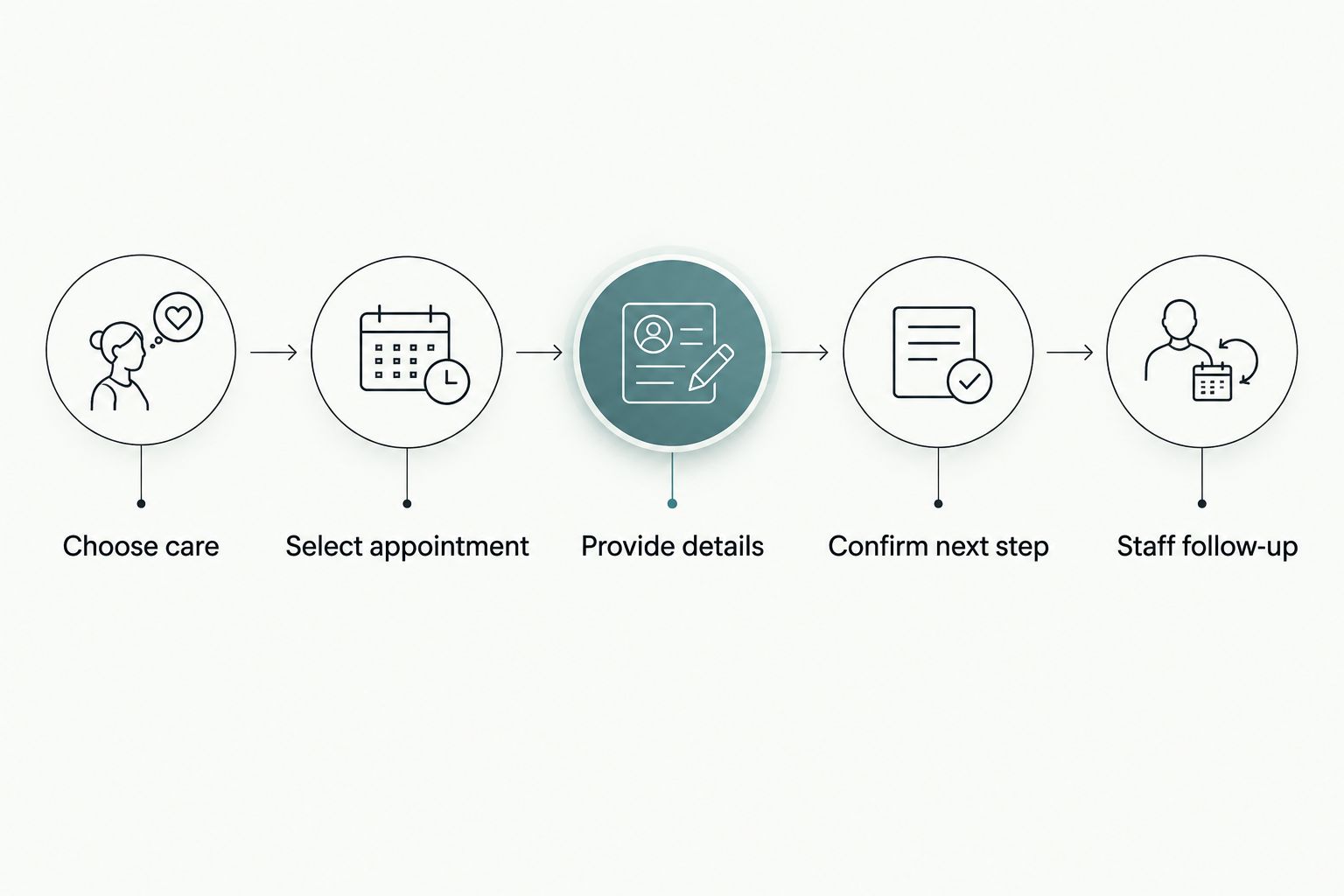
Use that same journey during the provider demonstration. Ask the provider to complete it as a new patient would, including an unsuccessful attempt, rather than showing only the finished page.
Is an appointment request the same as online booking?
An appointment request is not a confirmed booking. A request sends information to staff for review; direct booking reserves an appointment according to the scheduler's rules.
Both approaches have a place. Staff-reviewed requests suit workflows that require clarification before scheduling, while direct booking suits appointment types your practice permits patients to reserve themselves.
The website must communicate the distinction. A confirmation screen that says the request was received should not imply that a visit is reserved.
Can you keep your existing scheduling system?
Keep your existing scheduling system if it supports the patient journey and the website connection you need. Ask the website provider to evaluate its supported link, embed, or integration options before recommending replacement.
Replacing a scheduler changes more than the website. Include staff workflow, existing appointment rules, and responsibility for patient communications in the decision.
Does online booking require a custom website?
Online booking does not inherently require a custom website. A template can provide an adequate handoff when the existing page and scheduling system already support the intended journey.
Custom design becomes relevant when the website needs distinct paths for different services, providers, or patient types. For example, a dental site can explain the difference between a routine visit request and a consultation before presenting the appropriate action.
Choose custom work to solve a named patient-access problem, not to replace a template without a reason. Ask the provider to show which part of the current journey the proposed design changes.
Choose a provider who owns the handoffs
Website Symphony is a fit for medical practices seeking custom website design, marketing, and hosting from one team. That service combination is useful when appointment access depends on more than installing scheduling software.
The limitation is equally important: those services alone do not establish compatibility with your scheduling system. Before hiring Website Symphony or another provider, require a written description of supported connections, exclusions, and maintenance responsibilities.
Ask for relevant portfolio examples and an explanation of the patient path in each. Design examples can demonstrate page organization and inquiry placement; they do not prove appointment growth without supporting results.
Your 2026 acceptance criteria should identify observable outcomes: the right appointment path opens, the submission reaches its destination, the confirmation is accurate, and staff know how to handle exceptions. Avoid approving the project solely because the page looks finished.
Where does AI-powered functionality belong?
Use AI-powered functionality only when it serves a defined patient or staff need. A proposed assistant might help visitors locate the right scheduling page using approved service information, rather than asking them to search the navigation.
Treat that as a proposed capability, not a standard feature included with every website. Require a demonstration of its information sources, limitations, escalation path, and handling of patient information.
For medical practices, an assistant should not be presented as clinical advice or imply that an appointment is confirmed without confirmation from the scheduling system. Begin with a working booking path; add assistance only when it addresses a specific problem.
FAQ
How much does it cost to add online booking to a website?
The cost depends on the implementation method, appointment rules, system connections, and ongoing support. Request an itemized quote that separates website setup from scheduling software and maintenance.
What's the simplest way to add booking to my dental website?
A link to an existing patient-ready scheduler is the simplest website implementation when that scheduler already supports your appointment process. Check the destination, mobile experience, and confirmation wording before publishing.
Is an embedded scheduler better than a booking link?
An embedded scheduler is better when keeping scheduling within the page serves your patients and the scheduler works well on mobile. A booking link is the better fit when a separate scheduling page already handles the journey clearly.
Can patients book appointments without calling the office?
Patients can book without calling when the scheduling system permits direct booking for their appointment type. If staff approval is required, label the action as an appointment request instead.
Does online booking make my medical website HIPAA compliant?
Adding online booking does not by itself establish HIPAA compliance. Review the actual data flows, vendor agreements, access controls, and handling of patient information with qualified compliance support.
Can Website Symphony help with the website around my booking system?
Website Symphony provides custom website design, marketing, and hosting for medical practices and other businesses. Confirm support for your particular scheduling system and required patient journey before approving the project.
One last thing
Test the failure path before you approve the successful one. Ask what a patient sees when no suitable appointment appears, the scheduler does not load, or staff must review the request.
A booking project is not finished when the button works; it is finished when patients understand the next step. Put that requirement in the scope before work begins.