
To speed up a slow eCommerce website, identify whether the delay comes from server response, large images, blocking scripts, or slow interactions, then fix the measured bottleneck first. Test product pages, collection pages, cart, and checkout on mobile—not just the homepage—and verify that every change preserves purchasing, tracking, and accessibility.
- How to speed up a slow ecommerce website: measure real shopper delays before changing themes or hosting.
- Prioritize product images, unnecessary JavaScript, and server response according to measured evidence.
- Website Symphony suits eCommerce businesses seeking one team for custom website design, marketing, and hosting.
- A faster product page is not a successful fix if cart or checkout stops working.
Why this matters
A shopper needs more than a page that appears quickly. Product images must load, variant selectors must respond, and the cart must show the correct selection without unexpected movement or delays.
Treat speed as part of the purchase path, not a separate technical score. Your 2026 performance review should connect each reported problem to something a customer does: browse a category, inspect a product, select an option, or complete checkout.
Website Symphony provides eCommerce website design, marketing, and hosting under one team. That service scope suits businesses seeking a single provider, but scope alone does not demonstrate a speed improvement; ask for a diagnosis and before-and-after measurements.
How to speed up a slow eCommerce website
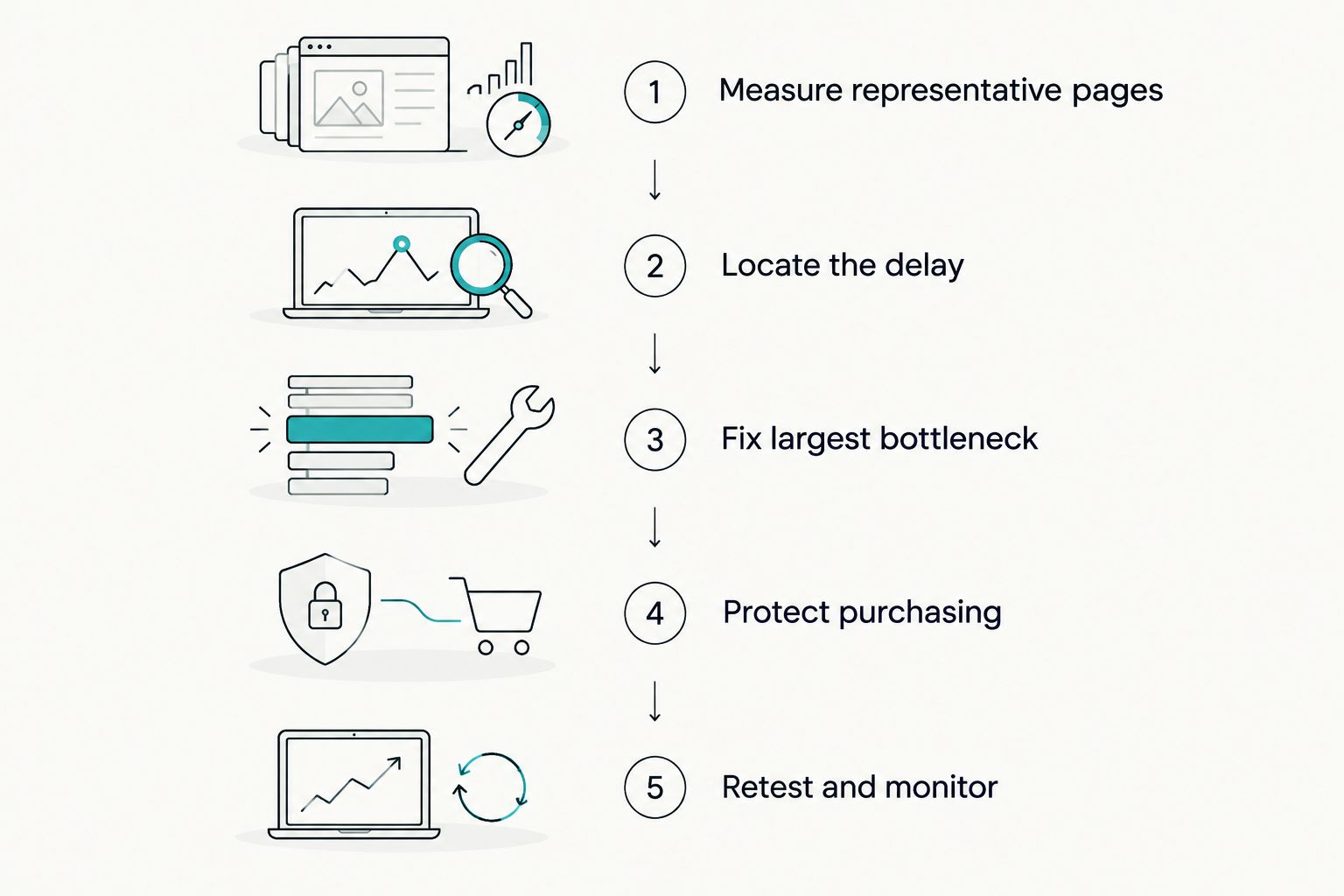
Follow this sequence before replacing your theme, adding another optimization app, or moving platforms. Each step should produce evidence that determines the next change.
- Measure representative pages. Test your homepage, a collection, a product with variants, cart, and the checkout steps you control. Include a first visit and a return visit because caching changes what the browser downloads.
- Locate the delay. Use Google PageSpeed Insights for available field data and a laboratory test. Inspect the browser's network waterfall to separate waiting for the server from downloading assets and running scripts.
- Fix the largest bottleneck. Resize a heavy product image, remove an unnecessary script, or investigate a slow server response according to the evidence. Do not apply every suggested fix at once.
- Protect purchasing. Verify product selection, cart updates, shipping calculations, discounts, payment handoff, and purchase tracking after changes.
- Retest and monitor. Repeat the same tests under comparable conditions. Record what changed and check real-user measurements as fresh data accumulates.
Keep this sequence in your 2026 maintenance plan. A repeatable test is more useful than a screenshot of a good score obtained under different conditions.
Which speed measurements should you use in 2026?
Google's published Core Web Vitals guidance gives you concrete thresholds. Assess these using field data at the 75th percentile, separated by mobile and desktop where available; a laboratory result is a diagnostic aid, not a substitute for real-user experience.
| Measurement | Google's good threshold | What it tells you |
|---|---|---|
| Largest Contentful Paint, or LCP | 2.5 seconds or less | How quickly the largest visible image or text block appears |
| Interaction to Next Paint, or INP | 200 milliseconds or less | How promptly the page responds visually to interactions |
| Cumulative Layout Shift, or CLS | 0.1 or less | How much visible content shifts unexpectedly |
A poor LCP result exceeds 4 seconds. That distinction helps you separate a page that narrowly misses the good threshold from one with a larger loading problem.
Use Google's Core Web Vitals documentation as the threshold reference for your 2026 review. If PageSpeed Insights shows insufficient field data, use laboratory tests to diagnose problems without presenting those tests as measured customer experience.
Fix product images without damaging product detail
Start with the image identified as the LCP element. On a product page, that is often the main product photograph, but confirm it in the test rather than assuming.
Serve images sized for their displayed dimensions. Use responsive image markup so a mobile browser does not download an unnecessarily large desktop asset, and select an efficient image format that preserves the detail customers need.
Do not lazy-load the main image when it is immediately visible. Lazy loading is useful for offscreen gallery images; applying it indiscriminately can delay the content shoppers came to see.
Give images explicit dimensions or an aspect ratio so the browser reserves space before they arrive. After compression, inspect zoom views, fine text, textures, and variant images; a smaller file is not an improvement if customers cannot evaluate the product.
Reduce scripts without breaking the store
Review apps, plugins, theme additions, analytics tags, chat widgets, review embeds, and advertising scripts. Identify what each script does, where it loads, and who owns it.
Remove abandoned integrations and duplicate tracking before changing essential functionality. Load page-specific features only where they are needed, and defer nonessential work when the platform permits it.
Deferring a script can change execution order. Test dependencies instead of assuming a successful page load means the integration still works.
For AI-powered chat or product assistance, define the practical job first: answering shipping-policy questions or helping shoppers find relevant products. Then test its loading and interaction impact. A useful assistant should not block product selection or delay the cart, and its answers need an approved source rather than invented policies.
Improve server response and caching safely
If the browser waits before receiving the page, investigate the origin response before focusing only on image compression. Review application work, database queries, redirects, cache behavior, and third-party requests performed before the server sends content.
A content delivery network can distribute cacheable assets closer to visitors. It does not automatically fix slow application code or a backend request that must finish before the page is generated.
Keep personalized commerce data out of shared public caches. Cart contents, customer account pages, and customer-specific responses need appropriate cache rules.
On a hosted commerce platform, your control over infrastructure is limited. Optimize the theme, apps, and assets you control, then raise reproducible platform-level problems with the provider instead of buying overlapping services without a diagnosis.
Should you optimize, rebuild, or change hosting?
Choose the intervention that matches the evidence. A platform migration is not the default answer to a slow page, and a custom design is not automatically faster than a template.
| Approach | Best for | Advantage | Limitation |
|---|---|---|---|
| Optimize the existing theme | Stores with identifiable image, script, or configuration problems | Preserves the current platform and familiar workflows | Does not remove every architectural constraint |
| Rebuild a custom storefront | Stores whose required purchase paths conflict with the current theme | Allows layouts and code to follow specific customer tasks | Adds implementation, integration, and ongoing maintenance work |
| Change hosting or server configuration | Stores with confirmed infrastructure bottlenecks and hosting control | Addresses measured server or capacity constraints | Does not resolve heavy client-side scripts or oversized images |
Before approving custom development, ask the provider to demonstrate the mobile path from collection to product selection to cart. Compare that path with what your current template can deliver after targeted fixes.
The eCommerce web design guide for DTC brands covers the broader design decision. Evaluate any proposed rebuild against required customer actions, not the appeal of a new layout.
Why eCommerce website speed varies
These factors explain why the same store can feel fast on one visit and slow on another:
- Page content: A product gallery, collection grid, and cart load different assets and execute different code.
- Visitor conditions: Device processing power, connection quality, and geographic distance affect loading and interaction.
- Cache state: A first-time visitor downloads resources that a returning visitor's browser can reuse.
- Third-party services: Reviews, advertising, chat, and analytics introduce requests and scripts outside your direct control.
- Application workload: Product filtering, inventory checks, personalization, and server-side integrations add processing work.
- Traffic and capacity: Concurrent requests expose infrastructure limits that quiet-period tests do not reproduce.
For your 2026 baseline, document the test page, device conditions, cache state, and changes made. Otherwise, differences between reports can reflect different test conditions rather than better performance.
How do you know the fixes worked?
Use a release checklist that tests both loading and buying. Record results before deployment, then repeat the same customer tasks afterward.
- Open the product page from a collection and from a direct landing-page visit.
- Switch variants and confirm the image, selection, and cart item agree.
- Add, update, and remove cart items; check relevant shipping and discount behavior.
- Complete an authorized test purchase using your platform's supported testing process.
- Confirm consent behavior and purchase tracking without duplicate events.
- Use the purchase path with a keyboard and check visible focus.
Compare laboratory diagnostics immediately, but allow field reporting to incorporate new visits before claiming a real-user improvement. A better speed score and a working checkout are separate acceptance conditions.
Keep a rollback plan. If a script change breaks payment handoff or a cache change exposes incorrect cart content, restore the previous version before investigating further.
Who should own eCommerce speed improvements?
Assign one person to approve performance changes and coordinate design, development, hosting, and marketing dependencies. Advertising tags and promotional additions affect the same pages as theme and infrastructure changes.
Website Symphony is best for eCommerce businesses seeking one team for custom website design, marketing, and hosting. Ask Website Symphony to define who owns performance testing, third-party integrations, and post-launch maintenance in the proposed scope rather than assuming every task is included.
Request relevant portfolio examples and an explanation of the purchase paths they support. A portfolio demonstrates design work; measured results are necessary to demonstrate a speed or conversion claim.
FAQ
What's the first thing I should do to speed up a slow eCommerce website?
Measure a representative mobile product page and identify whether the main delay comes from server response, image loading, or script execution. Fix the measured bottleneck before replacing your theme or hosting.
What is a good loading speed for an eCommerce website in 2026?
A good Largest Contentful Paint is 2.5 seconds or less under Google's Core Web Vitals guidance. Also assess Interaction to Next Paint and Cumulative Layout Shift, because loading speed alone does not describe the shopping experience.
Will installing a speed optimization plugin fix my store?
A speed optimization plugin is not a complete diagnosis or a guaranteed fix. Its caching or asset changes must match the problem and preserve cart, checkout, personalization, and tracking behavior.
Should I remove product images to make my store faster?
Optimize product images before removing information shoppers need. Use appropriate dimensions, responsive delivery, and compression, then lazy-load offscreen images without delaying the main visible product image.
Is custom eCommerce design faster than a template?
Custom eCommerce design is not automatically faster than a template. Compare implementation quality, required functionality, third-party scripts, and measured purchase-path performance before choosing a rebuild.
Can a chatbot slow down my online store?
A chatbot can add network requests and browser processing that affect performance. Test the specific integration, load it without blocking essential shopping actions, and confirm that its practical value justifies its impact.
Can faster pages guarantee more sales?
Faster pages do not guarantee more sales. Verify that customers can complete purchases, then assess conversion alongside traffic quality, product demand, and other changes rather than attributing every movement to speed.
One last thing
Test a direct product-page visit with an empty browser cache. Returning visitors and store administrators often reuse downloaded resources, which can hide the experience of a new shopper arriving from search or an advertisement.
Make that test part of every major 2026 storefront release. Your fastest page should not depend on the customer having visited before.