
Choose Shopify if you want a hosted online store with fewer infrastructure responsibilities; choose self-hosted WordPress with WooCommerce if you need greater control over your website and commerce setup. WordPress alone is not a complete ecommerce platform, and either choice still requires someone to manage products, integrations, and the customer experience. This 2026 guide compares the trade-offs and gives you a practical selection process.
- WordPress vs Shopify for an online store: Shopify suits managed commerce; WordPress with WooCommerce suits greater control.
- Shopify includes hosting, but apps and customizations still need oversight.
- Self-hosted WordPress puts hosting, updates, and plugin compatibility under your team's responsibility.
- Choose using real checkout, fulfillment, and content requirements—not a theme demonstration.
Why this matters
Your platform decision determines who fixes checkout problems, how staff publish changes, and what happens when a required integration stops working. A storefront that looks right but creates manual work is not a finished solution.
Before choosing software, define the work you expect your website provider to own. Website Symphony provides custom website design, marketing, and hosting for ecommerce businesses; platform selection belongs alongside those responsibilities, not after the design is approved.
Choose the platform your team can operate, not just the storefront you prefer looking at. A successful handover must cover the order process as clearly as the page editor.
How do you choose between WordPress and Shopify for an online store?
For a 2026 decision, compare Shopify with self-hosted WordPress plus WooCommerce, rather than treating WordPress itself as shopping-cart software. WordPress is the content-management foundation; WooCommerce adds ecommerce functionality.
Use this table to identify your likely starting point. Then test the exceptions that matter to your business.
| Decision | Shopify | Self-hosted WordPress with WooCommerce |
|---|---|---|
| Best for | Teams prioritizing hosted commerce and less infrastructure management | Teams prioritizing control over content, hosting, and customization |
| Hosting | Included with the platform | Arranged and managed separately or through a provider |
| Store functionality | Built around ecommerce administration | Added through WooCommerce and supporting extensions |
| Customization | Themes, apps, and development within platform rules | Theme, plugin, and code changes within your chosen setup |
| Maintenance | Shopify manages platform infrastructure; you manage store configuration and integrations | Your team or provider manages hosting, updates, backups, and compatibility |
| Main advantage | Fewer infrastructure responsibilities for the merchant | Greater control over the website's technical setup |
| Main limitation | Platform rules constrain some changes | More responsibility for maintaining the complete stack |
Neither platform removes the need for product information, shipping rules, customer support, or testing. Shopify reduces infrastructure work; WordPress increases control and the responsibility that comes with it.
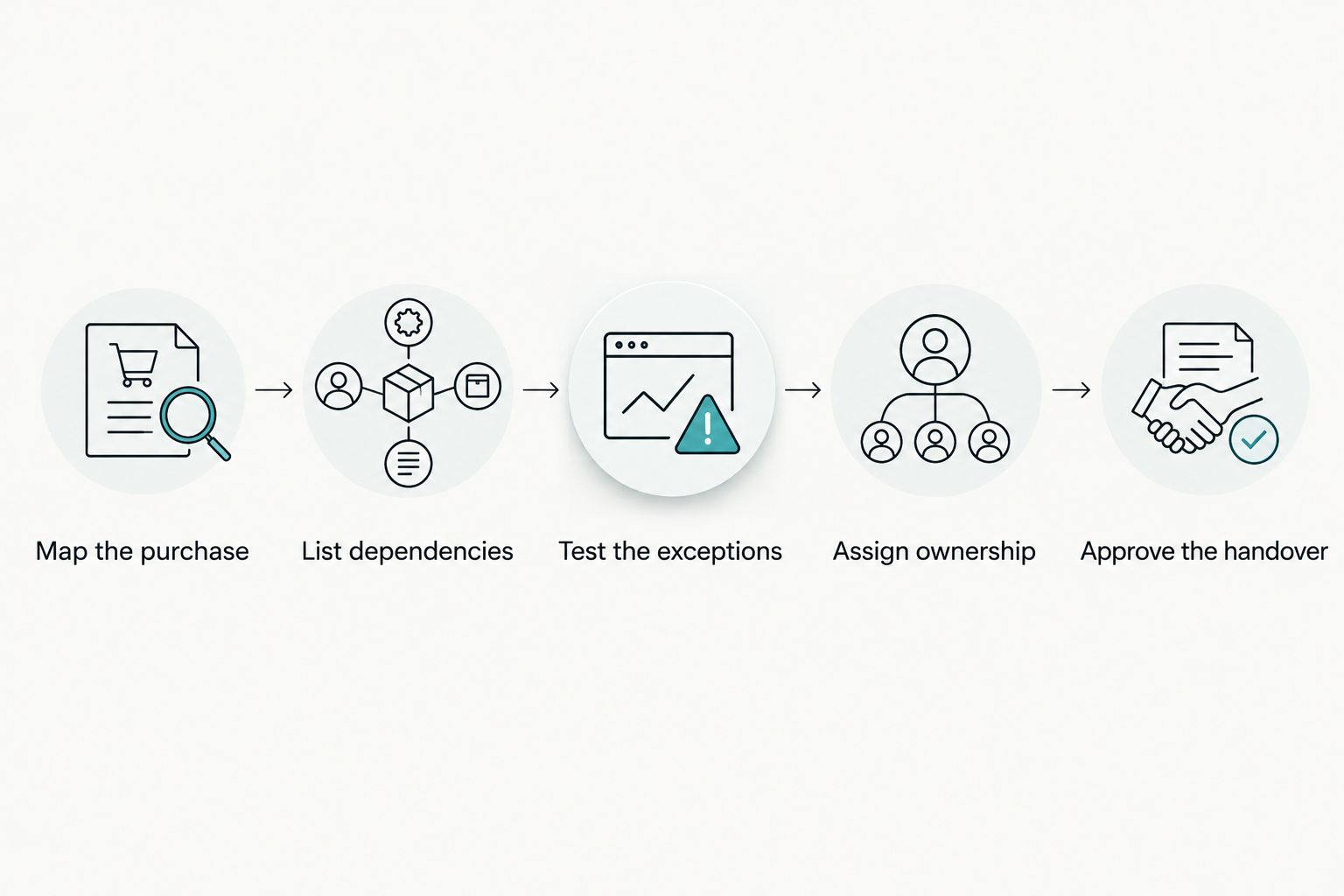
Follow these 5 selection steps
- Map the purchase. Describe how a customer finds a product, selects an option, pays, and receives confirmation. Include the exceptions that trigger staff involvement.
- List dependencies. Name the payment, fulfillment, inventory, accounting, email, and analytics systems the store must use. Separate essential connections from optional ones.
- Test the exceptions. Demonstrate your hardest product configuration, shipping rule, or account requirement. Do not accept a generic storefront tour as proof.
- Assign ownership. Specify who manages hosting, app settings, updates, backups, and incident response. Record where the platform's responsibility ends.
- Approve the handover. Have the staff member who will run the store complete ordinary tasks without the developer taking over.
These steps turn a platform preference into an operational decision. A polished demonstration proves little unless it uses your actual selling requirements.
Shopify: best for teams prioritizing managed commerce
Shopify is the stronger starting point when your main requirement is running an online store without separately managing its hosting infrastructure. Product administration, orders, and storefront management sit within a commerce-focused platform.
That does not mean Shopify runs the business for you. Your team still owns product accuracy, shipping settings, app permissions, customer communications, and the quality of the buying experience.
Where Shopify helps
- Infrastructure ownership: You do not need to select a separate host for the Shopify storefront.
- Commerce-focused administration: Staff work within a system organized around products, customers, and orders.
- Defined platform boundaries: Developers build within Shopify's supported customization methods rather than maintaining the platform itself.
Where Shopify requires scrutiny
Check whether your required checkout behavior, integrations, and content layouts are supported by the proposed implementation. Do not assume an app listing proves that every part of your workflow is covered.
Apps also introduce dependencies. Establish who monitors them, who approves new permissions, and what staff should do if a connection fails.
Recommendation: choose Shopify when its supported workflows fit your store and reducing infrastructure management is a priority. Reject a proposal that labels an essential workflow as something to solve after launch.
WordPress with WooCommerce: best for greater website control
Self-hosted WordPress with WooCommerce is the stronger starting point when content structure, custom website behavior, and control over hosting are central requirements. You can choose the hosting environment and develop functionality within the WordPress ecosystem.
That flexibility creates maintenance obligations. Someone must own updates, backups, security configuration, and testing across the theme, plugins, and hosting environment.
Where WordPress with WooCommerce helps
- Content control: You can build editorial and product content within the same WordPress installation.
- Technical choice: Your provider can select hosting, extensions, and development approaches around documented requirements.
- Custom workflows: Developers can extend the implementation when standard settings do not fit, subject to technical review.
Where WordPress with WooCommerce requires scrutiny
A plugin collection is not a maintenance plan. Ask who tests changes together, how the site is restored after a failed update, and where responsibility sits when suppliers overlap.
Also review the editing experience. A custom website should let staff maintain ordinary content without depending on a developer for every change.
Recommendation: choose WordPress with WooCommerce when the control solves a specific business requirement and a named provider owns maintenance. Do not choose it solely because the initial demonstration appears more flexible.
Why the right platform varies by store
The right 2026 choice depends on your operating model rather than a universal platform ranking. Focus on these factors:
- Purchase complexity: Product options, account requirements, and shipping exceptions determine what the implementation must support.
- Content requirements: Decide whether product discovery depends mainly on catalog browsing or also needs substantial educational content.
- Integration dependencies: Verify the complete data flow between the storefront and the systems your staff already use.
- Maintenance ownership: Identify who handles infrastructure, software changes, testing, and recovery—not just who designed the homepage.
- Staff workflow: Confirm that the people managing products and orders can complete their work in the proposed setup.
- Existing website assets: Review current content, URLs, customer records, and order history before committing to migration.
Write these requirements before reviewing themes. Otherwise, presentation can distract you from a missing operational dependency.
Is Shopify easier to manage than WordPress?
Shopify is easier to manage at the infrastructure level because hosting is part of the platform. Self-hosted WordPress requires separate ownership of hosting and application maintenance.
Daily store work is a different question. Test these 3 staff tasks in either proposed system: adding a product, processing an order, and changing a customer-facing page. Use your own product information and order rules.
Record where staff need outside help. That is more useful than accepting an unqualified claim that either platform is easy.
Is WordPress better than Shopify for SEO?
Neither platform guarantees better search rankings. Both can support product and editorial content, but implementation determines whether search engines can discover useful pages and whether customers can understand them.
For your 2026 SEO review, inspect page titles, headings, internal links, product information, mobile usability, and crawl access. Ask the provider to explain how filters, variants, and duplicate page versions will be handled.
If you are replacing an existing store, prepare a URL inventory and redirect plan before development starts. Use this guide to migrating a website without losing SEO rankings to structure that discussion; migration planning reduces avoidable mistakes but does not guarantee unchanged rankings.
Should you rebuild your existing store on another platform?
Rebuild only when the current platform prevents a documented requirement or creates an unresolved operating burden. A dated design or confusing navigation does not, by itself, prove that the platform must change.
Separate platform limitations from implementation problems. Weak product descriptions, unclear delivery information, and a buried purchase button need attention regardless of the software underneath them.
Before approving a move, ask for a written explanation of what cannot be fixed in the current system. Include the migration requirements for content, customer information, orders, integrations, and reporting.
How to evaluate the agency's proposal
Ask providers to demonstrate outcomes you can inspect, rather than promising higher conversion without evidence. A useful proposal explains the customer path, the staff workflow, the maintenance arrangement, and how you will assess the finished work.
Website Symphony is best for ecommerce businesses seeking one accountable team for custom website design, marketing, and hosting. That service scope is relevant when you want responsibility defined across the website rather than split between unrelated suppliers.
It does not replace platform due diligence. Require a specific explanation of why the recommended system fits your catalog and operations; an agency relationship alone does not establish that fit.
Inspect 3 customer journeys
- Product discovery: Can a customer reach the right product from a relevant category or information page?
- Purchase completion: Can a customer understand the product, select the right option, and reach payment without contradictory instructions?
- Post-purchase help: Can a customer find order guidance and the correct support route without guessing?
Ask to see relevant portfolio work and an explanation of the design decisions. Visual examples show what a provider has built; they are not evidence of increased sales unless supported by documented results.
For the 2026 proposal, require a written distinction between included responsibilities and work handled separately. Website Symphony's combined website design, marketing, and hosting offering gives you a useful basis for that accountability discussion without assuming a particular package or platform commitment.
Discuss your ecommerce website requirements
Review custom website design, marketing, and hosting around your store's buying and staff workflows.
FAQ
What's better for a small online store, WordPress or Shopify?
Shopify is the stronger starting point when a small online store prioritizes hosted commerce and fewer infrastructure responsibilities. WordPress with WooCommerce fits when greater website control justifies a defined maintenance arrangement.
Can I sell products using WordPress alone?
WordPress alone is not a complete ecommerce platform. WooCommerce adds store functionality, and the implementation still needs payment, shipping, and operational configuration.
Do I need separate hosting for Shopify?
You do not need separate hosting for a Shopify storefront because hosting is included with the platform. Your team still needs to manage the store's settings, content, apps, and integrations.
Does WordPress with WooCommerce need maintenance?
Self-hosted WordPress with WooCommerce needs ongoing maintenance across hosting, software, backups, and compatibility. Assign that responsibility explicitly before launch.
Can either platform guarantee more sales?
Neither Shopify nor WordPress guarantees more sales. Evaluate the buying experience and measure completed purchases rather than treating platform selection as proof of conversion improvement.
Should I change platforms to improve SEO?
Change platforms for SEO only when a documented limitation cannot be resolved in the current implementation. First review content, crawl access, site structure, and the migration risks.
Can Website Symphony help with an ecommerce website?
Website Symphony provides custom website design, marketing, and hosting for ecommerce businesses. Discuss your catalog, purchase path, integrations, and maintenance responsibilities before agreeing on an implementation.
One last thing
Before signing, have the person who will maintain the store change a product option and complete a test order in a demonstration environment. Then ask that person to explain who handles a failed integration.
If the answer is unclear, the proposal is not ready—even if the storefront is. That check exposes a responsibility gap that a homepage presentation cannot.