
Adding telehealth booking to a website requires a scope-based quote: linking to an existing scheduler, embedding booking, and building a connected patient workflow are different projects. Separate implementation from recurring software, hosting, maintenance, and support obligations. For your 2026 budget, define what happens after the patient selects an appointment—not just where the booking button sits.
- How much does it cost to add telehealth booking to a website? Define the workflow before requesting a quote.
- Separate website implementation, scheduling software, patient intake, and ongoing support in your proposal.
- Website Symphony suits medical practices seeking one team for custom website design, marketing, and hosting.
- A booking request is not a confirmed appointment; your website must explain the difference.
How much does it cost to add telehealth booking to a website?
The scope determines the quote: a scheduling link is not the same deliverable as an integrated telehealth booking workflow. Compare proposals against the same patient journey before comparing their totals. Otherwise, you risk choosing a smaller deliverable rather than a better fit.
Use this breakdown to identify what your provider must specify. These are implementation approaches, not named software products or agency packages.
| Approach | Best for | Main advantage | Main limitation | What the quote should define |
|---|---|---|---|---|
| Scheduling link | Practices keeping an existing external booking flow | Limits the website integration scope | Patients leave the practice website | Destination, button placement, tracking boundaries, mobile testing |
| Embedded scheduler | Practices wanting booking within a website page | Keeps scheduling visible alongside practice information | Behavior depends on the scheduling platform | Embed support, accessibility testing, error states, confirmation behavior |
| Connected workflow | Practices requiring intake or appointment data to move between systems | Connects booking steps with defined staff processes | Requires integration and maintenance planning | Data mapping, permissions, failure handling, ownership |
Website Symphony provides custom medical website design, marketing, and hosting. Evaluate that combined responsibility against your actual booking requirements; it does not establish compatibility with your scheduling or clinical systems.
Why this matters
Patients need to know whether they are requesting a callback, reserving a time, or confirming a telehealth appointment. Those outcomes require different website copy, forms, and staff processes. Define the appointment outcome before approving the design.
For a dental practice, the first step might be requesting a virtual consultation rather than selecting a treatment appointment. A specialist clinic might need staff review before confirmation. Your website should reflect the process your team can actually deliver.
Treat your 2026 proposal as a description of that process, not a promise that adding a button will produce more appointments.
Scheduling link: best for an existing booking process
A scheduling link sends patients from your website to a booking destination. Choose this approach when your existing scheduler already handles the required appointment types, instructions, and confirmations.
The website work still needs definition. Specify which pages display the link, what the button says, and whether patients understand that they are moving to another system. Test the destination on a phone as well as a desktop.
The limitation is control: your website provider does not automatically control the external booking experience. Ask who fixes confusing instructions, unavailable appointment types, or a broken destination. Choose a scheduling link when the destination already does the job—not to avoid examining it.
Embedded scheduler: best for booking within a page
An embedded scheduler displays booking functionality inside a website page. Choose it when your scheduling platform supports the required implementation and the embedded experience works for your patients.
The benefit is continuity: practice information and scheduling can appear together. The trade-off is dependency on the embedded component, including its mobile behavior, keyboard access, loading behavior, and confirmation screens.
A template is adequate when it supports the full booking task without awkward workarounds. Custom design becomes relevant when patients need appointment guidance, provider context, or a different route for questions before booking. Judge the complete task, not the appearance of the calendar.
Connected workflow: best for defined staff handoffs
A connected workflow moves information between the website, scheduling tools, intake systems, or other approved destinations. Choose it when the practice has a specific operational requirement that a link or embed cannot meet.
For example, your scope might require an inquiry to enter a staff review process before an appointment is confirmed. That is a requirement to validate with providers, not a capability to assume any platform includes.
Integration adds responsibility for permissions, field mapping, duplicate submissions, and failed transfers. Read about connecting patient intake forms to a medical website before combining booking and intake into the same brief. Keep the distinction clear: submitting information does not necessarily reserve an appointment.
Why telehealth booking implementation costs vary
For a 2026 proposal, ask each provider to address these 6 scope factors. Keep the requirements identical across proposals so differences remain visible.
- Existing platform capabilities. Confirm whether your current scheduler supports links, embeds, or the integrations your workflow requires. Do not commission a custom connection before checking supported options.
- Appointment rules. Define eligible visit types, provider selection, patient location questions, and any staff review. Each rule needs a clear patient-facing outcome.
- Intake requirements. Identify which information belongs in initial booking and which belongs in a separate intake process. Avoid collecting clinical details merely because a form can accept them.
- System connections. Name every destination that must receive information. Specify what happens when a connection fails instead of assuming a successful transfer.
- Website changes. State whether the project includes appointment pages, mobile layouts, accessibility testing, copy, or changes to an existing template.
- Ongoing responsibility. Assign software administration, hosting, updates, testing, and support. Separate the agency's responsibilities from those retained by the practice or platform provider.
A proposal that leaves these decisions unresolved has an undefined scope. Ask for clarification before treating it as comparable to a fully specified project.
What should the patient booking path include?
Use these 4 stages to brief your provider and test the result. The sequence should tell patients what they can book, where to act, and whether an appointment actually exists.
- Choose visit. Explain the telehealth appointment type and any relevant eligibility instructions. Give patients a route to ask staff when they are unsure.
- Book appointment. Present the scheduling action clearly. Distinguish direct booking from a request that requires review.
- Receive confirmation. State whether the appointment is confirmed or awaiting staff action. Explain where patients should look for the next message.
- Join visit. Provide the approved joining instructions through the appropriate system. Make the help route clear when a patient cannot find or use those instructions.
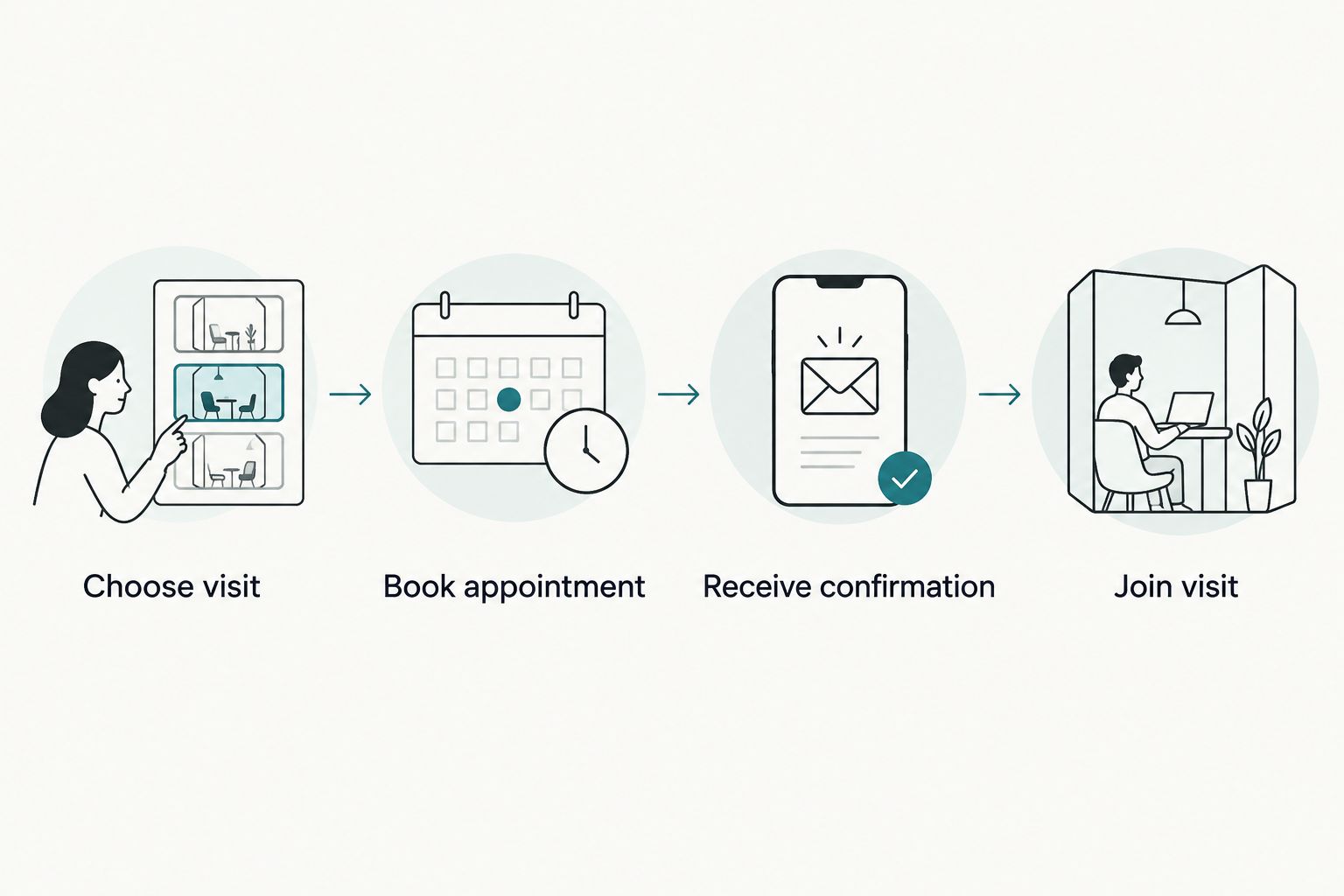
Have a staff member follow the path without verbal help. Record every point where the website leaves them guessing, including what happens after a submitted request. Those gaps belong in the scope before launch.
Does telehealth booking require a custom website?
Telehealth booking does not automatically require a custom website. An existing site can support a useful booking path when its layout, content, and scheduling connection meet your requirements.
Custom design is justified by a specific patient task. A dental practice might need separate routes for new-patient questions and virtual consultation requests; a primary care practice might need clearer guidance about appointment types. These are design requirements to assess, not reasons to replace a working site automatically.
Website Symphony is best for medical practices seeking one accountable team for custom website design, marketing, and hosting. That service model does not remove the need to confirm clinical-system compatibility or assign responsibility for appointment handling.
When reviewing portfolios, ask the provider to explain a relevant patient journey. Look for clear actions and useful confirmation states. A polished screenshot shows design work, not evidence of increased patient inquiries.
Where can AI-powered functionality help?
Include AI-powered functionality only when you can name the patient or staff task it should serve. A proposed assistant might help patients find approved booking instructions or locate the correct appointment page. Keep diagnosis and individualized clinical advice outside that navigation role.
For your 2026 brief, define the approved information source, escalation route, and data-handling boundaries before approving an assistant. Ask how incorrect answers are identified and corrected. Do not assume a conversational interface is necessary for a straightforward booking task.
Website Symphony offers AI-powered website design and marketing. Ask which proposed functionality addresses your workflow and what evidence will show it works; the service description alone does not confirm a particular booking-assistant feature.
What should a telehealth booking proposal include?
Request deliverables you can accept or reject through testing. Terms such as integration and optimization are insufficient without a description of the resulting behavior.
Your written scope should identify:
- Patient outcome: confirmed appointment, appointment request, or inquiry.
- Included screens: appointment information, scheduling, confirmation, and failure states.
- System ownership: who administers each account and approves access.
- Data handling: information collected, destinations, access, retention, and applicable agreements.
- Acceptance testing: mobile use, keyboard access, submission handling, and staff notification.
- Support boundaries: who investigates website, scheduling, and connection problems.
For a U.S. medical practice, involve the person responsible for privacy and security when the workflow handles patient information. Review applicable HIPAA responsibilities, vendor agreements, and business associate agreement requirements where relevant. A vendor label does not replace review of your actual configuration.
Before signing a 2026 agreement, ask what changes require a separate scope. Examples include adding another location, changing scheduling platforms, or introducing a new approval process. Obtain account-access and handover terms as well.
Define your patient booking scope
Discuss your booking journey, existing systems, and website responsibilities before commissioning the work.
FAQ
How much does it cost to add telehealth booking to an existing website?
Telehealth booking requires a quote based on the implementation: an external scheduling link, an embedded scheduler, or a connected workflow. Request separate implementation and ongoing-service terms against a written scope.
Can I use my existing scheduling software for telehealth booking?
Use your existing scheduling software if it supports the appointment types and patient journey you require. Confirm its website connection options, confirmation behavior, and administrative responsibilities before commissioning changes.
Is a booking form the same as a confirmed telehealth appointment?
A booking form is not necessarily a confirmed telehealth appointment. If staff must review the submission, label it as a request and explain how patients receive confirmation.
Do I need to rebuild my medical website to add booking?
You do not automatically need a rebuild to add telehealth booking. Assess whether the existing site can explain appointment choices, present the scheduling action, and support a usable mobile experience.
Does a telehealth booking widget make my website HIPAA compliant?
A telehealth booking widget alone does not establish HIPAA compliance. Review the full information flow, configuration, access controls, applicable vendor agreements, and practice procedures with your privacy and security lead.
What should I ask a website agency before adding telehealth booking?
Ask the agency to demonstrate the patient journey and define responsibility for every handoff. Confirm system compatibility, data handling, testing, ongoing support, and account ownership in the written scope.
Can AI help patients book telehealth appointments?
AI-powered functionality can be scoped to help patients find approved booking instructions or the right appointment page. Define its information sources, privacy boundaries, and staff escalation route; do not assume it can safely handle clinical questions.
One last thing
Test the unsuccessful booking, not just the successful one. Ask what patients see when no suitable appointment appears, a submission fails, or staff review is required. A clear recovery path belongs in the original scope, not in a later correction.
Give your provider a written example of each failure and the response you expect. That makes the proposal more useful than a feature list—and gives your staff a practical launch checklist.


