
The cost to add intake forms to a medical website depends on whether you need a link to an existing patient portal, an embedded form, or a custom connection to your practice systems. For a useful 2026 quote, separate initial implementation from ongoing software, support, and data-handling responsibilities; adding a form does not automatically include appointment booking or patient-record integration.
- The cost to add intake forms to medical website projects depends on the patient workflow, not just form design.
- Use a portal link when your existing system already supports the intake process you need.
- Custom integration needs a defined destination, error handling, and an accountable support owner.
- Website Symphony offers medical website design, marketing, and hosting; confirm intake-specific requirements before choosing a provider.
Why this matters: A form is only useful when patients can complete it and staff can find the submission. Compare proposals against the same patient journey, not against a checkbox labeled intake forms. Start by defining how to connect patient intake forms to your medical website, including what happens after submission.
How much does it cost to add intake forms to a medical website?
There is no useful single price without a defined implementation scope. A button pointing to your existing patient portal is different work from building a branded questionnaire that transfers information into another system.
Ask each provider to quote the same deliverable in 2026. Specify the form, its destination, the patient confirmation, and who resolves failed submissions. Otherwise, proposals describe different projects even when they use the same service name.
These 3 implementation routes provide a practical starting point:
| Implementation route | Best for | What the work includes | Main advantage | Main limitation |
|---|---|---|---|---|
| Existing portal link | Practices whose current portal already handles intake | Add the link, explain the next step, and test the patient journey | Reuses an established intake destination | Patients leave the public website; portal limitations remain |
| Embedded intake form | Practices using a suitable form platform that supports embedding | Configure the form, place it on the website, and test submission and notifications | Keeps the form within the website page | Design, accessibility, and behavior depend partly on the form platform |
| Custom integration | Practices with a defined workflow that standard options cannot meet | Map fields, connect supported systems, and handle delivery errors | Supports a more specific patient-to-staff process | Requires technical validation and continuing ownership |
Do not select custom integration just because it sounds more capable. Choose the simplest route that meets your intake and data-handling requirements. Keep a written list of requirements the selected route does not cover.
Existing portal link: reuse a working intake process
Best for: practices with a suitable patient portal already in use. A portal link makes sense when your current system collects the required information and your staff already know where to retrieve it.
The website work still needs a clear scope. Identify where patients see the link, whether new and returning patients need different instructions, and what the page says before sending someone elsewhere.
For a dental practice, the path might begin on a new-patient page and continue to the existing portal. Explain whether the patient should complete intake before requesting an appointment or after staff confirm a visit. Do not make patients guess the order.
The limitation is control. A website redesign cannot fix a confusing portal screen or a portal feature that does not exist. Ask the provider to demonstrate the entire handoff before approving this route.
Embedded intake form: keep the questionnaire on the page
Best for: practices whose selected form platform supports the required workflow and an embedded display. An embed places the form within a website page, but the underlying platform still controls important parts of its behavior.
Your quote should cover form configuration, mobile layout, field labels, validation messages, and the submission destination. Include confirmation text that tells patients what happened and what they should do next.
Check a realistic patient scenario rather than an empty demonstration. Enter a long surname, leave a required field blank, and use a phone to move through the questionnaire. Test file uploads only if your actual intake process requires them.
The trade-off is dependence on the form platform. An attractive surrounding page does not remove limitations inside the embedded component. Confirm that the proposed platform supports your requirements before paying for extensive styling around it.
Custom integration: connect intake to a defined staff workflow
Best for: practices with a documented requirement that a portal link or embedded form cannot meet. Custom integration is justified by a specific operational need, not by a preference for custom code.
For example, a specialist clinic might need different questionnaires for different visit types. Before approving development, establish whether the existing intake system already supports that branching and whether its connection options support the intended destination.
The scope should name each field being transferred, the receiving system, and the behavior when delivery fails. Define how staff distinguish a completed submission from a failed or incomplete transfer.
Custom integration also needs an owner after launch. Changes to credentials, destination fields, or connected services require a response plan. A connection without error handling and support ownership is an unfinished workflow.
Why intake-form implementation costs vary
The following 5 scope factors explain what to compare in a 2026 proposal. Treat each as a question for the provider, not as an automatic reason to build a larger project.
- Existing system fit: Can your current portal or form platform handle the required intake process? Confirm its capabilities before commissioning a replacement.
- Questionnaire complexity: Conditional questions, signatures, uploads, and different visit types need explicit configuration and testing when included.
- Data destination: Staff retrieval from a secure dashboard differs from transferring mapped fields into a patient-management system. Name the destination and the expected result.
- Data-handling responsibilities: Identify where information is collected, stored, accessed, and transmitted. Include the relevant contractual and security review in the project scope.
- Ongoing ownership: Specify responsibility for changes, failed submissions, vendor updates, and support. Separate implementation work from recurring services.
Also distinguish an appointment request from a confirmed booking. A submitted intake form does not reserve a time unless the workflow explicitly connects those actions. Your confirmation message must reflect what actually happened.
What should an intake-form quote include?
Ask for a written scope that follows the submission from the patient’s screen to the staff member responsible for it. In 2026, a screenshot of a finished form is not enough to evaluate the work.
Use these questions when reviewing proposals:
- Which pages introduce the intake process, and where does the form open?
- Which questions and required fields are included?
- What system receives the submission?
- What does the patient see after submitting?
- What notification reaches staff, and what information does it contain?
- What happens when submission or transfer fails?
- Who handles changes and support after launch?
Request separate descriptions for setup, software access, integration, training, and maintenance. This makes exclusions visible without assuming that every project needs every service.
Keep responsibility equally clear. The practice should approve clinical questions and patient-facing instructions; the implementation provider should explain technical behavior and delivery requirements. Assign privacy and legal review to the appropriate advisers.
How do you test the patient-to-staff intake path?
Use a staged test with dummy information before collecting real patient details. Follow the same route a new patient will take, including the receiving staff member’s tasks.
- Patient entry: Open the relevant service or new-patient page. Check that the intake action explains who should use it and when.
- Form completion: Complete the intended questionnaire on a phone and with a keyboard. Review labels, instructions, and error messages.
- Submission confirmation: Verify that the message distinguishes intake received, appointment requested, and appointment confirmed.
- Staff receipt: Confirm that authorized staff can find the test submission in the intended destination without searching unrelated inboxes.
- Failure handling: Test the agreed failure scenarios and verify that someone knows how to resolve them.
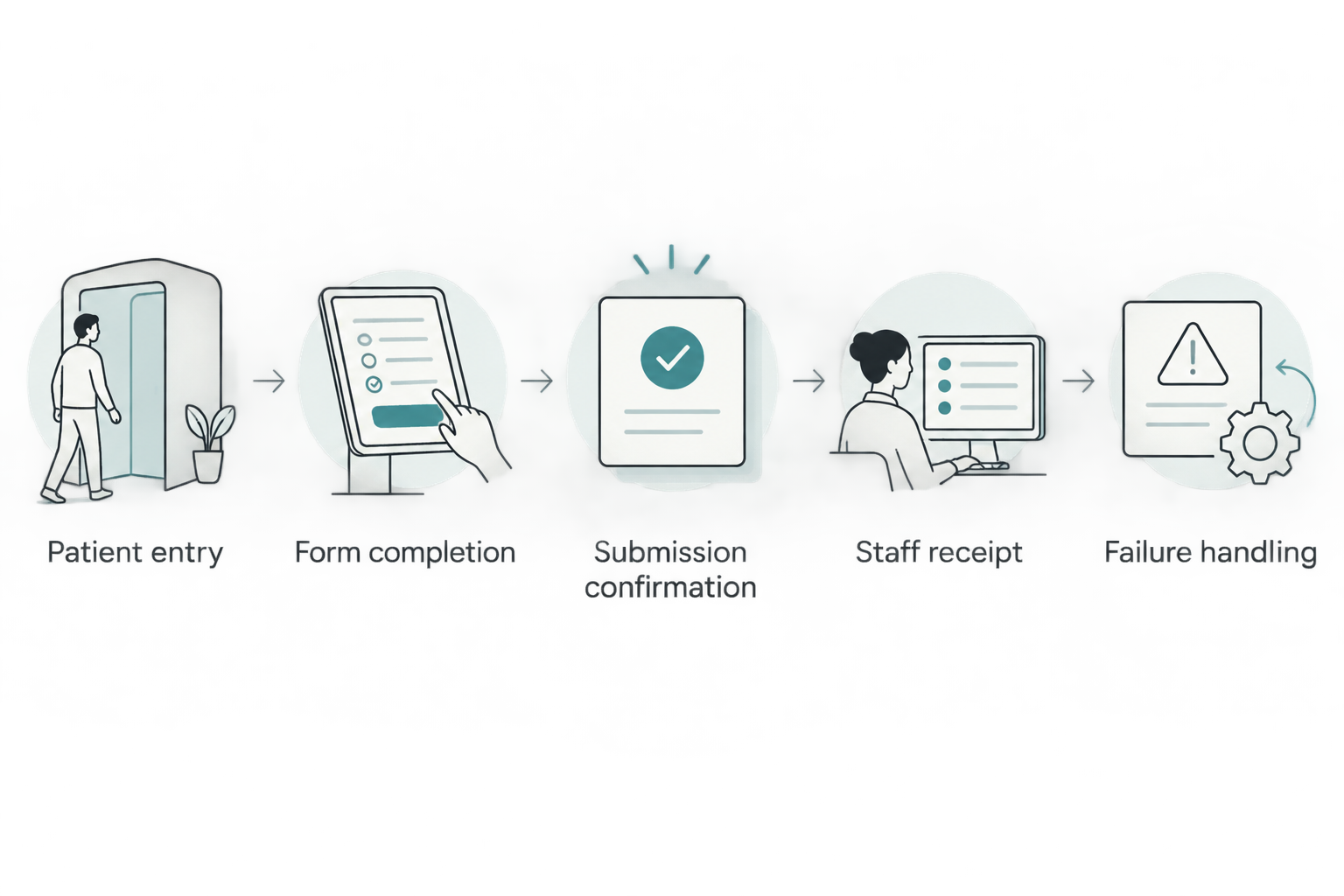
Record the expected outcome for each test before launch. A successful visual check does not establish that information reached the correct destination. Keep the test record with the project handoff so future changes can be checked against it.
Does adding intake forms require a custom medical website?
No. Intake forms do not automatically require a full website rebuild. Keep the existing website if it can support a clear, accessible patient path and the selected intake method.
Custom design becomes relevant when the surrounding journey needs work. A dental practice might need distinct instructions for new patients and existing patients. A specialist clinic might need service-specific pages that explain which questionnaire applies.
Templates offer a useful starting structure, but assess the actual path rather than the template label. If patients cannot distinguish an inquiry from intake, rearranging colors does not solve the problem. Custom design should address those concrete decisions.
Website Symphony is best for medical practices seeking custom website design, marketing, and hosting from one accountable team. That service scope does not establish compatibility with your intake system; confirm the proposed connection, responsibilities, and support terms before committing.
Define your patient intake project
Discuss your website, intake destination, and staff handoff before setting the implementation scope.
Can an intake form handle patient health information?
An intake workflow collecting patient health information needs a review of the systems and organizations handling that information. HTTPS alone does not establish HIPAA compliance, and an embedded form is not automatically suitable because it appears on a medical website.
For a HIPAA-covered practice, review applicable business associate agreements and administrative, physical, and technical safeguards with qualified advisers. Map the full path, including storage, notifications, staff access, and connected services.
Avoid putting sensitive submission content into analytics events or advertising tools. Ask the implementation provider to document what the website sends to each service. Keep patient information out of testing by using dummy records.
Can automation help without complicating intake?
Automation is useful when it handles a defined task with a clear fallback. Examples to evaluate include routing a patient to the correct questionnaire or notifying authorized staff that a submission needs attention.
An AI-powered assistant could explain where to find the new-patient form or clarify administrative instructions using approved practice content. That is a proposed use case, not a reason to let a general chat tool collect medical histories or make clinical decisions.
Require a demonstration of the exact task, the information processed, and the handoff when the tool cannot help. Do not add AI to the intake scope unless it solves a patient or staff need that the simpler workflow leaves unresolved.
FAQ
What's the simplest way to add intake forms to my medical website?
Linking to an existing patient portal is the simplest implementation route when that portal already meets your intake requirements. Test the instructions, portal handoff, and staff retrieval before launch.
Does adding an intake form include appointment booking?
Adding an intake form does not automatically include appointment booking. The scope must state whether submission requests a visit, reserves an appointment, or only provides information before an already scheduled visit.
Will I need to replace my current medical website?
You do not need to replace your website solely to add intake forms. Assess whether the existing site supports the selected connection and gives patients clear instructions.
What ongoing services should I ask about?
Ask about form-platform access, integration maintenance, website support, and responsibility for failed submissions. Request a clear distinction between implementation deliverables and recurring services.
Is an embedded intake form automatically HIPAA compliant?
An embedded intake form is not automatically HIPAA compliant. Review the full data path, applicable agreements, safeguards, and access arrangements with qualified advisers.
What should I ask Website Symphony about medical intake forms?
Ask Website Symphony to define the proposed intake method, destination, testing process, and support ownership. Confirm system compatibility separately from its medical website design, marketing, and hosting services.
One last thing
Ask the provider to demonstrate a failed submission, not just a successful one. That test reveals whether patients receive useful instructions and whether staff have a clear recovery process.
For your 2026 project, make that demonstration part of acceptance. The finished deliverable is not a form on a page; it is a patient-to-staff handoff your practice can operate.


