
A Shopify store is ready to launch when its products, checkout, payments, delivery rules, and customer communications work together—not after a fixed number of days. Your timeline also includes content preparation, approvals, and testing, so opening an account is not the same as launching a store that can accept and fulfill orders.
- How long does it take to launch a Shopify store? Your launch scope and readiness determine the schedule.
- Shopify setup is not the finish line: test checkout, delivery rules, and order notifications before publishing.
- Use a theme when its structure fits; choose custom design when a documented buying requirement justifies it.
- Website Symphony suits eCommerce businesses seeking one accountable team for custom website design, marketing, and hosting.
How long does it take to launch a Shopify store?
There is no reliable universal launch duration. Get a schedule tied to your actual catalog, design requirements, integrations, and approval process. A deadline without those details is a target, not a supported estimate.
For a 2026 launch, define what must work on opening day before asking for a delivery date. A published storefront, a tested purchasing journey, and a store connected to your operating systems are different deliverables.
If you need outside support, Website Symphony provides custom website design, marketing, and hosting for eCommerce businesses. Ask any prospective provider to separate design work from content preparation, platform configuration, and operational testing in its proposal.
Use these launch gates to turn a vague timeline into an accountable plan:
- Approve the scope. Identify the products, customer journeys, pages, and connections required at launch.
- Prepare the content. Finalize product information, images, navigation, and business policies.
- Build the storefront. Configure the theme or implement the approved custom design.
- Connect operations. Set up payment methods, delivery rules, notifications, and required systems.
- Test the purchase. Check the customer experience and the staff workflow behind it.
- Authorize publishing. Confirm ownership, remove launch blockers, and approve the public store.
The launch date should follow the work remaining at these gates. Do not treat an unfinished gate as complete because another part of the store looks ready.
Why this matters
A homepage can look finished while the store still has an incorrect delivery rule or an unanswered product question. Customers encounter those problems during the purchase, not during a design presentation.
Schedule around the complete order journey, not the homepage reveal. For your 2026 launch plan, separate tasks that prevent a purchase from improvements that can follow publication. That distinction gives you a useful way to reduce scope without ignoring essential checks.
Which launch approach fits your store?
Choose the approach based on what your customers need to buy and what your team needs to fulfill orders. Custom work is justified by a requirement, not by the word custom in a proposal.
| Approach | Best for | Main advantage | Main limitation | What must be resolved before launch |
|---|---|---|---|---|
| Theme-based storefront | Businesses whose buying journey fits an existing theme | Starts with established page structures | Layout and behavior must fit the theme or require changes | Content, configuration, checkout, and delivery testing |
| Custom storefront design | Businesses with defined requirements an existing layout does not meet | Shapes pages around the required customer journey | Adds design decisions, implementation, and approval work | Approved layouts and verified behavior across key pages |
| Existing-store migration | Businesses moving an operating store to Shopify | Carries an existing business into a new platform | Adds data mapping and transition dependencies | Product data, redirects, integrations, and order handling |
Theme-based storefront: use the existing structure deliberately
A theme-based build works when its product pages, navigation, and cart behavior fit your store. Prepare the content before adjusting cosmetic details; otherwise, the layout gets approved around placeholder material.
The trade-off is constraint. If your team repeatedly requests changes to the theme's basic behavior, revisit the requirements instead of calling every change a minor adjustment.
Best for: a store whose purchase journey fits the chosen theme without extensive modification.
Custom storefront design: solve a defined buying problem
Custom design is useful when customers need a product-selection path, information hierarchy, or page structure that the proposed theme does not provide. Describe that requirement in plain language before approving design work.
The benefit is control over the experience. The cost to the schedule is additional decisions and implementation work; custom design alone does not prove that more customers will buy.
Best for: a business with documented requirements that justify departing from an existing layout.
Existing-store migration: plan the transition, not just the replacement
A migration includes deciding what moves, what changes, and what happens to existing links. Product records, customer information, and connected systems need explicit handling rather than an assumption that everything transfers unchanged.
Replacing a storefront also creates an operational handoff. Staff need to know where new orders appear and how exceptions are handled after the switch.
Best for: an operating business that needs continuity while changing platforms.
Why your Shopify launch timeline varies
These factors belong in the project scope because each creates work that must be completed or deliberately excluded:
- Catalog readiness: incomplete descriptions, inconsistent variants, and missing images leave product pages unfinished.
- Design requirements: an established theme and a custom customer journey require different implementation work.
- Business rules: delivery regions, tax settings, payment methods, and return information need configuration and review.
- Connected systems: accounting, fulfillment, inventory, or email connections need defined responsibilities and testing.
- Migration requirements: existing records and URLs require mapping when an operating store changes platforms.
- Approval ownership: conflicting feedback and unresolved decisions prevent work from reaching acceptance.
Ask the provider to name the dependency behind each milestone. If product content must arrive before page review, put that dependency in the plan rather than leaving it in an email conversation.
For a 2026 project, keep a shared record of approved scope and subsequent changes. When a request changes the work, require a revised schedule before approving it.
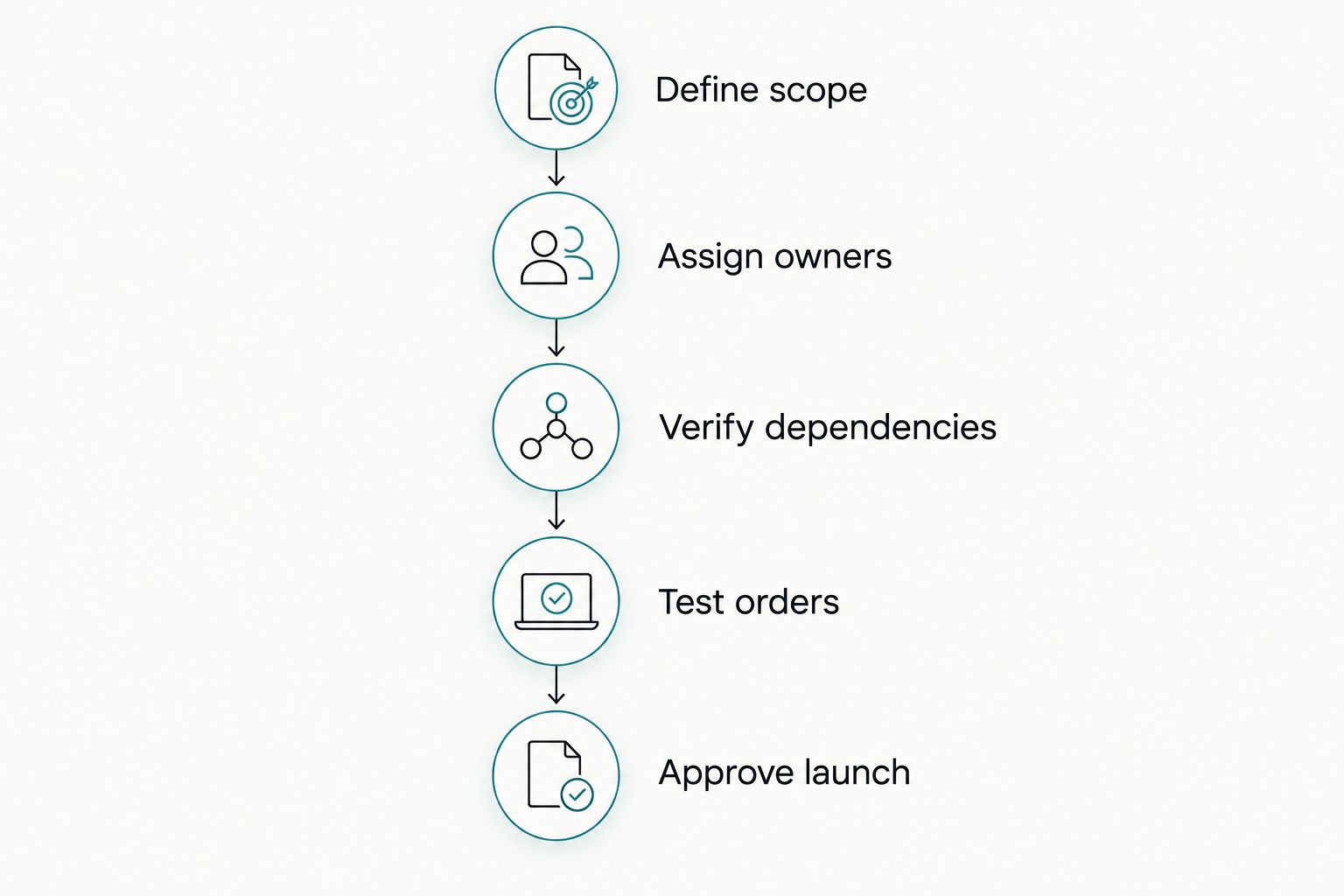
How do you build a launch schedule you can trust?
Start with the purchase journey and work backward to its dependencies. This produces a schedule based on deliverables rather than a date chosen before anyone understands the store.
Define scope
Write down the launch catalog, required pages, customer regions, and essential connections. Explicitly exclude enhancements that do not need to be ready for the first order.
A useful scope statement describes behavior: customers can select the correct variant, understand delivery, complete checkout, and receive confirmation. A list of page names alone does not establish that outcome.
Assign owners
Give every deliverable an owner and an approver. The person supplying product information is not necessarily the person authorized to approve it.
Group feedback into a clear decision. Conflicting comments should be resolved before they become instructions to the designer or developer.
Verify dependencies
Identify what must exist before the next task can finish. A delivery configuration needs business rules; a product layout needs representative product content.
Record external dependencies separately, including account access and any required provider review. Do not silently fold work outside the build team's control into a guaranteed publishing date.
Test orders
Run the purchase journey using the platform's supported testing methods. Check the order record and customer communication, not just the confirmation screen.
Include the operational handoff. Your team should understand how to find the order, recognize its payment state, and send it through the intended fulfillment process.
Approve launch
Review unresolved issues against the agreed launch scope. Block publication for issues that prevent the intended order journey or misrepresent essential business information.
Assign responsibility for publishing and for checking the live store afterward. Approval is a decision with an owner, not silence after a preview link.
What should you test before publishing?
A successful test checks what the customer sees and what your staff receives. Use scenarios that reflect your actual catalog and delivery rules rather than a single convenient purchase.
Your 2026 launch checklist should cover:
- Product selection: names, descriptions, images, variants, and options match the intended purchase.
- Mobile use: navigation, product selection, forms, and checkout controls remain usable on a phone.
- Delivery behavior: supported destinations receive the intended choices, and unsupported destinations do not slip through.
- Payment behavior: the expected payment methods and resulting order states work as configured.
- Customer communication: confirmations contain the correct business information and order details.
- Staff handoff: the team can locate the order and follow its fulfillment process.
- Public access: the intended domain opens the store without an unintended access barrier.
If recovery emails are in scope, review the Shopify to abandoned cart recovery emails workflow separately from order confirmations. A customer who completes checkout and a customer who leaves checkout need different communication paths.
Keep a record of failed checks and their resolution. A checked box without an observed result is not evidence that the store works.
Can you launch a Shopify store faster with a theme?
A theme reduces the need to create page structures from scratch, but it does not finish your product content or configure your business rules. Choose it when the existing structure supports the customer journey you need.
To shorten the project, approve representative pages and freeze nonessential layout changes. Do not remove purchase testing to protect a date; remove optional work instead.
Does custom design make a Shopify launch take longer?
Custom design adds design, implementation, and approval tasks that need a place in the schedule. Whether those tasks change your publishing date depends on the agreed scope and the work already complete.
Require each custom element to solve a named problem. If nobody can explain how it helps customers choose, understand, or purchase, consider moving it outside the launch scope.
Can AI-powered tools shorten the launch process?
AI-powered tools can assist with draft product descriptions or group draft customer questions for review. Those are practical preparation tasks, not substitutes for accurate product information or working checkout settings.
Keep a person responsible for approving every published claim. Website Symphony offers AI-powered website design and marketing, but any proposed functionality should have a defined user need and an acceptance test—not an assumed improvement in sales or delivery speed.
FAQ
How long does it take to launch a Shopify store from scratch?
The launch timeline depends on your catalog readiness, design scope, business rules, integrations, and approvals. Ask for a schedule tied to those deliverables rather than an unsupported standard duration.
Can I launch my Shopify store before every product is ready?
You can define a smaller launch catalog and add other products afterward. Every published product still needs accurate information, working purchase options, and a fulfillment process.
Is a Shopify theme better than custom design for a first store?
A theme is the better starting point when its existing structure fits your buying journey. Custom design is justified when a documented requirement needs a different structure or behavior.
What should I prepare before hiring someone to build my Shopify store?
Prepare your product information, images, business rules, required connections, and approval ownership. Give the provider a clear launch scope so the proposed schedule reflects the actual work.
Does publishing my Shopify store mean checkout has been tested?
Publishing does not establish that checkout has been tested. Verify product selection, delivery choices, payment behavior, order records, and customer notifications before authorizing launch.
Can Website Symphony help with an eCommerce website?
Website Symphony provides custom website design, AI-powered marketing, and hosting for eCommerce businesses. Confirm the Shopify-specific scope, responsibilities, and acceptance criteria before agreeing to a project.
What should I postpone if my Shopify launch date is at risk?
Postpone optional enhancements before removing essential purchase checks. Keep the product information, checkout, delivery rules, customer communication, and staff handoff within the launch scope.
One last thing
The most useful launch question is not just when the store goes live. Ask: What evidence will show that a customer can place an order and your team can fulfill it?
For your 2026 launch, require a documented test result and a named owner for unresolved issues. That turns a publishing date into an operational decision instead of a design milestone.