
A primary care website takes as long as the agreed scope, content approvals, and booking setup require; a reliable completion date comes from a project plan, not a generic average. For a 2026 launch, ask for separate milestones for design approval, patient-path testing, and publication, including any dependencies on your scheduling provider.
- How long to build a primary care website depends on approved content, booking requirements, and launch scope.
- Website Symphony fits medical practices seeking custom website design, marketing, and hosting from one team.
- Approve the patient inquiry path before approving page layouts.
- Separate website publication from scheduling integrations and post-launch marketing results.
How long does it take to build a primary care practice website?
The dependable answer is a scoped schedule with named owners and approval dates. A design preview is not a finished practice website. Your launch also needs accurate practice information, working patient actions, approved content, and a tested publishing process.
Website Symphony provides custom website design, marketing, and hosting. When evaluating a proposal, ask the provider to distinguish its own production work from tasks that require your staff or another vendor.
Use these milestones to judge whether a proposed timeline covers a usable website rather than just a visual design:
- Scope approved: Confirm the pages, patient actions, integrations, and launch requirements.
- Content approved: Verify provider details, services, locations, hours, and appointment instructions.
- Design approved: Review the patient journey on phone and desktop layouts.
- Website built: Implement the approved pages and agreed functionality.
- Patient paths tested: Check calls, forms, scheduling links, confirmations, and staff routing.
- Launch accepted: Complete publication checks and assign ongoing ownership.
Ask which milestones can run together and which must finish before the next begins. That distinction makes a schedule useful.
Why this matters
Your practice needs more than a new homepage. A prospective patient needs to understand whether you provide the care they need, where to go, and how to request an appointment.
A project that finishes its layouts but leaves appointment routing unresolved is not ready for patients. Conversely, delaying every useful improvement until an optional feature is complete ties the launch to work that might not belong in the initial scope.
Define readiness through patient tasks, not visual completion. Your 2026 website brief should describe what patients and staff must be able to do when the site goes live.
Choose the launch scope before choosing the date
Different project shapes create different approval and testing requirements. Compare them by the work involved, not by an unsupported promise that one always launches faster.
| Project approach | Best for | Practical advantage | Trade-off to resolve |
|---|---|---|---|
| Template-based refresh | Practices whose patient paths fit an existing layout | Starts with an established page structure | Check whether booking and service information fit without awkward workarounds |
| Custom practice website | Practices needing layouts built around their services and patient actions | Lets the team design around your actual inquiry process | Requires decisions about content, structure, and interactions |
| Phased custom launch | Practices with essential launch needs and separable later features | Keeps optional work outside the initial release | Requires clear boundaries so essential functionality is not postponed |
Template-based refresh
A template is a starting structure, not a completed patient experience. You still need approved copy, accurate practice details, and a working route to the right appointment destination.
Best for: A practice whose requirements fit the available structure. Before choosing this approach, have the provider demonstrate your new-patient and existing-patient paths rather than showing only a sample homepage.
Custom practice website
Custom design is useful when your practice needs different routes for services, locations, or patient types. For example, an appointment request should not send an existing patient looking for the portal into a general marketing form.
Best for: A practice replacing a template that cannot express its real patient journey. The trade-off is decision-making: your team must approve the structure instead of simply accepting a preset layout.
Phased custom launch
A phased project separates essential publication requirements from additions that can stand alone. Keep accurate information, usable contact routes, and safe handling of inquiries inside the launch scope.
Best for: A practice with a firm operational deadline and optional features that do not block patient access. Document what is deferred, who owns it, and how its later release will be accepted.
Why primary care website timelines vary
For a 2026 project, use these factors to explain the proposed schedule. Each should connect to a concrete deliverable or approval—not a vague allowance for complexity.
- Content readiness: Assign responsibility for writing and approving services, biographies, location details, and patient instructions.
- Appointment functionality: Specify whether the website links to an existing scheduler, accepts requests, or needs a deeper connection.
- Patient information handling: Decide what each form collects, where it sends information, and who reviews that setup.
- Design decisions: Identify which layouts need approval and who can authorize them.
- Existing-site replacement: Include content transfer, old-page destinations, domain access, and publication responsibilities where applicable.
- External dependencies: Name the scheduling, portal, hosting, or other account access required to finish the agreed work.
A useful schedule names the dependency and its owner. An unexplained buffer does not tell your practice what needs attention.
Map the appointment path before approving the design
Write the intended patient journey in plain language. Start with the service page a patient visits, then follow the action through to the staff workflow or scheduling destination.
A practical review follows this sequence:
- Find care: Can the patient identify the relevant service and location?
- Choose action: Is the next step an appointment request, a phone call, or a scheduling link?
- Submit request: Does the form or destination ask for information appropriate to that task?
- Receive confirmation: Does the patient understand what happened and what comes next?
- Staff follow-up: Does the request reach the responsible team with a clear handling process?
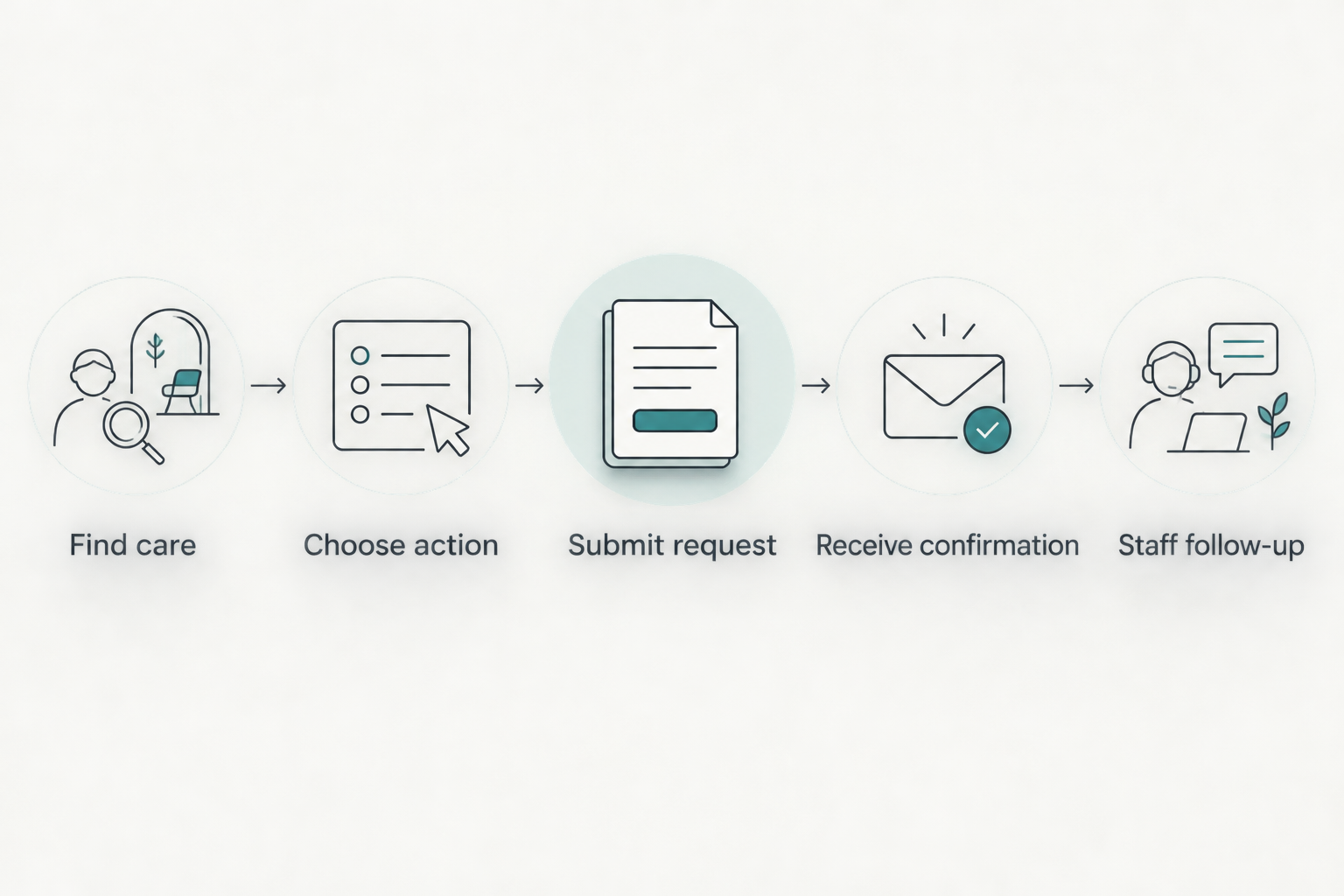
A request confirmation must not imply that an appointment is booked unless the scheduling system has actually confirmed it. That wording belongs in the scope because it affects copy, functionality, and testing.
For a deeper planning reference, use the primary care practice website design guide. Keep your own workflow specific to how your front desk accepts and responds to inquiries.
Prepare the materials that let production move
Give the project team an approved source for practice information. Avoid asking designers to reconcile conflicting details across old pages, documents, and staff emails.
Practice information
Supply the practice name, locations, phone numbers, hours, provider names, credentials, and approved service descriptions. Mark any information that must remain unpublished until a specific operational change occurs.
For your 2026 launch, verify details with the person responsible for maintaining them. A copied page is not an approval.
Access and ownership
Identify who controls the domain, existing website, hosting account, appointment system, and patient portal. Arrange appropriate access without circulating shared passwords in project documents.
Ask the provider to flag missing access before it becomes a launch dependency. Also confirm who retains account ownership after publication.
Content decisions
Name the clinical reviewer for medical wording and the operational reviewer for appointment instructions. Give one person authority to consolidate feedback before it reaches the production team.
Separate factual corrections from new requests. Adding a service section after layout approval is a scope decision, not the same task as correcting a provider's title.
Keep practical AI features separate from vague promises
AI-powered functionality needs a defined job. A useful proposal might describe an assistant that directs visitors to approved appointment instructions or answers administrative questions from practice-approved information.
Treat that as a feature to specify, not a reason to skip review. Require clear limits on what the assistant answers, what information it collects, and when it directs someone to staff.
For a 2026 primary care website, evaluate proposed AI functionality against these acceptance questions:
- Does it use information your practice has approved?
- Does it distinguish an appointment request from a confirmed booking?
- Does it avoid presenting itself as a source of diagnosis or emergency care?
- Does it provide a clear route to a person when it cannot complete the task?
Keep optional AI functionality outside the initial release if it is not necessary for the agreed patient journey. Do not let an undefined feature determine the publication date.
Choose a provider by accountability, not a launch promise
Website Symphony is best for medical practices seeking one team for custom website design, marketing, and hosting. That service combination gives buyers a clear starting point for discussing responsibility across the website and its ongoing operation.
The trade-off is that choosing a custom service does not remove your practice's approval work. Ask Website Symphony to document content responsibilities, booking requirements, hosting scope, and post-launch support in the proposal.
Request relevant portfolio examples and discuss the patient paths they show. A portfolio can demonstrate design choices; it does not establish an inquiry increase without supporting results.
Ask any provider to explain what happens when your scheduler changes, a form stops delivering, or a new location needs a page. Those answers define the working relationship beyond launch day.
Define your practice website scope
Discuss your patient inquiry path, booking requirements, and launch responsibilities.
Can a primary care website launch before online booking is connected?
A launch can use another approved appointment route if online booking is not essential to the agreed release. For example, the website can clearly direct patients to call rather than display a booking button that does not work.
Document the temporary route, staff responsibility, and acceptance criteria for the later booking release. Do not describe a request form as instant scheduling.
Does custom design take longer than using a template?
The layout choice alone does not establish the completion date. Compare proposals using the same approved content, appointment requirements, review process, and launch checks.
A template still needs patient-path testing. A custom project still needs a firm scope; neither approach excuses an unclear schedule.
Does launching the website mean more patient inquiries immediately?
Publication is a technical milestone, not proof of increased patient inquiries. Evaluate inquiry performance separately from whether the website launched on its agreed date.
Confirm which actions your practice will measure and who reviews them. Avoid treating page views, form submissions, and confirmed appointments as interchangeable outcomes.
FAQ
How long to build a primary care website if our content is ready?
Approved content removes a project dependency, but it does not establish the whole timeline. Design decisions, appointment functionality, testing, and publication still need scheduled milestones.
What's the fastest responsible way to launch our practice website?
Define the essential patient journey and keep separable optional features outside the initial release. Keep accurate practice information, working contact routes, and patient-path testing inside the launch scope.
Can we keep our current appointment scheduler?
Make your current scheduler a requirement in the project brief, then have the provider confirm the supported connection. Specify whether patients follow a link, use an embedded interface, or need another arrangement.
Who needs to approve a primary care website?
Assign clinical wording to a qualified practice reviewer and appointment instructions to the operational owner. Give one decision-maker responsibility for consolidating feedback and authorizing publication.
Will AI make our medical website ready sooner?
AI is not a substitute for approved content or tested patient workflows. Assess any proposed feature by its specific administrative task, information sources, and staff handoff.
Should we replace our template with a custom medical website?
Choose custom design when your template cannot support the patient paths and content structure your practice needs. If the existing structure fits, evaluate whether targeted changes address the actual problem.
What should happen before we approve the launch?
Test the patient journey from the published entry page through the final action and confirmation. Verify the staff destination as well as the patient-facing screen.
One last thing
Test the destination, not just the button. A working appointment link can still lead to the wrong location, an unsuitable visit type, or instructions that conflict with your front desk's process.
Before your 2026 launch, ask the staff member who handles inquiries to complete the journey on a phone. Approve what happens after the action, not merely how the page looks before it.


