
Best overall: booking connected to your existing practice system; best for dental offices: dental-system scheduling; best for referral-led clinics: appointment-request software. This 2026 guide compares those approaches with standalone scheduling so you can choose around patient needs, staff responsibilities, and your website’s appointment path.
- The best patient appointment booking software for medical practices fits appointment rules and staff workflows before website appearance.
- Website Symphony is best for practices seeking custom medical website design, marketing, and hosting from one accountable team.
- Choose dental-system scheduling around provider, procedure, and new-patient requirements—not a generic calendar.
- Use appointment requests when staff must review referrals or visit eligibility before confirming an appointment.
Why this matters
A booking button is not a booking process. Your website must help patients identify the right service, choose the appropriate next step, and understand whether their appointment is confirmed or awaiting review.
Website Symphony provides custom medical website design, marketing, and hosting as one accountable team. Scheduling software remains a separate buying decision: choose the workflow first, then design the website around it.
For your 2026 shortlist, distinguish patient convenience from operational fit. A calendar that accepts an appointment your staff must cancel creates a different problem from a form that clearly requests a callback.
What makes the best patient appointment booking software?
Judge patient scheduling against these criteria before comparing demonstrations:
- Appointment accuracy: Does the workflow distinguish new patients, established patients, visit types, providers, and locations?
- Schedule ownership: Which system controls appointment inventory, and how does information reach staff?
- Patient clarity: Does the final screen distinguish a confirmed booking from a submitted request?
- Privacy controls: What information is collected, where does it go, and which contractual safeguards apply?
- Website usability: Can patients complete the path on a phone, with a keyboard, and without confusing detours?
- Staff accountability: Who handles incomplete requests, changes, integration failures, and follow-up?
Reject a workflow that cannot explain what happens after the patient presses Submit. That answer matters more than a long feature list.
Patient booking options at a glance
These are workflow categories, not interchangeable products. Confirm each shortlisted vendor’s actual capabilities against your practice requirements.
| Rank and option | Best for | Standout capability to require | Key limitation |
|---|---|---|---|
| 1. Practice-system booking | Primary care and practices keeping their current clinical system | Scheduling governed by the practice’s existing appointment rules | Depends on what the current system supports |
| 2. Dental-system scheduling | Dental practices with procedure-specific appointment paths | Separate rules for new patients, procedures, and providers | Public booking still needs carefully restricted appointment types |
| 3. Appointment-request software | Specialist clinics requiring review before confirmation | A clear staff review and response workflow | Does not give patients immediate confirmation |
| 4. Standalone scheduling | Narrow, clearly defined appointment workflows | A simple booking path with explicit calendar ownership | Creates a separate workflow unless connections are verified |
1. Practice-system booking: best for primary care continuity
Practice-system booking uses scheduling functionality connected to the software your practice already operates. For a primary care practice retaining its current system, this is the first approach to evaluate—not an automatic endorsement of every built-in scheduler.
Start with the appointment rules. Ask the vendor to demonstrate how a new patient, an established patient, and someone selecting a particular clinician reach appropriate appointment options.
Practice-system booking pros:
- Keeps the evaluation focused on your existing clinical workflow.
- Gives staff a defined system to check for appointment status.
- Lets you assess website booking against rules staff already understand.
Practice-system booking cons:
- Your current system’s public booking capabilities constrain the website experience.
- A poorly explained portal handoff still leaves patients uncertain.
- Configuration requires input from the people managing the schedule.
Best for: Primary care and other practices that want to retain their existing practice system.
Before selecting this route in 2026, demonstrate a schedule change from start to finish. Have staff change an appointment and check what the patient sees. Test cancellation and rescheduling separately rather than assuming they follow the same path.
Your custom website should explain who can book, what the next screen requires, and how patients get help. It should not imply that every visitor can book every service.
Verdict: Buy only after the connected workflow passes your appointment-rule tests.
2. Dental-system scheduling: best for dental appointment rules
Dental-system scheduling is the strongest starting point when your booking process depends on procedure type, provider assignment, and whether the patient is new to the practice. Evaluate these requirements explicitly rather than treating dental appointments as identical calendar slots.
For example, your practice can define separate website paths for new-patient inquiries, routine appointments, and urgent concerns. The clinical team—not the website designer—must approve which paths allow direct booking.
Dental-system scheduling pros:
- Centers the buying decision on dental appointment requirements.
- Supports a clear brief for separate patient and procedure paths.
- Keeps provider eligibility and appointment duration in the evaluation.
Dental-system scheduling cons:
- Opening too many appointment types creates avoidable selection errors.
- Existing-patient verification and urgent-care instructions need separate attention.
- A booking interface does not replace clear treatment information.
Best for: Dental practices replacing a generic calendar or unclear appointment form.
Ask the vendor to demonstrate a patient selecting the wrong appointment category. Check whether the system prevents the mistake, explains the restriction, or simply leaves staff to resolve it.
Website Symphony’s custom medical website design is best for practices that need patient inquiry and appointment paths built around their services. For a dental practice, that means designing the page and booking handoff together rather than dropping the same calendar onto every treatment page.
Verdict: Buy when dental appointment rules—not just calendar appearance—drive the setup.
3. Appointment-request software: best for specialist review
Appointment-request software collects an inquiry for staff to review before confirming a visit. This approach fits a specialist workflow when referral information, records, or appointment eligibility require human review.
The distinction must remain visible throughout the process. Label the action Request an appointment, then explain who responds and what happens next using your practice’s actual process.
Appointment-request software pros:
- Preserves staff review before an appointment is confirmed.
- Gives patients an online path when direct booking is inappropriate.
- Lets the practice define routing by service or location.
Appointment-request software cons:
- Patients do not receive an immediately confirmed appointment.
- Requests need a named owner and a reliable response process.
- An overly detailed form creates unnecessary data-handling responsibilities.
Best for: Referral-led specialist clinics and services requiring appointment review.
Separate basic appointment requests from clinical intake. Ask only for information needed at that stage, and use an approved process for sensitive information. The guide to connecting patient intake forms to a medical website addresses that handoff.
For a 2026 implementation, test submission, staff receipt, assignment, and patient acknowledgment. A successful form submission is not evidence that someone has taken responsibility for the request.
Verdict: Buy when staff review is necessary and request ownership is explicit.
4. Standalone scheduling: best for a narrow booking workflow
Standalone scheduling provides a separate appointment interface rather than making your existing practice system the starting point. Evaluate it for a tightly defined use case with clear rules and a documented staff handoff.
Do not assume that a calendar connection provides full clinical-system integration. Ask exactly what information transfers, which direction it travels, and what happens when a connection fails.
Standalone scheduling pros:
- Gives you a focused interface to assess for a specific appointment path.
- Separates a limited scheduling project from a broader system replacement.
- Makes it straightforward to demonstrate the patient-facing booking sequence.
Standalone scheduling cons:
- Separate systems create additional reconciliation responsibilities.
- General scheduling features do not establish suitability for patient information.
- Duplicate entry remains a risk unless the workflow addresses it.
Best for: A limited appointment workflow with verified privacy requirements and clear calendar ownership.
Have the vendor demonstrate a conflicting appointment, a cancellation, and a failed handoff. Require an explanation of what staff see in each situation. A polished patient screen does not answer those operational questions.
Verdict: Hold until privacy, schedule ownership, and information transfer are verified.
Build the patient path before choosing the interface
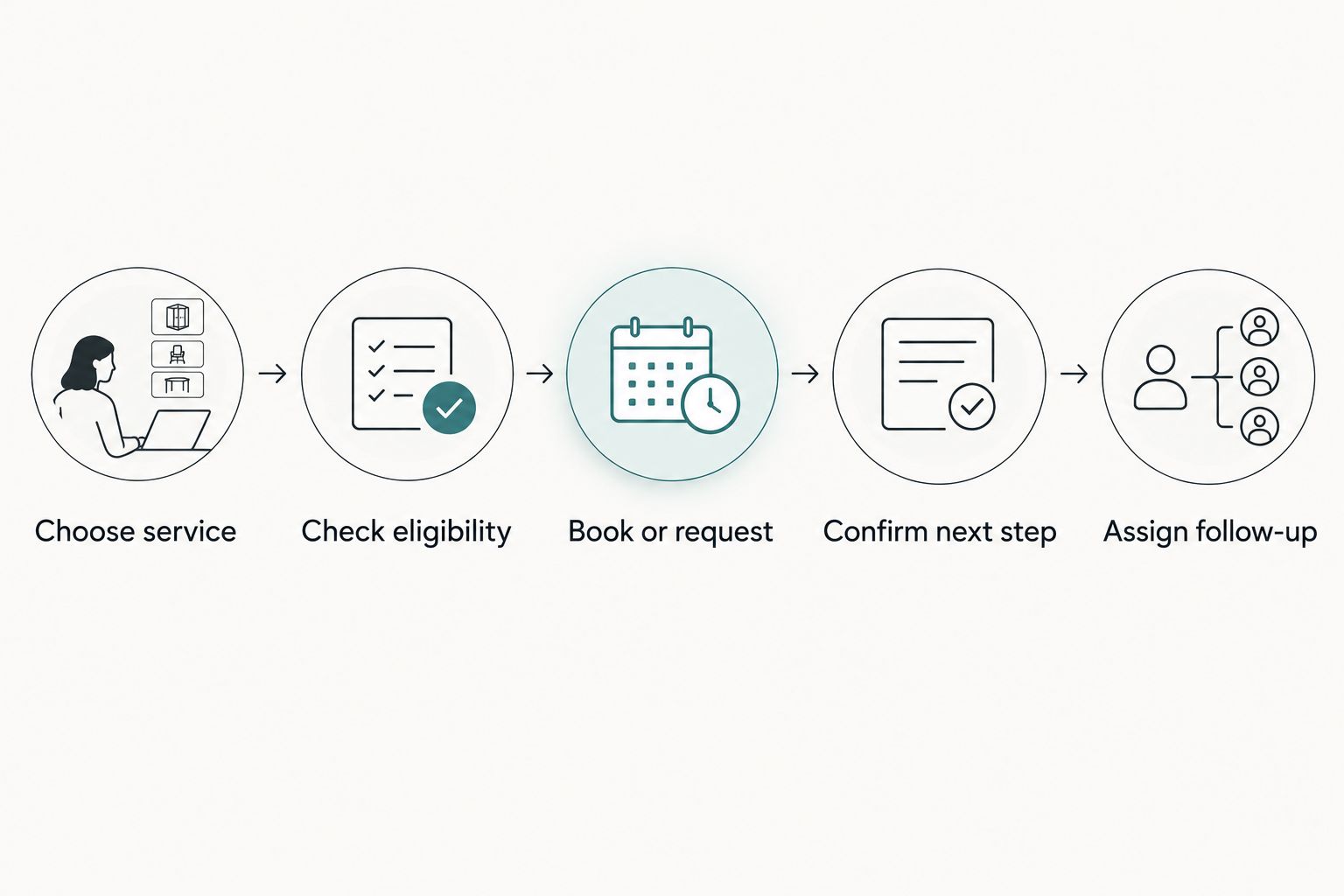
Your 2026 website brief should describe the appointment journey in plain language. Use this sequence to expose gaps before design or software configuration starts:
- Choose service: Help patients identify the relevant care or appointment category.
- Check eligibility: Explain new-patient rules, referral requirements, or other practice-approved restrictions.
- Book or request: Send patients to confirmed scheduling or a clearly labeled request process.
- Confirm next step: State what happened and what the patient should do next.
- Assign follow-up: Make staff responsibility clear for requests and exceptions.
A custom website earns its place when these paths differ meaningfully across your services. A template remains a reasonable option when it supports the required paths without confusing workarounds.
Test 5 appointment scenarios on 2 device types: a phone and a desktop computer. Include a new patient, an established patient, a wrong appointment choice, no suitable appointment, and a cancellation. Assign 1 staff owner to record failures and approve fixes; these are acceptance-test requirements, not performance benchmarks.
Use AI for a defined patient or staff task
AI-powered functionality needs a specific job. Consider an assistant that explains practice-approved booking instructions, helps patients find the appropriate appointment page, or answers administrative questions from approved content.
Keep diagnosis, urgent symptom assessment, and treatment recommendations outside that administrative role. Provide a clear route to staff, and have the practice approve the assistant’s content and escalation instructions.
For Website Symphony, an AI-powered medical website brief should name the task, permitted information, and human handoff. Do not treat a conversational interface as proof that scheduling is connected or that a patient has a confirmed appointment.
Measure completed requests and confirmed appointments separately. Also record requests that staff cannot act on; otherwise, a higher submission count conceals a poor patient pathway.
How these booking approaches are ranked
The ranking prioritizes appointment accuracy, schedule ownership, patient clarity, privacy controls, website usability, and staff accountability. It favors an existing-system evaluation before adding another scheduling destination.
This is a workflow ranking, not a vendor performance score. Move appointment-request software to the top when clinical review must precede confirmation; put dental-system scheduling first when dental appointment rules define the requirement.
Which booking approach should you choose?
Start with your existing practice system, then prove that its booking workflow fits your patients. Choose dental-specific scheduling for dental appointment requirements and appointment requests for visits needing staff review.
Select your website provider separately from your scheduling vendor. Ask the provider to explain responsibility for page design, booking handoffs, marketing measurement, hosting, and post-launch troubleshooting.
Website Symphony brings website design, marketing, and hosting under one accountable team. Define the scheduling vendor’s responsibilities alongside that scope so neither party leaves the appointment handoff unowned.
Plan your patient booking path
Discuss custom medical website design, patient inquiry paths, marketing, and hosting.
FAQ
What’s the best patient appointment booking software for medical practices in 2026?
Start by evaluating scheduling connected to your existing practice system. Choose it only if it supports your appointment rules, patient-facing requirements, and staff workflow; use requests when appointments need review before confirmation.
What’s the best booking approach for a dental practice?
Start with dental-system scheduling and test your practice’s procedure, provider, and new-patient rules. Keep appointment types that require staff review outside unrestricted public booking.
Is an appointment request the same as a confirmed booking?
No. An appointment request requires further action before confirmation, so the website must clearly explain that distinction and the practice’s next step.
Should I replace my practice software to add website booking?
Evaluate your current system’s scheduling capabilities before considering replacement. A website redesign and a clinical-system replacement are separate decisions with different operational consequences.
Can AI handle patient appointment questions?
An AI assistant can be assigned administrative tasks such as explaining approved booking instructions or directing patients to appointment pages. Define its limits, staff handoff, and permitted information before deployment.
Is a custom medical website better than a template for booking?
Choose custom design when your services need distinct patient paths that a template does not support clearly. A template is sufficient when it handles your approved booking and inquiry workflows without confusing workarounds.
Does a booking tool’s HIPAA claim settle the privacy question?
No. Assess how patient information moves through the complete workflow, including forms, messages, connected services, and staff access. Review applicable business associate agreements and configuration with qualified advisers.
One last thing
Read the confirmation screen before approving the homepage. That screen tells you whether the patient has an appointment, has submitted a request, or still needs to act. If your team cannot agree on its wording, the booking workflow is not ready to launch.


