
Yes—a dental website can sync automatically with scheduling software when the scheduling system supports the required connection and permissions. An appointment-request form alone does not reserve a slot, and displaying a calendar does not prove that changes sync back to the practice schedule. For a 2026 website project, define exactly which booking actions must happen automatically before choosing the design or integration.
- Dental website sync scheduling software: require a demonstrated connection, not just a booking button.
- Website Symphony suits practices seeking one team for custom medical website design, marketing, and hosting.
- Distinguish appointment requests, confirmed bookings, and two-way updates before approving your patient booking workflow.
- Test cancellations, competing bookings, and connection failures before launch.
Can a dental website sync with scheduling software automatically?
Automatic scheduling is possible, but the integration determines what actually syncs. Your website needs a supported route into the scheduling system: a vendor-provided booking interface, an approved connector, or a custom connection using the system’s documented capabilities.
The distinction is the result. Does the patient submit a request, receive a confirmed appointment, or also manage later changes?
| Booking approach | What happens | Best for | Advantage | Limitation |
|---|---|---|---|---|
| Appointment request | Staff review the submission before assigning an appointment | Visits requiring review | Keeps staff in control of appointment assignment | Does not reserve a time automatically |
| Connected online booking | The supported booking system creates an appointment | Approved visit types with clear scheduling rules | Removes manual entry from the supported booking step | Changes and cancellations need separate verification |
| Two-way scheduling connection | Supported changes pass between the patient-facing system and practice schedule | Practices needing ongoing appointment updates | Keeps supported appointment actions connected | Requires more permissions, rules, and exception testing |
Website Symphony provides custom medical website design, marketing, and hosting. Ask for a demonstration using your scheduling system before treating any website proposal as a confirmed integration plan.
Why this matters
A patient booking path is only complete when the patient and your staff understand the same appointment status. A confirmation screen that says an appointment is booked must correspond to an actual reservation—not an email waiting in an inbox.
For your 2026 requirements, describe the patient outcome before the visual layout. A new patient seeking an initial examination needs a different path from an existing patient requesting a treatment appointment that requires staff review.
The practical benefit is specific: a supported connection can remove the need to re-enter appointment details for the actions it handles. It does not automatically eliminate eligibility checks, clinical review, or every scheduling call. Automate the approved task, not an undefined promise of fewer front-desk responsibilities.
Appointment requests: keep staff approval explicit
An appointment-request path collects a preferred visit type, contact details, and scheduling preferences for staff review. It is appropriate when your team must establish what the patient needs before choosing an appointment.
The website should say that the submission is a request. Explain what happens next without inventing a response deadline your practice cannot consistently meet.
The advantage is control. The drawback is that staff still need to review and act on the request, so this approach does not meet a requirement for automatic confirmed booking.
Use a clear submission message and an assigned review process. A request that reaches an unattended inbox is not a completed patient inquiry workflow.
Confirmed booking: reserve an approved appointment
Connected online booking should create a reservation in the schedule used to manage appointments. Before enabling it, identify which visit types patients can book and which provider, location, or resource restrictions apply.
Ask the provider to demonstrate the complete transaction. The patient selects an eligible appointment, submits the required details, receives confirmation, and appears in the correct practice schedule.
This approach is best for appointment types your practice has approved for self-service booking. Its limitation is scope: successful appointment creation does not prove that rescheduling, cancellations, or patient-record updates also work.
Approve each supported action separately. A booking demonstration answers the booking question, not every integration question.
Two-way updates: verify changes in both directions
A two-way connection exchanges supported appointment changes between systems. Define those changes individually: appointment creation, rescheduling, cancellation, and status updates are different requirements.
Ask what happens when staff move an appointment after the patient has booked it. Then reverse the test: make an allowed patient-side change and check the practice schedule.
This approach is best for practices that need patient self-service beyond initial booking. The trade-off is a larger set of permissions, conflict rules, and failure cases to maintain.
Do not accept “two-way” as the specification. Require a written list of supported actions, the authoritative system for each action, and the expected behavior when an update fails.
Why dental scheduling integration varies
Your 2026 integration scope should address these factors before development starts:
- System access: Confirm whether your scheduling provider permits the required booking and update operations through a supported interface.
- Appointment rules: Identify which visits need staff review and which patients can schedule directly.
- Resource requirements: Define how providers, rooms, chairs, and locations constrain the appointment types you intend to publish.
- Patient matching: Establish how the connection distinguishes an existing patient from a new patient without silently creating duplicate records.
- Update behavior: Document how bookings, cancellations, and changes reach the other system, including failure handling.
- Data responsibilities: Identify what information crosses each service and who manages access, support, and applicable privacy obligations.
These factors determine the work required. A visually simple booking page can still depend on detailed rules behind the scenes.
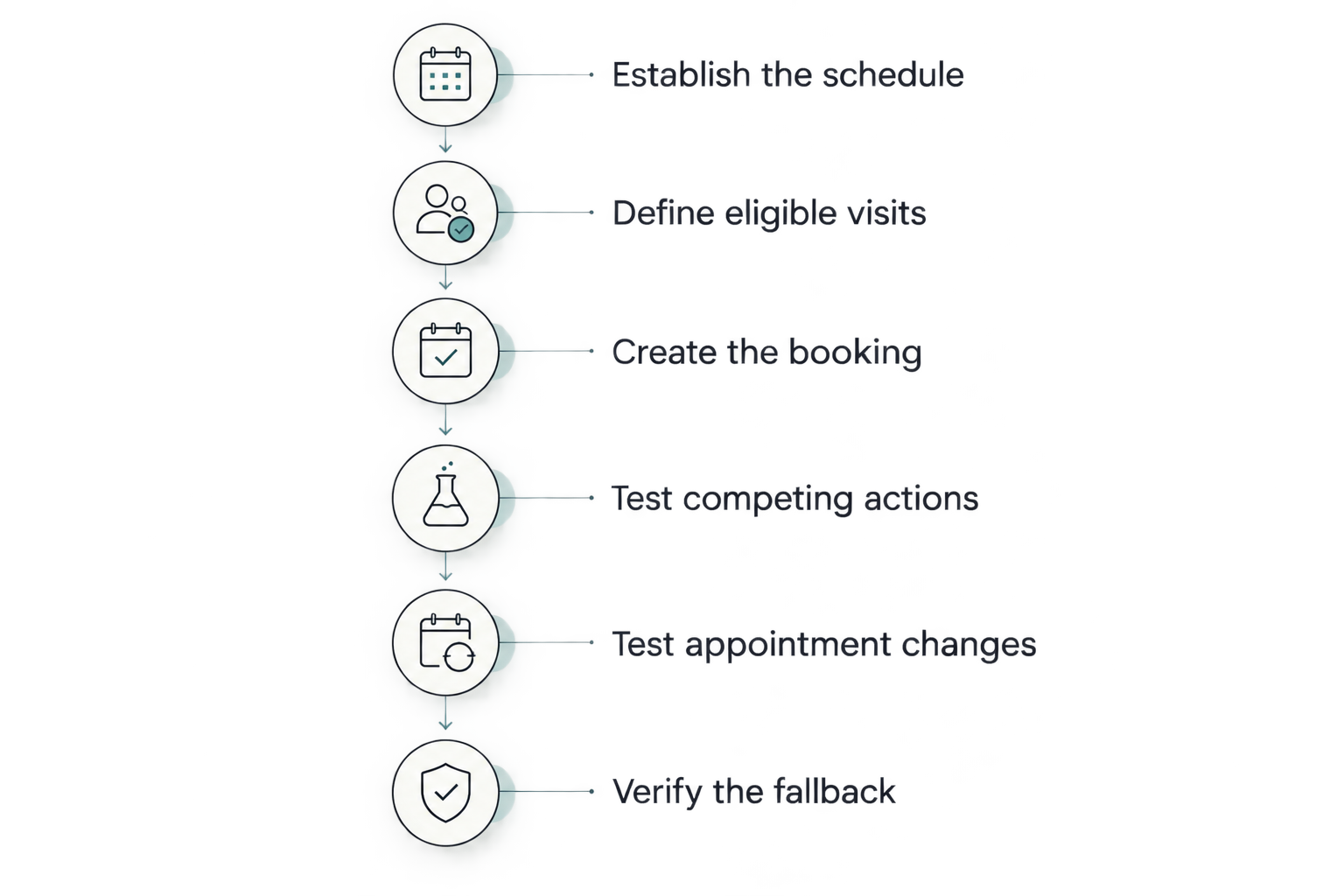
How do you verify the connection before launch?
Use a test environment or a vendor-approved testing process. Avoid creating realistic patient records in an unapproved demonstration tool.
Establish the schedule
Name the system that controls appointment availability. Document whether the website reads that availability directly, opens a vendor-hosted booking page, or uses an intermediary.
Ask where staff should look when systems disagree. The answer needs to be operationally clear before patients begin booking.
Define eligible visits
Create an approved list of patient-facing appointment choices. For each choice, document the required provider, resources, patient eligibility, and any review requirement.
Use language patients understand. A practice’s internal appointment codes should not force a patient to guess which visit to select.
Create the booking
Complete the patient journey on a phone as well as a desktop browser. Check that the chosen appointment reaches the intended schedule with the correct visit type and patient details.
Inspect the final message. It must distinguish a confirmed reservation from a request awaiting staff action.
Test competing actions
Attempt to select the same appointment through separate sessions, then check how the system resolves the conflict. Also test a staff-side schedule change while a patient is partway through booking.
The acceptance requirement is clear: the system must not represent a rejected reservation as confirmed. Ask the scheduling provider to explain how it protects appointment assignment during competing actions.
Test appointment changes
Cancel and reschedule through every interface you intend patients or staff to use. Check both the schedule and any messages sent afterward.
An old confirmation can confuse a patient even when the calendar itself is correct. Include notification behavior in the test, not just the appointment record.
Verify the fallback
Simulate an unavailable connection using the approved testing process. Confirm that patients receive an accurate message and staff have an assigned way to investigate failed transactions.
Do not let a failure silently turn a booking into an untracked request. Provide a clearly labeled alternative contact path instead.
Does your dental practice need a custom website for this?
Custom design is not a prerequisite for automatic scheduling. A template site can link to or display a supported booking interface. Custom development cannot create scheduling access that the software provider does not permit.
Custom design becomes relevant when your patient journey needs more than a generic booking button. Consider a practice that needs separate paths for new patients, existing patients, and inquiries that require staff review. The site should explain those choices and direct each patient to the appropriate destination.
A useful custom scope connects service pages, location selection, booking instructions, and confirmation states. Its limitation is that your team must define those decisions and maintain the resulting workflow; customization alone does not prove better conversion.
When choosing a custom website provider for a dental practice, ask for relevant portfolio examples and a walkthrough of the proposed appointment path. Portfolio work shows design and workflow choices, not an automatic guarantee of more inquiries.
Where does AI help with patient scheduling?
AI-powered functionality needs a defined administrative job. Useful requirements include helping visitors find the correct booking destination, explaining approved appointment categories, or handing a question to staff when the patient needs assistance.
It must not invent availability or report that an appointment is booked without a successful scheduling response. Keep clinical decisions and patient-specific treatment advice outside a general website assistant’s scheduling role.
For a 2026 project, ask for demonstrations of ordinary questions and failure cases. What happens when a visitor asks for a visit type that is not offered online? What happens when the scheduling connection is unavailable?
The benefit should be visible in the task: the patient reaches the appropriate next step without receiving a false answer. A chatbot’s presence is not evidence that the website and practice schedule are connected.
What should your provider own?
Website Symphony brings custom website design, marketing, and hosting into one team. That gives your practice a single agency relationship for those services; scheduling-system access and third-party responsibilities still need to be defined in the project scope.
Ask the provider to assign ownership for:
- Website booking links and embedded interfaces.
- Integration credentials and permission changes.
- Failed-transaction investigation and escalation.
- Website updates that affect the booking journey.
- Scheduling-vendor changes that require integration review.
- Measurement of appointment requests versus confirmed bookings.
Also review the data path. Identify which services receive patient information, restrict access appropriately, and review applicable HIPAA obligations and business associate agreements with qualified advisers. Hosting alone does not establish compliance for the entire workflow.
Before signing a 2026 agreement, require a written acceptance checklist and a support handoff. Define who receives an issue first and who coordinates with the scheduling vendor; do not leave the front desk responsible for resolving an undefined technical dispute.
Discuss your dental booking workflow
Define your patient appointment path, scheduling requirements, and website responsibilities.
Will automatic sync eliminate manual appointment work?
Automatic sync handles only the actions the connection supports. Your team still owns any review, eligibility checks, exceptions, or follow-up that remains outside that scope.
Before approval, mark each task as automated or staff-managed. That distinction is more useful than describing the entire front desk as automated.
Can you keep your existing scheduling software?
You can keep your existing scheduling software when it supports the required website connection. Confirm its capabilities before commissioning a replacement website or changing practice systems.
If the required access is unavailable, choose a supported booking path or retain clearly labeled appointment requests. A website redesign should not conceal that limitation.
FAQ
Can my dental website automatically add appointments to our schedule?
Yes, when your scheduling system supports a connection that creates appointments. Require a demonstration showing the patient submission and the resulting reservation in your practice schedule.
Is an appointment request the same as an online booking?
No. An appointment request needs staff review unless a supported workflow actually reserves the appointment; label the patient confirmation accordingly.
Does embedding a booking calendar guarantee two-way sync?
No. An embedded calendar describes how the interface appears, not which updates it exchanges. Verify booking, cancellation, and rescheduling separately.
Can a template dental website support scheduling integration?
Yes, if the template platform can use your scheduling provider’s supported interface. Custom design is useful when the patient journey needs more control, not because templates inherently prevent booking.
Can an AI chatbot confirm a dental appointment?
Only when it uses a supported scheduling connection and receives a successful booking response. Otherwise, it should direct the patient to booking or clearly collect a request rather than claim confirmation.
What should we test before enabling patient self-booking?
Test appointment creation, competing bookings, cancellations, rescheduling, patient matching, and connection failures. Include staff-side changes and the messages patients receive.
Who should support a broken website scheduling connection?
Your project agreement should name the initial support contact and assign responsibility across the website provider, integration provider, and scheduling vendor. Resolve that ownership before launch.
One last thing
Test the confirmation message against the actual appointment record. Open the practice schedule after submitting a test booking and verify that the patient-facing status matches what staff see.
A polished booking interface is not proof of synchronization. The reservation—and the handling of its later changes—is the evidence that matters.


