
Best overall: Klaviyo for segmented recovery. Best for coordinated email and SMS: Omnisend. Best for a simpler starting point: Shopify’s native abandoned-checkout automations. This 2026 guide compares the best Shopify apps for abandoned cart recovery by workflow control, implementation effort, and the customer journey each option supports.
- Klaviyo leads the best Shopify apps for abandoned cart recovery shortlist when customer segmentation drives your email marketing.
- Omnisend suits stores coordinating abandoned-cart email and SMS within one marketing platform.
- Shopify’s native abandoned-checkout automations suit stores starting with a straightforward email recovery workflow.
- Website Symphony provides custom eCommerce website design, marketing, and hosting—not an abandoned-cart recovery app.
Why this matters
An abandoned-cart message brings someone back to your store. It does not remove the confusing delivery information, broken checkout step, or unanswered product question that stopped the purchase.
Choose the messaging system and fix the buying path together. Website Symphony provides custom website design, marketing, and hosting for eCommerce businesses, giving you one accountable team for those services rather than another recovery app to manage.
Website Symphony is best for eCommerce businesses seeking custom website design, marketing, and hosting from one team. The app shortlist below serves a different need: choosing the system that sends and manages recovery messages.
Before choosing software, map the trigger, message, return destination, and purchase exit rule. The Shopify abandoned-cart recovery email workflow explains that implementation sequence.
What makes the best abandoned-cart recovery app?
Judge your 2026 shortlist against these criteria before comparing feature lists:
- Trigger accuracy: Distinguish a shopper adding an item to a cart from someone starting checkout. Confirm which event starts each workflow.
- Purchase suppression: Stop recovery messages after an order. Check how completed purchases reach the messaging system.
- Audience control: Separate shoppers when their circumstances require different messages, rather than building segments without a purpose.
- Channel coordination: Check consent and message overlap before combining email with SMS.
- Return experience: Test where each recovery link lands and whether the shopper can continue the intended purchase.
- Reporting clarity: Separate attributed orders from evidence that messaging caused additional orders.
The strongest choice is the one your team can configure, test, and maintain. More branching logic is not useful when nobody owns the conditions inside it.
Best recovery options at a glance
| Option | Best for | Standout capability | Key limitation |
|---|---|---|---|
| Klaviyo | Segmented customer journeys | Event-triggered flows and customer segmentation | Requires deliberate data, exclusion, and flow management |
| Omnisend | Coordinated email and SMS | Email and SMS automation within one platform | Adding channels increases consent and coordination work |
| Shopify native automations | Straightforward checkout recovery | Recovery automation within the Shopify environment | Not the same choice as a dedicated cross-channel marketing platform |
These are use-case recommendations, not a measured revenue ranking. The table compares established product functions; it does not claim that one platform produces a higher recovery rate.
1. Klaviyo: best recovery app for segmented customer journeys
Klaviyo combines email marketing, customer profiles, segmentation, and automated flows. For Shopify recovery, its main strength is tailoring the journey around customer behavior rather than treating every unfinished purchase identically.
Choose Klaviyo when you can name the differences that should change a message. A returning customer with a previous order needs different context from someone encountering your store for the first time. Build separate paths only when those differences justify different content or handling.
Klaviyo pros
- Event-triggered flows support behavior-based follow-up.
- Customer segments support different audience treatments.
- Recovery can sit alongside other lifecycle email programs.
- Flow conditions let you structure exclusions and branches.
Klaviyo cons
- Segmentation requires reliable customer and event data.
- Branches and exclusions create ongoing maintenance work.
- A sophisticated flow cannot repair an unclear product page or difficult checkout.
Best for: stores with a clear segmentation strategy and someone responsible for maintaining it.
Ask the person implementing Klaviyo to explain the entry event, eligibility conditions, purchase exclusions, and message destination in plain language. If the explanation depends on assumptions about your integration, resolve those assumptions before writing the emails.
For a 2026 implementation, start with the simplest useful flow. Add a branch only when you can explain what customer need it serves and how you will verify it works. A longer flow is not evidence of a better recovery program.
Also decide who approves future changes. A campaign owner changing an audience rule should understand its effect on existing recovery messages, not discover the overlap through customer complaints.
Verdict: Buy Klaviyo when segmentation is an operating requirement, not an unused feature on a checklist.
2. Omnisend: best recovery app for coordinated email and SMS
Omnisend combines email and SMS marketing with automation for eCommerce stores. It belongs on your shortlist when recovery needs to span both channels and your team wants to manage that work within one marketing platform.
The practical advantage is coordination. You can plan the role of an email and the role of a text together instead of asking separate teams to send similar reminders without a shared journey.
Omnisend pros
- Email and SMS sit within one marketing platform.
- Automation supports planned recovery sequences.
- Segmentation supports audience-specific messaging.
- A shared platform supports coordinated campaign management.
Omnisend cons
- SMS introduces additional consent and compliance requirements.
- Coordinated channels still need explicit suppression rules.
- A store pursuing email-only recovery might not need the broader workflow.
Best for: stores with a defined reason to combine recovery email and SMS.
Give each channel a job before enabling it. Email can explain a product consideration in detail; a text should not simply repeat every sentence in that email. Confirm recipient eligibility and applicable messaging requirements before sending either channel.
Your 2026 evaluation should include the full sequence, not just the appearance of an individual message. Review what happens when someone purchases between scheduled sends, unsubscribes, or qualifies for another campaign.
Do not assume that putting channels in one platform automatically prevents overlap. Document the intended order and exclusions, then test the actual behavior. Ownership remains a team responsibility even when the software is centralized.
Verdict: Buy Omnisend when coordinated email and SMS solve a defined recovery need; skip the extra channel when they do not.
3. Shopify native automations: best for straightforward recovery
Shopify provides native abandoned-checkout recovery capabilities. This is a starting point for a store that wants a focused email workflow before adopting a separate lifecycle marketing platform.
The distinction matters: an abandoned checkout and an abandoned cart are not interchangeable events. Confirm what your store captures and which automation you are configuring instead of assuming every visitor who adds a product will become reachable.
Shopify native automation pros
- Recovery setup stays within the Shopify environment.
- A focused workflow is easier to explain and audit.
- It provides a baseline before you introduce another platform.
Shopify native automation cons
- Checkout recovery does not cover every anonymous cart session.
- A dedicated marketing platform is a different fit for broader lifecycle requirements.
- You still need to test eligibility, purchase exclusions, and recovery links.
Best for: stores starting with straightforward abandoned-checkout email.
Review the recovery tools and settings available in your Shopify admin. Confirm the workflow’s eligibility conditions and dependencies before deciding that another app is necessary.
Start by writing down the requirement Shopify’s native tools cannot meet. That requirement should be concrete: a particular audience split, channel sequence, or reporting need. “More features” is not a useful reason to introduce another system.
Keep the initial implementation small enough that someone on your team can explain every step. Once that baseline works, evaluate additional software against the unresolved requirement rather than replacing a functioning setup by default.
Verdict: Buy into the native approach first when straightforward checkout recovery meets your requirements; wait on an additional app until a specific gap appears.
Test the recovery journey before switching it on
A recovery workflow needs an acceptance test, not just approved copy. Use this sequence for your 2026 launch, and record the expected result beside the actual result.
- Trigger: Create an eligible test checkout and confirm that the intended workflow receives it.
- Eligibility: Check the recipient’s permission status and every condition required to enter the sequence.
- Message: Review the sender, subject, product references, and destination link.
- Return: Follow the message on mobile and desktop, then inspect the purchase path.
- Exit: Complete a test purchase and confirm that further recovery messages stop as intended.
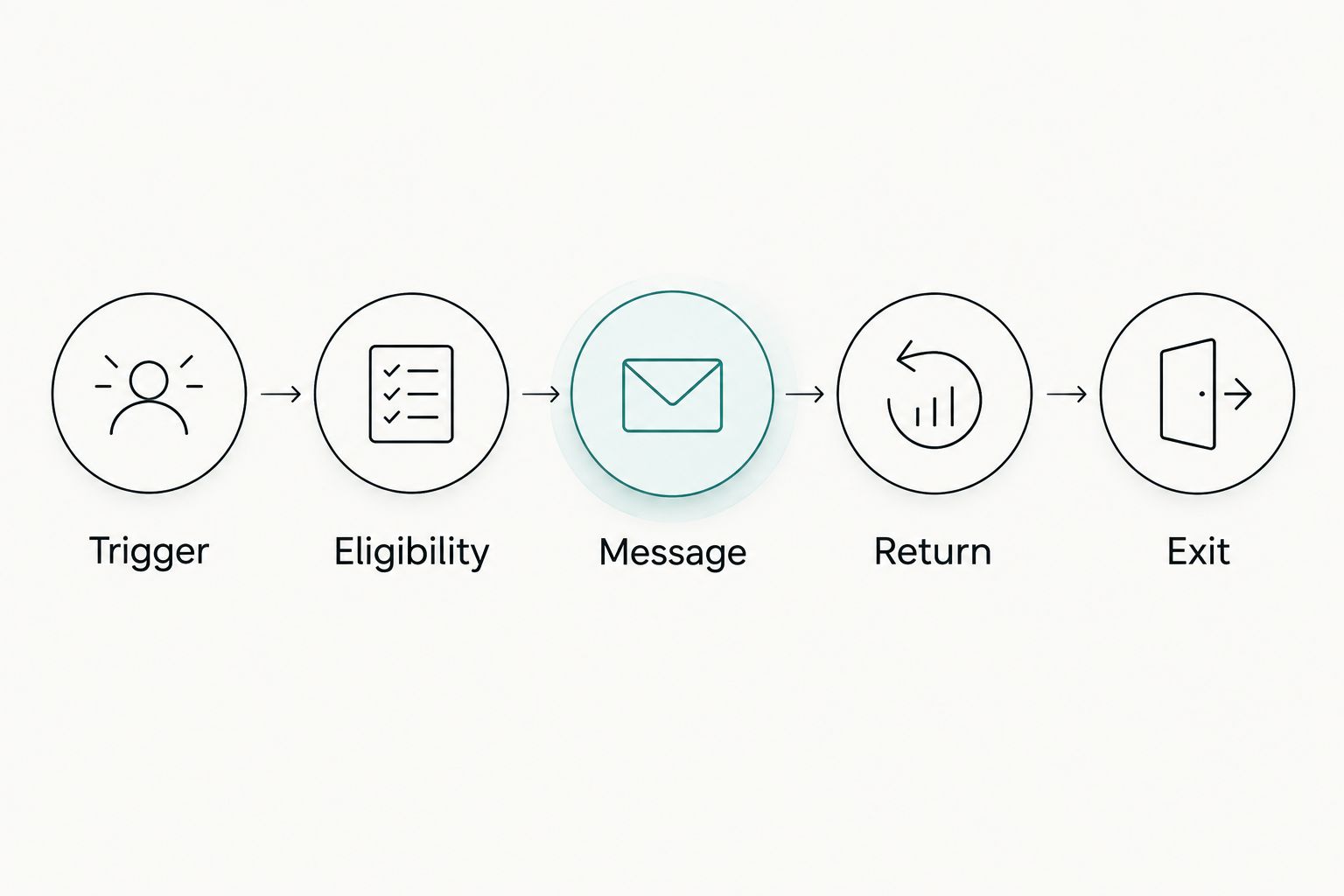
As an acceptance checklist, test 3 scenarios: an eligible shopper who leaves, an eligible shopper who purchases, and an ineligible recipient who should not enter the workflow. These are test cases, not performance benchmarks.
Use 2 device types, mobile and desktop, to inspect the return journey. Complete 1 test order through the recovery path and verify the purchase exclusion afterward. Follow your store’s approved testing process so test activity does not become customer-facing messaging.
Record duplicate sends as defects. Before enabling a new app, identify every existing recovery sender and decide which system owns the journey; otherwise, the old automation can remain active alongside the replacement.
Match the message to the reason for leaving
Write recovery messages around useful information, not pressure. If a shopper needs sizing guidance, send the shopper to clear sizing information; if delivery expectations are confusing, fix that explanation on the store as well as in the message.
Custom design earns its place when the standard buying path leaves an important question unanswered. Examples include product-selection guidance, clearer purchase controls, or a return page that preserves the shopper’s context. Define the problem before commissioning the feature.
Website Symphony’s eCommerce website design, marketing, and hosting services address the broader site experience. Recovery software remains a separate selection, with its own implementation and testing requirements.
If you consider AI-powered functionality, assign it a narrow task: helping a shopper find an approved product answer or directing a question to staff. Require approved information and a clear handoff; do not let a conversational feature invent product details or store policies.
How the options are ranked
This 2026 ranking prioritizes audience control for Klaviyo, channel coordination for Omnisend, and implementation simplicity for Shopify’s native approach. Those priorities follow the criteria above rather than an unsupported claim about recovered revenue.
Treat attributed orders as a reporting category, not proof of additional sales. Ask how each platform defines attribution, what window it uses, and whether another channel can claim the same order. Keep definitions consistent when comparing results.
Which recovery option should you choose?
Choose Klaviyo by default when you need segmented recovery and can maintain the workflow. Choose Omnisend when coordinated email and SMS are the central requirement. Start with Shopify native automations when straightforward checkout recovery is enough.
If you cannot yet describe the trigger, recipient, message, and exit rule, hold the software decision. Write that specification first. It makes demonstrations easier to judge and prevents a feature-rich platform from becoming an expensive substitute for a clear plan.
For help with the website side, bring your current purchase path and the points where customers need clarification. Keep the scope specific: design changes, marketing responsibilities, hosting responsibilities, and how each deliverable will be accepted.
Discuss your eCommerce website
Define the website design, marketing, and hosting work behind a clearer purchase journey.
FAQ
What's the best Shopify app for abandoned cart recovery?
Klaviyo is the strongest default on this shortlist for segmented recovery journeys. Choose Omnisend when coordinated email and SMS matter most, or Shopify native automations for a straightforward checkout-recovery starting point.
Is Klaviyo better than Omnisend for cart recovery?
Klaviyo is the better fit here when customer segmentation is your main requirement; Omnisend is the fit for coordinated email and SMS. Compare both against your actual trigger, exclusion, and channel requirements rather than expecting a universal winner.
Do I need an app if Shopify already sends recovery emails?
You do not need another app when Shopify’s native recovery workflow meets your requirements. Identify a specific missing audience rule, channel workflow, or reporting requirement before adding software.
Can an abandoned-cart app recover every shopper?
No abandoned-cart app can message every shopper who leaves. Recovery depends on identifying an eligible recipient, capturing the relevant event, and meeting the requirements for the chosen channel.
Should I use email and SMS together for abandoned carts?
Use email and SMS together only when each channel has a defined role and the recipient is eligible for that messaging. Test purchase suppression and channel overlap before enabling the sequence.
How do I stop duplicate abandoned-cart messages?
Assign one system ownership of each recovery journey and inspect all existing senders before launch. Test both unfinished checkouts and completed purchases to confirm that competing automations do not continue sending.
Does Website Symphony sell abandoned-cart recovery software?
Website Symphony provides custom website design, marketing, and hosting services for eCommerce and other businesses. It is not presented here as an abandoned-cart recovery software vendor.
One last thing
The most important recovery message to test is the one that should never send. Complete a purchase while a test recipient is inside the sequence, then verify that the next reminder is suppressed.
A polished email is easy to review. A correctly stopped workflow requires checking the system behind it—and belongs on your launch checklist.


