
Best overall: your existing clinical system’s intake tool, if it supports the patient journey you need. Best for complex appointment paths: custom-integrated intake; best for an independent form workflow: a healthcare-focused form platform; best as a fallback: a downloadable form.
- The best patient intake form software for medical websites fits your clinical workflow, not just your page design.
- Evaluate existing clinical-system intake before introducing another place to manage patient information.
- Website Symphony provides custom medical website design, marketing, and hosting—not a standalone intake software product.
- Choose intake tools by patient usability, staff handoff, privacy responsibilities, and integration requirements.
Why this matters
A patient inquiry, an appointment request, and a clinical intake form serve different purposes. Your website should distinguish them before asking someone to share health information.
For a dental practice, a new-patient appointment request should not automatically become a full medical-history questionnaire. A specialist clinic needs a different path when referrals or records must be reviewed before scheduling. Choose the patient path first; choose the software second.
Website Symphony provides custom website design, marketing, and hosting through one accountable team. For intake planning, assess that website work separately from the software vendor’s responsibilities for patient information.
What makes the best patient intake form software?
Use these criteria for your 2026 shortlist. Treat each as a demonstration requirement, not a sales-deck checkbox.
- Patient task fit: Separate general questions, appointment requests, and clinical history collection.
- Staff handoff: Establish who receives each submission and what happens next.
- Privacy responsibilities: Review the business associate agreement, access controls, retention, and relevant HIPAA obligations with qualified advisers.
- System connection: Demonstrate the actual transfer into your clinical or practice-management workflow.
- Mobile accessibility: Test labels, keyboard access, error messages, and completion on a phone.
- Operational ownership: Assign responsibility for broken forms, account access, website changes, and vendor support.
A polished form cannot compensate for an unmonitored destination. Reject any proposal that explains the screen but leaves the receiving workflow undefined.
Intake options at a glance
These are implementation routes, not interchangeable software products. The ranking prioritizes continuity with your existing operations; the right route depends on what your current system actually supports.
| Rank and option | Best for | Standout advantage | Key limitation |
|---|---|---|---|
| 1. Existing clinical-system intake | Practices with a suitable intake module | Keeps intake close to the clinical workflow | Patient experience depends on the existing system |
| 2. Custom-integrated intake | Practices with complex patient paths | Shapes the website journey around practice requirements | Requires integration planning and ongoing ownership |
| 3. Healthcare-focused form platform | Practices needing a separate form workflow | Separates form management from website publishing | Adds another system and handoff to manage |
| 4. Downloadable form | Practices needing a printable fallback | Supports patients who need an offline option | Does not provide a complete digital intake workflow |
1. Existing clinical-system intake: best for workflow continuity
Start with the intake capabilities already associated with your electronic health record or practice-management system. Ask the provider to demonstrate the exact patient journey, including how someone reaches the form from your website and how staff find the result.
The strongest reason to choose this route is continuity, not familiarity. It belongs first only when it supports the information, appointment types, and staff actions your practice requires.
Existing clinical-system intake pros:
- Starts the evaluation with your established clinical workflow.
- Gives staff an opportunity to use an existing system rather than learn another one.
- Makes the connection between intake and patient records a direct demonstration requirement.
Existing clinical-system intake cons:
- Website presentation remains constrained by the system’s supported options.
- Account creation or portal access can introduce extra patient steps.
- An existing contract does not prove that the intake experience meets your requirements.
For a primary care practice, test both new-patient registration and an established patient requesting an appointment. For a dental practice, verify whether the journey distinguishes a routine appointment request from clinical history collection.
Best for: Practices whose existing intake module passes patient and staff testing.
Verdict: Buy this route when the demonstrated workflow fits; hold when it requires duplicate entry or unclear handoffs.
2. Custom-integrated intake: best for complex appointment paths
Custom-integrated intake means designing the website journey around practice-specific requirements while connecting it to an appropriate intake system. It does not mean storing clinical information in an ordinary website contact form.
A specialist clinic might need a referral-review path before appointment confirmation. A dental practice might need separate routes for new patients, existing patients, and general questions. Define those routes before requesting an integration proposal.
Custom-integrated intake pros:
- Lets the website distinguish patient tasks before presenting a form.
- Supports practice-specific instructions and appointment-request paths.
- Makes responsibility for website behavior part of the project scope.
Custom-integrated intake cons:
- Requires clear boundaries between the website and the clinical system.
- Depends on the selected software’s supported integration methods.
- Needs maintenance planning when either system changes.
Website Symphony is best suited to medical practices seeking custom website design, marketing, and hosting from one accountable team. Intake software selection and integration requirements still need explicit agreement; those services do not establish support for a particular clinical platform.
Ask for relevant portfolio examples that show patient journeys. Evaluate the clarity of the appointment path rather than treating appearance as proof of increased inquiries.
Best for: Practices whose appointment and referral requirements do not fit a generic website template.
Verdict: Buy this route when the scope names the patient paths, system boundaries, and maintenance owner.
3. Healthcare-focused form platform: best for separate form management
A separate form platform is an option when your existing system does not provide a suitable patient-facing workflow. Evaluate the specific service configuration and agreement, not the word “healthcare” on a product page.
Require a demonstration using your actual form requirements. If staff must move information into another system, make that step visible during evaluation rather than discovering it after launch.
Healthcare-focused form platform pros:
- Creates a dedicated place to manage forms independently of website publishing.
- Lets you evaluate form behavior without replacing the entire website.
- Provides a distinct workflow to assess against your existing intake process.
Healthcare-focused form platform cons:
- Introduces another account, vendor relationship, and access-control responsibility.
- Can leave staff with manual transfer work unless a connection is demonstrated.
- Requires coordination when form changes affect website instructions.
For your 2026 evaluation, ask the vendor to show conditional questions, accessible error handling, submission review, and data export where those features are requirements. Do not assume any feature is included or appropriate merely because another configuration supports it.
Review notifications carefully. The message telling staff that a submission exists should not become an uncontrolled copy of the clinical information itself.
Best for: Practices that need a separate intake workflow and can assign someone to manage it.
Verdict: Buy only after the patient journey, privacy terms, and staff handoff pass review.
4. Downloadable form: best for an offline fallback
A downloadable form is a document, not a full intake software solution. Keep it as a fallback when patients need to print paperwork or complete it through an agreed offline process.
The website must explain how to return it. Do not instruct patients to send sensitive information through an ordinary inquiry channel simply because the document is easy to download.
Downloadable form pros:
- Gives patients an option that does not require completing a web form.
- Lets staff provide the same document through another appropriate channel.
- Supports a clearly defined printable fallback.
Downloadable form cons:
- Does not automatically create a structured intake record.
- Requires a separate return and processing workflow.
- Needs accessible document preparation and version control.
Check whether the document remains usable with assistive technology. A scanned image of paperwork is not equivalent to an accessible digital form.
Best for: Practices preserving a printable alternative alongside a managed intake process.
Verdict: Hold as a fallback; skip as the only digital intake strategy.
Design the appointment path before building the form
For a 2026 medical website brief, map the journey in this order: Patient need, Appointment request, Clinical intake, and Staff review. Keep clinical questions in the appropriate intake environment rather than adding them to every website inquiry form.
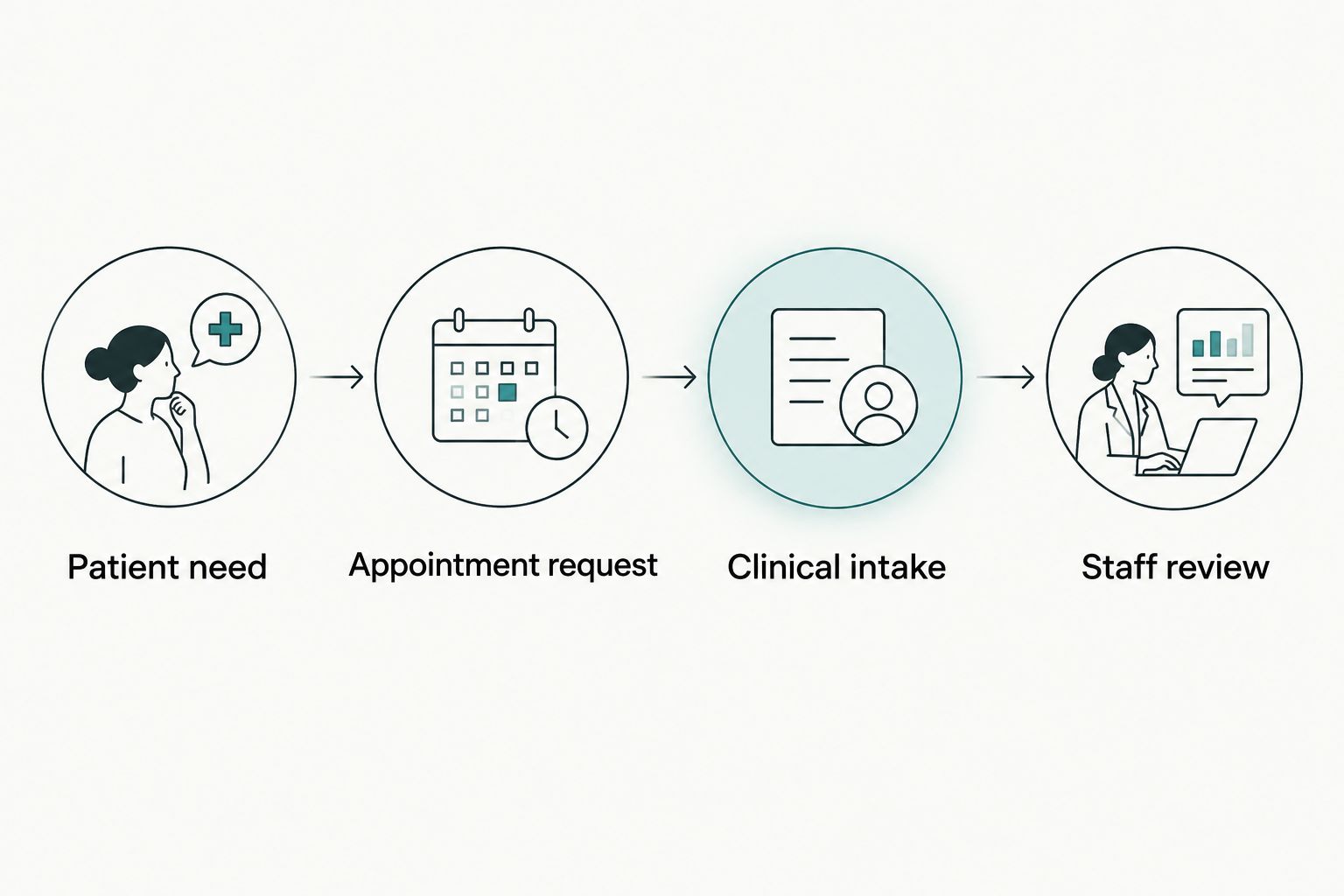
Custom design earns its place when it resolves a specific mismatch. For example, a specialist’s referral request should explain the review process instead of showing a confirmation that implies an appointment has been booked.
Template replacement alone is not the objective. Ask whether the proposed design makes the next action clearer, avoids unnecessary questions, and gives staff usable submissions. The guide to connecting patient intake forms to a medical website covers the connection decision in more detail.
Where practical AI belongs
Consider an AI assistant for a narrow administrative task, such as helping visitors find published registration instructions. Keep appointment status, clinical advice, and collection of sensitive information outside that task unless the proposed system has been specifically assessed for them.
For Website Symphony projects, request a concrete demonstration of any proposed AI-powered function. State what it reads, what it records, when it hands off to staff, and how incorrect responses are handled. A useful administrative function has a defined boundary, not a vague promise to improve conversions.
Test the complete workflow before launch
Use 4 patient scenarios: a new dental patient, a returning patient, a specialist referral, and someone asking a general administrative question. These are test cases, not assumptions that every practice serves all four groups; substitute your actual patient tasks.
For each applicable scenario, check:
- Entry: The patient reaches the correct form from the relevant service page.
- Completion: Required fields, labels, and error messages make sense on a phone.
- Confirmation: The message distinguishes a received request from a confirmed appointment.
- Handoff: The responsible staff member can locate and process the submission.
- Recovery: The patient has an appropriate alternative when the form fails.
Make 2 submission attempts during testing: one valid and one with a required field omitted. Confirm both the patient-facing response and the staff-facing result.
Assign 1 named owner to approve the complete website-to-staff journey. Other people can manage individual systems, but someone must verify the handoffs. Keep test records synthetic; do not use real patient information to demonstrate an unfinished workflow.
How the options are ranked
This 2026 guide ranks implementation routes by patient task fit, staff handoff, privacy responsibilities, system connection, accessibility, and ownership. It does not assign product scores or claim comparative performance results.
Existing-system intake comes first because evaluating it establishes whether another platform is necessary. Custom integration follows when practice requirements justify a tailored journey. Separate form software serves a defined operational gap; downloadable documents remain a fallback.
Which intake route should you choose?
Start by asking your existing clinical-system provider to demonstrate your required intake journey. If that route fails, identify the specific failure before evaluating a separate platform or custom integration.
Bring Website Symphony a brief describing the patient action, receiving system, staff owner, and confirmation message. That turns the website discussion into an accountable scope rather than a request to add a form.
Plan your patient inquiry path
Discuss custom website design, marketing, and hosting around your practice’s patient journey.
FAQ
What's the best patient intake form software for medical websites in 2026?
Start with your existing clinical system’s intake tool if it supports your required patient and staff workflow. Choose a separate platform or custom integration only after identifying what that existing route cannot do.
Should a medical website embed an intake form or link to a portal?
Choose the approach that passes patient usability, privacy, accessibility, and staff-handoff review. An embedded form is not automatically better than a clearly explained portal link.
Is a general contact form suitable for medical intake?
Do not treat an ordinary contact form as a clinical intake system. Keep general inquiries separate and assess any collection of health information against the practice’s privacy and security obligations.
Can patient intake software confirm an appointment?
Only describe an appointment as confirmed when the actual scheduling workflow supports that confirmation. Otherwise, state clearly that staff have received an appointment request.
Does a custom medical website replace intake software?
No. Custom website design shapes the patient journey, while the selected intake system handles its agreed information-processing role; document the boundary between them.
How should a dental practice test online intake?
Test the practice’s actual new-patient and returning-patient paths from website entry through staff review. Include phone use, missing required information, and the distinction between a request and a booked appointment.
What should an AI assistant do on a medical intake website?
Give an AI assistant a narrow administrative task, such as locating published registration instructions. Define its information access, recording behavior, and staff handoff before enabling it.
One last thing
Test the confirmation message before approving your 2026 launch. If the website says an appointment is booked but staff have only received a request, the patient journey is already wrong—even when the form submits successfully.


