
Instead of copying five-star reviews onto your med spa website, connect an authorized review source to a website display that publishes only eligible, approved feedback. Automate collection and updates, but keep privacy checks, source attribution, and a clear path to booking in the workflow.
- To automatically publish reviews med spa website teams need an authorized source, approval rules, and a synchronized display.
- Website Symphony suits med spas seeking one team for custom website design, marketing, and hosting.
- Label five-star selections clearly; never present selected testimonials as your complete review history.
- Start with approval-based publishing, then automate updates and removal checks.
Why this matters
A review should help someone decide whether to contact your practice. A disconnected carousel that hides the consultation button adds content without improving the patient inquiry path.
Website Symphony is best for med spas that want one accountable team for website design, marketing, and hosting. Its custom website services give you a provider to discuss the entire journey with: review placement, inquiry forms, appointment links, and ongoing site ownership. A review integration still needs a defined scope; custom design alone does not establish source permissions or patient authorization.
Use Website Symphony to start that scope discussion. Ask for the review workflow and booking journey to be specified together, rather than treating testimonials as a decorative add-on.
For your 2026 implementation, define success as correct publication and a working inquiry path before measuring business outcomes. A connected feed is not evidence of increased appointments.
Before you start
- Accounts and access: Identify the review source, its authorized website-display method, website editing access, and the person responsible for integration credentials. Confirm that your chosen connection supports the reviews you intend to display.
- Approval and materials: Assign a staff approver, document your publication criteria, and prepare an existing consultation or inquiry destination. Have your privacy lead review the planned reuse of patient feedback, including applicable authorization requirements.
- The hidden gotcha: A review visible on a public platform is not automatically cleared for every marketing reuse. Confirm both source terms and patient-privacy requirements before importing names, photos, treatment details, or review text into your website.
Choose the publication mode
Use approval-based publishing for the initial rollout. It separates routine synchronization from the decision to feature patient feedback.
| Publication mode | Best for | Advantage | Limitation |
|---|---|---|---|
| Automatic publication | Feedback already cleared under documented rules | Removes the approval task for eligible records | An incorrect rule can expose unsuitable content immediately |
| Approval-based publishing | Med spas establishing privacy and editorial controls | Gives staff a checkpoint before publication | Requires someone to clear the queue |
Neither mode makes a review suitable simply because it has 5 stars. Keep privacy eligibility separate from the rating filter, and describe the website section as selected feedback.
Configure the review source
The configuration names below are a build specification, not claimed menu labels from a particular app. Give these exact field names to your implementer; actual vendor buttons and settings depend on the connection you select.
Source connection
- Select the authorized connection method. Use a supported integration, a permitted embed, or an API connection whose access and display rights your implementer has confirmed. Do not build around copied search results or unauthorized scraping.
- Define Source account and Location. Match the connection to the correct practice listing, not merely a similar business name. For a multi-location practice, keep each location's feedback attached to its own location record.
- Define Review ID, Source URL, Rating, Review text, and Updated at. Preserve source identifiers so later changes update the existing record rather than creating another testimonial. Store only fields needed for the approved display.
- Choose a supported refresh method. Use scheduled checks when the source requires polling; use change notifications only when the source supports them. Document the actual refresh behavior instead of promising instant updates.
Expected result: Your implementer can retrieve an authorized sample, identify its location, and match it to a stable source record without publishing it.
For a 2026 handoff, record who owns the source account and who receives connection-failure alerts. An integration tied solely to a departing employee's login creates an avoidable maintenance problem.
Configure eligibility and approval
A rating filter answers which reviews you want to feature. It does not answer whether you have permission to feature them.
Publication rules
- Define Minimum rating as 5 stars for this selected-testimonial workflow. Apply the filter to the source rating, not to sentiment inferred from the text. Keep the original rating attached to the record.
- Define Privacy status with explicit outcomes such as approved, needs review, and excluded. Route treatment details, identifying information, and unclear authorization to the responsible reviewer. Do not treat a positive tone as permission.
- Define Publication status separately. A record becomes publishable only when it passes the rating rule, source-use requirements, and privacy review. Keep rejected records out of the public display.
- Define Display attribution according to the source's requirements and the approved use. Do not invent initials, attach a different photograph, or rewrite a patient's statement. Exclude records that cannot be displayed appropriately.
- Establish an exception route. When a record fails a check, leave it unpublished and notify the assigned owner. Avoid a fallback that publishes everything when a field is missing.
Expected result: A five-star rating alone cannot trigger publication. Only records that pass every required check reach the website queue.
Use this sequence in the implementation brief: Source connection, Privacy review, Publication approval, Website display. Each stage should have a named owner or a documented automated rule.
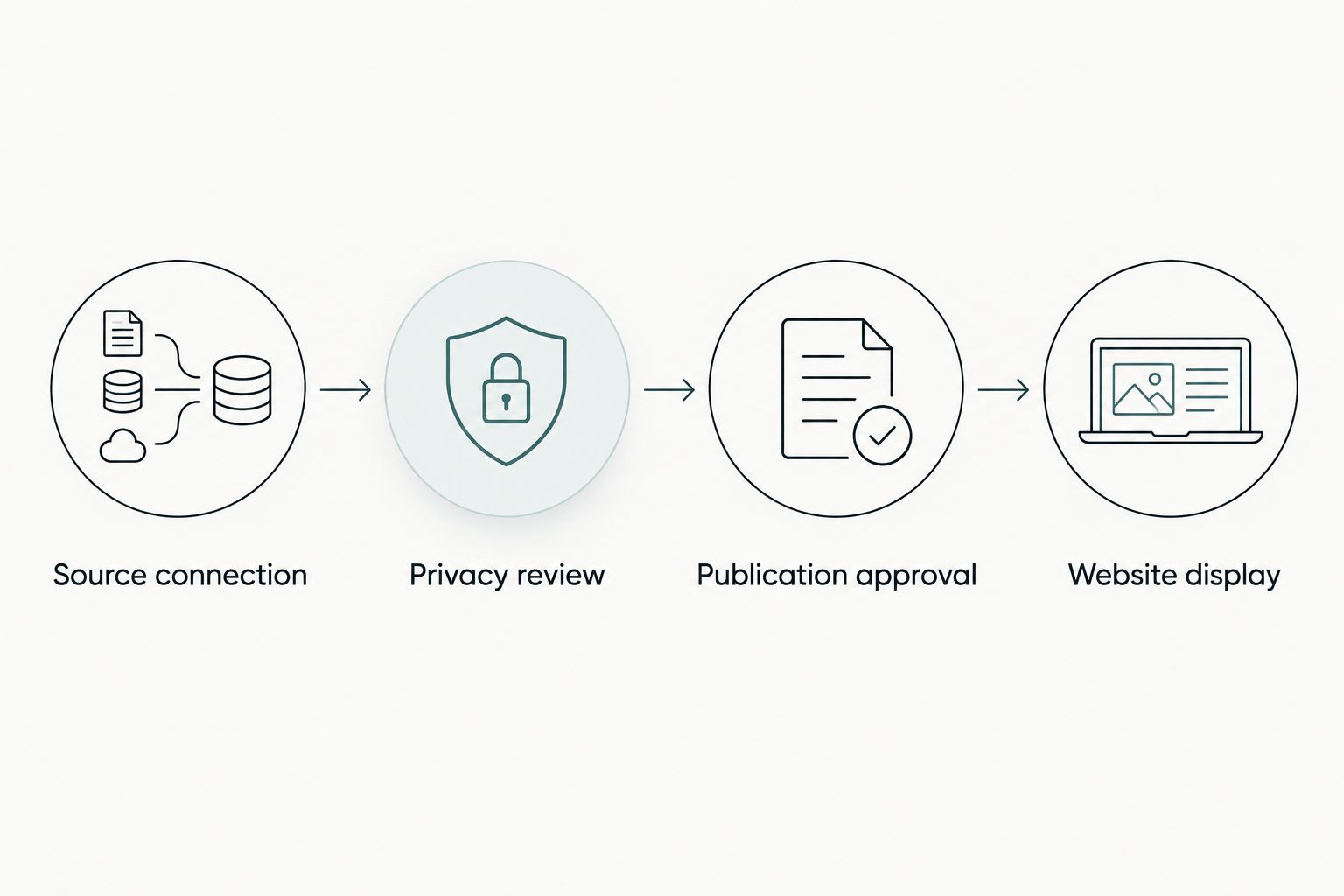
Do not ask an AI system to rewrite testimonials into stronger endorsements. A practical AI task is flagging possible treatment references for staff review; that flag is not a privacy decision, and any processing needs its own data-handling review.
Configure the website display and update rules
A custom display should fit the consultation journey without making selected praise look like a complete review record. A template widget is simpler when its controls meet your requirements; custom development is justified when those controls cannot support your approval, accessibility, or booking needs.
Website display
- Create a clearly labeled section, such as Selected five-star reviews. Preserve the approved wording and required attribution. Do not label a handpicked selection as all patient reviews or calculate a practice-wide score from it.
- Place the section beside a relevant decision point. On a treatment page, follow the selected feedback with your consultation action. Keep medical explanations and suitability information separate from personal testimonials.
- Connect the action to your existing booking or inquiry destination. Test the full path, including the confirmation state. If the destination collects patient information, coordinate the form and data handling with your privacy requirements.
- Configure updates around the source identifier. Use 1 source review ID per website record. An edited review should update or suspend its existing display, not create a second copy.
- Specify removal behavior. When the source confirms deletion, or approval is withdrawn, remove the website copy. Distinguish a confirmed deletion from a temporary connection failure, and define when uncertain content should be hidden.
Expected result: Approved feedback appears in the intended section, its inquiry action works, and a source change does not leave an unmanaged duplicate.
Test your 2026 release with 3 test records in a nonpublic environment: an approved record, an excluded record, and an edited record. Use synthetic text or material cleared for testing, not unapproved patient content.
For the adjacent inquiry workflow, see how to connect patient intake forms to your medical website. A review can support a decision; the form still has to complete the handoff.
Update the website whenever a review changes
The second useful workflow is synchronization after publication. New-review automation alone leaves you with stale testimonials when patients edit or remove their feedback.
- Match the incoming change to Review ID and compare it with the saved record. If the source provides no change event, perform this check during the supported refresh process.
- Recheck the rating and eligibility rules. If a review no longer meets the five-star selection rule, remove it from that selected display. Do not preserve an earlier positive version.
- Return changed text to approval when your policy requires it. A previously approved review can acquire treatment details or other information that needs another check.
- Record the publication outcome and notify staff about exceptions. Keep operational logs limited to what is necessary; avoid copying patient text into unrelated notifications.
Expected result: Your website reflects approved source changes rather than accumulating permanent copies of old reviews.
During your 2026 acceptance check, test edits and removals explicitly. A successful initial import does not prove that either behavior works.
Troubleshooting
New reviews never reach the queue
Check the account, location, connection authorization, and source-access permissions before changing the display. Then inspect the rating and eligibility filters; a functioning connection can correctly exclude a record.
The same review appears repeatedly
Match records using the source's stable identifier, not the reviewer's name or review text. Confirm that scheduled checks update existing records and that retries do not create new entries.
A removed or edited review stays visible
Check whether synchronization handles changes, not just new records. Then inspect the website cache and any separately stored display copy; hiding a record in the integration is insufficient if an old public version remains cached.
The review section breaks the mobile booking path
Test the page on a narrow screen with a long approved review. Remove layouts that cover the consultation action, trap keyboard focus, or require carousel interaction to reach essential information.
A connection error leaves an empty section
Provide a neutral fallback that preserves the page's consultation action. Never replace unavailable feedback with fabricated testimonials, placeholder endorsements, or a misleading aggregate rating.
Customize your workflow
Expand from publication to accountable maintenance. Your implementation brief should identify who approves feedback, fixes a failed connection, handles removal requests, and tests the booking destination after site changes.
Ask Website Symphony to scope review placement alongside custom design, marketing, and hosting responsibilities. Confirm the integration method, source permissions, and maintenance deliverables in the agreement; those details are not established simply by choosing a website provider.
For your 2026 measurement plan, separate review-section interactions, inquiry starts, completed inquiries, and booked appointments. Report only events your systems actually record, and do not treat a button click as a confirmed patient booking.
Plan your review publishing workflow
Discuss source access, approval rules, website placement, and the patient inquiry path.
FAQ
Can I automatically publish five-star reviews on my med spa website?
Yes, when your review source supports the intended use and each displayed review meets your publication and privacy requirements. Automate synchronization separately from approval so a five-star rating does not bypass those checks.
What's the best starting workflow for a medical spa?
Approval-based publishing is the best starting workflow for a med spa establishing its controls. Import eligible feedback into a queue, have the responsible person approve it, and automate the approved website display.
Can I copy a public patient review onto my website?
Public visibility alone does not establish permission for every website reuse. Confirm the review platform's terms and have your privacy lead assess applicable patient-authorization requirements before republication.
Should my website show only five-star reviews?
A clearly labeled selected-testimonial section can feature five-star feedback, subject to applicable rules. Do not describe that selection as your complete review history or use it to create a misleading overall rating.
Will automatic reviews get my med spa more appointments?
Automatic publication does not establish that appointments will increase. Measure completed inquiries and confirmed bookings separately, and verify that the review section connects to a working consultation path.
Can AI approve patient reviews for publication?
Do not use AI output as the final privacy approval. AI can assist with flagging text for staff review when the processing arrangement is appropriate, but your responsible reviewer must resolve publication eligibility.
What happens when a patient edits or deletes a review?
Your workflow should recheck edited feedback and remove confirmed deletions from the website display. Require the implementer to test both behaviors because a new-review import alone does not cover them.
Can Website Symphony handle the website side of this project?
Website Symphony provides custom website design, marketing, and hosting services. Ask for the review integration, approval controls, and ongoing synchronization responsibilities to be explicitly included in your project scope.
One last thing
Test removal before celebrating publication. The most useful acceptance test is not whether praise appears; it is whether withdrawn approval stops that same content from appearing across the live site.
Keep that test in your maintenance checklist. A testimonial workflow is only controlled when you can stop it as reliably as you can start it.


