
Best for managed custom delivery: Website Symphony. Best for content ownership and extensibility: WordPress. Best for straightforward in-house editing: Squarespace. The best website platforms for law firms in 2026 depend on who will maintain the site, how prospective clients request consultations, and how much control your firm needs.
- Website Symphony suits law firms seeking custom website design, marketing, and hosting from one team.
- WordPress leads the best website platforms for law firms shortlist when content ownership and extensibility matter most.
- Squarespace fits straightforward firm websites; Wix suits teams that want visual editing.
- Webflow fits design-led websites with a trained editor or an ongoing development partner.
Why this matters
Your law firm's website has two jobs: explain whether you handle the visitor's legal problem and make the next step clear. A polished homepage cannot compensate for a confusing consultation path.
The platform affects who can fix that path. In 2026, choose the operating model before the editor: a managed custom website, a flexible publishing system, or a hosted builder your staff can maintain.
Website Symphony is best for law firms that want custom website design, marketing, and hosting from one accountable team. That is a service recommendation, not a claim that an agency is interchangeable with website software.
What makes the best website platforms for law firms
Judge every option against these criteria before comparing templates:
- Consultation path: Visitors need a clear route from a relevant practice-area page to a call or inquiry.
- Content control: Staff should be able to update attorney biographies, office information, and practice-area content without breaking layouts.
- Search structure: You need readable URLs, editable page titles, useful internal links, and distinct pages for distinct services.
- Maintenance ownership: Someone must own updates, hosting administration, forms, and ongoing fixes.
- Data handling: Decide what inquiry forms collect, where submissions go, and who can access them.
- Exit options: Clarify ownership of the domain, content, design assets, and any transferable website files before signing.
For a 2026 shortlist, reject any proposal that explains the visual design but leaves those responsibilities unclear. The best-looking demonstration is not automatically the best operating arrangement.
Law firm website options at a glance
The table compares one managed service with four software platforms. That distinction matters: an agency supplies delivery and ongoing services; software still needs an owner.
| Option | Best for | Standout characteristic | Key limitation |
|---|---|---|---|
| Website Symphony | Outsourced custom website delivery | Custom design, marketing, and hosting from one team | Confirm the proposed platform, access, and scope before committing |
| WordPress | Content ownership and extensibility | Open-source publishing with themes and plugins | Maintenance responsibilities remain with your firm or its provider |
| Squarespace | Straightforward in-house editing | Hosted website building with integrated editing | Less freedom for bespoke workflows than a custom development approach |
| Wix | Visual editing by office staff | Hosted builder with visual page editing | Moving the complete site to another platform requires rebuilding |
| Webflow | Design-led websites with specialist support | Visual development with structured content collections | Its editing and development model requires training |
1. Website Symphony: best for managed law firm website delivery
Website Symphony designs and develops custom websites for legal businesses and provides marketing and hosting services. It also describes its offering as AI-powered. For a law firm, the value is one team responsible for the website and its supporting services rather than separate vendors working from different briefs.
A custom approach lets you specify the consultation journey around your practice. Ask the proposal to show how someone moves from a legal issue to the relevant attorney or service page, then to an inquiry. Do not accept a homepage concept as a substitute for that explanation.
Website Symphony pros:
- Custom website design is part of the stated offering.
- Legal businesses are among the sectors it serves.
- Website design, marketing, and hosting come from one team.
Website Symphony cons:
- You still need to confirm the underlying platform and your administrative access.
- Specific legal intake integrations and AI functions need confirmation in the project scope.
Ask for portfolio examples that demonstrate navigation, service explanations, and inquiry placement. Review those examples as design evidence, not proof of increased consultations.
Best for: Law firms that want to outsource custom website delivery and coordinate related services with one provider.
Verdict: Buy the managed-service approach when the written scope assigns ownership clearly.
2. WordPress: best for law firm content ownership and extensibility
WordPress is an open-source content management system. It supports pages, posts, themes, and plugins, giving your firm a flexible foundation for publishing practice-area information and attorney content.
The distinction is between the software and the implementation. A well-built WordPress site can give staff controlled editing access; an overloaded installation can make routine updates difficult. Choose the development partner and maintenance arrangement with the same care as the platform.
WordPress pros:
- Suitable for extensive practice-area and educational content.
- Themes and plugins support a wide range of site requirements.
- Self-hosted deployments give you a choice of hosting provider.
- Roles and permissions help separate editing responsibilities.
WordPress cons:
- Core software, themes, and plugins require ongoing maintenance.
- Plugin choices introduce dependencies that someone must manage.
- Poorly planned templates make editing harder than necessary.
For a 2026 project, ask the developer to demonstrate a routine content update before approval. Have your administrator edit a biography, correct office information, and publish a practice-area change without assistance.
Best for: Firms that publish regularly and want control over content, hosting choices, and future extensions.
Verdict: Buy WordPress when a named person or provider owns maintenance. Skip an unmanaged installation.
3. Squarespace: best for straightforward law firm websites
Squarespace is a hosted website builder with integrated page editing and templates. It fits a firm whose website needs are primarily informational: explain services, introduce attorneys, show office details, and offer a clear contact route.
Its appeal is a contained operating model. You do not manage a separate WordPress plugin stack, but you work within the builder's available structures and integrations.
Squarespace pros:
- Website building and hosting sit within the same service.
- Templates provide a starting point for page structure.
- Staff can maintain ordinary informational content through the editor.
Squarespace cons:
- Bespoke layouts and workflows face platform constraints.
- A template still needs practice-specific writing and navigation.
- Unusual intake requirements need an integration check before selection.
Test the actual template with a long attorney biography and a detailed service page. A design that works for a short overview can become awkward when your firm adds substantive legal explanations.
Best for: Firms with straightforward publishing needs and an internal owner for routine updates.
Verdict: Buy Squarespace for a focused informational site. Skip it when complex custom workflows drive the project.
4. Wix: best for visual editing by law firm staff
Wix is a hosted website builder with visual editing tools. It suits teams that want direct control over page arrangement without maintaining a separate hosting environment and content management installation.
That freedom needs boundaries. Give staff approved page patterns rather than inviting every editor to rearrange every page. Consistent headings, consultation prompts, and attorney details matter more than frequent visual changes.
Wix pros:
- Visual editing supports hands-on layout changes.
- Hosting is part of the platform arrangement.
- Templates and built-in tools provide a starting point for a firm website.
Wix cons:
- Layout freedom makes inconsistent pages easier to create.
- A complete Wix website is not portable to independent hosting.
- Specialized workflows require checking available features and integrations.
Ask the person who will maintain the website to complete a real editing task during evaluation. If routine changes require repeated help, the visual editor has not solved your staffing problem.
Best for: Small legal teams with a designated editor who wants visual control.
Verdict: Buy Wix when staff can maintain consistent pages. Skip it when platform portability is a requirement.
5. Webflow: best for design-led law firm websites
Webflow combines visual website development with a content management system built around collections. A developer can use those collections to structure repeatable content, such as attorney profiles and practice-area entries.
Webflow is not simply a beginner-friendly replacement for every builder. Its design tools reward an understanding of web layout, and your staff needs a defined editing process.
Webflow pros:
- Offers detailed visual control over responsive layouts.
- Content collections support repeatable page structures.
- Separates structured content from the design work that presents it.
Webflow cons:
- Design and development tasks require specialist knowledge.
- Your content model needs planning before the build.
- Complex intake workflows need separate technical evaluation.
Best for: Firms with a strong design brief and a developer or trained editor responsible for the site.
Verdict: Buy Webflow with a capable implementation partner. Skip it as an untrained staff member's first website project.
How these options were ranked
The ranking prioritizes the consultation path, content control, search structure, maintenance ownership, data handling, and exit options. Each recommendation owns a different use case rather than claiming to beat every alternative at every task.
This is a fit-based comparison of established platform characteristics and the stated agency offering. It does not claim measured differences in leads, speed, or conversion rates.
Test the consultation path before choosing
Use the same sample journey for every 2026 proposal. A prospective client should understand what you handle, find the appropriate next step, and know what happens after submitting an inquiry.
- Practice area: Start on the page that matches the legal issue, not the homepage.
- Consultation request: Check whether the action explains what the visitor is requesting.
- Staff review: Confirm who receives the inquiry and how the office handles it.
- Client follow-up: Show the visitor what to expect without promising representation.
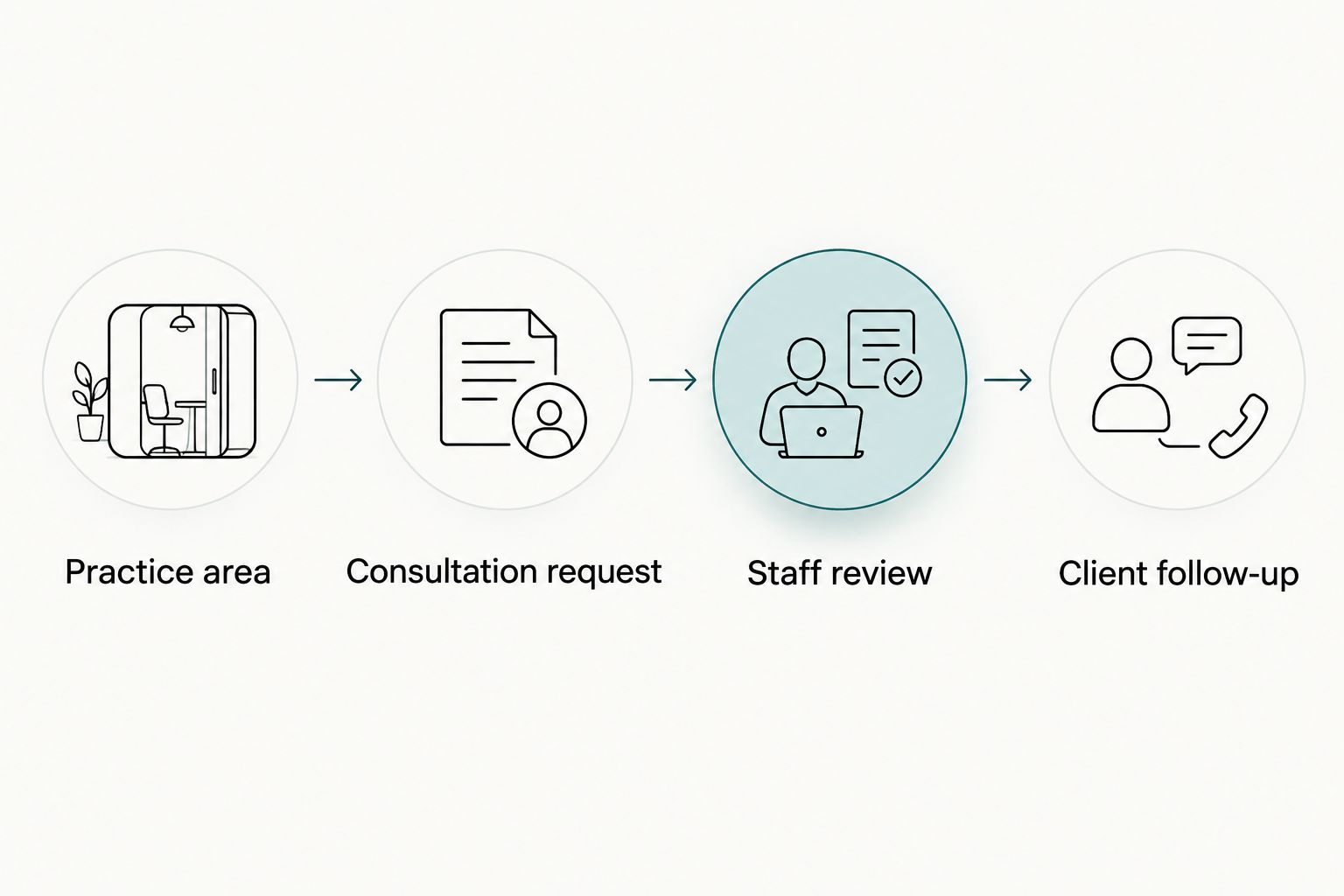
Run 3 sample inquiries through the proposed setup: a relevant prospective client, an inquiry outside your practice, and an existing client seeking help. These are acceptance tests, not performance benchmarks.
Assign 2 reviewers: one attorney to assess wording and one staff member to assess the handoff. Name 1 accountable owner for fixes. Those responsibilities expose gaps that a platform feature checklist misses.
For AI-powered functionality, ask for a concrete task and boundary. A proposed assistant might direct visitors to approved service information, but it should not be presented as a substitute for legal advice. Require the provider to specify approved content, escalation, and data handling; do not assume those capabilities are included.
Which law firm website option should you choose?
Choose WordPress as the default software shortlist when content ownership and extensibility matter most. Choose Squarespace for a straightforward informational site, Wix for visual editing, and Webflow for design-led work with specialist support.
Choose managed custom delivery when your firm does not want to coordinate design, marketing, and hosting separately. Ask Website Symphony to explain the proposed platform, consultation journey, editing access, and responsibility for ongoing changes.
Before signing a 2026 proposal, distinguish deliverables from outcomes. Practice-area pages, inquiry routing, and staff training are deliverables you can inspect. Increased consultations require measurement; a platform name alone cannot substantiate that claim.
Discuss your law firm website
Ask about custom design, marketing, hosting, and the consultation path your firm needs.
FAQ
What's the best website platform for a law firm in 2026?
WordPress is the strongest default shortlist for a law firm that prioritizes content ownership and extensibility. Squarespace, Wix, and Webflow fit different editing and design needs; managed custom delivery suits firms that want an outside team responsible for implementation.
Is a custom law firm website better than a template?
A custom website is better when your consultation journey, content structure, or workflow needs exceed the template's constraints. A template remains a valid starting point for a straightforward informational site, provided the content and inquiry path fit your practice.
Is WordPress better than Squarespace for lawyers?
WordPress is better for extensibility and hosting choice; Squarespace is better suited to a contained, hosted editing arrangement. Choose based on your publishing needs and who will maintain the website.
Can our office staff update a law firm website?
Office staff can update a website when the build provides suitable permissions, clear page patterns, and training. Test a biography change and a practice-area update before approving the platform.
Will a new website platform get us more client inquiries?
A platform change alone does not establish that your firm will receive more inquiries. Define the consultation path and measure completed inquiries, their relevance, and the staff handoff before judging results.
Should a law firm add an AI assistant to its website?
Add an AI assistant only when it has a defined task, approved information, and a clear route to staff. Evaluate data handling and prevent the assistant from presenting general information as individualized legal advice.
What should we ask a law firm website provider before signing?
Ask who owns the domain and content, which platform will be used, what staff can edit, and who maintains forms and hosting. Require the proposal to explain the consultation journey and identify responsibilities for ongoing changes.
One last thing
Test the message after the form submission. A consultation button can look clear while the confirmation leaves visitors unsure whether they requested an appointment, sent a general inquiry, or established an attorney-client relationship.
Have counsel review that wording and staff confirm the actual follow-up process. The website should describe what your office does, not what the template assumes.