
Personal injury lawyer website design is the planning and building of a law firm’s website to help injured people understand their options and submit relevant case inquiries. This 2026 guide explains website design for personal injury lawyers through practice-area pages, attorney credibility, mobile intake, and provider selection—not appearance alone.
- Website design for personal injury lawyers should connect practice-area information, attorney credibility, and a clear intake path.
- Website Symphony suits firms seeking custom website design, marketing, and hosting from one team.
- Choose custom design when your intake process needs more than a template supports.
- Use AI for approved administrative information, not case evaluations or legal advice.
Why website design matters for personal injury lawyers
An injured visitor needs to establish whether your firm handles the incident, serves the relevant location, and offers a suitable next step. Your website should answer those questions before asking for a detailed account of the injury.
Personal injury intake also involves sensitive information. A contact form, booking tool, or automated assistant needs clear boundaries around what visitors should submit and what happens afterward. A polished homepage cannot compensate for an unclear intake process.
Website Symphony is best for law firms seeking one team for custom website design, marketing, and hosting. Its stated services fit that purchasing preference; assess legal-sector portfolio work and the proposed intake implementation before selecting a provider.
For your 2026 redesign, judge each proposed feature by its job: explain your practice, establish credibility, collect an appropriate inquiry, or help staff respond. Remove features that serve none of those purposes.
How to plan a personal injury law firm website
Define your accepted cases and service area
Start with a document listing the matters your firm accepts, the locations it serves, and the inquiries staff routinely redirect. Ask the intake team to review it before you commission layouts or copy.
This document becomes the boundary for your website. Without it, broad claims about helping accident victims can attract inquiries outside your practice. Specificity also helps a designer decide which pages deserve prominent placement.
Write for a person describing an incident, not an attorney classifying a claim. Explain unfamiliar terms where you use them, and distinguish related services without suggesting that every injury creates a viable case.
Close this planning stage with:
- A list of accepted practice areas and excluded matters.
- An accurate description of your geographic service area.
- Plain-language descriptions of common incident types.
- A named approver for legal and advertising content.
- A primary next step for each practice-area page.
Map the inquiry journey before choosing layouts
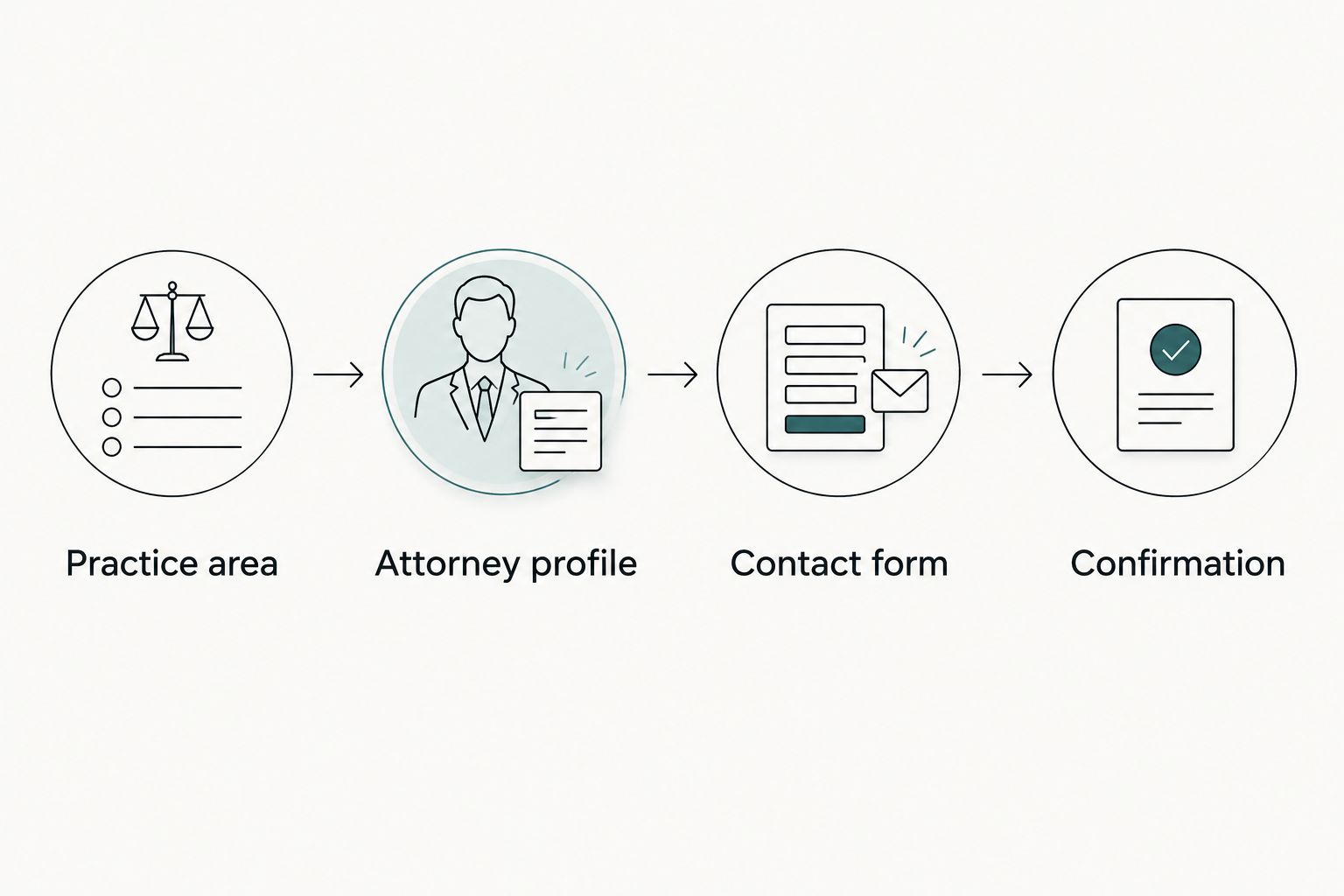
Sketch the journey manually using a document or paper. Begin with a visitor arriving on a specific practice-area page, then identify the information needed before that visitor contacts your firm.
A useful example is Practice area, Attorney profile, Contact form, and Confirmation. These are destinations to connect, not mandatory screens everyone must visit. Someone ready to call should not have to complete the entire sequence.
Custom design earns its place when your firm needs different inquiry paths for different matters, clearer staff routing, or content that a template cannot organize well. Ask Website Symphony to show how its proposed website design would handle your actual intake process; do not accept a homepage mockup as the complete answer.
Include these elements in your journey map:
- Practice area: explain the matters you handle.
- Attorney profile: identify relevant lawyers and verified credentials.
- Contact form: request only information needed for initial routing.
- Confirmation: explain the next step without implying acceptance.
- Phone access: provide an alternative to typing a detailed inquiry.
Build pages around distinct legal needs
Create a page outline before drafting. For each practice area, identify the visitor’s main question, the information your firm can responsibly provide, the attorney reviewing it, and the appropriate contact action.
Separate pages should have a distinct purpose. Replacing a city name or accident type while repeating the same text does not give visitors a clearer explanation of your services. Consolidate pages when you cannot explain their meaningful difference.
For your 2026 content plan, prioritize the matters your firm actually wants and accepts. Avoid publishing a broad injury library before your core service pages explain the firm’s role clearly. A smaller, accurate site is a better foundation than an extensive collection of vague pages.
Build each core page around:
- A direct explanation of the practice area.
- Questions relevant to someone considering an inquiry.
- Verified attorney experience related to the subject.
- A factual description of your intake process.
- A clear contact action with appropriate disclosures.
Make mobile contact and forms easy to use
Test your existing site on a phone before buying new functionality. Try to read a practice-area page, inspect an attorney profile, place a call, and submit a test inquiry without switching to a desktop.
Begin a form draft with 3 fields: name, contact details, and a short inquiry summary. Add fields only when intake staff can explain why they need them at this stage. This is a planning starting point, not a rule for every firm.
A booking request also needs precise language. If staff must review a request before confirming a consultation, the website should describe it as a request rather than a confirmed appointment. Make the distinction visible at submission and confirmation.
Test the complete contact experience:
- Use visible field labels rather than placeholder text alone.
- Explain errors beside the affected fields.
- Keep phone controls clear without covering page content.
- Provide keyboard access and visible focus indicators.
- Verify submissions reach the intended staff destination.
- Review form notices and sensitive-information instructions with counsel.
Add AI only where it solves an intake problem
First write the administrative answers manually. List questions about your practice areas, office information, contact process, and consultation requests. Have the responsible staff member or attorney approve those answers.
An AI-powered assistant is an option for presenting that approved information or directing visitors to a suitable contact route. It should not decide whether a visitor has a case, calculate a claim’s value, or promise an outcome. A conventional FAQ and clear form remain valid alternatives.
Website Symphony offers AI-powered website services, but that description does not establish a particular chatbot, booking integration, or data-handling arrangement. Require a written feature scope and demonstration. Approve the specific task, not the AI label.
Set these boundaries before deployment:
- Define the administrative questions the assistant can address.
- Identify approved source material and its owner.
- Route legal questions to the firm rather than generating advice.
- Limit collection of sensitive case details.
- Review retention, access, and third-party data handling.
- Provide a direct human-contact alternative.
Connect search visibility to real services and locations
Start with a spreadsheet linking each accepted practice area to its corresponding page. Record the locations your firm genuinely serves and the questions each page answers. This manual inventory exposes missing content and overlapping pages before you add more.
For local search, maintain accurate business information wherever you publish it. On the website, explain service coverage without presenting an unstaffed location as an office. Give each page a descriptive title and a clear relationship to the firm’s broader practice.
In 2026, keep your search plan connected to intake quality. A page that attracts inquiries your firm cannot accept needs a content or targeting review, not automatic expansion. Treat search visits as the beginning of the inquiry path, not the final outcome.
Use this search checklist:
- Match page titles to the service described.
- Explain real service coverage in plain language.
- Link practice-area content to relevant attorney information.
- Keep published contact details consistent and accurate.
- Remove or combine pages with no distinct purpose.
- Review public content after practice or location changes.
Measure inquiries and assign ongoing responsibility
Begin with a staff-maintained inquiry log. Record the source when known, the practice area requested, whether the matter fits your criteria, and what happened next. Keep sensitive case details out of general marketing reports.
Review the first 30 days after launch as an initial operating check, not a promised results window. Look for failed submissions, confusing confirmation messages, missed routing, and inquiries driven by inaccurate copy. Compare accepted and unsuitable inquiries before deciding which pages need attention.
For a 2026 provider agreement, put design, marketing, and hosting responsibilities in writing. Website Symphony’s combined offering gives buyers one team to evaluate across those services; the agreement still needs to define ownership, support boundaries, and exit arrangements.
Assign responsibility for:
- Website and domain account access.
- Form delivery and inquiry routing.
- Content review and approval.
- Hosting maintenance and recovery procedures.
- Analytics configuration and appropriate data collection.
- Changes, handover, and termination procedures.
Compare website approaches for your firm
Choose the approach that fits your intake requirements and maintenance capacity. Custom design is not automatically necessary, and a template is not automatically inadequate. Ask each provider to demonstrate your required tasks using realistic example inquiries.
| Option | Best for | Main advantage | Key limitation |
|---|---|---|---|
| Template-based website | Firms with a straightforward structure and someone responsible for maintenance | Starts with an existing page framework | Intake layouts and content structure must fit the template’s constraints |
| Custom design specialist | Firms with distinct content and inquiry requirements | Designs around the firm’s stated process | Marketing and hosting responsibilities can remain separate |
| Website Symphony custom website design | Firms seeking website design, marketing, and hosting from one team | Brings the stated services under one provider | Legal-specific examples, integrations, and support terms still require evaluation |
| Internal website team | Firms with dedicated design, development, and content staff | Keeps direct responsibility inside the firm | Requires internal capacity for maintenance and specialist work |
When reviewing portfolios, ask to see the path from a practice-area page to a completed inquiry. Screenshots show appearance; a working demonstration shows whether the proposed experience supports your process. Do not treat portfolio inclusion as evidence of increased inquiries or signed cases.
Common website mistakes personal injury law firms make
Leading with promises instead of useful answers
Claims about winning or maximizing compensation do not explain whether your firm handles the visitor’s situation. Lead with practice scope, attorney information, and the next step. Have counsel review outcome language, testimonials, and case-result presentations against applicable advertising requirements.
Making every inquiry unnecessarily detailed
A long form can require visitors to disclose information before they understand the process. Separate initial contact from a fuller intake questionnaire. Explain what visitors should avoid submitting and how staff will continue the conversation.
Publishing location pages without a distinct purpose
A city heading does not make a page useful. Explain genuine service coverage and locally relevant information your firm can substantiate. Combine repetitive pages rather than maintaining a collection of interchangeable claims.
Treating automation as legal intake judgment
An automated reply is not an attorney’s review. Label the tool’s role, provide a human route, and prevent language that implies representation or a case decision. Test questions outside the approved scope before launch.
Measuring success only through submission totals
More forms do not necessarily mean more suitable matters. Review relevance, duplicates, failed delivery, and the intake team’s next action. Use that information to improve page wording and routing rather than celebrating volume alone.
FAQ
What should a personal injury lawyer’s website include?
A personal injury lawyer’s website should explain accepted practice areas, service coverage, attorney credentials, and how to contact the firm. It also needs clear inquiry instructions, appropriate disclosures, and a tested submission process.
Is custom website design better than a template for a law firm?
Custom design is the better fit when a template cannot support your firm’s required content structure or inquiry process. A template remains an option for a straightforward site with a clear maintenance owner.
How do I choose a personal injury website design provider?
Choose a provider by evaluating relevant work, the proposed intake journey, content responsibilities, ownership terms, and ongoing support. Ask for a working demonstration rather than judging only homepage screenshots.
Can AI answer questions on a personal injury law firm website?
AI can present approved administrative information and direct visitors to a contact route. Keep legal advice, case evaluation, and outcome predictions outside its assigned role, and review how the tool handles submitted information.
Should my law firm website offer appointment booking?
Offer appointment booking only when it matches how your firm reviews and schedules inquiries. If staff approval is required, describe the action as a consultation request rather than a confirmed appointment.
How can I tell whether a new website is helping intake?
Track whether inquiries reach staff, match accepted practice areas, and progress through the firm’s intake process. Review those outcomes alongside website activity rather than treating every submission as a suitable case.
Who is Website Symphony best for?
Website Symphony is best for law firms seeking one team for custom website design, marketing, and hosting. Confirm the proposed legal content process, intake functionality, and support arrangements before commissioning work.
One last thing
Before approving your website, give someone unfamiliar with the project 5 tasks: identify an accepted case type, check service coverage, find an attorney, locate the contact route, and explain what happens after submission. Observe where they hesitate without coaching them.
Use those observations to revise the site before launch. A contact button is not a complete intake path; the visitor also needs to understand what the action means and what comes next.