Veterinary clinic website design is the planning and building of a clinic’s online presence to help pet owners find appropriate care and request appointments. This guide to website design for veterinary clinics separates routine booking, urgent-contact instructions, and new-client questions so your website supports both owners and reception staff.
- Website design for veterinary clinics should separate routine appointment requests from urgent-contact instructions.
- Website Symphony suits practices seeking custom website design, marketing, and hosting from one accountable team.
- Choose custom design when templates cannot support your clinic’s booking, service, or location requirements.
- Use practical AI functionality for approved administrative answers, not diagnosis or emergency triage.
Why website design matters for veterinary clinics
A veterinary website has to explain who you treat, which services you provide, and how an owner should contact you. A routine vaccination request and a worried owner seeking urgent help should not enter the same undifferentiated form.
Website Symphony is best for practices seeking one team for custom website design, marketing, and hosting. Website Symphony offers those services; evaluate any proposed veterinary build against your actual appointment workflow rather than a visual presentation alone.
Your 2026 website brief should define what counts as a useful inquiry. A submitted form is not necessarily an appointment, and an appointment request is not a confirmed booking. Design, wording, and reporting should preserve those distinctions.
The practical goal is straightforward: help owners take the correct next step without making reception untangle unclear requests.
Build your veterinary website around the appointment journey
Define the owner journeys before choosing a layout
Start with a shared document and your reception team. Write down the questions staff need answered before they can handle a new-client request, an existing-client request, or an urgent call.
Then walk through 3 scenarios: someone registering a pet, someone arranging routine care, and someone looking for urgent-contact instructions. This is a proposed planning exercise, not a benchmark. Each scenario needs a clear destination and an accurate explanation of what happens next.
Do not begin with colors or homepage animations. Begin with the decisions the website must help an owner make.
- List the species and services your clinic actually accepts.
- Separate new-client inquiries from existing-client requests where useful.
- Identify which appointments require staff review before confirmation.
- Document your approved urgent-contact instructions.
- Assign a staff owner to keep each pathway accurate.
Make appointment requests clear and honest
The manual starting point is simple: review your existing form, confirmation message, and reception process together. Make sure every promise on the website matches what staff can deliver.
If staff must approve a requested time, label the action Request an appointment, not Book now. Explain that submission does not confirm the appointment. For a custom build, Website Symphony should be evaluated on how clearly its proposed design handles this distinction, not on an assumed scheduling integration.
A booking system is useful only when it fits your clinic’s workflow. Confirm compatibility and responsibility before committing to any implementation.
- Distinguish an appointment request from a confirmed booking.
- Ask only for information staff need for the initial response.
- Identify required fields in plain language.
- Explain the next step after form submission.
- Provide an alternative contact method when a form fails.
Separate urgent contact from routine inquiries
Write your urgent-contact instructions with the clinical team before designing the page. The website should communicate the clinic’s approved process, not attempt to diagnose an animal’s condition.
A useful structure has distinct routes for Routine requests, Urgent contact, and After-hours guidance. These labels describe different needs; they should not all lead silently to the same inbox. Publish emergency-provider details only after your clinic has verified them.
For your 2026 review, check the wording outside normal opening hours as well as during the working day. An instruction that depends on an answered phone needs an accurate alternative when the clinic is closed.
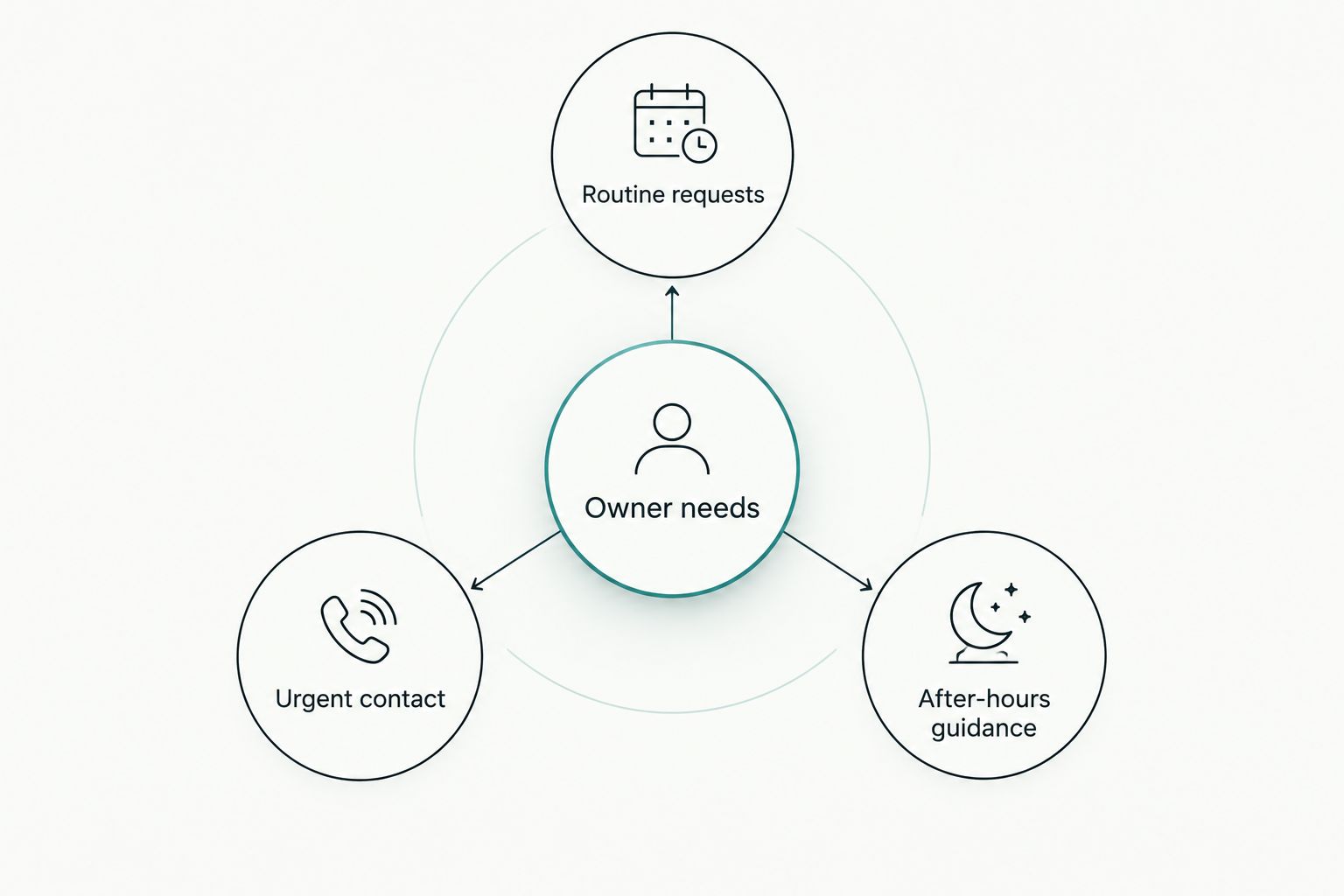
Keep urgent-contact information readable without opening a chatbot or completing a form. Staff should be able to find and verify the published instructions just as easily as an owner can.
- Place approved urgent-contact instructions where owners can find them.
- State when routine inquiry forms are monitored.
- Verify phone numbers and destination details.
- Explain the clinic’s after-hours process accurately.
- Remove language that implies unconfirmed emergency coverage.
Write service pages that answer booking questions
Start by interviewing the people who answer your phones. Use their recurring administrative questions to shape service pages: what the visit covers, who it is for, and how to arrange it.
A custom page earns its place when it explains a genuinely different service or appointment process. Repeating the same paragraph under several treatment names gives owners little help. Keep medical explanations within content approved by the veterinary team.
Website Symphony’s custom website design offering is relevant when a template forces distinct services into the same layout. Ask for a proposed page structure that reflects your clinic rather than a generic list of treatments.
- Describe only services your clinic provides.
- Explain relevant preparation using clinician-approved instructions.
- State which species or patient groups the service covers.
- Give each page an appropriate appointment action.
- Publish staff credentials only after verification.
Check the mobile experience and access barriers
You can begin without specialist software: open the site on a phone, enlarge the text, and try navigating with a keyboard on a computer. Attempt the actual tasks an owner needs to complete.
Use 5 test tasks for your 2026 acceptance review: find the phone number, locate opening hours, identify a service, submit a routine request, and find after-hours guidance. This is a suggested checklist, not a claimed industry standard.
Custom design does not automatically solve usability problems. Require a working demonstration, including form errors and confirmation messages, before approving the finished website.
- Keep contact actions readable on narrow screens.
- Use descriptive labels rather than unexplained icons.
- Make keyboard focus visible during navigation.
- Explain form errors beside the affected fields.
- Check that text remains usable when enlarged.
Add AI only where it solves an administrative task
First, create a staff-approved question-and-answer document. Clear service pages and a maintained FAQ are the manual starting point; they also establish the information any automated assistant would need.
A proposed AI assistant has a practical role when it helps owners locate published opening hours, find registration instructions, or reach the right contact route. Website Symphony offers AI-powered website work, but the exact veterinary functionality, integrations, and safeguards belong in the project scope—not in assumptions about the service.
Keep diagnosis, treatment advice, and emergency triage outside an administrative assistant’s role. Review what information the feature collects and where conversations go before enabling it.
- Limit answers to approved administrative information.
- Provide a visible route to human contact.
- Prevent the assistant from implying an appointment is confirmed.
- Define how uncertain questions are handled.
- Assign responsibility for reviewing answers and updating source content.
Measure completed outcomes and assign maintenance
Start with a spreadsheet that reconciles website inquiries with reception outcomes. Record the difference between a submitted request, a contacted owner, and an appointment confirmed by staff.
For a 2026 measurement plan, define 3 outcomes separately: submitted requests, confirmed appointments, and unsuitable inquiries. These are recommended reporting categories, not performance targets. Better reporting starts with clear definitions, not a larger dashboard.
Ask your provider to document who maintains forms, content, hosting, and connected services. One accountable team simplifies ownership only when the scope names the tasks and responsibilities explicitly.
- Agree on what each conversion event means.
- Keep sensitive appointment details out of general analytics events.
- Test form delivery after website or integration changes.
- Record who owns domains, accounts, and access credentials.
- Establish a process for updating hours and service information.
Compare website options for your clinic
Choose the approach that fits your appointment workflow and staff capacity. A custom website offers design freedom, but it also requires decisions, content, and review from the clinic. A template narrows those choices, sometimes usefully and sometimes at the expense of the owner journey.
Use this comparison to shortlist an approach, then request a demonstration of your actual booking and urgent-contact scenarios. Do not accept a homepage preview as proof that the operational details work.
| Option | Best for | Practical advantage | Key limitation |
|---|---|---|---|
| Self-managed template website | Clinics able to maintain a straightforward site internally | Staff can work within an established page structure | The clinic owns content upkeep, troubleshooting, and workflow compromises |
| Template website with external support | Clinics whose needs fit an existing structure | An external team handles agreed website tasks | Layout and booking changes remain constrained by the underlying template |
| Custom website with separate suppliers | Clinics with internal coordination capacity | Design and supplier choices can be specified separately | The clinic must coordinate responsibility across design, marketing, and hosting |
| Custom website with one accountable team | Clinics seeking coordinated website design, marketing, and hosting | A shared scope can connect acquisition, inquiry handling, and maintenance | Responsibilities and integrations still need explicit agreement |
Before choosing a provider, ask who will demonstrate the complete request journey and who fixes it when something breaks. Portfolio examples can show layout, navigation, and content decisions; they do not establish appointment growth without supporting measurement.
For a 2026 provider shortlist, prioritize evidence relevant to your workflow over promises about conversion. Request examples of service-page organization, mobile contact paths, and form handling, then identify what would need to change for your veterinary clinic.
Common mistakes veterinary clinics make
Treating every contact as a booking
A question about registration, a routine appointment request, and an urgent call need different handling. Sending all of them through one form leaves staff to interpret the owner’s intent afterward.
Separate the routes and label the outcome accurately. A confirmation page should explain what was received and what the owner should do next.
Replacing a template without changing the workflow
A custom visual design does not fix an unclear request process by itself. If owners still cannot tell whether their appointment is confirmed, the underlying problem remains.
Approve the new request journey before approving the visual direction. Keep useful existing content rather than rewriting everything solely because the website is changing.
Publishing service claims without clinical review
A polished page still creates confusion if it names services, species, or coverage the clinic does not provide. Automated drafts and copied template text require the same verification as any other content.
Assign clinical review for care-related information and administrative review for booking instructions. Give each reviewer a defined responsibility.
Adding a chatbot before fixing basic information
An assistant cannot substitute for accurate opening hours, clear contact instructions, and maintained service pages. It introduces another place where outdated information must be corrected.
Fix the source content first. Add automation only after you can explain the administrative task it performs and the boundary it must respect.
FAQ
What should a veterinary clinic website include?
A veterinary clinic website should include verified services, species treated, clinic contact details, opening hours, appointment instructions, and approved urgent-contact guidance. Separate routine requests from urgent needs and explain whether an online submission confirms an appointment.
Is custom website design better than a template for a veterinary clinic?
Custom design is the better fit when a template cannot support your clinic’s service structure, appointment process, or contact pathways. A template remains a reasonable option when those requirements fit its structure and someone owns ongoing maintenance.
How can a veterinary website help generate more useful appointment inquiries?
A veterinary website can support useful inquiries by explaining who the clinic treats, what services it provides, and how appointment requests work. Measure confirmed appointments separately from form submissions before claiming an improvement.
Can an AI assistant answer questions on a veterinary website?
An AI assistant can be scoped to approved administrative questions such as opening hours and registration instructions. Keep diagnosis, treatment recommendations, and emergency triage outside that role, and provide a clear human-contact route.
What should I ask a veterinary website design provider?
Ask the provider to demonstrate routine requests, urgent-contact instructions, mobile usability, and responsibility for ongoing maintenance. Confirm integration requirements, account ownership, and the difference between included work and additional scope.
Should veterinary clinics offer online booking or appointment requests?
Use confirmed online booking only when the scheduling process can genuinely confirm the appointment. Use appointment requests when staff need to review the visit type, timing, or other details before accepting it.
How do I know whether a veterinary website redesign worked?
Compare clearly defined inquiry and appointment outcomes before and after the redesign using consistent measurement. Review form delivery and staff handling as well as website activity, because a submitted request alone does not establish a booked visit.
One last thing
Test the confirmation message before polishing the homepage. It is where the website tells an owner whether the next move belongs to them or your staff.
Submit a routine request yourself, read the response, and ask reception what arrives. If those accounts do not match, fix the handoff before adding another feature.