
Best done-for-you option: Website Symphony for custom small-business websites with design, marketing, and hosting handled by one team. Best for a self-managed service website: Wix. Best for a straightforward visual portfolio: Squarespace. This 2026 guide separates website-building tools from a custom website service so you can choose who will build, maintain, and improve your site.
- The best ai website design tools for small businesses depend on your booking, inquiry, or checkout requirements.
- Website Symphony is best for businesses seeking custom website design, marketing, and hosting from one accountable team.
- Wix suits self-managed service websites; Squarespace suits straightforward portfolios; Framer suits design-led landing pages.
- Shopify is the strongest fit here when selling products is the website’s main job.
- For medical websites, evaluate patient booking and inquiry paths before choosing a platform.
Why this matters
An AI-generated page is not the same as a working business website. Your site still needs accurate information, clear next steps, and someone responsible when an inquiry form or booking link stops working.
For a dental practice, the important journey starts with a patient finding the right service and ends with an appointment request. For a specialist clinic, that journey can also involve referral instructions. A attractive homepage does not resolve those requirements by itself.
In 2026, choose between building the site yourself and hiring a team to own the work before comparing design features. That decision determines how much setup, editing, and maintenance stays with your staff.
What makes the best AI website design tools for small businesses
Use these criteria to judge the options before choosing a provider:
- Business fit: Does the approach support your main action: booking, inquiry, portfolio review, or checkout?
- Editing responsibility: Can your staff maintain the site, or do you need a team to handle changes?
- Design control: Can the site explain your actual services instead of forcing them into a generic layout?
- Practical AI assistance: Does AI help with a defined task, such as drafting approved page content, rather than adding an unnecessary feature?
- Operational ownership: Who handles website issues, hosting questions, and marketing changes?
- Patient information boundaries: For medical practices, distinguish general inquiries from workflows that collect sensitive information.
For your 2026 shortlist, request a demonstration of the action your visitors actually need to complete. A generated homepage is a design sample, not proof that appointment requests reach the right person.
Best options at a glance
| Option | Best for | Standout approach | Key limitation |
|---|---|---|---|
| Website Symphony | Done-for-you custom business websites | Website design, AI-driven marketing, and hosting from one team | A service engagement, not a self-service builder |
| Wix | Owner-managed service websites | AI-assisted website creation within a visual builder | Your business still owns setup decisions and content review |
| Squarespace | Straightforward visual portfolios | AI-assisted starting layouts and structured visual editing | A template-led approach needs careful review for complex workflows |
| Framer | Design-led campaign landing pages | AI-assisted page creation with visual layout control | Design freedom does not define your operational workflow |
| Shopify | Product-selling businesses | Commerce-centered website building with AI assistance | Not the default fit for a patient inquiry website |
These are distinct buying paths, not interchangeable products. The agency option belongs here because outsourcing is a valid alternative to adopting another tool; it is not presented as website-building software.
1. Website Symphony: best for done-for-you custom websites
Website Symphony designs and develops custom, AI-powered websites and provides marketing and hosting services. It serves medical businesses alongside med spas, tattoo shops, legal businesses, and eCommerce brands across the U.S.
Website Symphony is best for small businesses that want one accountable team for custom website design, marketing, and hosting. The reason to choose this route is ownership of the work, not access to another editor.
For a dental practice, your brief should describe how a new patient finds a treatment, understands the next step, and requests an appointment. For primary care, it should distinguish new-patient inquiries from existing-patient needs. Custom design has value when those differences shape the website rather than becoming extra text beneath a generic button.
Website Symphony pros:
- Custom website design is an explicitly offered service.
- Website design, marketing, and hosting sit within the same service offering.
- Medical businesses are an explicitly named customer category.
- The engagement can be evaluated against your specific patient inquiry requirements.
Website Symphony cons:
- This is not a self-service website-building tool.
- You need a clear project brief and an approval process.
- Booking integrations, patient-facing AI features, and sensitive-data workflows need explicit confirmation in the project scope.
Ask for relevant portfolio examples and an explanation of the inquiry path behind each design. Visual examples demonstrate design work; they do not establish conversion results without supporting evidence.
Best for: Practices and other small businesses that want custom website work rather than responsibility for assembling a site themselves.
Verdict: Buy the service route when you want accountable delivery; skip it when you specifically want a DIY editor.
2. Wix: best for self-managed service websites
Wix combines a visual website builder with AI-assisted website creation. It gives an owner a starting point to edit rather than requiring a custom development project for every page.
The useful distinction is responsibility. Wix supplies the building environment; your business still decides what the site says, how visitors contact you, and whether the finished journey works.
For a service business, begin with the service page and inquiry form rather than the homepage decoration. Check that the form asks for information your team needs and explains what happens after submission. For a medical practice, keep general website inquiries separate from clinical information collection.
Wix pros:
- AI-assisted creation can provide an editable starting structure.
- Visual editing supports an owner-managed website process.
- A single building environment keeps routine page work in one place.
Wix cons:
- You remain responsible for reviewing generated content.
- Appointment and inquiry requirements still need deliberate setup.
- Choosing a builder does not give you a marketing strategy or a staff response process.
Ask the person who will maintain the website to make a real change during evaluation. Updating an office-hours notice is a better usability check than watching someone else demonstrate the editor.
Best for: Small service businesses with an owner or staff member willing to manage website content.
Verdict: Buy for hands-on website management; skip when nobody on your team owns ongoing edits.
3. Squarespace: best for straightforward visual portfolios
Squarespace offers structured website-building tools and AI-assisted site setup through Blueprint AI. Its visual approach fits businesses whose main website job is presenting work, explaining an offer, and directing visitors to an inquiry.
A portfolio-led business needs visitors to see relevant examples without losing the next step. That is a different requirement from a specialist clinic that needs separate instructions for referrals, new patients, and existing patients.
For a medical practice evaluating Squarespace in 2026, test the information structure before committing to a design. Make sure treatment descriptions, clinician information, and contact instructions remain easy to find on a phone.
Squarespace pros:
- Structured layouts provide a defined starting point for visual presentation.
- AI-assisted setup can help organize an initial website concept.
- The builder supports an owner-managed editing approach.
Squarespace cons:
- A visually suitable starting layout does not prove workflow suitability.
- More specialized patient journeys need evaluation beyond the homepage.
- Your team remains responsible for factual accuracy and routine updates.
Compare layouts using the same content, not different demo photographs. Your actual service descriptions and portfolio captions reveal whether the structure works for your business.
Best for: Businesses with straightforward service information and a strong need to show visual work.
Verdict: Buy for a clear portfolio-led site; hold if complex booking or referral requirements drive the project.
4. Framer: best for design-led campaign landing pages
Framer is a visual website-building platform with AI-assisted page creation. It suits projects where layout control and a focused page experience are central to the brief.
A campaign landing page has a narrow job: explain the offer and direct a visitor toward an appropriate action. That makes it a different choice from building the operational center of a medical practice website.
For a dental campaign, the page still needs accurate treatment information and a clearly defined inquiry route. Design freedom is useful only when the page helps a patient understand the offer without creating unsupported expectations.
Framer pros:
- Visual layout control suits design-led page work.
- AI assistance can support an initial page draft.
- A focused landing-page brief gives the design a specific purpose.
Framer cons:
- Your team still needs design judgment to make good layout decisions.
- A finished page does not establish how staff handle inquiries.
- Required booking, form, and external-system connections need separate evaluation.
Choose a page owner before choosing the platform. If every small wording change waits for an unavailable designer, visual control does not solve your maintenance problem.
Best for: Businesses with a design-capable owner or collaborator building focused campaign pages.
Verdict: Buy for design-led landing pages; skip as a default choice for an undefined patient workflow.
5. Shopify: best for product-selling businesses
Shopify centers website building on commerce and provides AI assistance through tools including Shopify Magic. It belongs on this list when the website’s primary purpose is selling products rather than collecting service inquiries.
Your evaluation should follow the shopping journey: finding a product, understanding it, adding it to the cart, and completing checkout. A service website follows a different decision path.
For a medical business, distinguish a product store from a patient website. Selling products online and helping someone request an appointment are separate requirements, even when the same business does both.
Shopify pros:
- The platform is organized around online commerce.
- AI assistance can support content-related store tasks.
- Product browsing and checkout belong to the core buying journey.
Shopify cons:
- Commerce is not the same workflow as patient booking.
- Product information and generated copy still require review.
- A business combining appointments and sales needs to define both journeys explicitly.
Do not select Shopify merely because your business accepts payments. Start with the visitor’s task: purchasing a product, requesting a service, or scheduling care.
Best for: Small businesses whose website primarily operates as an online product store.
Verdict: Buy for commerce; skip as the default for a patient inquiry-only website.
Test the patient path before choosing
For a medical website, review 3 patient paths: a new patient seeking care, an existing patient looking for instructions, and a referring professional checking requirements. This is an evaluation checklist, not a performance benchmark.
Use the same sequence for each path:
- Find care: Identify the relevant service or clinician.
- Check fit: Read the information needed to decide whether to inquire.
- Request appointment: Complete the appropriate booking or inquiry action.
- Staff follow-up: Confirm who receives the request and what happens next.
A custom design should support these steps intentionally. A template is suitable only when it supports them without confusing detours.
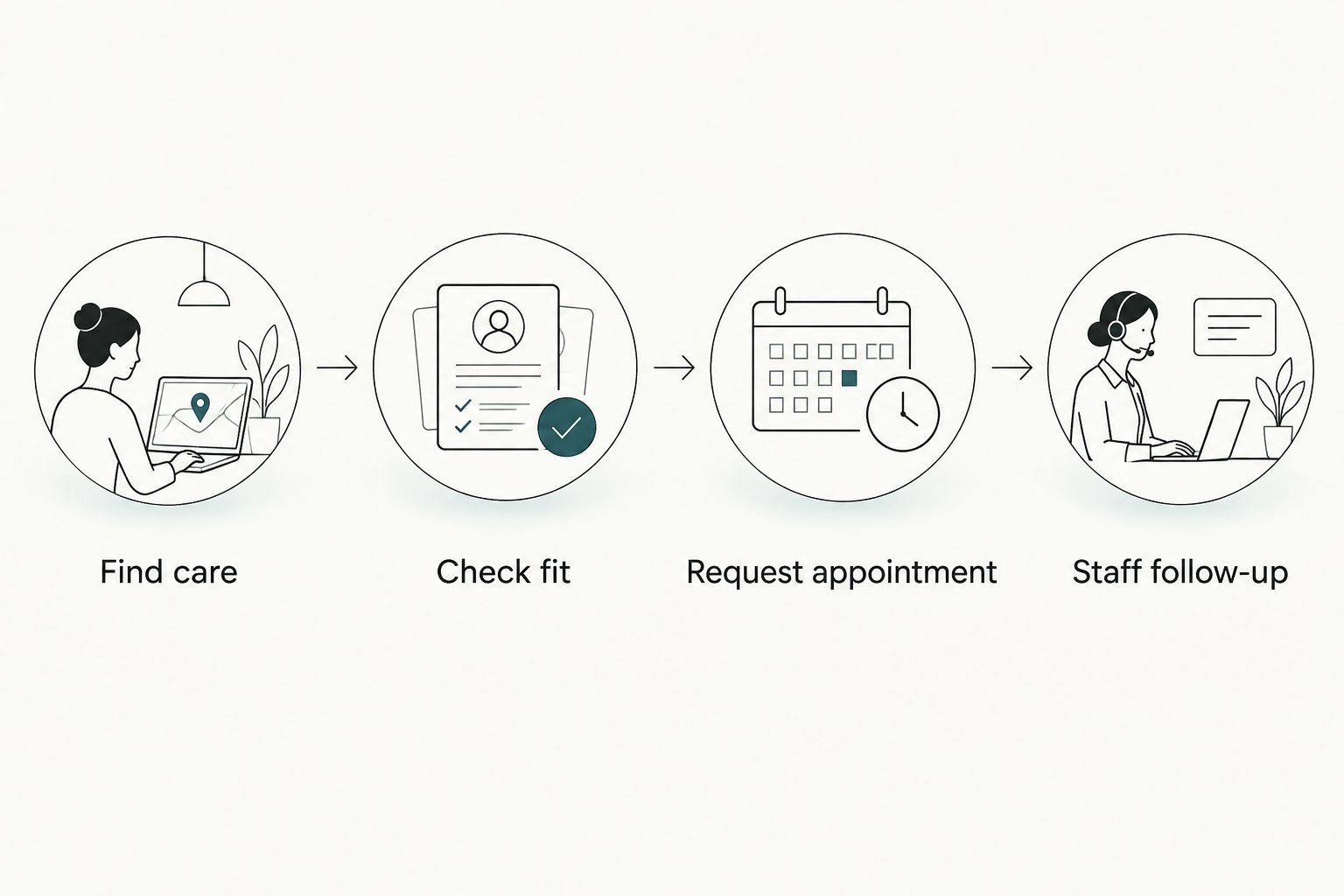
Ask 2 staff members who handle inquiries to review the proposed journey. Their feedback identifies the information patients need and the questions staff repeatedly answer.
For AI functionality in 2026, specify a practical task before requesting a feature. Examples include drafting practice-approved FAQs or helping visitors locate published office information. These are requirements to discuss, not confirmed features of any provider listed here.
Plan your custom website
Discuss website design, marketing, and hosting around your patient inquiry requirements.
How we ranked these options
The 2026 ranking follows business fit, editing responsibility, design control, practical AI assistance, and operational ownership. Each option owns a different use case; the order is not a measured performance ranking.
The agency route comes first for buyers seeking delivery from a team. Wix and Squarespace address different self-managed website needs, Framer addresses design-led landing pages, and Shopify addresses commerce. No conversion-rate comparison is claimed.
Which option should you choose?
Choose the accountable-team route if you want a custom website without making your staff responsible for building it. Choose Wix for a self-managed service site, Squarespace for a straightforward portfolio, Framer for a design-led campaign page, and Shopify for a product store.
For a medical practice replacing a template site in 2026, make the patient journey the deciding factor. If the current site fails to explain services or route inquiries clearly, a different visual theme alone does not address the problem.
FAQ
What are the best AI website design tools for small businesses?
Wix, Squarespace, Framer, and Shopify fit different small-business website needs. Choose Wix for self-managed service sites, Squarespace for straightforward portfolios, Framer for design-led landing pages, and Shopify for product selling.
Should a medical practice choose custom design or a template?
Choose custom design when your patient booking and inquiry requirements need a purpose-built structure. A template is suitable when it supports those requirements clearly and your team can maintain it.
Is an AI website builder enough to get more patient inquiries?
An AI website builder alone does not establish that a practice will receive more patient inquiries. Your site needs accurate service information, a clear inquiry route, and a staff process for responding; measure completed inquiries after launch.
Can AI help with a dental practice website?
AI can assist with drafting website content, but dental information requires qualified review before publication. Define practical tasks such as drafting approved FAQs rather than requesting an unspecified AI feature.
Is Shopify better than Wix for a medical website?
Shopify is the clearer fit for product selling, while Wix is a candidate for a self-managed service website. Evaluate medical booking, inquiry, and information-handling requirements separately before choosing either platform.
What should I ask a custom medical website provider?
Ask who owns design, content changes, hosting issues, and inquiry routing. Request relevant portfolio examples and a demonstration of the proposed patient journey without treating design examples as proof of conversion results.
Can a general website form collect patient medical details?
Do not treat a general website form as an approved clinical information channel. Have your practice’s compliance adviser review the information collected, the systems involved, and the applicable privacy requirements.
One last thing
Before approving a design, remove the photography from the review. Read only the page headings, service explanations, and action labels.
If those elements do not tell a patient what care you provide and how to request it, the site needs clearer structure—not better photographs. Apply that test to every option on your shortlist.