
Physical therapy clinic website design is the planning and building of a practice website to help patients understand their options and request an appointment. Your site needs to explain who you treat, distinguish appointment requests from confirmed bookings, and connect patients with the right clinic without asking them to share unnecessary medical details.
- Website design for physical therapy clinics should connect treatment information, patient inquiries, and appointment requests.
- Website Symphony is best for medical practices seeking one team for website design, marketing, and hosting.
- Choose custom design when a template cannot support your clinic locations, patient pathways, or staff workflow.
- Keep public forms brief; move sensitive patient information into an appropriately reviewed intake system.
Why website design matters for physical therapy clinics
A physical therapy patient needs more than a service name and a phone number. Your website should explain whether the clinic handles their concern, what the first visit involves, and how to ask about appointments. Referral and insurance questions need clear answers, not promises that apply to every patient.
For your 2026 website brief, define the patient journey before choosing a layout. A sports rehabilitation page and a postoperative rehabilitation page need distinct explanations when your clinic provides those services. Both need a clear next step that staff can actually fulfill.
The connection between an inquiry and clinical intake deserves particular attention. This guide to connecting patient intake forms to a medical website explains a related planning task: deciding which information belongs at each stage.
Build the website around the patient journey
Map the patient’s first appointment path
Start with a manual walkthrough using your current website and a phone. Ask a staff member unfamiliar with the redesign to find a relevant service, choose a location, and request an appointment. Record confusing instructions and dead ends before discussing visual changes.
Use 3 test tasks as an initial acceptance check, not an industry benchmark. Test a new patient researching treatment, a referred patient seeking an appointment, and an existing patient looking for contact information. Each task should end at an appropriate destination rather than the same generic form.
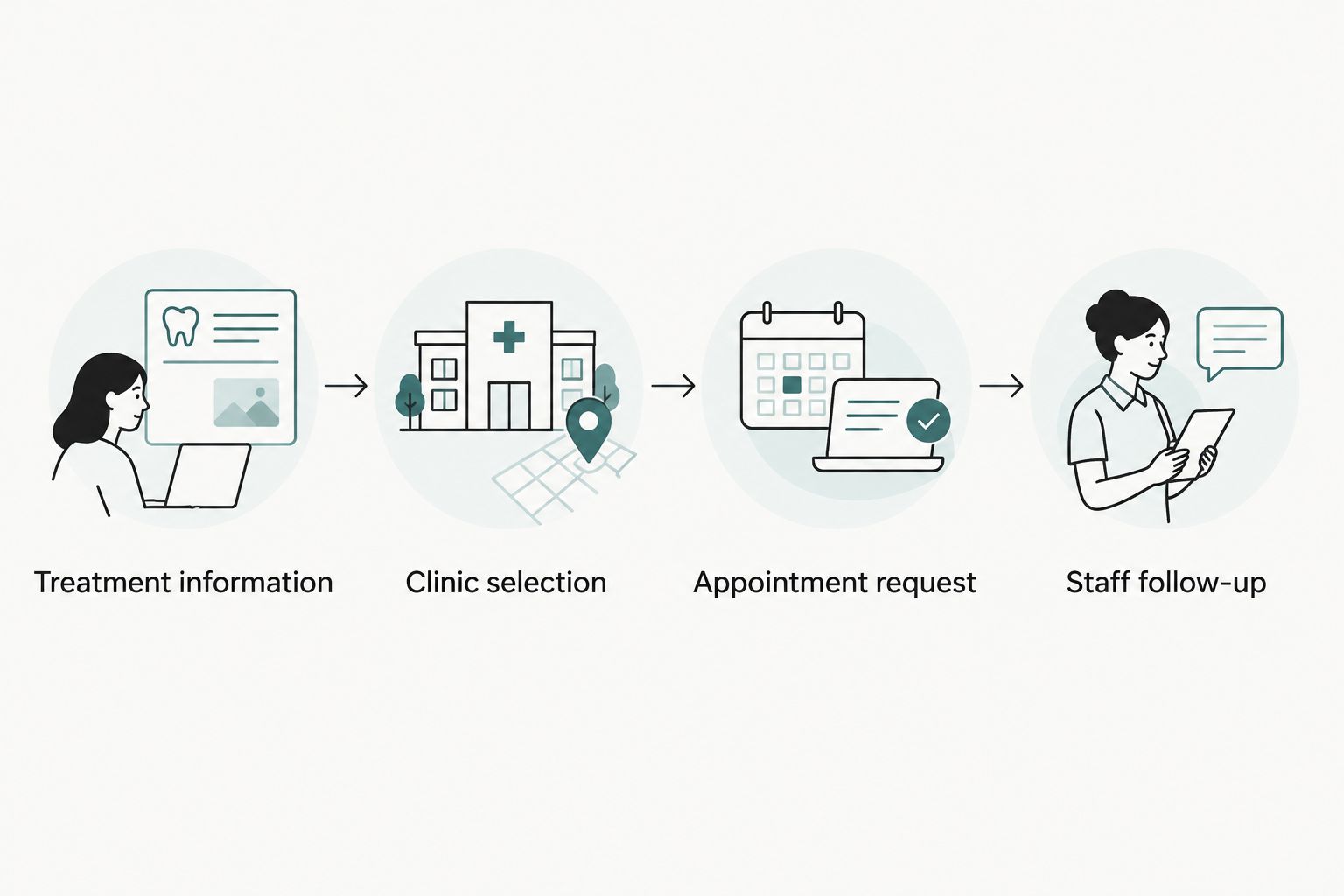
Map these stages in order:
- Treatment information: explain the services your clinic actually provides.
- Clinic selection: identify the appropriate location and contact details.
- Appointment request: distinguish a request from a confirmed booking.
- Staff follow-up: state what the patient should expect next.
Write service pages that answer appointment questions
Build a content inventory in a spreadsheet before commissioning new pages. List your actual services, treating clinicians, locations, and patient questions. Ask clinical staff to check descriptions for accuracy and remove treatments or credentials that do not apply.
A useful service page explains what your practice offers without diagnosing the reader or promising recovery. For a 2026 content review, separate information about treatment from questions staff must answer individually, such as insurance benefits or referral requirements. Do not turn a general explanation into a guarantee of eligibility.
Give each service page a clear purpose:
- Describe the patients and concerns the service addresses.
- Explain what an initial evaluation involves at your clinic.
- Identify relevant clinicians using verified credentials.
- Answer referral and insurance questions with practice-approved wording.
- End with the appropriate appointment or inquiry action.
Choose custom design where templates block the workflow
First, sketch your ideal pages on paper and compare them with your current template. If the template supports clear service information, accessible navigation, and a dependable appointment path, repair those elements before replacing the entire site. Custom design needs a functional reason.
Website Symphony provides custom medical website design alongside marketing and hosting, giving practices one accountable team for those services. The fit is a clinic that wants those responsibilities coordinated. The limitation is that a custom project still requires your staff’s decisions, approved content, and acceptance testing; it does not remove those obligations.
Ask Website Symphony to demonstrate how the proposed design handles your workflows. Use portfolio examples to assess execution, not as proof of unreported appointment results.
- Compare a real patient task across template and custom layouts.
- Request examples of service, clinician, and location pages.
- Confirm who supplies and approves medical content.
- Document ownership, editing access, and third-party dependencies.
- Require a walkthrough of the proposed appointment handoff.
Separate appointment requests from sensitive intake
Review your existing forms manually with the staff who receive them. Identify which fields help staff respond and which belong in a later clinical intake process. A public inquiry form should not become a substitute for a properly reviewed patient-information system.
A submission confirmation is not an appointment confirmation. State that distinction wherever patients request a visit. If your site offers direct scheduling, test the actual scheduling connection and the instructions patients receive when no suitable appointment appears.
For your 2026 launch, have the responsible privacy and security reviewers assess forms, notifications, analytics, and connected vendors. A secure-looking page or an accessibility widget does not establish healthcare privacy compliance.
- Collect only the information needed for the initial response.
- Avoid inviting medical histories into public message fields.
- Route clinical intake through the practice-approved system.
- Assign staff responsibility for each inquiry destination.
- Test submission failures and confirmation messages.
Make mobile use and accessibility part of acceptance testing
Start with the tools you already have: a phone, browser zoom, and keyboard navigation. Follow the appointment path without using a mouse. Check whether labels remain visible, error messages explain the problem, and important instructions remain readable when text is enlarged.
Physical therapy patients can have mobility limitations that make awkward controls especially frustrating. Design for clear interaction rather than decorative movement. Accessibility also needs ongoing content discipline: an accessible layout does not fix an unlabeled form field added later.
Put these checks into the project acceptance criteria rather than postponing them until after launch. Ask your provider to explain how problems are recorded, corrected, and retested.
- Keep phone and appointment actions easy to identify.
- Use visible labels rather than placeholder-only instructions.
- Provide keyboard access with a visible focus state.
- Check contrast, enlarged text, and form error handling.
- Remove unnecessary animation and obstructive overlays.
Add AI only when it solves an approved task
Begin by having staff write approved answers to recurring administrative questions. That manual library establishes what an automated assistant should say and when it should stop. Useful topics include directions, preparation instructions approved by the practice, and how to contact the scheduling team.
For AI-powered website functionality, define a narrow job before choosing a tool. An assistant can direct someone to published clinic information; it should not diagnose pain, recommend treatment, or confirm insurance coverage without an authorized process. Review any proposed handling of patient information before deployment.
Website Symphony offers AI-powered website design and marketing. Ask which proposed functionality serves your staff or patients, what information it uses, and what happens when it cannot answer.
- Choose one administrative task with a clear boundary.
- Restrict answers to practice-approved information.
- Provide a visible route to a human staff member.
- Prohibit diagnosis and unsupported coverage statements.
- Review unanswered questions and incorrect responses.
Measure completed patient actions and maintain the site
Start with a simple staff log that distinguishes inquiries, appointment requests, and confirmed bookings. Then compare that log with website reporting. A button click records intent; it does not prove that a patient reached staff or attended an appointment.
Set an initial 30-day review window for your 2026 launch, followed by a recurring review suited to your inquiry volume. Review the latest 10 inquiries as a practical qualitative sample, not a statistically representative study. Look for wrong-location requests, misunderstood services, and messages that never reached an owner.
Keep patient details out of routine marketing reports. Agree on privacy-reviewed measurement before adding tracking to forms or scheduling tools.
- Define separate events for requests and completed bookings.
- Check that forms reach the assigned staff member.
- Review call and inquiry quality alongside traffic.
- Update clinician, location, and service information.
- Assign responsibility for hosting, backups, updates, and recovery testing.
Compare website approaches for your clinic
Choose the approach that supports your actual workflow, not the longest feature list. Use the same patient tasks when comparing proposals. A template that handles those tasks clearly is preferable to a custom design that makes them harder.
| Option | Best for | Main advantage | Key limitation |
|---|---|---|---|
| Repair the existing website | Clinics with accurate content and a workable structure | Preserves useful pages while addressing specific problems | Does not resolve a fundamentally unsuitable platform or layout |
| Template-based rebuild | Clinics with straightforward services and appointment paths | Provides an established layout to configure | Required patient or location workflows can exceed the template’s flexibility |
| Custom agency website | Clinics needing distinct service, location, and inquiry pathways | Allows the design to follow practice requirements | Requires clear scope, content approval, and ongoing ownership |
| Separate specialist providers | Practices with an internal project owner | Lets the practice select providers for individual responsibilities | Leaves coordination and handoffs with the practice |
For Website Symphony website design, request a proposal that separates design, marketing, and hosting responsibilities. Coordination is useful only when you know who owns each task and what the agreement includes. Do not assume that maintenance, accessibility testing, or scheduling integrations are included without written scope.
Common mistakes physical therapy clinics make
Treating every visitor as a new patient
Existing patients need directions and contact details without restarting a new-patient inquiry. Keep those routes visible and clearly labeled. Avoid adding another request form when a direct instruction would solve the task.
Publishing treatment promises instead of useful explanations
A condition page should explain your services and evaluation process, not guarantee a recovery timeline. Have a clinician approve medical statements and remove unsupported outcomes. Specific explanations establish relevance without promising an individual result.
Treating insurance information as a coverage guarantee
A list of insurers does not establish an individual patient’s benefits. Explain the verification process using approved wording and give patients a route for questions. Apply the same discipline to referral requirements.
Rebuilding without protecting useful existing pages
Before a 2026 redesign, inventory existing pages and decide what stays, changes, or moves. Document redirects for changed addresses and test important patient journeys after launch. A new design should not strand links patients or referring offices already use.
FAQ
What should a physical therapy clinic website include?
A physical therapy clinic website should include accurate service information, clinician credentials, location details, first-visit guidance, and a clear appointment path. Explain whether patients are requesting an appointment or confirming one through a connected scheduling system.
Is a custom website better than a template for a physical therapy practice?
A custom website is the better fit when a template cannot support the practice’s service, location, or patient inquiry workflows. A template remains a valid option when it handles those requirements clearly and the practice can maintain it.
Can a physical therapy website help generate more patient inquiries?
A website can support patient inquiries by explaining relevant services and providing a working contact path. Measure completed requests and staff-confirmed bookings separately; traffic and button clicks do not establish an increase in appointments.
Should patients book appointments directly on the website?
Offer direct booking only when the connected scheduling process supports your clinic’s rules and staff workflow. Otherwise, use an appointment request and explain that staff must confirm the visit.
Can an AI assistant answer physical therapy patient questions?
An AI assistant should be limited to approved administrative information, such as directions and contact instructions. Do not use it to diagnose symptoms, recommend treatment, or make unsupported insurance statements.
How do I choose a medical website design provider?
Choose a provider by testing relevant portfolio examples against your patient tasks and reviewing the written scope. Confirm content approval, privacy responsibilities, editing access, hosting, maintenance, and the appointment-system handoff.
What should I check before replacing my clinic’s website?
Check existing content, important page addresses, inquiry destinations, scheduling connections, and ownership access before replacing the site. Preserve useful pages and test redirects, forms, and patient instructions before launch.
One last thing
Test what happens after the patient presses submit. Send a clearly labeled test request, confirm which staff member receives it, and check the patient-facing response. A polished appointment page is unfinished if the handoff behind it has no owner.


