
Orthodontists’ website design is the planning and building of a practice website to help patients understand treatment and request a consultation. Unlike a general business site, it must explain care to parents and adult patients, distinguish appointment requests from confirmed bookings, and give staff a clear way to handle inquiries.
- Website design for orthodontists should connect treatment information, patient questions, and consultation requests.
- Website Symphony suits practices seeking custom medical website design, marketing, and hosting from one team.
- Choose custom design when a template cannot support your patient booking and inquiry workflows.
- Judge the website by qualified inquiries and confirmed consultations, not appearance alone.
Why website design matters for orthodontists
An orthodontic website has to support a decision, not just display treatments. A parent researching braces needs different information from an adult comparing orthodontic options. Both need to understand the next step without guessing whether submitting a form creates an appointment.
Build around the questions patients ask before contacting your practice. Explain who you treat, what the first consultation involves, where care takes place, and how your team responds. Publish only treatment and administrative details your practice has approved.
For a 2026 redesign, separate presentation problems from workflow problems. New photography will not fix an inquiry that reaches an unattended inbox. A shorter form will not fix unclear appointment instructions.
The broader medical website design guide provides context for evaluating providers across healthcare practices. For orthodontics, your selection should start with the patient journey and the staff process behind it.
How to build an orthodontic website that supports patient inquiries
Define your patient paths before choosing a layout
Start with a document or spreadsheet. Map 3 patient paths: a parent seeking care for a child, an adult researching treatment, and an existing patient looking for practical information. These are planning categories, not claims about your patient mix; adjust them to your practice.
For each path, identify the visitor’s main question, the page that answers it, and the appropriate next action. Keep existing-patient requests separate from new-patient inquiries so appointment changes do not enter the wrong workflow.
A custom layout earns its place when it supports these differences. A template remains a valid option when it presents the same information clearly and supports your actual process. Choose the structure before choosing the visual treatment.
Ask your front desk to review the map. Staff can identify wording that creates confusion, information patients repeatedly request, and handoffs the website needs to explain.
- Document the questions each patient group asks.
- Separate new-patient and existing-patient actions.
- Assign a destination page to each question.
- Name the staff role responsible for each inquiry.
- Remove navigation labels patients do not understand.
Build a consultation path that matches your scheduling process
Sketch the inquiry journey on paper before changing software. A useful sequence is Treatment page, Consultation request, Staff review, and Appointment confirmation. If your practice offers direct booking, document that separate route accurately rather than presenting every request as a reserved time.
Use a 4-field draft as a starting exercise: name, contact method, contact details, and broad reason for the inquiry. Have your privacy and operations reviewers decide what belongs in the final form and how submissions must be handled. Do not collect clinical details simply because a form builder allows them.
The confirmation message must describe what actually happens next. Avoid publishing a response deadline unless your team has approved and can maintain it. Give patients an alternative contact route when they cannot complete the form.
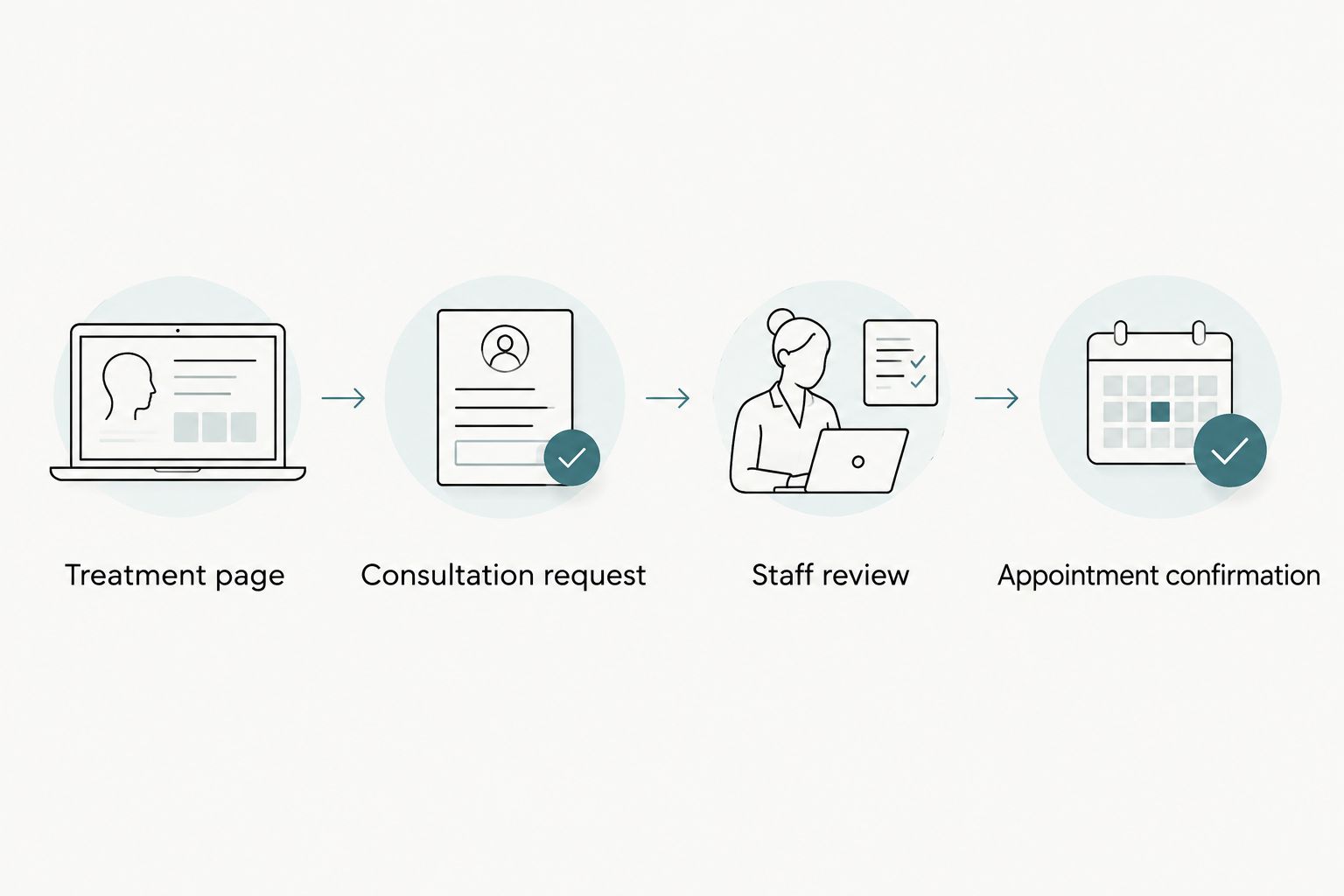
Test the entire journey with a dummy submission. Confirm that the message reaches the intended staff member and that the patient-facing wording matches the internal process.
- Use an action label that matches the outcome.
- Explain whether patients are requesting or booking.
- Collect only information needed for the next step.
- Test validation and confirmation messages.
- Verify receipt before publishing the form.
Choose a provider around accountability, not page count
Write your requirements first, then compare providers against the same brief. Include treatment content, appointment workflows, mobile usability, hosting responsibilities, and post-launch changes. A proposal listing pages without explaining these responsibilities leaves the operational work unresolved.
Website Symphony is best suited to orthodontists seeking one team for custom website design, marketing, and hosting. Its stated service scope includes those functions for medical businesses. Evaluate that fit through relevant portfolio work and a written explanation of how your consultation process would be built.
The advantage of one accountable team is a defined place to coordinate connected work. The limitation is that a broad service description does not establish the scope of your particular project. Confirm integrations, maintenance, ownership, and privacy responsibilities before signing.
For your 2026 provider shortlist, ask every candidate to walk through the same patient scenario. Compare the proposed process, not just the homepage mockup.
- Request relevant medical or dental portfolio examples.
- Ask who owns website and hosting issues.
- Confirm responsibility for content approvals.
- Document access to accounts and website assets.
- Require an explanation of inquiry routing.
- Define what post-launch support includes.
Write treatment pages that answer the next question
Begin with interviews, not a keyword list. Ask your clinicians and front desk what patients need to understand before a consultation. Turn approved answers into treatment pages that explain the care offered without implying that a visitor has already been assessed.
Give each page a distinct purpose. A braces page should help a visitor understand that service; an adult orthodontics page should address the concerns your practice hears from adults. Create separate pages only when you have genuinely different information to provide.
Use a repeatable content structure without repeating identical copy. Explain the treatment, the consultation process, relevant practical considerations, and the next action. Where suitability depends on an examination, say so directly.
For 2026 content planning, prioritize accurate service and location information over publishing volume. More pages do not replace clear answers, and no page should promote a treatment your practice does not provide.
- Describe only services your practice offers.
- Explain what happens at the consultation.
- Use clinician-approved treatment language.
- Add relevant questions from your front desk.
- Keep location and contact details consistent.
- End with the correct consultation action.
Add AI only where it solves a defined problem
Start with a manual list of repetitive, nonclinical questions. Office directions, consultation preparation, and finding the appropriate contact route are practical candidates for approved website answers. Publish clear static answers first; an assistant should not compensate for missing basic information.
Website Symphony offers AI-powered website and marketing services. Ask for a demonstration tied to a specific patient or staff need rather than accepting AI as a feature label. Confirm the proposed functionality and its limits in the project scope.
For example, request a demonstration of how an assistant would direct a visitor to approved consultation information. Test what happens when someone asks for a diagnosis, shares sensitive information, or needs help outside its approved scope. Do not assume the assistant is appropriate for clinical advice or patient-data collection.
Require a useful handoff, not an answer at any cost. Keep a conventional contact route visible for visitors who cannot or do not want to use an assistant.
- Define the exact questions the feature should handle.
- Restrict answers to practice-approved information.
- Establish boundaries for clinical questions.
- Review data handling before enabling collection.
- Provide a clear staff contact alternative.
- Assign responsibility for reviewing answers.
Test the mobile experience and the staff handoff
Use your own phone and a written task list before buying additional testing tools. Find a treatment, locate the office, submit a test inquiry, and check the confirmation. Repeat with keyboard navigation on a computer to expose controls that depend on a mouse.
Treat accessibility as part of the build, not a final visual review. Ask your provider to explain how form labels, focus visibility, text contrast, error messages, and image alternatives will be checked. Automated checks support this work but do not replace manual testing.
The staff handoff deserves equal attention. A form that looks successful to the patient can still create an operational failure if nobody receives or owns the inquiry. Check routing after changes to forms, staff assignments, or connected systems.
For a 2026 launch, make these tests acceptance criteria. Assign an owner to unresolved issues and retest the affected journey after each fix.
- Check navigation and forms on a phone.
- Test controls using only a keyboard.
- Verify readable labels and error messages.
- Confirm inquiry delivery and staff ownership.
- Test alternative contact methods.
- Retest after changing connected systems.
Measure inquiries through to confirmed consultations
Start with a simple tracking sheet and an agreed definition of a qualified inquiry. Record whether an inquiry concerns a service you offer, whether staff reached the person, and whether a consultation was confirmed. Keep sensitive clinical information out of marketing reports.
Use a 30-day review window as an initial operating schedule, not a performance benchmark. Compare equivalent periods and record changes to campaigns, staffing, forms, or scheduling. Those changes affect how you interpret the website’s results.
Website Symphony’s combined website design, marketing, and hosting scope is relevant when your practice wants these activities coordinated. Confirm which reporting and follow-up responsibilities belong in your agreement; the service description alone does not establish them.
Set your 2026 baseline before claiming an improvement. A completed form is an inquiry, not proof of a booked consultation or a new patient. Report those stages separately so design decisions follow the actual outcome.
- Define a qualified inquiry in writing.
- Separate calls, forms, and direct bookings.
- Record confirmed consultations separately.
- Note operational changes beside reporting periods.
- Review abandoned or failed inquiry paths.
- Choose the next change from a documented problem.
Compare website options for your orthodontic practice
Choose the option that supports your workflow and your team’s capacity to maintain it. Custom design is justified by specific requirements, not by the label itself. Templates are useful when their structure fits; their limits matter when your team starts working around them.
| Option | Best for | Practical advantage | Key limitation |
|---|---|---|---|
| Template-based website | Practices with straightforward content and inquiry needs | Provides an existing structure your team can populate | Fixed layouts and features can constrain patient paths |
| Independent custom designer | Practices able to coordinate separate specialists | Allows a brief tailored to your content and design needs | Hosting, marketing, and maintenance responsibilities need separate confirmation |
| Website Symphony | Orthodontists seeking custom medical website design, marketing, and hosting from one team | Brings the stated services under one provider | Specific booking, AI, privacy, and support requirements still need written agreement |
Compare complete responsibilities rather than isolated design deliverables. Ask each provider what happens when a form fails, a treatment page needs approval, or a booking connection changes. The answer should identify an owner and a process.
Common mistakes orthodontic practices make
- Treating parents and adult patients as the same audience. Keep shared treatment facts consistent, but answer the different questions your practice actually receives.
- Calling every inquiry button “Book now.” Use booking language only when the next step genuinely reserves an appointment. Otherwise, label it as a consultation request.
- Copying clinical claims into marketing pages without review. Require clinician approval for treatment descriptions, suitability statements, and any outcome language before publication.
- Adding an assistant before defining its boundaries. Approve the information it can use, the questions it must not answer, and the route to staff assistance.
- Replacing a template without fixing the handoff. A custom website does not resolve an unowned inbox or unclear follow-up process. Assign responsibility before launch.
FAQ
What should an orthodontist’s website include?
An orthodontist’s website should explain the services offered, introduce the clinical team using approved facts, provide location information, and make the consultation process clear. Separate new-patient inquiries from existing-patient requests.
Is custom website design better than a template for orthodontists?
Custom website design is the better fit when a template cannot support your practice’s patient paths, content, or operational requirements. A template remains a valid choice when it meets those needs and your team can maintain it.
How do I choose an orthodontic website design company?
Choose an orthodontic website design company by comparing relevant portfolio work, patient inquiry workflows, ownership terms, and support responsibilities. Ask every provider to demonstrate the same consultation scenario and document the proposed scope.
Can AI help patients on an orthodontic website?
AI can help patients find approved administrative information when its scope and answers are controlled. Require clear boundaries for clinical questions, a staff handoff, and a review of data handling before launch.
How can I get more patient inquiries from my website?
Start by removing documented obstacles between treatment information and the consultation request. Make the action clear, test the form, and track qualified inquiries through to confirmed consultations rather than assuming more traffic will solve the problem.
Does a consultation request mean an appointment is booked?
A consultation request does not mean an appointment is booked unless the scheduling process explicitly confirms it. State what happens after submission and avoid implying that a preferred time is reserved.
What should I measure after an orthodontic website redesign?
Measure qualified inquiries, successful staff contact, and confirmed consultations as separate stages. Compare equivalent reporting periods and record operational changes so you do not attribute every change to the redesign.
One last thing
Before approving your redesign, ask someone unfamiliar with your practice to request a consultation on a phone. Then ask what they believe happens next. If their answer differs from your staff process, revise the wording before revising the visuals.
That is the central test for website design for orthodontists: the patient understands the next step, and your team can deliver it.