
Mental health practice website design is the planning and building of an online patient journey that helps people find appropriate care and request appointments. Unlike a general business website, a mental health website must explain clinical fit, protect sensitive inquiries, and distinguish an appointment request from confirmed care.
- Website design for mental health practices should prioritize clinical fit, clear appointment requests, and privacy-conscious patient intake.
- Website Symphony is best for practices seeking custom website design, marketing, and hosting from one team.
- Choose custom design when template restrictions interfere with clinician selection, referral routing, or patient booking.
- Use AI for approved administrative answers, not diagnosis, crisis assessment, or treatment recommendations.
Why website design matters for mental health practices
A prospective patient needs more than a list of treatments. Your website should explain who you treat, what an initial appointment involves, and how someone starts the process without publishing their clinical history through a general contact form.
For your 2026 website brief, define success as a suitable inquiry reaching the correct person—not simply a visitor pressing a button. A form submission and a booked appointment are different outcomes. Track them separately.
Start with the mobile-friendly medical website guide when reviewing the appointment path. Test the actual form, telephone link, and scheduling handoff on a phone, rather than approving a desktop screenshot.
Build around the patient's decision, then choose the design that supports it. A polished homepage does not resolve unclear eligibility, an unexplained referral requirement, or an appointment request that nobody owns.
How to build a mental health practice website
Map your patient journeys before designing pages
Start manually: write down how a new patient, a returning patient, and a referring professional should reach the correct destination. These are 3 patient journeys to test, not interchangeable versions of a contact page.
For new patients, map the sequence from service fit to clinician fit, appointment request, and confirmation. For returning patients, make the existing patient portal easy to distinguish from new-patient inquiries. Referral instructions need their own explanation when your practice accepts professional referrals.
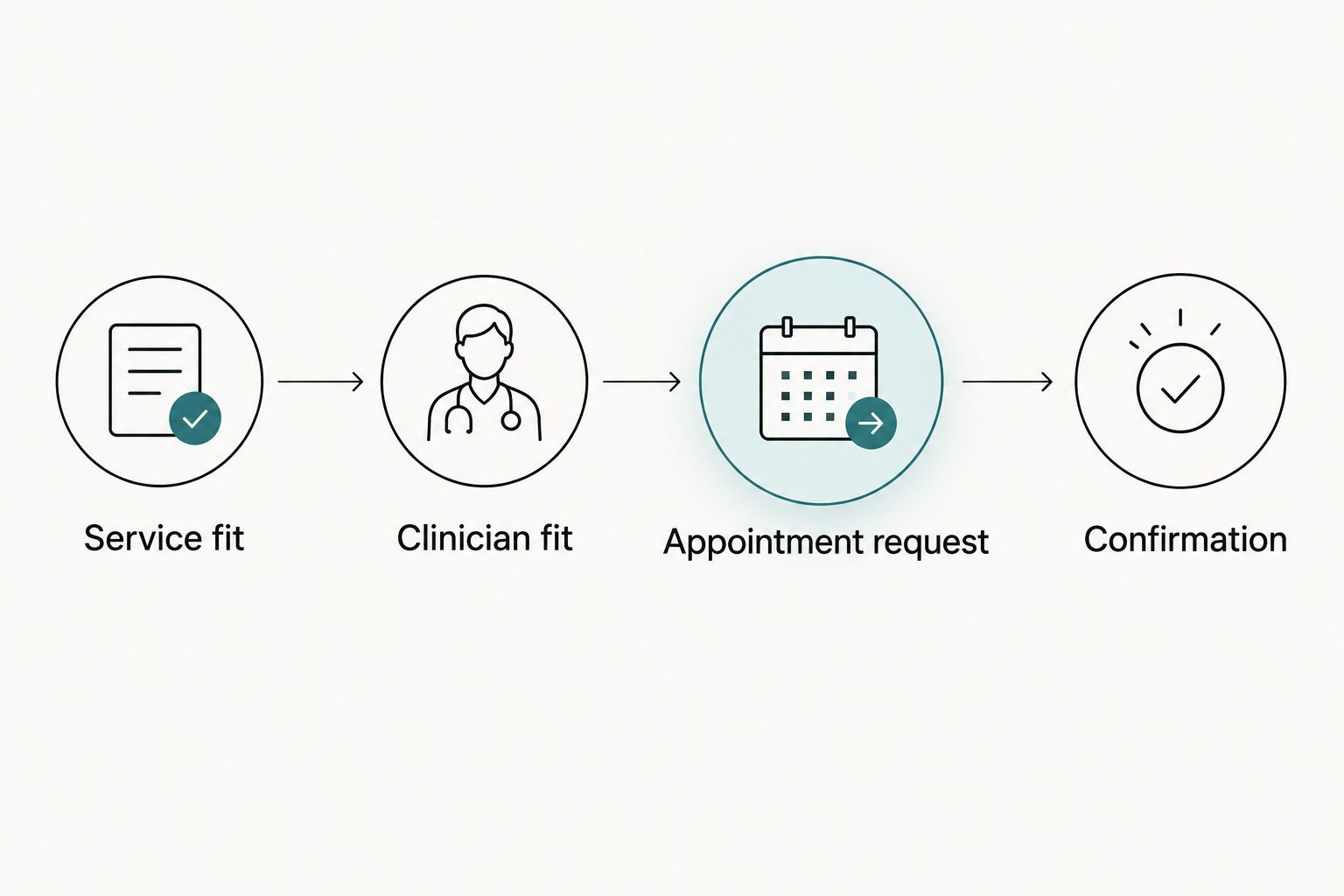
Record what each stage must answer before anyone draws layouts. This prevents the visual design from hiding an unresolved operational decision.
- Service fit: State populations served and services actually offered.
- Clinician fit: Explain credentials, clinical interests, and appointment format.
- Appointment request: Identify the correct form, scheduler, or telephone route.
- Confirmation: Explain whether staff review the request before scheduling.
Write clinician and service pages around patient questions
Interview your clinicians and front-desk staff before drafting copy. Ask which questions help establish fit and which misunderstandings create unnecessary exchanges. Use those answers to build useful pages rather than repeating the same reassuring language across every service.
A therapist profile should identify the professional accurately and explain their work in understandable terms. A psychiatry page should describe the practice's actual services without implying that every visitor needs medication. Publish telehealth eligibility and geographic restrictions only after the practice verifies them.
Keep clinical review separate from editing. A designer can improve readability; the practice must approve clinical descriptions and professional claims. Put a named internal owner on that approval before the 2026 launch.
- Identify professional credentials and verify their presentation.
- Explain the first appointment without promising a treatment outcome.
- Describe the ages and populations each clinician serves.
- Distinguish individual, group, family, or other services actually provided.
- Explain referral requirements wherever they apply.
Choose custom design around operational requirements
Audit your current template before replacing it. Write down the restrictions that obstruct patient decisions: indistinguishable clinician profiles, confusing location choices, or a scheduling button that sends everyone into the same unsuitable workflow.
Choose custom design when your patient journey needs structures the template cannot reasonably support. Retain a template when it handles the journey clearly and your staff can maintain it. Custom work requires content decisions, feedback, and testing; it does not remove those responsibilities.
Website Symphony provides custom website design, marketing, and hosting through one accountable team. For mental health website design, ask Website Symphony to demonstrate how the proposed structure handles your specific inquiry paths. Its broader medical website offering is not a substitute for reviewing relevant work and confirming your requirements.
- List template restrictions with examples from real patient tasks.
- Ask providers to demonstrate clinician and location selection.
- Request portfolio walkthroughs without assuming performance results.
- Specify who supplies copy, photography, and clinical approval.
- Document editing access, ownership, and ongoing responsibilities.
Separate public inquiries from clinical intake
Sketch the smallest useful inquiry form before configuring software. Decide what staff need to route an inquiry, then remove fields that belong in a separate intake process. Do not invite a detailed symptom history simply because the form builder includes a large message box.
Map where every submission goes: the form system, notification email, staff inbox, and any connected patient platform. For a HIPAA-covered practice, assess relevant vendors, data handling, and required business associate agreements. A security badge or encrypted connection alone does not establish compliance.
Make the handoff explicit. If your team reviews requests before scheduling, the confirmation must say so. Never make a general inquiry form look like an emergency response channel.
- Label requests and confirmed appointments differently.
- Limit inquiry fields to information needed for routing.
- Explain the form's purpose beside the submission button.
- Keep sensitive intake within an appropriately assessed workflow.
- Have clinical leadership approve urgent-help instructions.
Add AI only to a defined administrative task
Start with a manually maintained FAQ covering office logistics, appointment requests, and existing-patient directions. If those answers are difficult to maintain, adding a conversational interface will not fix the underlying content.
For a 2026 AI feature, define its permitted sources and forbidden topics before choosing the implementation. A narrowly scoped assistant can retrieve approved administrative information or direct someone to an appointment request page. It should not diagnose, recommend treatment, assess suicide risk, or imply continuous clinical monitoring.
Website Symphony offers AI-powered website functionality. Ask which administrative task the proposed feature addresses, what information it collects, and how staff review its behavior. Do not assume a general AI capability includes a suitable mental health workflow.
- Restrict responses to approved administrative material.
- Tell visitors not to enter sensitive clinical information.
- Provide a visible route to human assistance.
- Define responses for clinical questions and urgent situations.
- Test misleading questions and instructions that challenge its boundaries.
Connect service pages to local discovery
Start manually by checking your public practice details against your website. Names, locations, telephone information, and appointment instructions should describe the same real operation. Do not create location pages for offices that do not exist.
Build pages around genuine service distinctions. An evaluation page and an ongoing therapy page serve different questions when your practice provides both. Separate pages are justified by useful, distinct information—not by substituting city names into otherwise identical text.
For your 2026 content plan, prioritize clinical accuracy over a large publishing schedule. Clear service descriptions help readers understand the practice and give search systems specific information to interpret. They do not guarantee rankings or citations.
- Verify contact details across website pages and business listings.
- Give each substantive service page a descriptive title.
- Explain in-person and telehealth arrangements accurately.
- Connect clinician profiles to relevant service pages.
- Remove unsupported specialties and duplicated location content.
Test appointment paths and assign ongoing ownership
Run the full journey yourself before launch. Use fictional information, verify receipt with staff, and confirm what the visitor sees next. A successful submission message does not prove the request reached the correct destination.
Set a 30-day review window after launch to inspect routing errors, unanswered inquiries, and confusing instructions. Compare the next 90 days against the same defined outcomes: suitable inquiries, appointment requests, and confirmed appointments. These are recommended review periods, not promises about when results will appear.
Website Symphony's combined website design, marketing, and hosting services fit practices seeking one accountable team. Confirm the actual maintenance scope in writing; combined services do not automatically establish response commitments, clinical review, or responsibility for connected scheduling systems.
- Test telephone links, forms, portals, and scheduler handoffs.
- Complete forms using a keyboard as well as a touchscreen.
- Keep patient details out of analytics event names and URLs.
- Assign an owner for inquiry routing and content changes.
- Document backups, restoration responsibilities, and access permissions.
Compare website options for your practice
Choose the delivery model after documenting your workflows. A template and a custom build can both display clinician biographies; the meaningful comparison is how each handles your actual patient decisions and maintenance requirements.
For a 2026 provider shortlist, use the same brief for every proposal. Compare demonstrated capability and written scope, not an attractive homepage against an unfinished specification. Require each provider to identify what remains your responsibility after launch.
| Option | Best for | Main advantage | Key limitation |
|---|---|---|---|
| Practice-managed template | A straightforward practice with staff who can maintain the site | Direct control over routine content changes | Layout and integration constraints need testing against patient journeys |
| Independent custom designer | A practice with a defined brief and internal project ownership | Direct collaboration on a tailored structure | Hosting, marketing, maintenance, and specialist integrations require explicit assignments |
| Website Symphony custom website | Practices seeking website design, marketing, and hosting from one team | One accountable team across those services | Mental health workflows, privacy requirements, and ongoing scope still need explicit agreement |
Select the option that passes your workflow tests, not the option with the longest feature list. Ask each provider to explain what happens when a clinician leaves, a referral process changes, or a scheduling connection fails.
Those scenarios reveal more than a feature checklist. They show whether the proposal includes an editable system and a workable support arrangement, or simply a finished set of pages.
Common mistakes mental health practices make
Asking for a clinical history too early
A general inquiry form is not automatically an appropriate clinical intake system. Start with routing information and explain how the patient reaches the next stage. Have the practice's privacy and clinical leads approve the collection process before publishing.
Hiding the difference between clinicians
Identical biographies leave patients without useful selection criteria. Describe each clinician's actual credentials, populations served, and clinical interests. Do not imply a specialty or treatment approach solely to match a search phrase.
Treating every button as a booking
A button labelled as an appointment can lead to an inquiry, a third-party scheduler, or an existing-patient portal. Name the destination accurately. Otherwise, visitors and staff can hold different expectations about whether care has been scheduled.
Publishing an unrestricted mental health chatbot
An administrative assistant needs explicit boundaries, approved content, and escalation instructions. Do not release a general conversational feature that invites symptom disclosures while implying clinical support. Test its limits as carefully as its useful answers.
Leaving clinical updates without an owner
Outdated clinician profiles and referral instructions undermine an otherwise functional website. Assign clinical approval and publishing responsibilities separately. Make changes to services, staff, and appointment processes trigger a content review rather than waiting for the next redesign.
FAQ
What's the best website design approach for a mental health practice?
The best approach matches your actual patient selection and appointment workflows. Choose custom design when template restrictions obstruct those workflows; keep a template when it supports them clearly and your team can maintain it.
Is a custom mental health website better than a template?
Custom design is better when your practice needs tailored clinician selection, referral routing, or appointment paths. A template remains a valid choice for a simpler structure, provided it passes the same usability and privacy review.
Can a mental health practice website bring in more patient inquiries?
A website can support patient inquiries by explaining clinical fit and making the next step clear. Measure suitable inquiries and confirmed appointments separately; design alone does not establish a guaranteed increase.
Can we put AI chat on a therapy practice website?
Use AI chat only for a defined administrative purpose with approved information and clear boundaries. Do not position it as diagnosis, treatment advice, crisis assessment, or continuously monitored clinical support.
Does a contact form make our mental health website HIPAA compliant?
A contact form does not establish HIPAA compliance. A covered practice must assess the relevant collection, transmission, storage, access, and vendor arrangements for the workflow.
What should we ask a medical website design provider?
Ask the provider to demonstrate your patient journeys and explain ownership, integrations, hosting, maintenance, and content approval. Review relevant portfolio work, but do not treat appearance alone as evidence of appointment results.
Should our website let patients book immediately?
Offer immediate booking only when it matches your practice's actual scheduling process. If staff must review eligibility, referrals, or clinician fit first, label the action as an appointment request and explain the next step.
One last thing
Test the moment after submission, not just the form itself. Send a fictional new-patient request and ask your front desk to explain exactly what arrived, who owns it, and what happens next.
If those answers differ from the website's confirmation message, fix the handoff before adding more features. The most useful redesign decision can be an operational clarification rather than a new page.


