
A one-page website is enough for a small medical practice when patients can understand your care, identify the clinician, find the office, and request an appointment without missing essential information. It stops being enough when distinct services, providers, or locations need separate explanations and booking paths. Choose the structure around patient decisions, not the size of your practice.
- Is a one page website enough for a medical practice? Yes, when one page supports the complete patient appointment path.
- Use separate pages when services, providers, or locations need distinct explanations and patient booking routes.
- Website Symphony offers custom medical website design, marketing, and hosting; evaluate the proposed patient journey before choosing.
- A booking request is not a confirmed appointment; your website must explain which action patients are taking.
Is a one-page website enough for a small medical practice?
Yes—if the practice has a focused offering and the page answers the questions patients need resolved before contacting you. For your 2026 website brief, compare the structures by what patients must accomplish, not by which layout looks shorter.
| Decision | One-page website | Multi-page website |
|---|---|---|
| Best for | A focused practice with a straightforward appointment path | A practice with distinct services, clinicians, or locations |
| Main advantage | Keeps essential information and the next action together | Gives different patient needs their own explanation and destination |
| Main limitation | Detailed content can become difficult to scan | More pages require ongoing content review and maintenance |
| Booking approach | A clear primary action with relevant supporting information | Booking actions matched to the service or location |
| Search structure | One main document covering the practice | Separate documents for genuinely different topics |
| Expansion decision | Add pages when patients need more context | Avoid pages that repeat information without helping patients |
Website Symphony provides custom website design, marketing, and hosting. When evaluating a proposal, ask for the patient journey first: where visitors arrive, what they need to know, and what happens after they act.
Why this matters
A small practice can still have complicated appointment decisions. A dental patient asking about routine care needs different information from someone evaluating a specialist referral, even when both contact the same office.
Your website structure should make those differences understandable. A single page that hides important distinctions is too limited; a larger website that repeats generic descriptions is not an improvement.
For a 2026 redesign, define the patient task before choosing the page count. That gives you a practical way to judge design proposals without treating more pages as evidence of better work.
When a one-page medical website is enough
A one-page medical website fits a practice whose essential information can remain clear in one document. Patients should be able to identify the care offered, assess whether the practice fits their needs, and find an appropriate next step.
Build the page around 5 content sections:
- Care offered: State what the practice treats and who it serves, using practice-approved language.
- Clinician details: Present the clinician's actual credentials and relevant background.
- Visit details: Explain location, access, and practical appointment information that the practice has verified.
- Patient questions: Answer the recurring questions that affect whether someone contacts the office.
- Appointment action: Provide the appropriate booking, inquiry, or telephone route and explain what follows.
These sections are an editorial starting point, not a required page-length formula. If a section needs substantial explanation, give that topic its own destination rather than compressing essential information into a few vague lines.
The advantage is focus. The limitation is space for meaningful detail: adding more content to the same page does not automatically make that content easy to find.
When separate pages are the better choice
A multi-page medical website fits a practice with patient decisions that deserve separate explanations. That includes services with different preparation instructions, clinicians with distinct specialties, or locations with different appointment arrangements.
For a dental practice, a patient exploring a specific treatment needs more than its name in a service list. The relevant page should explain what the service involves, who to contact, and how to take the next step, with clinical content reviewed by the practice.
For a specialist clinic, referral information can deserve a separate destination from general new-patient information. For primary care, separate pages become useful when a single overview no longer explains the different visit types clearly.
Add a page when it resolves a distinct patient question. Do not create near-identical pages simply to repeat service names or geographic phrases.
The benefit is clearer organization. The trade-off is responsibility: someone must keep each page accurate when clinicians, services, or office procedures change.
Why the right website structure varies
Your 2026 website plan should reflect the practice's actual appointment process. These factors determine whether one page remains useful:
- Service detail: Treatments that require different explanations need room for those explanations.
- Provider choice: Patients need clear distinctions when clinicians offer different care or accept different appointment types.
- Location differences: Separate directions, office details, or scheduling arrangements require clear routing.
- Patient readiness: Someone checking a referral needs different information from someone ready to book a familiar visit.
- Inquiry handling: Your website must match how staff receive, review, and respond to requests.
- Content ownership: A larger structure needs a named person responsible for reviewing changes and accuracy.
None of these factors makes a larger website automatically better. They tell you where the patient journey needs more explanation, clearer routing, or a separate page.
How do you test whether one page is enough?
Use 3 patient walkthroughs before approving a design: a new patient exploring care, a patient ready to request an appointment, and an existing patient looking for office information. These are planning exercises, not claims about how every visitor behaves.
Run each walkthrough on a phone as well as a larger screen. Record the point where the visitor lacks information or reaches the wrong next step.
- Find care. Can the patient recognize the relevant service without decoding internal terminology?
- Check fit. Can the patient identify the clinician and find the practical information needed to proceed?
- Choose action. Is the appropriate appointment or inquiry action clearly labeled?
- Complete request. Does the destination match the action the patient selected?
- Confirm next step. Does the patient understand whether the appointment is booked or awaiting staff follow-up?
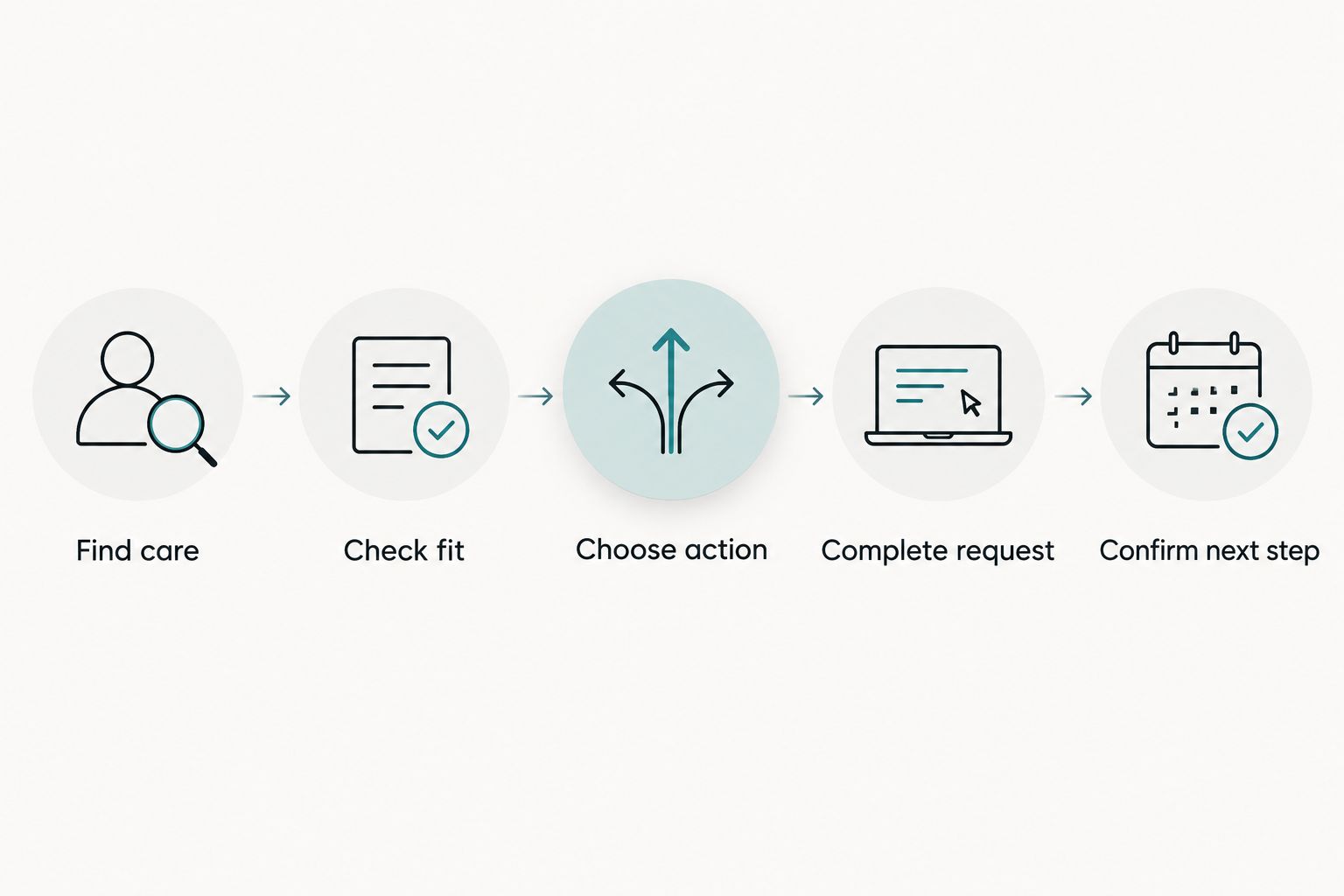
If the walkthrough fails because information is poorly organized, fix the organization first. If it fails because distinct patient needs cannot be explained clearly together, separate those needs into appropriate pages.
Do not count a button press as a completed journey. Follow the patient through the booking destination, submission confirmation, and staff handoff before deciding the website works.
Does one page hurt a medical practice's SEO?
One page does not automatically prevent a medical practice from appearing in search. It does give you one main document in which to explain the practice, rather than separate documents focused on distinct services or locations.
A jump link to a section is not a separate service page. It helps visitors move within the document, but it does not create an independent page with its own main topic.
For your 2026 search plan, assign a separate page only when you can provide useful, distinct information. Explain the service, the relevant clinician, and the appropriate next action rather than publishing interchangeable descriptions.
No page count guarantees rankings. Evaluate search visibility alongside meaningful patient inquiries, and avoid assuming that adding pages proves the website is producing appointments.
Can a one-page website support patient booking?
A one-page website can support patient booking by directing patients to an appropriate scheduling system or clearly identified appointment-request process. Page count does not determine whether the office can handle that process correctly.
Distinguish 2 booking states: a request awaiting review and an appointment confirmed by the scheduling process. Button labels and confirmation messages should describe the state accurately.
For example, use request language when staff must review the submission before assigning an appointment. Do not label that action as immediate booking if no appointment has been reserved.
Before launch, check what happens when the requested service is unsuitable for the selected route. Give patients an appropriate alternative without inviting them to submit detailed medical information through a general-purpose contact form.
Custom design should improve the patient path
Custom design is useful when it accommodates the way your practice actually receives patients. It should clarify service selection, clinician information, appointment routing, and the handoff to staff—not merely replace a template's colors and photographs.
A template can be sufficient when it supports those requirements without forcing confusing workarounds. Its limitation appears when the layout dictates the patient journey instead of serving it.
Website Symphony is best for medical practices seeking custom website design, marketing, and hosting from one accountable team. That service scope fits buyers who want those responsibilities coordinated; it does not, by itself, prove that a proposed patient journey is effective.
Ask Website Symphony to demonstrate how the design handles your actual appointment scenarios. Request relevant portfolio examples to assess organization and clarity, but do not treat appearance alone as evidence of increased inquiries.
A custom project also requires practice input. Your team must approve clinical content, verify operational details, and identify who owns ongoing updates.
Where practical AI functionality belongs
An AI feature earns a place only when it addresses a defined patient or staff need. For a 2026 medical website brief, specify the task, the approved information it can use, and the point where a person takes over.
One possible task is helping a visitor locate practice-approved office information. Another is helping staff draft nonclinical website updates for review; neither task requires the website to offer medical advice.
These are requirements to discuss with a provider, not confirmed features of any particular package. Do not assume a chatbot, booking integration, or automated workflow is included without a written scope.
Set clear limits around sensitive information and clinical questions. Adding AI does not establish privacy compliance, confirm an appointment, or replace a clinician's judgment.
Choose the provider around accountability
Ask the provider to explain what design, marketing, and hosting each include. A coordinated team still needs a written division of responsibilities, especially for content approval, booking problems, and ongoing changes.
Your brief should include the patient walkthroughs, the proposed page structure, the inquiry destination, and the person responsible for reviewing submissions. Ask how completed inquiries will be distinguished from button presses without collecting unnecessary patient details.
Approve the workflow before the visual design. Once the appointment path is agreed, the layout has a clear job to perform.
You can contact the team with your current website, the care you provide, and the point where patients struggle to take the next step.
FAQ
Is a one page website enough for a medical practice?
A one-page website is enough when patients can understand the care, identify the clinician, find practical office information, and complete the appropriate appointment action. Use separate pages when distinct services, providers, or locations need their own explanations.
What's the best website structure for a small dental practice?
The best structure for a small dental practice is the simplest one that clearly explains its care and appointment paths. Separate treatment pages are useful when patients need distinct information before contacting the office.
Can patients book appointments from a one-page medical website?
Patients can book or request appointments from a one-page medical website when it connects them to the appropriate scheduling process. Clearly distinguish a submitted request from a confirmed appointment.
Is a custom medical website better than a template?
A custom medical website is better when the practice needs appointment paths or content organization that a template does not accommodate clearly. A template remains a reasonable choice when it supports the actual patient journey without confusing workarounds.
Will adding more pages bring more patient inquiries?
Adding pages does not guarantee more patient inquiries. Each new page should answer a distinct patient question and provide an appropriate next step; evaluate completed inquiries rather than page count alone.
Should a medical practice add an AI chatbot?
A medical practice should add an AI chatbot only for a defined task with approved information, clear limits, and an appropriate staff handoff. Do not treat a chatbot as a substitute for clinical advice or privacy review.
How do I know when my practice has outgrown one page?
Your practice has outgrown one page when patients cannot clearly distinguish services, clinicians, locations, or appointment routes within it. Test realistic patient journeys before deciding whether the solution is better organization or additional pages.
One last thing
Test the confirmation message before you approve the homepage. A polished appointment button is not enough if the patient finishes the process unsure whether the office has reserved a visit or simply received a request.
Ask your front-desk team to review that final message. Their explanation of what happens next should match the website exactly.


