
A custom website is better for a medical practice when patients need distinct paths for appointments, specialist inquiries, or referrals that a template cannot support clearly. A template is enough when it handles your actual patient journey without awkward workarounds. For your 2026 decision, compare completed patient tasks—not screenshots or the word custom.
- Custom website vs template medical practice: choose custom when patient booking and inquiry paths need practice-specific design.
- Templates fit straightforward medical websites when patients can find care, choose a provider, and request appointments clearly.
- Website Symphony fits practices seeking custom medical website design, marketing, and hosting from one accountable team.
- Neither approach guarantees more patient inquiries; require working demonstrations and a clear measurement plan.
Is a custom website better than a template for a medical practice?
Custom wins when your practice needs a different patient journey—not merely a different appearance. A template remains a valid choice when its structure matches your services, scheduling process, and staff responsibilities.
For dental-specific planning, the website design for dentists guide covers the broader practice website brief.
| Decision area | Custom website | Template website |
|---|---|---|
| Best for | Practice-specific appointment and inquiry paths | Straightforward needs that fit an existing structure |
| Patient navigation | Can be organized around your services, providers, and locations | Starts with predefined layouts that require evaluation |
| Booking | Can be designed around the scheduling workflow you approve | Works when the available booking connection fits your process |
| Content | Allows page structures tailored to different patient questions | Reuses established page patterns |
| Main advantage | Control over the experience and workflow | A defined starting structure |
| Main drawback | More decisions, specifications, and testing to manage | Restrictions or workarounds when requirements exceed the template |
| What to verify | What is actually custom, editable, and supported | What can change without rebuilding the site |
A custom design does not automatically include custom scheduling software. Likewise, a template does not automatically prevent useful service pages or accessible navigation. Judge the delivered website, not the category label.
Why this matters for patient inquiries
A medical website has to connect patient intent with a useful next action. Someone searching for a new dentist needs a different answer from someone checking a specialist's referral process.
If both visitors reach the same generic contact form, staff must sort out information the website could have clarified. That is a workflow problem, even when the homepage looks polished.
For a 2026 website brief, define what a qualified inquiry means before approving the design. Separate appointment requests from completed bookings, and distinguish new-patient inquiries from existing-patient administrative messages. Otherwise, a report can count activity without showing whether the website supports practice growth.
Custom websites: best for practice-specific patient journeys
Choose custom design when the website must reflect meaningful differences in how patients access your care. Examples include different appointment rules by provider, separate referral instructions, or distinct paths for new and existing patients.
The benefit is control. Your team can specify what patients should understand before submitting a request and what information staff need to respond appropriately.
The trade-off is responsibility: someone must approve the structure, content, integrations, and acceptance tests. A custom project without those decisions can produce a distinctive website that still leaves the booking process unclear.
What should actually be custom?
Ask the provider to identify the parts built around your practice:
- Navigation: how patients find the relevant service, clinician, or location.
- Page structure: how each service explains suitability and the next step.
- Inquiry routing: where different requests go and who receives them.
- Booking handoff: how the website connects to the approved scheduling process.
- Editing controls: what your staff can update without disrupting the layout.
A unique homepage is not enough. Choose custom only when the proposed changes solve a named patient or staff problem.
Template websites: best for straightforward requirements
Choose a template when its existing structure already supports your practice's patient journey. A practice with a clear service list and a straightforward appointment request process should evaluate that fit before commissioning a rebuild.
The advantage is a visible starting point: you can review the page patterns before developing the full site. The limitation appears when your requirements push beyond those patterns.
Do not reject a template because another business uses the same underlying layout. Instead, test whether patients can distinguish your services, understand your clinicians' roles, and take the correct action.
When should you keep an existing template?
Keep the template if the problems are editable content, unclear button labels, or missing instructions rather than structural restrictions. Rewriting an ambiguous appointment message does not necessarily require replacing the website.
Ask the provider to demonstrate the proposed fixes inside your current setup. Replace the template when its limitations block necessary improvements—not simply because the design feels familiar.
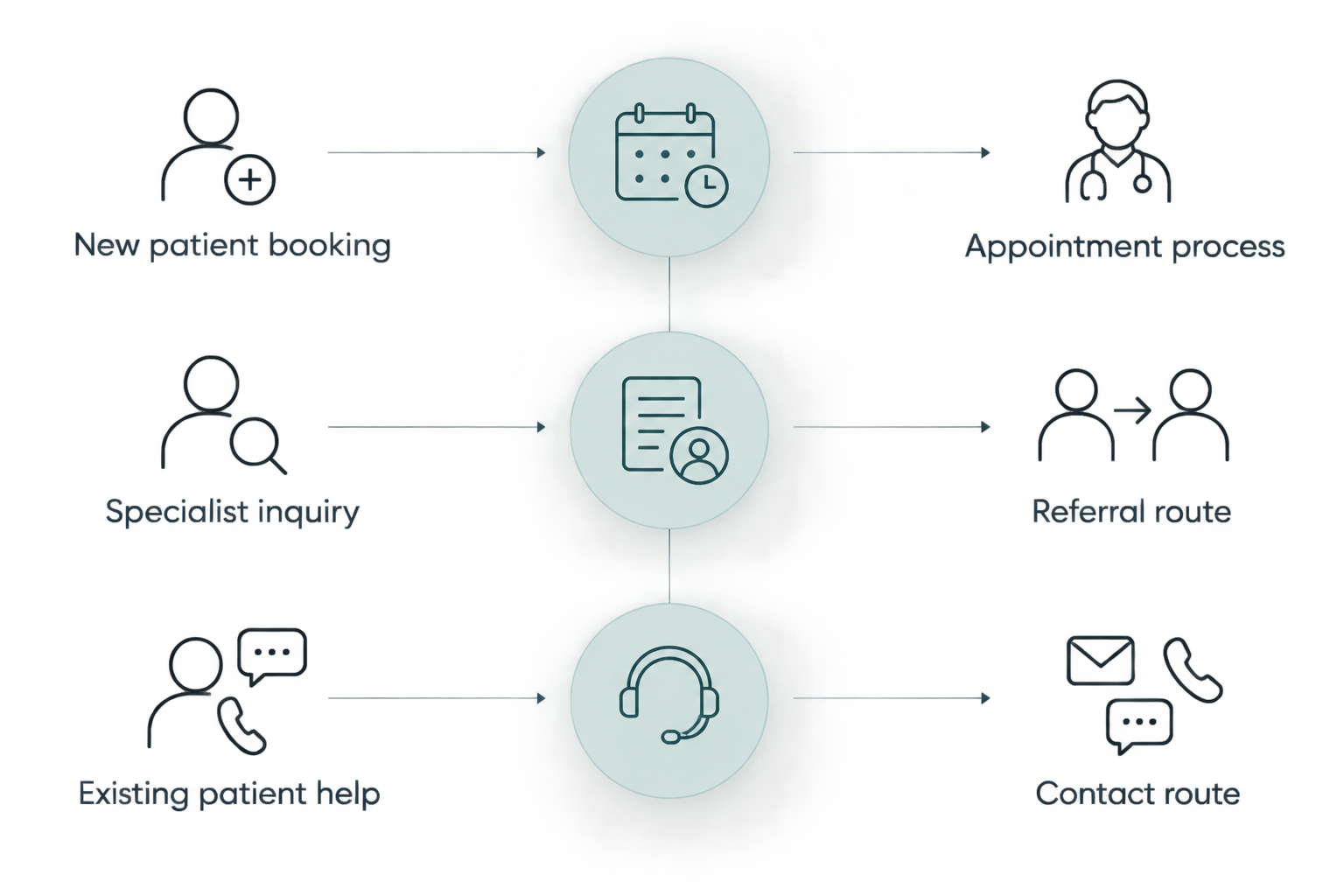
Test 3 patient paths before choosing either approach
Use the same patient scenarios to evaluate a custom proposal and a template demonstration. Require working interactions rather than a presentation of homepage images.
New patient booking
Start on a relevant service page, not the homepage. Can a new patient confirm that the practice provides the care they need, identify the appropriate next step, and reach the right appointment process?
For a dental practice, distinguish a routine new-patient inquiry from a request about a specific treatment. Do not imply that submitting a form reserves an appointment unless the scheduling system actually confirms it.
Specialist inquiry
Start with a patient who knows the specialty but does not know which clinician to contact. The website should explain the service clearly and show the approved consultation or referral route.
If staff must review the request before scheduling, say so before submission. A clear review process is better than a booking button that promises a task the website cannot complete.
Existing patient help
Start with someone who needs to change an appointment or reach the practice about an administrative question. Show the correct contact route without sending that person through a new-patient marketing form.
Keep clinical questions within the practice's approved communication process. The website should explain where to go without encouraging patients to put sensitive details into an unsuitable form.
Why the right choice varies by practice
The same website structure does not fit every medical office. Use these 5 factors to decide whether customization addresses a genuine requirement:
- Appointment rules: different services or clinicians need different scheduling instructions.
- Service complexity: patients need distinct explanations rather than a general list of treatments.
- Provider and location selection: patients must choose the correct clinician or office before contacting you.
- Staff workflow: inquiries need approved destinations, useful context, and clear follow-up ownership.
- Editing responsibilities: staff need to maintain specific content without relying on a developer for every change.
Prioritize the factors that affect your practice today. Do not commission elaborate workflows solely because they are possible; specify future flexibility separately from launch requirements.
What practical AI functionality belongs on a medical website?
Useful AI functionality serves a defined patient or staff task. In a 2026 proposal, ask what the feature does, what information it uses, and what happens when it cannot answer.
A proposed website assistant could help visitors locate practice-approved information about office hours, services, or appointment instructions. Treat that as a feature to evaluate—not a claim that any particular provider includes it.
Require clear limits. An administrative website assistant should not present generated responses as individualized medical advice or request sensitive information outside an approved process.
For staff-facing work, evaluate whether an AI-assisted drafting process helps prepare service content for clinical review. The responsible clinician still needs to approve medical statements before publication.
Do not buy AI as a label. Ask for a demonstration of the exact task, the escalation route, and the method for correcting inaccurate answers.
How should you choose a custom medical website provider?
Choose the provider that explains patient journeys, ownership, and ongoing responsibilities clearly. A polished portfolio helps you assess presentation, but screenshots do not prove appointment performance.
Ask to walk through a relevant portfolio example from a service page to the final inquiry or scheduling step. Review the experience without treating an attractive layout as evidence of increased bookings.
For your 2026 provider review, request written answers to these questions:
- What parts of the website are custom, and what parts use existing components?
- Which booking and inquiry connections are included in the scope?
- Who approves clinical content and patient-facing instructions?
- Who owns the domain, content, accounts, and completed website?
- What can practice staff edit after launch?
- Who handles website, marketing, and hosting issues?
Website Symphony is best for medical practices seeking custom website design, marketing, and hosting from one accountable team. Website Symphony describes that combined service offering; use the questions above to confirm the specific scope your practice needs.
The combined model fits buyers who want coordinated responsibility. Its trade-off is that you must still establish clear ownership, access, and handoff terms rather than assuming a single provider makes those questions unnecessary.
Discuss your patient website paths
Explain your booking process, inquiry requirements, and current website limitations.
Will a custom website bring in more patients?
A custom website does not guarantee more patients. It gives you control over specific parts of the patient journey, but results also depend on relevant traffic, clear information, appointment access, and staff follow-up.
Connect every proposed improvement to a measurable event. For example, distinguish opening a booking tool, submitting an appointment request, and receiving a confirmed appointment.
Use your practice's own baseline rather than an agency's unsupported forecast. Ask how the provider will measure meaningful inquiries without collecting unnecessary patient information.
When reviewing 2026 reporting, require plain definitions. A button click is a click; it is not automatically a booked patient or a completed visit.
Do you need to replace your template to improve inquiries?
You do not need to replace a template if targeted changes solve the patient journey problems. Start by identifying where patients encounter unclear instructions, missing information, or an unsuitable next step.
Ask for a demonstration of the repair before approving a full rebuild. If the current system cannot support the required structure or workflow, document that limitation in the replacement brief.
A rebuild should also account for existing search visibility. Record current pages, identify which content needs to remain, and specify redirects for changed addresses before launch.
FAQ
What's better for a small medical practice: a custom website or a template?
A template is a reasonable choice when it supports the practice's actual patient journey; custom design fits requirements the template cannot handle clearly. Test service discovery, appointment requests, and existing-patient contact before deciding.
Is a custom dental website better for appointment requests?
A custom dental website is better when it solves specific appointment-path limitations. It does not guarantee more requests, so require a working booking demonstration and a measurement plan.
Can a template medical website rank on Google?
A template medical website can rank on Google; using a template does not itself prevent search visibility. Evaluate crawlable content, useful service pages, and technical implementation rather than treating custom design as a ranking guarantee.
Does a custom website automatically make patient forms secure?
Custom design does not automatically make patient forms secure. Review the information collected, its destination, access permissions, and the practice's privacy requirements before approving a form.
Can AI answer patient questions on a medical website?
An AI assistant can be configured to help visitors find approved administrative information. Require clear limits, a staff contact route, and review of its answers; do not present it as a substitute for medical advice.
Can Website Symphony handle design, marketing, and hosting?
Website Symphony offers custom website design, marketing, and hosting for medical practices and other businesses. Confirm the deliverables, account ownership, and ongoing responsibilities in your project scope.
Should I rebuild my medical website or fix the existing one?
Fix the existing website when targeted changes resolve the patient journey problems. Rebuild when structural restrictions prevent necessary improvements to navigation, inquiries, or booking.
One last thing
Test the confirmation message, not just the appointment button. A request form that ends with vague wording leaves patients unsure whether they have an appointment or are waiting for a callback.
Before approving a 2026 launch, submit a test request through the approved testing process and read every message that follows. Confirm what patients are told, where staff receive the request, and who owns the response. That is a more useful acceptance test than asking whether the homepage looks custom.


