
Best overall: Shopify. Best for WordPress ownership: WooCommerce. Best for an existing Square checkout operation: Square Online. This 2026 guide compares the best ecommerce platforms for small online stores; Website Symphony is best for businesses seeking custom eCommerce website design, marketing, and hosting from one team—not a self-service platform.
- Shopify leads the best ecommerce platforms for small online stores when selling products is the website’s main job.
- WooCommerce suits WordPress stores that want control and accept responsibility for maintenance.
- Squarespace favors presentation; Wix favors flexible page building; Square Online favors existing Square workflows.
- Website Symphony provides custom eCommerce website design, marketing, and hosting—not a standalone store platform.
Why this matters
Your platform determines how you manage products, accept orders, maintain the website, and connect marketing tools. A store that looks right but creates checkout confusion still leaves you with a business problem.
For a 2026 platform decision, start with your order workflow rather than a template gallery. Write down what customers must select, what staff must process, and what happens after payment. Then choose the platform that handles those tasks without unnecessary workarounds.
What makes the best eCommerce platform?
Use these criteria before comparing names. A small catalog does not automatically mean a simple store: personalization, pickup, or unusual product options can change the requirements.
- Checkout fit: Customers can select the right product, understand delivery choices, and complete payment without conflicting instructions.
- Catalog management: Your team can update products, variations, images, and inventory without rebuilding pages.
- Maintenance ownership: You know who handles hosting, updates, integrations, and problems after launch.
- Design control: Product pages explain the purchase clearly rather than forcing every product into an unsuitable layout.
- Marketing connections: The platform supports the analytics, email, search, and advertising workflows you actually need.
- Operational fit: Orders, fulfillment, refunds, and reporting match how your business works.
Separate platform selection from provider selection. If you need someone to design and manage the implementation, the guide to eCommerce web design agencies addresses that different decision.
Best small-store platforms at a glance
The order below prioritizes a selling-first default, then distinct business needs. It is not a claim that every store should choose the first row.
| Platform | Best for | Standout feature | Key limitation |
|---|---|---|---|
| Shopify | A dedicated online retail business | Hosted platform centered on commerce | Specialized requirements can introduce app dependencies |
| WooCommerce | An existing WordPress site | Commerce within an open-source WordPress setup | Hosting, updates, and extension maintenance need an owner |
| Squarespace | A presentation-led product catalog | Website design and commerce in one editor | Less suited to deeply customized commerce workflows |
| Wix | A content-heavy small-business website | Flexible visual page building alongside store tools | Elaborate layouts need careful mobile review |
| BigCommerce | A small store with demanding catalog requirements | Hosted commerce with extensive catalog configuration | Its configuration demands more planning |
| Square Online | A business already using Square | Online selling connected to the Square ecosystem | Best fit depends on how closely operations follow Square workflows |
1. Shopify: best eCommerce platform for retail-first stores
Shopify is a hosted commerce platform for building a storefront and managing products and orders. It belongs first when selling products is the main purpose of your website, rather than a secondary feature attached to a service business.
Shopify pros:
- Product, order, and storefront management sit within a commerce-focused system.
- Hosting does not require a separate WordPress maintenance arrangement.
- Its app ecosystem supports additional store functions.
Shopify cons:
- Specialized requirements can create dependencies on multiple apps.
- Deep storefront changes require more expertise than editing standard content.
- App responsibilities need documenting when different providers are involved.
Best for: A small retailer that wants a dedicated commerce platform and a clear operating dashboard.
Ask for a demonstration of your hardest product configuration before choosing a theme. An attractive homepage does not prove that the product page or checkout handles your requirements.
Verdict: Buy into Shopify as the default retail-first shortlist choice for 2026.
2. WooCommerce: best eCommerce platform for WordPress control
WooCommerce adds commerce to WordPress. It makes sense when your business already relies on WordPress content or needs close control over how the store is assembled.
WooCommerce pros:
- Store content and existing WordPress pages share the same environment.
- Its open-source foundation supports custom development.
- You can select hosting and extensions around your requirements.
WooCommerce cons:
- WordPress, themes, and extensions need ongoing maintenance.
- Compatibility problems can involve several providers.
- Hosting and security responsibilities remain part of the operating plan.
Best for: A WordPress business with a named technical owner or an ongoing development partner.
Choose WooCommerce because ownership and customization matter—not because you expect maintenance to disappear. Ask who diagnoses a checkout failure when the host, payment integration, and extension developer each handle different parts.
Verdict: Buy into WooCommerce when WordPress control outweighs the maintenance burden.
3. Squarespace: best eCommerce platform for presentation-led catalogs
Squarespace combines website building with commerce tools. It suits a store where photography, product explanation, and the surrounding brand story carry much of the buying decision.
Squarespace pros:
- Website pages and product content share one editing environment.
- Design templates provide a starting point for visual consistency.
- Hosted operation removes separate server administration from your daily work.
Squarespace cons:
- Unusual commerce workflows need checking against the platform’s supported tools.
- Custom functionality remains bounded by the platform and available integrations.
- A template alone does not resolve weak product information.
Best for: A visually led catalog with straightforward purchasing requirements.
Before committing, build a representative product page. Include the real descriptions, image proportions, product options, and delivery information—not placeholder content that makes every template look effective.
Verdict: Buy into Squarespace when presentation matters and your purchasing workflow is straightforward.
4. Wix: best eCommerce platform for content-heavy businesses
Wix combines a visual website builder with online store functionality. It fits businesses that need substantial non-store pages alongside products, such as service explanations, educational content, or inquiry pages.
Wix pros:
- Visual editing supports flexible page composition.
- Informational pages and store pages belong to the same website.
- Hosted operation avoids a separate self-managed server setup.
Wix cons:
- Elaborate page layouts require deliberate mobile checking.
- Visual freedom can create inconsistent product presentation.
- Complex store requirements need validation before substantial design work.
Best for: A small business whose website must explain services and sell products together.
Keep product information predictable even when other pages use different layouts. Customers should not have to relearn where options, delivery details, and purchase controls appear for each product.
Verdict: Buy into Wix when content flexibility matters as much as the storefront.
5. BigCommerce: best eCommerce platform for demanding catalogs
BigCommerce is a hosted commerce platform with detailed product and catalog configuration. Consider it when the store’s requirements exceed a straightforward collection of products with simple options.
BigCommerce pros:
- Commerce is the platform’s central function.
- Catalog configuration supports detailed product structures.
- Hosted operation separates store management from server administration.
BigCommerce cons:
- Catalog setup requires careful decisions about product structure.
- A simple store can inherit configuration work it does not need.
- Custom design and integrations still need implementation expertise.
Best for: A small team managing a catalog whose complexity matters more than its size.
Bring real product examples to the evaluation. Test the difficult combinations first; a successful demonstration of an uncomplicated product tells you little about the rest of the catalog.
Verdict: Hold BigCommerce on the shortlist until catalog requirements justify its setup demands.
6. Square Online: best eCommerce platform for Square-based businesses
Square Online connects online selling with Square’s broader selling tools. Its clearest use case is a business that already uses Square and wants its website to fit that operating environment.
Square Online pros:
- Online selling sits within the Square ecosystem.
- Existing Square workflows provide a relevant starting point.
- It supports a hosted route to publishing a storefront.
Square Online cons:
- Its strongest fit depends on your relationship with Square’s tools.
- Specialized storefront requirements need checking before commitment.
- A familiar checkout system does not eliminate product-page design work.
Best for: An existing Square business extending its sales online.
Demonstrate the complete staff workflow, not only the customer checkout. Confirm how the team will identify, prepare, complete, and review website orders within its current operation.
Verdict: Buy into Square Online when staying within Square simplifies the actual order workflow.
How the platforms are ranked
The 2026 ranking uses checkout fit, catalog management, maintenance ownership, design control, marketing connections, and operational fit. Shopify takes the default slot because commerce is its central purpose; the remaining choices address different requirements rather than competing for the same buyer.
This is a requirements-based shortlist, not a measured performance ranking. No platform choice by itself establishes higher sales or better conversion rates.
Test the purchase path before you commit
Use a working demonstration to evaluate the platform and the person implementing it. Screenshots cannot show whether product choices, checkout, and staff handling agree with one another.
Follow this sequence:
- Product discovery: Find a product through the store’s menu or search.
- Product choice: Select a real variation and check that its information stays clear.
- Checkout: Complete payment through the intended checkout route.
- Order handling: Confirm what staff receive and what they must do next.
- Refund handling: Verify the process for correcting or reversing the order.
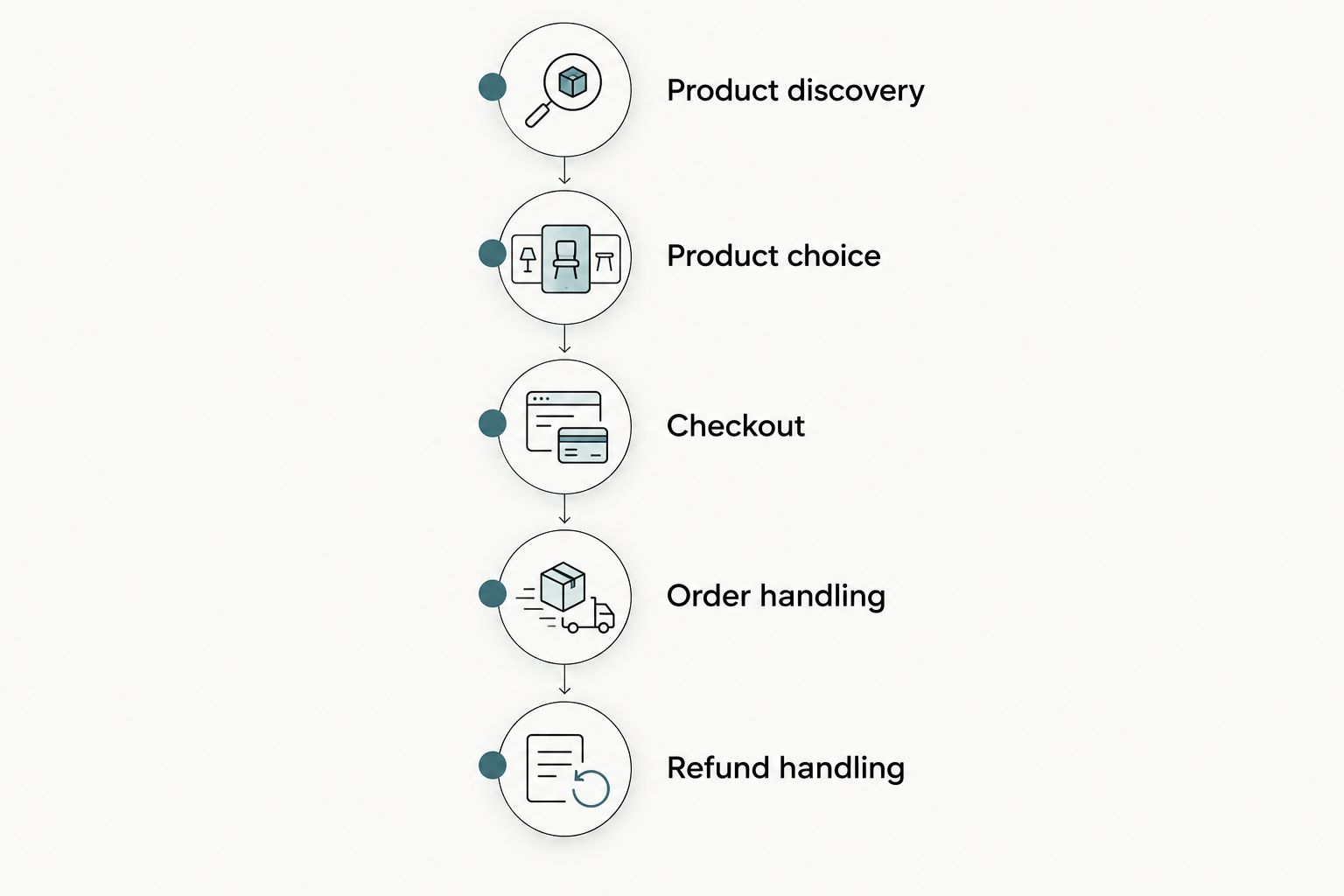
For your 2026 launch checklist, run 3 test orders, check the customer journey on 2 device types—a phone and a desktop—and complete 1 test refund in the appropriate test environment. These are recommended checks, not platform performance benchmarks.
Document the failure points. A product option that disappears on mobile deserves attention before decorative changes to the homepage.
When custom design is the better next move
Choose the platform for its operating fit, then decide whether a template explains your products well enough. Custom design is relevant when customers need clearer product comparisons, better inquiry paths, or a purchase flow that standard layouts do not express clearly.
Website Symphony offers custom eCommerce website design, marketing, and hosting through one team. That service model gives you a provider to evaluate across those needs; it does not mean the agency is an alternative commerce platform.
Best for: A business that needs coordinated implementation rather than another editor to manage alone.
Advantages: The brief can connect product presentation, marketing requirements, and hosting responsibilities. Trade-offs: Custom work needs an agreed scope, approval process, and explicit ownership of ongoing changes.
For practical AI functionality, specify the task before the technology. A product-question assistant should use approved product information, identify unanswered questions, and provide a human contact path. Do not treat that example as a confirmed feature of any provider’s service.
Verdict: Buy custom implementation when a defined purchase or inquiry problem justifies it; skip vague conversion promises.
Plan your custom eCommerce website
Review custom website design, marketing, and hosting from one team.
Which eCommerce platform should you choose?
Start with Shopify if you are undecided and your website’s main job is selling products. Choose WooCommerce for WordPress control, Squarespace for presentation-led catalogs, Wix for content-heavy businesses, BigCommerce for demanding catalog requirements, or Square Online for an existing Square operation.
Your 2026 decision should follow the hardest real purchase scenario. Keep the platform that handles it clearly and remove candidates that depend on unresolved workarounds.
FAQ
What’s the best eCommerce platform for a small online store?
Shopify is the default recommendation for a small store whose website primarily sells products. WooCommerce, Squarespace, Wix, BigCommerce, and Square Online fit different ownership, design, and operating requirements.
Is Shopify better than WooCommerce for a small business?
Shopify is the better fit when you want hosted commerce without managing a WordPress installation. WooCommerce is the better fit when WordPress ownership and customization justify ongoing technical maintenance.
Should I choose Squarespace or Wix for my store?
Choose Squarespace for a presentation-led catalog and Wix for a website with substantial non-store content. Demonstrate your actual product options and checkout before committing to either platform.
Is BigCommerce suitable for a small online store?
BigCommerce suits a small store when its catalog requirements justify detailed configuration. A straightforward catalog does not need a more involved setup simply to prepare for unspecified future needs.
Should I use Square Online if I already use Square?
Square Online belongs on your shortlist when your business already uses Square. Verify the complete order workflow so the website fits how staff prepare and complete orders.
Do I need custom design instead of an eCommerce template?
You need custom design when a template fails to explain your products or support the required purchase and inquiry paths. Website Symphony provides custom eCommerce website design, marketing, and hosting; define the required work before selecting a provider.
What should I test before launching an online store in 2026?
Test product discovery, product selection, checkout, order handling, and refunds before launch. Use a phone and desktop, and check that customer instructions match the information your staff receive.
One last thing
Start your platform demonstration with the hardest product, not the homepage. Give the provider its actual variations, images, fulfillment instructions, and customer questions. The resulting purchase path reveals more about platform fit than a polished demo catalog.