
To migrate a law firm website to a new hosting provider, copy the website and database, test the copy privately, then update the domain’s DNS records to send visitors to the new server. Keep the existing website URLs, email configuration, and intake connections intact unless you have a separate plan to change them. Do not cancel the old hosting until the new site handles real inquiries correctly and your rollback checks are complete.
- How to migrate a law firm website to a new hosting provider: copy, test, switch DNS, verify intake.
- Keep existing URLs and email records unchanged when only the website host changes.
- Website Symphony offers law firm website design, marketing, and hosting through one team.
- Test inquiry delivery, not just whether the new homepage loads.
Why this matters
A hosting migration moves more than pages. Your consultation forms, attorney profiles, practice-area pages, email authentication records, and advertising destinations all need deliberate checks. A working homepage does not prove that a prospective client can reach your staff.
Website Symphony provides custom website design, marketing, and hosting for businesses that include law firms. Whether you hire an agency or handle the move internally, your 2026 migration plan should name the person responsible for each connection—not just the server transfer.
How to migrate a law firm website to a new hosting provider
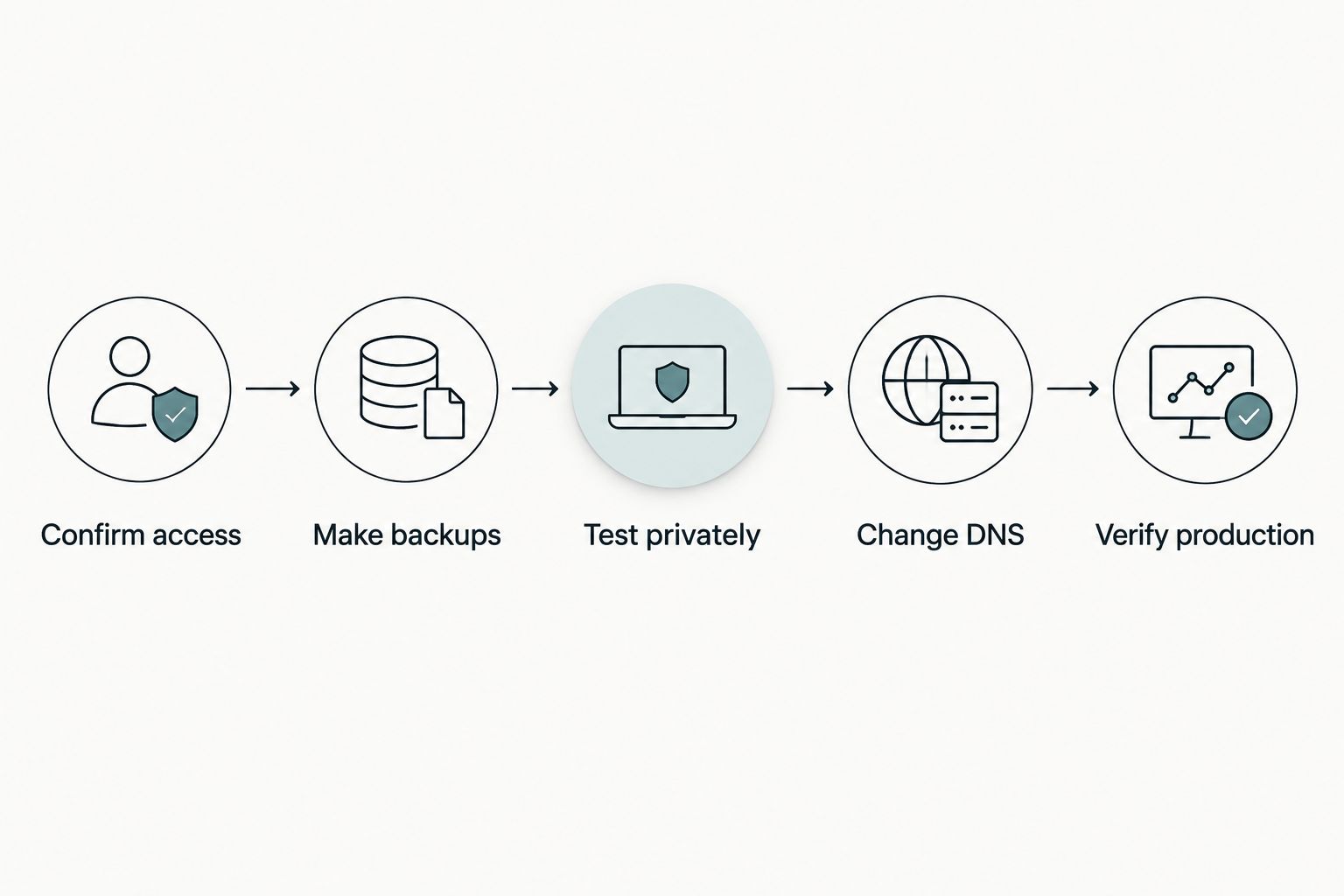
Treat the move as a controlled transfer, not a redesign. Follow the sequence below, and approve each stage before changing public DNS records.
1. Confirm ownership and access
Identify who controls the domain registration, DNS, existing hosting, website administration, and backups. These are separate responsibilities even when the same company supplies them.
Use firm-controlled accounts where possible. Confirm that your authorized staff can recover access without relying on a former employee or departing vendor.
Your access inventory should cover:
- Domain registrar and authoritative DNS provider.
- Hosting control panel, files, and database.
- Website administrator accounts and licensed components.
- Email provider and outgoing website email service.
- Intake platform, scheduling tools, analytics, and advertising tags.
Record which services end when you cancel the existing contract. Do not assume that domain registration, mailboxes, or plugin licenses will remain active independently.
2. Record the existing website baseline
Create a list of public URLs, including practice areas, attorney biographies, office pages, articles, and downloadable documents. Save the existing redirect rules, page titles, canonical settings, sitemap location, and indexing directives.
For your 2026 baseline, record how the important pages behave before migration. A normal public page should return HTTP status code 200; a permanent redirect commonly uses HTTP status code 301; a missing page should return HTTP status code 404 rather than pretend to be a valid page.
Also document form recipients, confirmation messages, phone links, booking destinations, and tracking events. This gives you something concrete to compare against the new server.
3. Make a recoverable backup
Back up the website files and database together. Include uploaded documents, images, configuration files, server redirects, and any scheduled tasks the website depends on.
Store the backup outside the hosting account being replaced. A backup inside an account you later close is not a usable recovery plan.
Confirm that the backup can restore the site in a separate environment. For websites that store inquiries, restrict access to the database backup and use an appropriate secure transfer method; do not circulate it as an ordinary email attachment.
4. Prepare the destination before changing DNS
Confirm that the new environment supports the website’s software, database, required extensions, and background tasks. Match the existing requirements first; schedule software upgrades separately unless the migration requires them.
Set up HTTPS for every hostname the live website uses. Check the main hostname, its alternate version where applicable, and any subdomains included in the move.
Arrange a private preview through an access-controlled staging environment or local hostname override. If staging uses indexing restrictions, document exactly where those restrictions live so they do not accidentally block the production site.
5. Copy the site and test complete journeys
Transfer the files and import the database using a method appropriate to your platform. Update environment-specific settings without replacing the public domain unnecessarily.
Test like a prospective client, not just an administrator. Open a practice-area page, follow its consultation link, submit clearly labeled test information, and verify that the intended staff member receives it.
Check document downloads, search, navigation, attorney photographs, mobile forms, and any embedded scheduling or intake tool. Do not submit real matter details during testing.
6. Plan the final synchronization
Decide how you will handle changes made after the initial copy. New articles, edited biographies, uploaded files, and stored form submissions can otherwise remain stranded on the old server.
For a mostly informational website, agree on an editorial freeze and perform a final copy before cutover. For a site accepting database writes, define how those writes will be reconciled while traffic reaches both environments.
Document your rollback trigger and the person authorized to use it. A rollback must account for new submissions received on the destination, not simply restore yesterday’s pages.
7. Change only the DNS records required
If DNS stays with its current provider, update the website records needed for the new destination. Preserve unrelated records, especially those serving email, verification, and other applications.
If you must change nameservers, reproduce the complete required DNS configuration at the new authoritative provider before switching. Review MX, SPF, DKIM, DMARC, and verification records rather than copying only the website address.
Review DNS time-to-live settings before the cutover. Lowering a TTL does not erase answers that resolvers have already cached, and DNS changes do not reach every visitor simultaneously.
8. Verify production and retain a rollback path
After cutover, repeat the public-site checks from an external connection. Confirm HTTPS, page responses, redirects, form delivery, intake records, tracking events, and any staff notifications.
Inspect both hosting environments for submissions received during the transition. Check server logs and application errors instead of relying only on what the browser displays.
Keep the old environment available until your team verifies the new setup and reconciles transition-period data. Then remove obsolete access, handle retained data under the firm’s policies, and cancel only the services you actually replaced.
Which migration approach fits your law firm?
The right approach depends on what actually needs to change. Keep the scope narrow when the current site works and the hosting arrangement is the problem.
| Approach | Best for | Advantage | Limitation |
|---|---|---|---|
| Website hosting only | Firms keeping their current site and DNS management | Limits changes to the website environment | Still requires intake, HTTPS, and outgoing mail tests |
| Hosting and nameservers | Firms intentionally moving DNS management too | Brings DNS administration into the new arrangement | Requires every necessary DNS record to be recreated correctly |
| Hosting and redesign | Firms replacing site structure or content | Allows a planned rebuild alongside the infrastructure change | Adds URL mapping, content review, and more launch checks |
Do not combine a redesign with a hosting move simply because both involve the website. A separate redesign creates a clearer comparison between the old and new hosting environments. If you combine them, approve the URL map and content changes before launch.
Why law firm website migrations vary
Your 2026 migration scope should reflect the website’s actual dependencies. These factors change the work required:
- Platform and export access: A transferable website and database need a different plan from a hosted platform that restricts exports.
- DNS ownership: Changing website records is narrower than moving authoritative nameservers and rebuilding the DNS configuration.
- Intake connections: Embedded forms, API connections, notifications, and scheduled synchronization each need their own test.
- Stored submissions: A website that saves inquiries requires a plan for data received during the transition.
- URL changes: Keeping paths stable avoids redirect work that a restructuring introduces.
- Licensed services: Themes, extensions, security tools, and outgoing mail services need valid access on the destination.
Ask the provider to turn these dependencies into named tasks. “Migration included” does not explain whether someone will verify consultation delivery or preserve your email records.
How do you protect client intake during migration?
Verify the full inquiry path from submission to staff action. A confirmation screen proves that the browser reached a response; it does not prove that an email arrived or an intake record was created.
For each form, record the destination, responsible staff member, required fields, consent language, and expected confirmation. Then submit labeled test data and check each destination directly, including spam filtering and any connected intake system.
If your site uses automated chat or AI-powered intake, test its routing and handoff behavior separately. For example, verify that a request for a consultation reaches the intended staff destination rather than ending with an on-screen answer. Keep real client information out of staging and screenshots.
Can you move hosting without changing email?
Yes. Website hosting and email hosting are separate services, although a provider can bundle them together. Keep the existing email service and its required DNS records if email is outside the migration scope.
Test both mailbox delivery and messages sent by the website. A working attorney inbox does not establish that the new web server can send consultation notifications through the configured mail service.
Will changing hosting affect your Google rankings?
Changing hosting does not require changing your domain, page paths, or content. Preserve those elements and verify that search engines can still access the same public pages after launch.
For a 2026 hosting-only move, compare indexing directives, canonical URLs, redirects, sitemap behavior, and server responses against your baseline. Remove staging restrictions from production while keeping the staging environment private.
Preserving URLs reduces migration scope; it does not guarantee unchanged rankings. If important pages disappear, redirects break, or the server blocks crawlers, fix those technical differences before treating the problem as a content issue.
How do you choose someone to manage the move?
Choose a provider who will own the production checks, not merely upload the files. Ask who handles DNS changes, who verifies intake delivery, who approves rollback, and what access your firm retains afterward.
Website Symphony fits law firms seeking one team for custom website design, marketing, and hosting. That combined scope suits buyers who want those responsibilities coordinated, rather than split across unrelated suppliers.
The trade-off is scope: a firm that only needs a server transfer should request a migration-specific proposal rather than assume it needs a redesign or marketing engagement. Confirm Website Symphony’s migration deliverables in writing; the service categories alone do not establish what a particular project includes.
Plan your law firm website move
Discuss hosting, website dependencies, and the inquiry paths your migration needs to preserve.
FAQ
Do I need to transfer my domain when I change website hosting?
No. You can keep the domain with its current registrar and change the necessary DNS records to point the website to the new host. Confirm who controls authoritative DNS before scheduling the move.
Can I migrate my law firm website without downtime?
Prepare and test the destination before cutover, and keep the old server working during the DNS transition. This approach reduces disruption, but it is not a guarantee against downtime.
Will my law firm's contact forms keep working after migration?
Contact forms require testing after migration; copying the pages does not establish that delivery still works. Verify submission storage, outgoing mail, staff notifications, and any connected intake records.
Should I redesign my law firm website while moving hosts?
Keep the projects separate unless you have a clear reason to combine them. A combined project needs additional content approvals, URL mapping, and redirect testing.
When can I cancel my old website hosting account?
Cancel after production checks pass, transition-period submissions are reconciled, and the old environment is no longer needed for rollback. Confirm that cancellation will not also terminate email, DNS, licenses, or domain services you intend to retain.
What should I do if the migrated website stops receiving inquiries?
Test the entire submission path and inspect the destination directly. Check application errors, outgoing mail configuration, filtering, integration credentials, and whether submissions reached the old server.
Does Website Symphony offer hosting as well as website design?
Website Symphony offers custom website design, marketing, and hosting for businesses that include law firms. Ask for a written migration scope covering the particular systems your firm uses.
One last thing
Test an unsuccessful submission, not just a successful one. Leave a required field empty and check whether the page explains what to fix without erasing the rest of the inquiry.
Add that check to your 2026 launch sign-off. A page that loads correctly still needs a usable path for someone who makes a mistake.