
Yes, a website can integrate with tattoo booking software automatically when the software provides a supported booking link, embedded scheduler, or application programming interface (API). The connection determines what happens automatically: opening a calendar is different from creating an appointment or syncing a cancellation. For your 2026 project, define those actions before choosing the integration.
- Can a website integrate with tattoo booking software? Yes, through supported links, embeds, or API connections.
- Tattoo booking automation should distinguish appointment requests from confirmed appointments.
- Website Symphony suits tattoo studios seeking one team for custom website design, marketing, and hosting.
- Choose the simplest supported connection that preserves artist approval and clear client instructions.
Why this matters
A booking button should tell clients what happens next. If someone submits a tattoo idea expecting a confirmed appointment, but your artist still needs to approve the design and duration, the website has created confusion instead of resolving it.
Automate the handoff, not an approval your artist still needs to make. Your website should explain whether clients are requesting a consultation, submitting a project, or reserving an approved session. The practical guide to connecting tattoo booking software to your studio website covers the implementation side of that decision.
Can a website integrate with tattoo booking software automatically?
Yes. There are 3 connection methods to evaluate: a booking link, an embedded scheduler, and an API connection. They solve different problems, so choose by the task you need completed rather than the most technical option.
| Connection method | Best for | What it does | Main limitation |
|---|---|---|---|
| Booking link | Studios that want clients to use an existing scheduler | Opens the booking software's hosted page | Does not itself transfer website inquiry details |
| Embedded scheduler | Studios that want booking within a website page | Displays a supported booking interface inside the site | Depends on the provider's embed controls and behavior |
| API connection | Studios with a defined data-transfer workflow | Exchanges supported information between systems | Requires development, permissions, testing, and maintenance |
A booking link is a valid connection, but it is not the same as an automated data integration. An embed changes where the interface appears; it does not automatically add capabilities the booking software lacks.
For a 2026 website brief, specify the outcome in plain language: create a request, notify the artist, record an approved appointment, or update a canceled session. Ask the provider to demonstrate each required action using your actual booking system.
Booking link: send clients to the existing scheduler
Best for: a studio whose booking software already handles the desired appointment process. A website button opens the provider's booking page, where clients complete the supported steps.
This keeps scheduling inside the system your staff already uses. It also avoids building a separate appointment form that collects information your team must enter again.
The trade-off is the handoff. Clients leave the website, and details entered elsewhere on the site do not transfer unless the provider supports that behavior.
Place the button beside relevant information, such as an artist profile or consultation explanation. Use a label that matches the destination: a consultation calendar should not be labeled as a confirmed tattoo appointment.
Embedded scheduler: keep the booking interface on your site
Best for: a studio that wants visitors to book without moving to a separate booking page. A supported embed displays the scheduler within the website, often through an iframe or provider-supplied script.
The benefit is continuity: clients can read studio instructions and use the booking interface on the same page. The limitation is control, because the booking provider determines which fields, layouts, and interactions the embedded interface supports.
Test the actual embed on a phone before approving the design. Check scrolling, keyboard behavior, required fields, error messages, and the confirmation state.
Keep a direct booking link available as a fallback. If the embedded interface fails to load, clients still need a clear next step rather than an empty section.
API connection: automate a defined handoff
Best for: a studio that needs website submissions to become records or actions inside its booking software. An API connection can send information between systems when the booking provider exposes the necessary functions and grants access.
For example, your intended workflow might send a project request for artist review rather than reserve a session immediately. Treat that as a requirement to verify, not a capability to assume.
A webhook can notify another system about an event, such as an appointment change, when the provider supports that event. The receiving system still needs instructions for processing it and handling failures.
The benefit is a workflow tailored to your studio. The drawback is ongoing responsibility: credentials, field changes, failed requests, and provider updates all need an owner. Do not commission an API connection until the developer confirms the required endpoints and permissions.
Why tattoo booking integration varies
Integration difficulty follows your booking rules and the software's documented capabilities. These factors belong in your 2026 scope before design approval:
- Provider access: A booking page, embed, API, and webhook are different capabilities. Confirm which ones your account supports.
- Artist approval: A custom project can require review before an appointment becomes final. Your workflow must preserve that decision.
- Appointment types: Consultations and tattoo sessions need distinct labels and instructions when they follow different processes.
- Information transfer: Confirm how contact details, artist preferences, project descriptions, and reference files reach the correct record.
- Change handling: Decide which system controls cancellations, rescheduling, and status updates, then document the supported direction of transfer.
- Failure ownership: Assign responsibility for monitoring errors, fixing broken connections, and helping clients whose submissions fail.
None of these requirements proves that a custom API build is necessary. A supported booking page is the better choice when it already handles your process correctly.
How do you set up automatic tattoo booking integration?
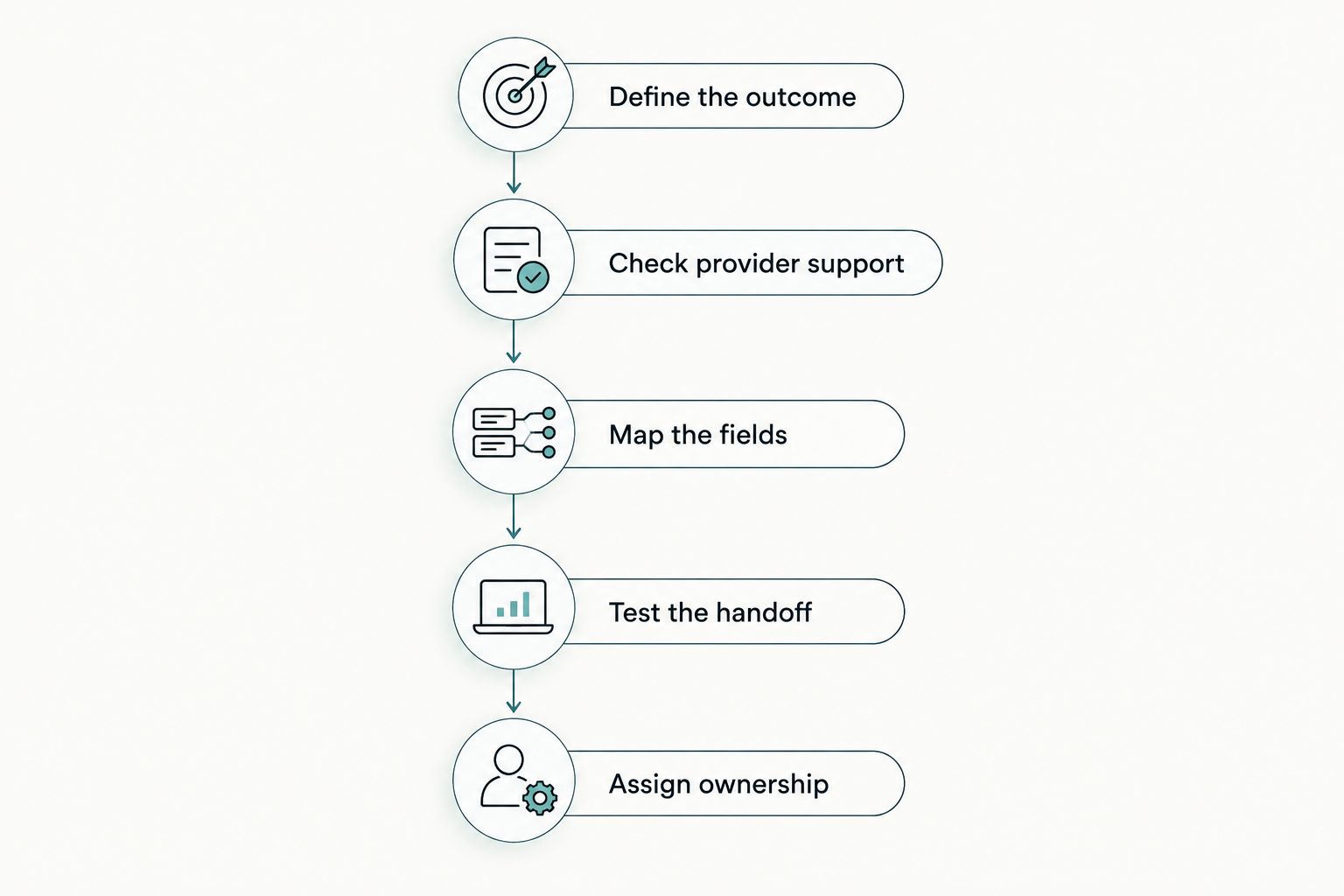
Use this 5-step setup process to separate the client experience from the technical connection. Each step should produce something you can review before the next begins.
- Define the outcome. State whether the website should collect a request, book a consultation, or confirm an appointment. Write the message clients should see afterward.
- Check provider support. Review the booking system's documentation for links, embeds, API actions, and event notifications. Confirm account permissions before committing to a build.
- Map the fields. Match each website field to its destination. Specify required information, artist routing, reference-file handling, and who can access submissions.
- Test the handoff. Submit a complete request, an incomplete request, and a repeated request. Verify the client message, staff notification, record creation, and recovery behavior.
- Assign ownership. Name the person or team responsible for changes, connection failures, and support escalation. Keep the setup documented rather than dependent on memory.
The website and booking system should agree on what happened. A success message must follow a successful action, not merely a button press.
What should happen after a client submits a tattoo request?
A request should end with an explicit status and next step. Tell clients whether their information reached the studio, whether artist review is pending, and whether an appointment exists.
Keep those states separate. A received inquiry is not automatically an approved tattoo project, and an approved project is not automatically a reserved session.
Your staff view should make the same distinction. Define where the request lives, who reviews it, and how the client receives the decision. If staff must manually transfer information, document that step instead of describing the entire process as automatic.
For your 2026 launch review, trace a submission from the website through to its final record. Check that the artist, appointment type, and contact details remain correct throughout the handoff.
Can a custom website do more than a template?
A custom website gives you control over the pages surrounding booking: artist selection, project explanations, inquiry fields, and confirmation instructions. It does not override restrictions inside third-party scheduling software.
Choose custom design when your client path requires it, not simply because an embed exists. A template can be sufficient when clients need a straightforward booking button and the existing scheduler already handles the rest.
A custom build becomes more relevant when different artists need different inquiry routes, consultation instructions need careful placement, or the standard page structure obscures the next step. The trade-off is a larger design and maintenance scope.
Website Symphony provides custom website design, marketing, and hosting for tattoo shops and other businesses. Website Symphony is best for tattoo studios seeking one accountable team for website design, marketing, and hosting. Confirm any proposed booking integration against the software documentation; that service scope alone does not establish compatibility with a particular scheduler.
Use Website Symphony to assess the agency's stated services, then request a demonstration of the specific client path you need. Judge portfolio examples by their inquiry and booking structure, not by unsupported conversion promises.
Can automation help without taking over artist decisions?
Automation can move a completed submission, notify the appropriate person, or display a confirmed status when the connected systems support those actions. Artist judgment still belongs with the artist.
If you consider an AI-powered feature, give it a narrow task: answering published booking questions or helping clients understand which inquiry form to use. Require an escalation path when the answer depends on design complexity, suitability, or staff approval.
Do not let a conversational answer masquerade as a booking confirmation. In a 2026 scope, specify the feature's approved information sources, limits, and handoff to staff before discussing presentation.
FAQ
Can my tattoo website book appointments automatically?
Yes, when your booking software supports the required scheduling action and your studio permits clients to book that appointment type directly. Keep project-review requests separate from confirmed sessions.
Is a booking button the same as a booking integration?
A booking button connects visitors to a scheduler, but it does not itself transfer website form data. Data transfer requires additional provider-supported functionality.
Can I put tattoo booking software directly on my website?
Yes, if the booking provider supplies a supported embed. Test the embedded interface on mobile and provide a direct booking link as a fallback.
Can clients choose a tattoo artist before submitting a request?
Yes, if your form or booking system supports artist selection and routes the choice correctly. Verify that the selected artist appears in the destination record, not just the website form.
Will tattoo booking automation prevent double bookings?
A website connection alone does not guarantee protection against double bookings. Verify how the scheduling system checks availability and how the integration handles simultaneous or repeated requests.
Do I need a custom website to connect booking software?
No, a supported booking link or embed does not inherently require a custom website. Custom design is relevant when your artist-selection, inquiry, and approval paths need more control.
Can booking software collect tattoo reference images from my website?
Reference-image transfer depends on the booking software and connection method. Confirm supported file handling, access permissions, and where staff will find the images before adding uploads.
Who should maintain my tattoo website booking connection?
Assign a named owner for the website side and a clear escalation route to the booking provider. Document responsibility for credentials, errors, software changes, and client support.
One last thing
The most useful acceptance test starts with a failure. Disconnect the test integration or trigger a rejected submission, then check what the client sees and whether staff know anything went wrong.
A polished confirmation screen proves little if it appears after a failed request. Before launch, require a truthful failure message, a usable alternative contact route, and a documented recovery process. Those details matter more than calling the connection automatic.