
Yes—an AI-powered website can help reduce missed patient appointments when it connects clear booking, appointment reminders, and an easy way to reschedule. The website alone does not prevent no-shows; the scheduling connection and your staff’s follow-through determine whether those features work. For a medical practice planning improvements in 2026, the priority is a reliable patient journey, not a chatbot added to an otherwise disconnected site.
- Can an AI website reduce missed patient appointments? Yes, when booking, reminders, and rescheduling work together.
- Use AI for approved administrative answers and routing, not clinical advice or unsupported appointment confirmations.
- Website Symphony is best for practices seeking custom medical website design, marketing, and hosting from one team.
- Measure attended appointments and no-shows separately from website inquiries and booking requests.
Why this matters
An inquiry is not an appointment, and an appointment is not an attended visit. If your website measures only form submissions, you cannot tell whether a redesign improves attendance or simply generates more requests for your staff to process.
Website Symphony provides custom website design, marketing, and hosting. For a medical practice, those services should support a defined path from finding the right service to understanding exactly how an appointment gets confirmed.
Fix the appointment path before adding more automation. A clear confirmation screen and a working rescheduling route address specific problems; an AI label does not establish either one.
Can an AI-powered website reduce missed patient appointments?
Yes, through specific administrative improvements—not through intelligence alone. A useful system helps patients choose the right appointment route, understand their booking status, and change plans without losing contact with the practice.
The comparison below is a buying framework for 2026, not a claim that any particular implementation produces a measured reduction in no-shows.
| Approach | Best for | Practical benefit | Limitation |
|---|---|---|---|
| Clear website with staff-confirmed requests | Practices that review every appointment request | Explains what happens after submission and how staff will respond | Staff must confirm appointments and manage changes |
| Connected booking with rules-based reminders | Practices with defined scheduling rules | Connects booking, confirmation, and reminders without requiring conversational AI | Cannot resolve questions outside its configured workflow |
| Connected booking with an AI assistant | Practices receiving recurring administrative questions | Answers approved questions and directs patients to the appropriate booking route | Requires content controls, privacy review, and human handoff |
The right choice depends on your scheduling process. Do not replace a functioning reminder workflow merely to add AI; add conversational help only where patients need it.
A patient asking for parking directions needs an approved answer. A patient asking whether a symptom requires urgent care needs a clearly defined clinical escalation path—not an improvised scheduling response.
Where AI helps—and where ordinary automation is enough
Clear booking: best for preventing uncertainty
Start by deciding whether patients can book a confirmed appointment or submit a request. Those are different actions, and the website must label them differently.
A dental practice might require staff review before scheduling a particular procedure. In that case, use wording such as Request an appointment and explain the next step rather than displaying a confirmation the scheduling system has not authorized.
The benefit is clarity about what the patient has actually completed. The limitation is operational: better wording does not remove the staff work required to review requests.
Connected reminders: best for appointment follow-through
A reminder should reflect the scheduling system’s current appointment details. If a patient cancels or reschedules, the reminder process needs to recognize that change rather than continuing to send outdated instructions.
Sending a scheduled message is automation; it does not inherently require AI. Before buying conversational features, establish who controls reminder settings, how patients choose communication channels, and how delivery failures reach staff.
The benefit is a consistent follow-up process. The limitation is that a sent reminder does not prove the patient received, understood, or acted on it.
AI assistance: best for administrative questions
Use an AI assistant to help patients find practice-approved information, such as office directions, the appointment request process, or published preparation instructions. Give the assistant a narrow purpose and an obvious route to a person.
For example, a specialist clinic can direct a referral question to its approved referral instructions. The assistant should not infer eligibility, promise coverage, or claim that a referral has been accepted without an authorized workflow confirming it.
The benefit is help with repetitive administrative questions. The limitation is the need to maintain approved information and control what the assistant does when an answer is unavailable.
Build the patient path before choosing the technology
For your 2026 project brief, map the complete appointment journey rather than listing features. Use the following sequence to expose gaps between the website, scheduling software, and front desk.
- Choose care. Help patients identify the relevant service, provider, and location using practice-approved descriptions. Keep clinical decision-making with qualified staff.
- Request or book. State whether the action creates a confirmed appointment or asks staff to review a request. Show only scheduling options supported by your actual process.
- Receive confirmation. Explain the appointment status and next step. Do not make patients guess whether submitting a form reserved a time.
- Manage changes. Provide a clear cancellation or rescheduling route that follows your practice’s policies. Explain when a change still requires staff approval.
- Reach staff. Keep a human contact route visible when the online process fails or the patient’s question falls outside approved information.
Test the complete journey on a phone. A booking button that opens correctly is not enough; patients also need to understand what happened after they used it.
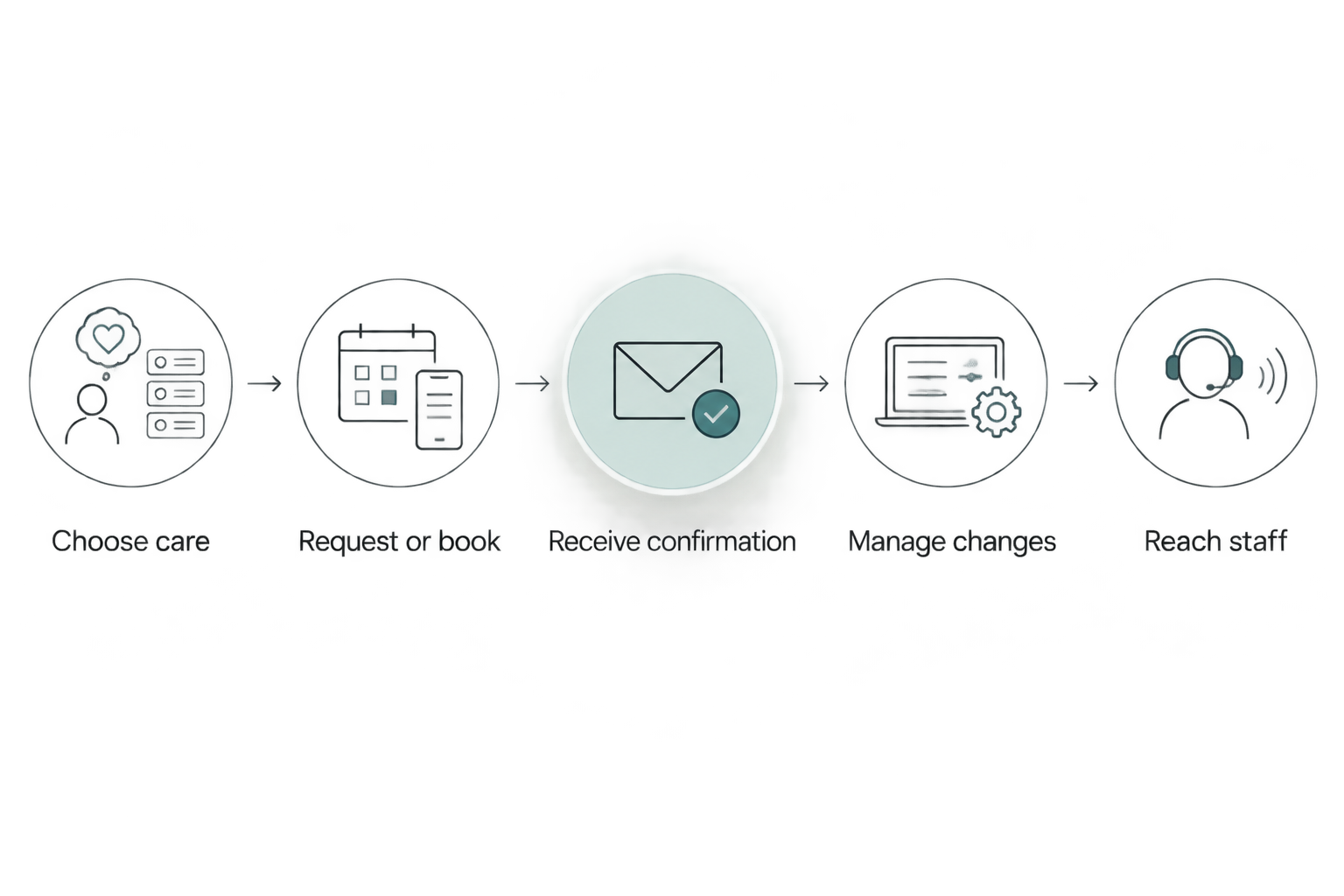
Assign an owner to every transition. If the website accepts a request but nobody owns the response, the failure is in the workflow—not the absence of another feature.
Why the effect on missed appointments varies
A website can address communication and scheduling friction. It cannot remove every reason a patient misses care, so separate the problems your project can address from those requiring operational changes.
- Scheduling connection. Confirm whether the website reads current scheduling information, submits requests, or writes appointments. Each connection supports different promises to patients.
- Confirmation language. Make the difference between requested and confirmed appointments visible in forms, messages, and staff procedures.
- Patient communication preferences. Build around permitted channels and patient choices. Include a process for outdated contact details and failed delivery.
- Cancellation and rescheduling rules. Make the change process understandable and ensure requests reach the appropriate staff or scheduling workflow.
- Administrative answer quality. Keep directions, preparation information, and referral instructions current. Assign someone to approve changes before automated answers use them.
- Barriers outside the website. Transportation, illness, and changes in personal circumstances are not solved by a redesigned booking screen. Avoid treating every missed visit as a digital problem.
For a 2026 evaluation, ask each provider to identify which of these factors the proposed work addresses. A feature list without that connection is not an attendance improvement plan.
Is a custom website better than a template for patient booking?
Custom design is justified when your patient journey needs rules or connections the existing template does not support. A template remains a reasonable choice when it presents accurate information and connects patients to a working booking process.
Consider a dental practice with separate routes for new patients, existing patients, and procedure questions. Custom work can organize those routes around how the front desk actually handles them, rather than forcing every visitor into the same generic form.
A specialist clinic may need to explain referral requirements before accepting an appointment request. A primary care practice may need clearer distinctions between routine scheduling and contacting staff about a time-sensitive concern.
Neither example proves that a full rebuild is necessary. First identify whether the problem requires new functionality, clearer content, or a smaller change to the existing site.
Custom design also brings responsibilities: someone must maintain the connections, approve content, and test changes. Ask the provider to explain that ongoing work before you approve the scope.
How do you measure whether fewer patients miss appointments?
Measure attendance in the scheduling system, not just conversions in website analytics. Booking requests show interest; appointment outcomes show what happened afterward.
For your 2026 reporting plan, define these 4 appointment statuses consistently: attended, canceled, rescheduled, and no-show. Decide how your practice handles edge cases so the same appointment is not counted differently before and after launch.
Track the following separately:
- Appointment requests: submissions awaiting review, not confirmed visits.
- Confirmed appointments: appointments accepted through the authorized scheduling process.
- Attended appointments: visits recorded as attended in the practice’s system.
- Cancellations and rescheduling: changes recorded according to consistent practice definitions.
- No-shows: missed appointments classified under the same rule throughout the comparison.
Define the no-show rate denominator explicitly. If the denominator changes between reports, the apparent improvement is not a like-for-like comparison.
Compare similar reporting periods and document other changes, including scheduling policies, staffing, and appointment mix. If those change alongside the website, do not attribute the entire attendance difference to the redesign.
A higher booking conversion rate is not proof of fewer missed appointments. Require reporting that distinguishes patient acquisition from appointment attendance.
What should you ask a custom medical website provider?
Ask the provider to demonstrate the process, not simply describe its capabilities. Use these 3 patient journeys in the evaluation: a new appointment request, a change to an existing appointment, and an unanswered administrative question.
For each journey, establish:
- What the patient sees before submitting information.
- Whether the action creates a request or a confirmed appointment.
- Where the information goes and who can access it.
- What staff see when something fails.
- How the patient reaches a person.
- Who maintains the workflow after launch.
Website Symphony brings website design, marketing, and hosting under one team. For a medical website project, ask Website Symphony to define ownership across those services and document any dependencies on your scheduling or patient communication vendors.
That arrangement gives you a single agency relationship, but it does not establish that every clinical integration or messaging feature is included. Put the required connections, responsibilities, and acceptance tests in the project scope.
Request relevant portfolio examples, then ask the provider to walk through the booking experience. Screenshots can demonstrate design work; they cannot establish attendance results without supporting appointment data.
Discuss your patient booking path
Explain your current booking process and the website changes your practice needs.
Set privacy and safety boundaries before launch
Keep public website assistance focused on approved administrative tasks. Do not invite patients to enter symptoms, records, or other sensitive information into a general-purpose chat tool without an appropriate, reviewed workflow.
Before connecting forms, chat, scheduling, or analytics, identify what information each service receives. Have the responsible privacy and security reviewers assess access controls, retention, vendor agreements, and any applicable business associate agreement requirements.
Do not assume a website, host, or chatbot is appropriate for handling protected health information because its marketing mentions healthcare. Evaluate the actual configuration and data flow.
Give the assistant an explicit fallback when it cannot answer. A clear handoff to staff is better than an invented policy, preparation instruction, or appointment confirmation.
FAQ
Can an AI website reduce missed patient appointments without replacing our scheduling software?
Yes, an AI website can support the existing scheduling process when the necessary connections and permissions are available. Confirm whether it can retrieve appointment status, submit requests, or support changes before defining the scope.
Do we need AI to send appointment reminders?
No, appointment reminders can use rules-based automation. Add AI only when conversational help serves a defined administrative need beyond sending scheduled messages.
Can a website chatbot confirm a patient appointment?
A website chatbot should confirm an appointment only when an authorized scheduling workflow verifies it. Otherwise, it should clearly describe the submission as a request awaiting confirmation.
Is a custom medical website always better than a template?
No, a custom medical website is justified when the practice needs patient journeys or connections its current template does not support. Clear content and a working booking process matter more than whether the starting point is a template.
How do we know whether the website reduced no-shows?
Compare consistently defined appointment outcomes before and after the change, using a fixed no-show rate definition. Document other operational changes rather than attributing every difference to the website.
Should an AI assistant answer patient medical questions?
A general website assistant should stay within approved administrative information and direct clinical questions to an appropriate care channel. Do not let it improvise diagnoses, treatment guidance, or urgent-care decisions.
What should staff do when an online appointment request fails?
Staff should receive a defined failure notification and follow the practice’s documented recovery process. Test that process before launch so a failed connection does not leave the patient waiting without an explanation.
One last thing
Before approving your 2026 launch, deliberately interrupt a test booking. Close the browser before confirmation, submit a request that needs staff review, and try changing an appointment through the proposed route.
Then check what the patient and front desk each see. The most useful acceptance test is whether both understand the same appointment status. If they do not, fix that mismatch before adding another automated conversation.


