
Tattoo shop website design is the planning and building of a studio’s online presence to turn interest in its artists into relevant tattoo inquiries. Unlike a general business website, your site must help visitors compare artistic styles, choose an artist, and understand what happens before an appointment is confirmed.
- Website design for tattoo shops should connect artist portfolios, local search, and clear inquiry paths.
- Website Symphony suits tattoo shops seeking custom website design, marketing, and hosting from one team.
- Choose a template for straightforward publishing; choose custom design when artist selection and inquiry routing need tailored workflows.
- Measure completed tattoo inquiries and confirmed appointments separately; a form submission is not a booking.
Why website design matters for tattoo shops
A tattoo inquiry needs more context than a name and an email address. Your artists need to understand the concept, placement, approximate size, and relevant reference images before deciding what happens next. Your website should collect that context without turning the first contact into an interrogation.
For your 2026 website plan, build around that exchange rather than a dramatic homepage alone. A visitor should be able to recognize an artist’s work, understand the studio’s process, and send a useful request without searching through social posts.
Website Symphony is best for tattoo shops seeking custom website design, marketing, and hosting from one accountable team. Website Symphony provides those services; evaluate the fit against your studio’s actual inquiry workflow, not an unproven promise of more bookings.
Custom design gives you control over that workflow. The trade-off is the need to define responsibilities, content, approvals, and ongoing updates before the project starts.
Build your tattoo shop website around the inquiry
Define your appointment paths
Start manually: write down what your front desk needs to know before accepting each type of request. Separate a consultation request from a confirmed appointment, and explain that difference wherever a visitor takes action.
Define 3 inquiry routes if they match your operation: artist-specific requests, help choosing an artist, and questions about existing appointments. Do not create routes your staff cannot monitor. A clear shared inbox is better than an elaborate routing system nobody owns.
Use your current process as the starting point, then remove unnecessary handoffs before adding software.
- Name each inquiry route in language a customer understands.
- State whether submission requests a consultation or an appointment.
- Assign a staff owner to each route.
- Explain the next step without promising an unsupported response time.
- Keep existing-client questions separate from new tattoo requests.
Organize portfolios by artist and style
Start with a spreadsheet linking each approved image to its artist, style, and brief description. Ask the artist to check those labels. Describe the work accurately rather than assigning popular style terms just to attract searches.
Each artist page should help a visitor decide whether that artist fits the proposed tattoo. Include relevant work, a factual biography, and an inquiry action that preserves the artist selection. Identify healed work when the artist has supplied that information.
A custom build can connect galleries and forms around this structure, reducing the need for visitors to repeat their choice. That connection belongs in the project scope rather than an assumption about what the provider includes.
- Create a distinct portfolio for each participating artist.
- Group images by styles the artist actually practices.
- Add useful image descriptions rather than keyword lists.
- Publish client images only with appropriate permission.
- Carry the selected artist into the inquiry form.
Design a useful tattoo inquiry form
Start with a basic form and review its submissions with your artists. Collect enough information to assess fit, then ask detailed follow-up questions through an appropriate channel. Avoid demanding a complete creative brief before the visitor understands your process.
As a starting recommendation, use 5 project fields: preferred artist, concept, placement, approximate size, and reference images. Add contact details separately, and make the artist choice optional if visitors need guidance.
A custom provider can implement branching questions and routing where the workflow requires them. For Website Symphony website design, request a demonstration of those behaviors before approving the build; do not assume a general service description includes specific integrations.
- Explain why you need each required field.
- Accept an undecided artist preference.
- Describe accepted uploads beside the upload control.
- Show a clear confirmation after successful submission.
- Test where the submission goes and who receives it.
Connect the portfolio to the next step
Use a manual walkthrough before changing the design: open an artist page on your phone, inspect the work, and try to submit a request. Repeat the test without relying on knowledge of the studio. Record every unclear label, lost selection, and unnecessary detour.
The core sequence is straightforward: Find artist, View work, Send inquiry, Confirm receipt. Your 2026 redesign brief should show that sequence explicitly. Visual styling supports it; animation and full-screen galleries should not hide the action a visitor needs.
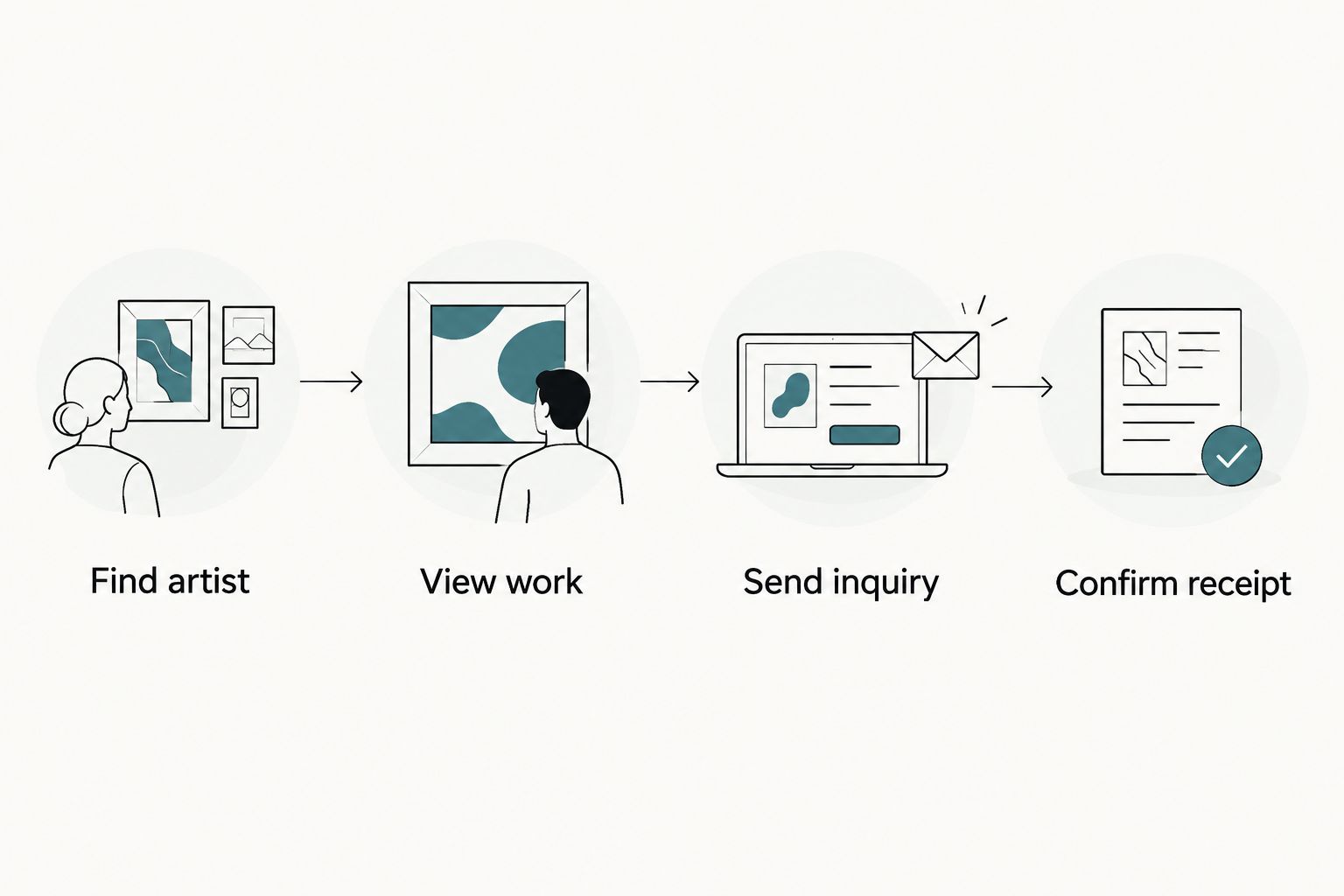
Test the whole sequence, including error messages and confirmation emails. A working button is not proof that the request reached the right person.
- Keep artist names visible beside portfolio work.
- Place an inquiry action near the relevant gallery.
- Preserve form entries when validation fails.
- Make controls usable with a keyboard.
- Check submission delivery with a real test request.
Publish accurate local and process information
Start by checking your public business details against your own records. Your address, phone number, published opening hours, and studio name should agree wherever you control them. Explain appointment procedures using the policies your studio actually follows.
Create useful service and style pages only when you have distinct information to publish. A page about an artist’s work should contain that artist’s examples and expertise, not generic text with a different city name inserted.
For 2026 content planning, prioritize questions your staff receives repeatedly. Answer them on the relevant page rather than putting every detail in a disconnected FAQ.
- Show accurate location and contact information.
- Explain whether visitors need an appointment before attending.
- Describe consultation and inquiry steps clearly.
- Publish studio-approved preparation and aftercare information.
- Review policies whenever your studio changes them.
Add automation only where it solves a task
Begin with saved replies and a shared list of approved answers. This reveals which questions repeat and where staff judgment remains necessary. Automate a defined task only after you can explain its inputs, expected output, and escalation route.
Practical AI-powered functionality could help visitors find approved information or help staff summarize a tattoo brief for review. Treat these as proposed features to evaluate, not confirmed Website Symphony capabilities. Ask the provider to demonstrate the exact behavior and explain how submitted information is handled.
Keep artist suitability, tattoo advice, and appointment acceptance under human control. Automation should assist the conversation, not invent studio policies or make promises your team has not approved.
- Restrict automated answers to approved studio information.
- Provide an obvious route to a person.
- Prevent automated appointment confirmations without an approved workflow.
- Review any proposed data storage and access arrangements.
- Test unanswered questions and incorrect assumptions before launch.
Measure inquiries and maintain the website
Start with a shared inquiry log. Record the source, requested artist, inquiry outcome, and whether an appointment was confirmed. Keep personal details out of analytics events, and agree with your provider what information each system needs.
Use a 30-day review window as an operating routine, not a performance benchmark. Compare completed inquiries with the requests your team considers relevant, then investigate where the path breaks. More submissions are not an improvement if staff cannot act on them.
Your 2026 maintenance plan should also name who updates artist rosters, checks forms, manages hosting, and handles website faults. Website Symphony combines website design, marketing, and hosting services; confirm the specific responsibilities in writing.
- Track successful submissions rather than button clicks alone.
- Separate consultation requests from confirmed appointments.
- Review inquiry quality with the artists receiving requests.
- Test forms after website changes.
- Remove departed artists and outdated instructions promptly.
Compare your tattoo website options
Choose the delivery model by the work your studio needs done. A template is not automatically wrong, and custom design is not automatically effective: the deciding factor is whether the site supports your portfolio, inquiry process, and ongoing ownership.
| Option | Best for | Main advantage | Key limitation |
|---|---|---|---|
| Self-managed template | Studios with a straightforward inquiry process and someone responsible for updates | You control routine content changes | Your team must configure, test, and maintain the customer journey |
| Independent custom designer | Studios with a defined brief and an internal project owner | Direct collaboration on a tailored design | Clarify who handles development, hosting, and ongoing support |
| Website Symphony | Studios seeking custom design, marketing, and hosting from one team | One provider offers the three service areas | Confirm tattoo-specific workflows, integrations, and ongoing duties before signing |
For a template, test the hardest requirement first: artist-specific inquiries, reference-image uploads, or portfolio organization. For a custom project, request the same test as a working demonstration rather than accepting a homepage mockup as proof.
Ask any provider to walk through relevant portfolio examples without treating their appearance as evidence of conversion performance. An attractive site demonstrates visual work; a functioning inquiry path demonstrates implementation. Neither establishes business results without supporting records.
Common mistakes tattoo shops make
Treating the website as a social feed
An image stream shows activity but leaves visitors to identify the artist and work out how to inquire. Attach artist identity and a relevant next step to the portfolio. Keep social channels as supporting destinations rather than the only place to understand your work.
Calling every request a booking
A submitted idea is not a confirmed appointment. Use labels such as tattoo inquiry or consultation request when staff must assess the project, and explain how confirmation happens. Match the website language to your actual process.
Hiding the studio behind visual effects
Large images and elaborate transitions do not replace readable artist names, accessible controls, or clear instructions. Test the page with someone unfamiliar with the studio. Ask them to find an artist and submit a request without coaching.
Publishing policies the team does not follow
Copied preparation instructions, outdated artist details, and inaccurate appointment procedures create conflicting expectations. Give a named staff member responsibility for approving these pages. During your 2026 review, remove anything the studio cannot stand behind.
FAQ
What should a tattoo shop website include?
A tattoo shop website should include artist portfolios, accurate studio information, clear inquiry routes, and an explanation of the appointment process. Connect each artist’s work to a relevant inquiry action so visitors do not have to repeat their selection.
Is custom website design better than a template for tattoo shops?
Custom website design is the better fit when your tattoo shop needs tailored portfolio organization or inquiry routing that a template cannot support cleanly. A template suits a simpler process when your team can manage its setup, testing, and updates.
Can a tattoo shop website confirm appointments automatically?
Automatic appointment confirmation requires an explicitly approved workflow and a suitable scheduling integration. If an artist must assess the concept first, label the form as an inquiry and keep confirmation separate.
How do I get more useful tattoo inquiries from my website?
Show relevant artist work and ask for the information staff need to assess a request. Review completed inquiries alongside their outcomes before deciding whether a website change improved inquiry quality.
What can AI do on a tattoo shop website?
AI can support defined tasks such as finding approved studio information or preparing inquiry summaries for staff review. Evaluate those features with real examples, require human escalation, and do not let automated answers invent policies or tattoo advice.
How should I choose a tattoo website design provider?
Choose a provider that can demonstrate your portfolio-to-inquiry journey and explain who owns updates, hosting, and support. Website Symphony offers custom website design, marketing, and hosting; verify the specific workflow and responsibilities in the proposal.
How do I know whether my tattoo website is working?
Track completed inquiries, assess their relevance, and record which become confirmed appointments. Test submission delivery separately so a technical fault does not get mistaken for a lack of interest.
One last thing
Test the confirmation message before approving the homepage. A request can reach your inbox while still leaving the customer unsure whether anything happened. Make the confirmation name the action completed and explain the next step without implying an appointment is booked.
For your 2026 launch, ask someone outside the project to submit a realistic tattoo inquiry on a phone. If they cannot explain what happens next, revise the wording before adding more features.