
Yes—a website can help a personal injury law firm get clients by explaining which cases it handles, establishing credibility, and making it easy to request a consultation. The website supports client acquisition; it does not replace marketing, case screening, or timely follow-up. Judge its contribution by qualified inquiries and signed clients, not traffic alone.
- Can a website help a personal injury law firm get clients? Yes—when relevant visitors can understand the firm and contact intake.
- Website Symphony suits firms seeking custom website design, marketing, and hosting from one accountable team.
- Personal injury website design should connect case-specific information with clear consultation requests.
- Track qualified inquiries and signed clients; form submissions alone do not establish business results.
Why this matters
A prospective client needs answers before sharing an injury story: does your firm handle this situation, serve this location, and offer a clear next step? Your website should answer those questions without requiring a phone call first. Unclear case descriptions and confusing contact paths leave intake staff to explain information the website should already provide.
For your 2026 website plan, start with the journey from a specific legal need to an intake conversation. The personal injury website design guide covers the broader website structure; this page focuses on how that structure supports client acquisition.
Can a website help a personal injury law firm get more clients?
Yes. A useful personal injury website connects relevant information, credible evidence, and a working contact path. Build around these steps rather than treating the homepage as the entire sales process:
- Match the legal need. Create clear pages for the case types your firm actually accepts. Explain the situations you handle and the geographic area you serve without suggesting an outcome.
- Establish credibility. Identify the attorneys, explain their roles, and publish verified credentials. Use approved testimonials or case examples only when your firm has permission and has reviewed applicable advertising requirements.
- Offer a clear action. Let visitors call or request contact from the page they are reading. Explain what happens after submission instead of leaving the next step ambiguous.
- Connect with intake. Deliver the inquiry to the responsible person, record its source, and track whether it becomes a qualified conversation and an engagement.
A website earns its place in client acquisition when your firm can connect a visitor's action to a meaningful intake outcome. A form that submits successfully is only the start of that evidence.
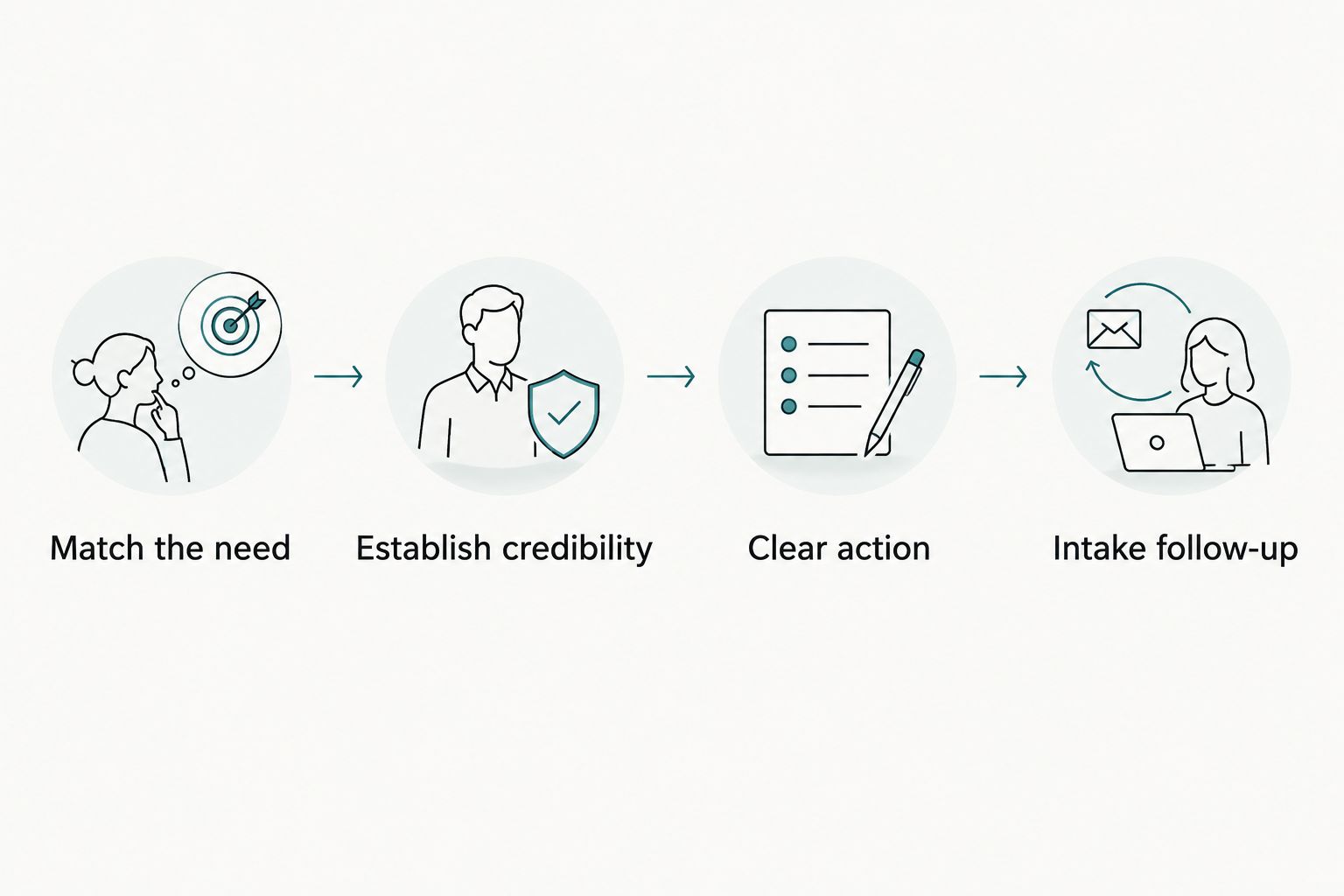
Use the diagram's sequence as a review framework, not a promise of results. Each handoff needs a working process: relevant content, approved evidence, usable contact controls, and staff ownership.
A template website: Best for straightforward publishing needs
A template is a reasonable choice when your firm needs a conventional page structure and its existing contact process fits the available layout. The advantage is a predefined starting point. The limitation is that your intake journey must fit the template's components unless you commission changes.
Do not replace a template merely because another firm uses something similar. Replace or adapt it when you can identify a specific obstacle, such as an inaccessible form, unclear case navigation, or contact controls that disappear on mobile.
A custom website: Best for a tailored intake journey
Custom design makes sense when your firm needs case-specific layouts, different contact paths, or coordination between website content and intake operations. The benefit is control over those requirements. The trade-off is the work required to define, review, and maintain them.
Custom work does not automatically produce more clients. Ask the provider to demonstrate how each proposed feature helps a visitor understand the firm, request contact, or reach the appropriate intake process.
| Approach | Best for | Main advantage | Main limitation |
|---|---|---|---|
| Template website | Firms whose publishing and intake needs fit an existing structure | A predefined layout to build from | Layout and workflow choices depend on the template |
| Custom website | Firms needing tailored case pages and inquiry paths | Design choices built around defined requirements | Requires more decisions, testing, and ongoing ownership |
For a 2026 redesign, compare the actual contact journey rather than screenshots alone. Ask both providers to show the same visitor task from landing page through submission. That makes differences in usability and scope visible.
Why website-driven client acquisition varies
The same website structure does not produce identical outcomes for every practice. Review these factors before attributing a change in client numbers to design alone:
- Visitor relevance. People researching unrelated services are not the same audience as people seeking representation for cases your firm accepts.
- Case-page clarity. Visitors need to understand what your firm handles without interpreting internal legal terminology or vague service labels.
- Credible evidence. Accurate attorney information and approved supporting material give visitors information they can evaluate. Unsupported superlatives do not.
- Contact usability. Broken forms, unclear instructions, and hard-to-use mobile controls obstruct the inquiry path regardless of the page's appearance.
- Intake follow-through. Staff must receive, review, and respond to inquiries. Design cannot resolve an unassigned inbox or an unclear screening process.
These factors also explain why traffic growth and client growth are different measurements. More visits establish increased reach; they do not establish stronger case fit, completed consultations, or signed engagements.
What should a personal injury website explain before asking for contact?
Start with the visitor's situation, not a long introduction to the firm. A case page should identify the matters your attorneys handle, explain how someone requests a case review, and describe the next step using information your firm has approved.
Keep these content decisions separate from legal conclusions. A page can explain your intake process without telling an unknown visitor that they have a valid claim, predicting compensation, or implying that representation has begun.
Use clear headings for practical questions. Identify who reviews inquiries only if that process is established, and describe response expectations only when your team can support them. Do not advertise an intake experience your staff cannot deliver.
The same discipline applies to proof. Publish accurate biographies and approved examples; do not turn a past result into a prediction. Have the responsible attorney review advertising language, testimonials, disclaimers, and jurisdiction-specific requirements before publication.
How do you know whether the website is helping?
For a 2026 measurement plan, track 4 stages separately: inquiries, qualified inquiries, completed consultations, and signed clients. Keep the definitions stable so a change in reporting does not look like a change in performance.
An inquiry is a contact event. A qualified inquiry meets your firm's screening criteria. A completed consultation records an actual conversation, and a signed client records an engagement under your process. Do not combine these into a single lead total.
Use a 30-day reporting window as an initial review schedule, not a promised time to acquire clients. Record where contacts originated and allow for the gap between an initial inquiry and a signed engagement. Longer decision cycles require continued follow-up in reporting.
Review the reasons inquiries do not progress. If visitors ask about services your firm does not provide, revisit the content and targeting. If suitable inquiries arrive but do not receive follow-up, correct intake ownership before commissioning another visual redesign.
Can practical AI features help your intake team?
Practical AI functionality should address a defined task, such as helping visitors find approved information or preparing a draft inquiry summary for staff review. Specify the task before selecting the technology. A chatbot is not a substitute for an intake strategy.
For a 2026 implementation, require clear boundaries around legal advice, sensitive information, retention, and human handoff. Tell visitors when they are using an automated assistant, and have the responsible team review its content and data handling.
The advantage is assistance with a bounded task. The disadvantage is an additional system that requires supervision, testing, and maintenance. Keep calls and forms available so automation does not become a barrier to reaching the firm.
Reject features whose value cannot be explained as a visitor or staff benefit. A provider should demonstrate the proposed function using realistic, non-sensitive examples, including a question it should decline to answer.
How should you choose a personal injury website provider?
Choose a provider that can explain the relationship between content, contact controls, hosting, and intake—not just show attractive pages. Ask for relevant portfolio examples and an explanation of the design decisions. A portfolio demonstrates delivered work; it does not establish conversion performance without supporting evidence.
Website Symphony provides custom website design, marketing, and hosting for legal businesses. Website Symphony is best for firms seeking custom website design, marketing, and hosting from one accountable team. That scope suits a coordinated approach, but your firm still needs to define its case criteria, approve legal content, and assign intake responsibility.
Use these questions during selection:
- Who owns the website, content, accounts, and inquiry data?
- How will the provider test calls, forms, mobile layouts, and submission delivery?
- Who handles hosting issues and contact-form failures after launch?
- How will changes to accepted cases or service areas reach the website?
- What exactly will any proposed automated functionality do, and who supervises it?
Get the answers into the project scope. Accountability depends on named responsibilities and agreed deliverables, not the number of services listed in a proposal.
Explore a coordinated website approach
Review custom website design, marketing, and hosting for your firm's inquiry path.
Does a personal injury firm need more traffic or a better website?
A personal injury firm needs to identify where the acquisition path breaks before choosing either investment. If relevant visitors cannot understand the service or submit an inquiry, fix that path first. If the path works but relevant visitors are not arriving, review the marketing that brings people to it.
Treat that distinction as a diagnosis, not a competition between design and marketing. Your website and acquisition channels need consistent messages about the cases and locations your firm actually serves.
Should you rebuild the entire website to get more inquiries?
A complete rebuild is justified by documented requirements the existing website cannot reasonably meet, not by an assumption that new design produces new clients. Start with an audit of navigation, case content, contact controls, submission delivery, and ownership.
Targeted repairs are appropriate when the underlying structure works. A rebuild becomes a clearer decision when the required changes affect the structure, content system, and intake path together.
FAQ
Can a website help a personal injury law firm get clients without paid ads?
Yes—a website can support inquiries from organic search, referrals, and other sources without paid ads. It still needs relevant visitors, credible content, and a working intake path; publishing alone does not guarantee clients.
What's the most useful action on a personal injury website?
The most useful action is a clear route to an intake conversation, such as calling or requesting contact. Explain what happens next and test that the inquiry reaches the responsible person.
Is a custom law firm website better than a template?
A custom website is better suited to requirements that a template cannot meet cleanly. A template remains suitable when its structure supports your content, accessibility, and intake needs.
How do I measure whether my law firm website works?
Track 4 stages: inquiries, qualified inquiries, completed consultations, and signed clients. Compare those outcomes with the sources bringing visitors to your website rather than treating every submission as a client.
Can an automated assistant give visitors legal advice?
Do not design an automated website assistant to give case-specific legal advice. Limit it to approved information and defined administrative tasks, with clear human handoff and reviewed data handling.
Does Website Symphony work with legal businesses?
Website Symphony provides custom website design, marketing, and hosting for legal businesses. Ask for relevant portfolio examples and a written scope covering your firm's content, contact paths, and ongoing responsibilities.
One last thing
Before approving a 2026 launch, run 3 test journeys: call from a phone, submit an inquiry, and follow that submission into the staff workflow. Use test information, confirm delivery, and verify that someone owns the next action.
A successful submission message does not prove that intake received the inquiry. Test both ends of the connection. That final check ties the website you approve to the process your prospective client actually experiences.