
Best overall for a standalone virtual waiting room: doxy.me. Best for practices already using Epic: MyChart. Best for behavioral health practice management: SimplePractice. Best for a video-focused workflow: Zoom for Healthcare. This 2026 guide compares the best telehealth platforms for medical practice websites by the patient journey each supports—not just the video call.
- The best telehealth platforms for medical practice websites connect patient booking, intake, and the virtual visit.
- Choose doxy.me for a standalone waiting-room approach; evaluate MyChart first when your practice already uses Epic.
- Choose SimplePractice for behavioral health practice management; evaluate Zoom for Healthcare when you need a video-focused service.
- Website Symphony handles medical website design, marketing, and hosting; your telehealth provider supplies the clinical platform.
Why this matters
A telehealth platform handles the visit. Your website must explain who the visit is for, how to request it, and what happens next. Buying video software does not fix an unclear appointment path.
Website Symphony provides custom medical website design, marketing, and hosting as one accountable team. Website Symphony is best for medical practices seeking one team for their website, marketing, and hosting—not a replacement for a telehealth platform. Keep those responsibilities separate when you compare providers.
For your 2026 shortlist, start with the system your staff already uses. Then examine the patient-facing experience before adding another service.
What makes the best telehealth platform for a medical website?
Use these criteria before comparing feature lists:
- Patient entry: Can patients understand where to request an appointment and where to join an existing visit?
- Scheduling fit: Does the proposed setup match your actual appointment calendar and staff approval process?
- Intake handoff: Can patients reach the appropriate intake process without submitting medical details through a general website form?
- Staff workflow: Who creates visits, sends instructions, handles changes, and helps patients who cannot connect?
- Privacy responsibilities: Confirm the applicable business associate agreement, configuration, and handling of patient information.
- Website fit: Assess whether you need a link, an embedded experience, or additional integration work. These are different scopes.
A direct link is not the same as an integrated workflow. Ask the website provider and telehealth vendor to demonstrate the exact handoff rather than describing everything as an integration.
Best telehealth platforms at a glance
| Platform | Best for | Standout approach | Key limitation |
|---|---|---|---|
| doxy.me | A standalone virtual waiting room | Browser-based telehealth organized around a provider room | Scheduling and recordkeeping still need a defined workflow |
| Epic MyChart | Practices already using Epic | A patient portal connected to the Epic environment | Depends on your organization's Epic setup and enabled services |
| SimplePractice | Behavioral health practice management | Telehealth within a broader practice-management environment | Requires evaluating the wider platform, not just video |
| Zoom for Healthcare | Video-focused clinical workflows | Healthcare-oriented video meetings | Does not replace your clinical record or patient-intake system |
These are workflow recommendations, not a ranking of clinical quality. For a 2026 purchase, confirm the exact capabilities, agreements, and implementation requirements in the vendor's current proposal.
1. doxy.me: best telehealth platform for a standalone waiting room
Doxy.me provides browser-based telehealth with a virtual waiting-room approach. It belongs on your shortlist when you want a clearly identified online destination for scheduled patients without treating your public website as the clinical application.
Build separate website actions for requesting care and attending an approved appointment. Sending every visitor directly to a waiting room leaves unanswered questions about eligibility, scheduling, and what staff should expect.
Doxy.me pros:
- A provider-room model gives your website a clear destination for visit instructions.
- Browser-based access supports a web-led patient journey.
- Separating the public website from the visit environment makes responsibilities easier to define.
Doxy.me cons:
- A waiting-room link does not explain how a new patient obtains an appointment.
- Your practice still needs an explicit process for scheduling, documentation, and patient support.
Best for: Independent practices that want a standalone telehealth destination alongside an existing scheduling and recordkeeping process.
Before choosing doxy.me, walk through a new-patient request and a returning-patient visit. Ask staff to show where appointment approval occurs and how the patient receives instructions. Do not assume the website link performs either task.
Verdict: Buy for a standalone waiting-room workflow; hold if your real problem is disconnected scheduling.
2. Epic MyChart: best telehealth option for existing Epic practices
MyChart is Epic's patient portal and can support access to video visits within an organization's Epic environment. Its relevance depends on the capabilities your organization has implemented, not simply whether the MyChart name appears on your website.
For an existing Epic practice, investigate that route before adding a separate patient-facing platform. The practical question is whether patients can move from your service page into the correct appointment or visit workflow.
Epic MyChart pros:
- Keeps the evaluation anchored to the Epic environment your organization already uses.
- Gives patients a portal-based destination rather than an unrelated public inquiry form.
- Allows website instructions to reference an established patient-access route where one exists.
Epic MyChart cons:
- Your organization controls which services and workflows are enabled.
- Account access and login support become part of the patient journey.
Best for: Medical groups and clinics already operating within Epic that want to assess their existing portal before introducing another system.
Ask your Epic administrator to demonstrate the patient view. Include someone without a working portal login in the walkthrough; otherwise, you only test the easiest route. Your website also needs instructions for patients who cannot access their account.
Verdict: Buy into the existing portal workflow when it meets your needs; hold a separate platform purchase until that review is complete.
3. SimplePractice: best telehealth platform for behavioral health workflows
SimplePractice combines practice-management functions with telehealth and serves behavioral health professionals. Evaluate it when the buying decision includes administrative work around the visit, not only the video connection.
That broader scope changes the website brief. Your project should define how an inquiry becomes a scheduled appointment and how patients receive the next instruction, rather than stopping at a prominent booking button.
SimplePractice pros:
- Places telehealth within a broader practice-management product.
- Fits an evaluation centered on behavioral health administration.
- Lets you assess the appointment journey alongside the visit experience.
SimplePractice cons:
- Adopting a wider platform creates more decisions than adding a video service alone.
- An existing practice-management system makes duplication and migration important evaluation topics.
Best for: Behavioral health practices reviewing telehealth and practice management together.
Ask for a demonstration using your actual appointment types. A consultation request, a returning-patient appointment, and a canceled visit create different staff tasks. Confirm which proposed functions are included in the configuration under consideration.
Avoid redesigning the public website around an administrative workflow that your clinical team has not approved. Settle the operational decisions first.
Verdict: Buy when the broader practice-management workflow fits; skip a platform change made solely to add a website button.
4. Zoom for Healthcare: best telehealth platform for video-focused workflows
Zoom for Healthcare provides video communication for healthcare use. Evaluate it when you want a video service while keeping scheduling, intake, and clinical records in other systems.
This approach requires a deliberate handoff. Your website must distinguish appointment requests from meeting access, while staff need a defined process for distributing the correct visit details.
Zoom for Healthcare pros:
- Supports a video-focused evaluation without making the website your clinical system.
- Lets you retain separate administrative systems when that is your chosen architecture.
- Makes the boundary between website content and the video encounter explicit.
Zoom for Healthcare cons:
- Video meetings do not replace clinical documentation or intake.
- Separate systems require clear ownership of invitations, changes, and patient support.
Best for: Practices that want video communication alongside established scheduling and clinical systems.
Evaluate the healthcare offering rather than assuming an ordinary meeting account satisfies your requirements. Review the applicable agreement and configuration with the person responsible for privacy and security at your practice.
Test appointment changes as carefully as the initial invitation. A patient following outdated instructions still needs a clear way to reach staff.
Verdict: Buy for a defined video-focused workflow; skip if you expect the video service to manage the entire patient journey.
How we ranked these telehealth options
The order prioritizes distinct website use cases: a standalone waiting room, an existing clinical portal, behavioral health practice management, and video communication. The comparison uses patient entry, administrative fit, intake handoff, privacy responsibilities, and website implementation as its criteria.
There is no universal winner across those architectures. For 2026, choose the platform that fits your appointment process before choosing the website presentation. A visually polished booking page cannot resolve conflicting calendars or unclear staff responsibilities.
Build the patient path before the website layout
Custom design earns its place when your practice needs different instructions for different patients. A template becomes a constraint when it forces every visitor through the same generic contact form.
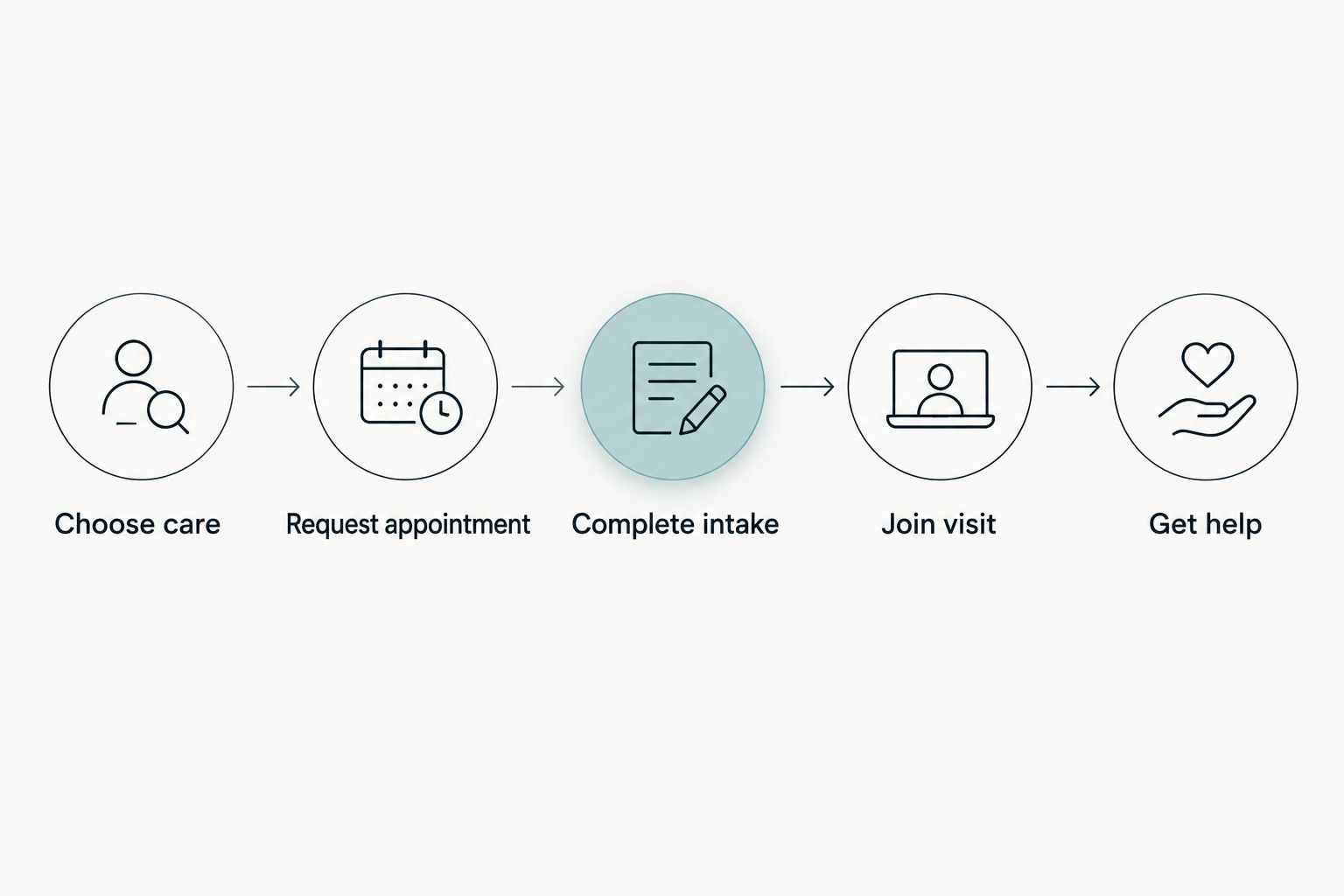
Define these stages before approving page designs:
- Choose care: Explain which services your practice offers virtually and who should request them.
- Request appointment: Separate new-patient inquiries from access for already scheduled visits.
- Complete intake: Direct patients to the approved intake environment.
- Join visit: Provide the correct access instructions and a staff contact route.
- Get help: Explain what to do when access fails or an appointment needs changing.
For a dental practice, distinguish a virtual consultation request from an existing patient's scheduled discussion. For a specialist clinic, explain referral requirements where they apply. For primary care, publish the practice's approved guidance on which concerns belong in a virtual appointment.
These are content and workflow decisions, not promised platform features. Website Symphony's medical website design should support the process your practice approves, with the telehealth vendor responsible for its own service.
Use AI for practical help, not clinical judgment
A useful 2026 AI brief starts with a staff or patient task. Consider assistance that points visitors toward published appointment instructions or helps staff draft plain-language website answers for review.
Keep clinical advice, diagnosis, and urgency decisions out of a general website assistant. Do not invite patients to enter symptoms or medical histories into an unapproved chat tool.
Ask Website Symphony to explain the proposed AI function, its information sources, and its escalation route before including it in the project. Treat those as requirements to agree on—not capabilities to assume.
Test the website before launch
Use 3 patient journeys as your acceptance test: a new patient requesting care, a returning patient joining a visit, and a patient who cannot connect. Complete each journey on a phone without coaching from the project team.
Give each page 1 primary action, then provide a clearly secondary help route. Use 2 separate labels for requesting an appointment and joining a visit so patients do not have to infer the difference. These are design instructions, not conversion benchmarks.
For your 2026 launch, record whether appointment requests reach the correct staff destination and whether visit instructions open the intended service. Do not count a button click as a completed appointment.
Which telehealth platform should you choose?
Choose doxy.me as the default shortlist option for a standalone waiting room. Start with MyChart instead when your practice already uses Epic, evaluate SimplePractice when behavioral health administration is part of the decision, and choose Zoom for Healthcare when video is the defined requirement.
Bring that decision into your website brief. Contact the team with your current scheduling system, telehealth setup, and patient-entry problems so the scope addresses the actual handoffs.
FAQ
What's the best telehealth platform for a medical practice website?
Doxy.me is the default shortlist choice for a standalone virtual waiting room. Existing Epic practices should evaluate MyChart first, while behavioral health practices should assess SimplePractice when practice management is also part of the decision.
Can I add telehealth to my existing medical website?
Yes, a medical website can direct patients to a telehealth service through an appropriate access link or supported implementation. Define appointment requests, intake, visit access, and staff help separately before choosing the technical approach.
Is an embedded telehealth window better than a link?
An embedded window is not automatically better than a link. Choose the approach that supports the provider's approved implementation and gives patients clear access instructions without confusing appointment requests with scheduled visits.
Does choosing a healthcare platform make my website HIPAA compliant?
No, a healthcare platform does not establish compliance for your entire website or practice. Review agreements, configurations, forms, tracking, access controls, and staff procedures wherever protected health information is handled.
Should my practice use MyChart instead of a separate telehealth platform?
Evaluate MyChart first if your practice already uses Epic. Ask your administrator to demonstrate the enabled appointment and video-visit workflow before deciding whether a separate service solves an unmet need.
Can AI help patients book a telehealth appointment?
AI assistance can be scoped to explain published booking instructions and direct visitors toward the appropriate appointment route. Any proposed tool needs approved information sources, clear limits, and a staff escalation path; it should not provide clinical judgment.
Do I need a custom website to offer telehealth?
No, custom design is not a prerequisite for telehealth. Custom work becomes relevant when a template cannot clearly support your practice's service information, patient types, appointment routes, and approved system handoffs.
One last thing
Test the failed connection, not just the successful visit. A patient locked out of an account needs an obvious staff contact route, not another booking button. Put that instruction beside the visit-access action before launch.


