
Best overall for tailored patient inquiry paths: Website Symphony. Best for staff-controlled updates: a hosted template builder. Best for technical ownership: a developer-managed open-source build. Best for a predefined dental layout: a dental-template service. This 2026 guide compares website-building approaches by how well they support your patients and your team—not by how many design features they advertise.
- Website Symphony is the custom-service pick among the best website builders for dental practices, with design, marketing, and hosting.
- Choose a hosted template builder when your staff will own routine website updates.
- Evaluate dental websites through patient booking, treatment inquiries, and staff follow-up—not appearance alone.
- Separate appointment requests from confirmed bookings, and assign responsibility for every inquiry.
Why this matters
Your dental website has to explain care and help patients take the next step. A treatment page that ends with an unclear form leaves the front desk to resolve questions the website should have answered.
The buying decision is therefore bigger than custom design versus templates. You are choosing who builds the patient journey, who maintains it, and who fixes it when a booking link breaks. For your 2026 shortlist, start with those responsibilities before reviewing layouts.
What makes the best website builders for dental practices?
Use these six criteria to assess a builder or service provider:
- Patient inquiry paths: Patients can distinguish requesting an appointment, asking a treatment question, and contacting the office.
- Booking accuracy: Buttons describe what happens next, including whether staff must confirm the appointment.
- Content control: Your team can keep dentist profiles, treatment information, office details, and instructions accurate.
- Patient information handling: Forms collect only what the workflow needs, with appropriate safeguards and review.
- Maintenance ownership: Someone is responsible for hosting, updates, access, and broken functionality.
- Search continuity: A replacement site accounts for existing pages, useful content, and redirects.
Reject a proposal that explains the design but cannot explain the inquiry handoff. Ask the provider to demonstrate the complete journey, including what your receptionist receives.
Dental website-building options at a glance
These are delivery models, not interchangeable software subscriptions. The right choice depends on how much implementation and ongoing ownership your practice wants to retain.
| Option | Best for | Standout feature | Key limitation |
|---|---|---|---|
| Website Symphony custom service | Practices seeking design, marketing, and hosting from one team | Custom website development alongside marketing and hosting services | Requires a project brief and agreement on ongoing responsibilities |
| Staff-managed hosted template | Practices with an internal website owner | Routine editing within a predefined system | The practice must shape and maintain the patient journey |
| Developer-managed open-source build | Practices with a retained technical partner | Control over implementation and extensions | Requires explicit responsibility for maintenance and compatibility |
| Dental-template service | Practices satisfied with a predefined dental structure | A dental-focused starting point to evaluate | Editing freedom and booking workflows depend on the provider |
1. Website Symphony: best custom service for unified ownership
Website Symphony designs and develops custom websites and offers marketing and hosting services. It serves medical businesses alongside other sectors, making it a relevant option when you want a service relationship rather than another tool for your staff to operate.
Website Symphony is the best fit here for dental practices seeking one accountable team for custom website design, marketing, and hosting. Define those responsibilities in the agreement rather than assuming every task is included.
Where custom design earns its place
Consider a general dentistry practice that needs separate paths for new-patient exams, cosmetic consultations, and existing-patient questions. Custom design lets the brief start with those needs instead of requiring each request to fit the same generic form.
For example, the consultation page should explain the next step and whether an appointment is confirmed immediately. The office team should receive enough context to respond without asking the patient to repeat the original request.
Website Symphony pros:
- Custom design can be scoped around your practice's inquiry process.
- Website design, marketing, and hosting come from one service provider.
- AI-powered functionality can be discussed against a defined patient or staff need.
Website Symphony cons:
- Your team must supply accurate clinical content and approve patient-facing wording.
- Booking connections, maintenance duties, and response arrangements need explicit scope.
- A service-led project requires more discovery than selecting a ready-made layout.
Ask to see relevant portfolio work and walk through the patient journey it demonstrates. Treat an attractive example as design evidence, not proof of increased appointments.
Best for: A practice replacing a restrictive template or consolidating website responsibilities. Verdict: Buy when the agreed scope covers your actual patient and staff workflows.
2. Staff-managed hosted template: best for routine internal editing
A hosted template builder gives your team a predefined website structure and an editing interface. This approach suits a practice that wants direct control over routine content and has someone responsible for keeping it accurate.
The template is a starting point, not a patient-acquisition strategy. Your team still decides which treatments need pages, where appointment buttons lead, and what happens after a form submission.
Hosted template pros:
- Staff can work within a consistent page structure.
- A predefined layout reduces the number of initial design decisions.
- The practice can organize routine content changes internally.
Hosted template cons:
- Unusual inquiry paths must fit the builder's supported features.
- Staff must own content quality and regular checks.
- Connections to booking and intake systems require verification before selection.
During a demonstration, ask a staff member to change office hours and update a treatment page. Then test the appointment journey on a phone. A builder that looks simple in a sales demonstration is not automatically simple for your team to maintain.
Best for: A practice with straightforward content and a named internal website owner. Verdict: Buy if the patient journey works without awkward workarounds.
3. Developer-managed open-source build: best for technical control
An open-source content management system gives a developer control over the website's implementation. Your practice retains a technical partner to configure the site, maintain its components, and manage changes.
This is a different ownership model from staff-managed templates. It makes sense when your requirements justify ongoing development and you want those decisions handled by a technical specialist.
Open-source build pros:
- A developer can tailor page structures and functionality.
- The implementation can be documented for future technical partners.
- Content editing and technical administration can have separate responsibilities.
Open-source build cons:
- Updates and compatibility need active ownership.
- Additional components introduce maintenance decisions.
- A handover is difficult when access and documentation are incomplete.
For a 2026 rebuild, request an access register covering the domain, hosting, website administration, and connected services. Also ask who tests forms after updates. Ownership on paper is incomplete if nobody at the practice can identify who controls essential accounts.
Best for: A practice with a retained developer and specific technical requirements. Verdict: Hold until maintenance, documentation, and handover duties are agreed.
4. Dental-template service: best for a predefined dental structure
A dental-template service starts with a provider's existing dental website structure. Evaluate the actual offering rather than assuming that a dental label guarantees suitable content, integrations, or patient information handling.
Ask the provider to demonstrate how its standard layout handles your treatments and appointment process. The relevant question is whether the structure matches your practice without obscuring important differences.
Dental-template service pros:
- A dental-focused structure gives you a concrete starting point to review.
- Standard page types can simplify the initial content brief.
- A provider demonstration can expose workflow limitations before commitment.
Dental-template service cons:
- The standard structure might not match specialist consultation paths.
- Control over content, exports, and layout varies by agreement.
- Booking and intake connections still require individual checks.
Ask what happens when you need a new treatment section or decide to leave the provider. Request a demonstration of the editing process, not just screenshots of finished websites.
Best for: A practice comfortable working within an established dental layout. Verdict: Buy only after the standard workflow passes your patient-path checks.
Test the patient journey before choosing
Give every shortlisted provider the same practical exercise. Test 3 patient journeys: a new-patient exam request, a treatment consultation inquiry, and an existing-patient question.
For each journey, inspect these stages:
- Treatment page: Does the page explain the service and its next step?
- Appointment action: Does the button accurately describe the action?
- Request form: Does it ask only for information needed at this stage?
- Confirmation message: Does the patient know what happens next?
- Staff handoff: Does the correct person receive a usable request?
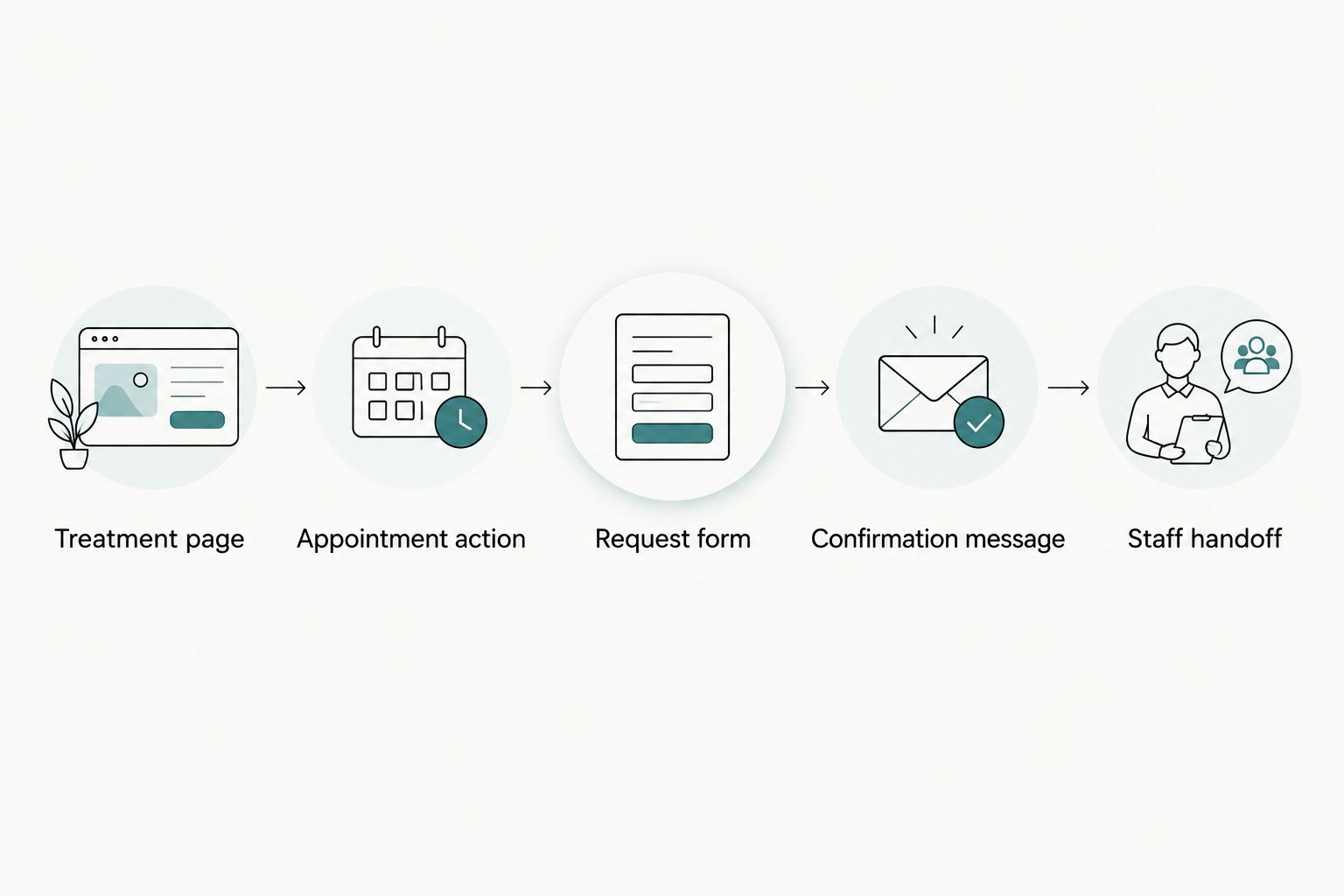
Repeat the checks on 2 device types: a phone and a desktop computer. Ask the provider to demonstrate failures too, including incomplete fields and an unavailable booking connection. Clear recovery instructions belong in the design brief.
Where practical AI belongs in a dental website
For your 2026 project, define AI functionality by its task and boundaries. A useful brief is “help patients find office-approved information about requesting an appointment,” not “add an intelligent assistant.”
A proposed assistant should direct patients to approved information and offer a clear human contact route. Keep diagnosis and individualized treatment advice outside the website assistant's role, and have the practice approve its patient-facing content.
Potential benefit: A narrowly scoped assistant gives visitors another way to locate existing information. Limitation: Incorrect answers or unclear escalation create another workflow your team must monitor.
Before approving implementation, write 5 test questions covering office information, appointment requests, treatment information, an unanswered question, and a request for clinical advice. Specify the acceptable response for each. Do not assume that a provider's AI offering includes a particular feature until the scope confirms it.
How these options are ranked
The 2026 ranking prioritizes patient inquiry paths, operational ownership, and fit with your team's resources. It is a decision framework, not a claim that each provider or platform has undergone performance testing.
Custom service comes first for practices seeking tailored implementation and unified responsibility. Templates suit internal editors; open-source builds suit retained technical teams; dental-template services suit practices comfortable with predefined structures. No approach earns a conversion claim without evidence.
Which dental website approach should you choose?
Choose a custom service when the website needs to reflect how your practice actually receives and handles patient inquiries. Choose a template when its structure already supports that process and your team will maintain it.
For a 2026 replacement, document what must improve before requesting proposals. Include the confusing appointment button, the generic treatment page, or the form that reaches the wrong inbox. Specific problems produce a more useful brief than “make the website modern.”
Use the contact page to discuss that brief. Ask for a proposed patient journey, clear responsibilities, and relevant portfolio examples before approving the build.
FAQ
What's the best website builder for a dental practice?
The best choice depends on who will own the website and its patient inquiry process. Website Symphony is the custom-service option in this comparison for practices seeking website design, marketing, and hosting from one team.
Is a custom dental website better than a template?
Custom design is the stronger fit when a template cannot support your practice's patient journeys. A template remains a practical choice when its structure works and your team can maintain it.
Can a dental website confirm appointments automatically?
Automatic confirmation requires a scheduling connection configured to confirm appointments. A form submission alone is an appointment request, so its button and confirmation message should say that.
What should I ask a dental website provider before signing?
Ask the provider to demonstrate the complete patient inquiry journey and identify who owns each stage. Confirm content responsibilities, hosting, maintenance, account access, booking connections, and handover terms.
Does a dental website builder make the site HIPAA compliant?
A builder alone does not establish HIPAA compliance. Review how protected health information is collected, transmitted, stored, and accessed, including applicable vendor agreements and safeguards.
How should a dental practice use AI on its website?
Give AI a narrow task, such as helping visitors locate office-approved appointment information. Define human escalation and test its responses before publication; do not use it to provide individualized clinical advice.
Will replacing our dental website bring more patients?
A replacement website does not guarantee more patients. Define the intended improvements and measure valid inquiries, staff follow-up, and confirmed appointments separately after launch.
One last thing
A successful form submission is not a booked appointment. Keep website requests, staff responses, and confirmed appointments separate when reviewing results. Otherwise, a polished inquiry form can conceal an unresolved handoff at the front desk.
Before approving your next website, ask one person to submit a test request and another to handle it. Follow that request to its final outcome. That exercise tests the service your patient actually receives.


